Release Notes
The following are the enhancements and improvements in the latest releases:
Release 2.9.0
October 03, 2025
Added New Property for Logging
In this release, we have added logging configuration to the properties page. Depending on the selected logging level, logs will be displayed. You can select the following log levels from the options:
- None
- All
- Info
- Error
- Warning
- Debug
By default, the 'All' log type is enabled. For more details, see Logging.
Added Support for SamPro Sync
A new property has been introduced in the Properties page to enable SamPro Sync for Software catalogs. When this option is enabled, after asset approval, the software installation records are stored in the Software Installation table. When it is disabled, after asset approval, the software installation records are stored in the CMDB Software Instance table. This property setting gives you the flexibility to manage software installed data.
For more details, see Enable SamPro Sync for Software Catalogs.
Dynamic Tagging with Scripts
Dynamic tagging has been enhanced to support scripting. You can now use scripts to create dynamic tags for attributes.
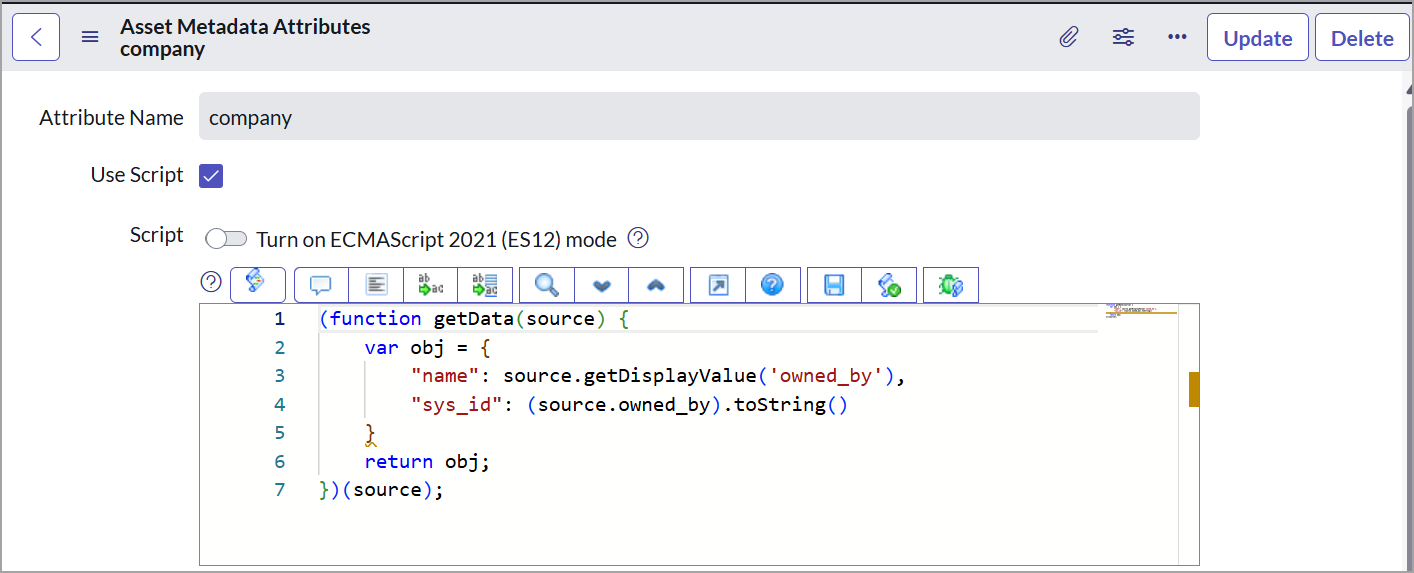
For more details, see Dynamic Asset Tagging Configuration.
Separate Sync Queues for Metadata
The synchronization process has been improved by separating asset metadata and business application metadata into two distinct sync queues. Previously, both were handled together, which made troubleshooting difficult.
A new sync type, 'Upload Business App', has been introduced to support the upload of business application metadata from ServiceNow to Qualys. This enhancement provides more visibility and control when syncing business application data.
For more details, see Sync Queue.
JSON Parsing Replaced XML for Asset Sync
Updated the Asset data sync from Qualys to ServiceNow schedules to use JSON instead of XML for parsing, making the process faster and easier to manage.
Issues Addressed
|
Category/Component |
Issue |
|---|---|
|
Logging Activities |
The issue has been fixed where invalid IP addresses were not giving a validation error message. |
|
API Call Errors |
The issue has been fixed where API response codes 999 and 1905 were marked as an error, causing an issue in ServiceNow to Qualys sync. |
|
CMDB Assets |
The issue has been fixed where duplicate records were being created in the catalog relation table. |
| Asset Tagging | The issue has been fixed where tag names with special characters were causing API call failure. |
Version 2.8.0
Release Date: April 18, 2025
The following are the improvements we have made in Qualys CMDB Sync App 2.8.0:
In this release,
-
Added validation for executing the ADD IP API call to ensure that at least a VM or PC is selected for the ServiceNow to Qualys sync. If unmanaged assets exist in ServiceNow and neither a VM nor a PC is selected, the scheduled API call to sync ServiceNow with Qualys does not execute. This validation helps prevent the empty response. For such unexecuted API calls, the event is logged with the validation reason in the application logs for better traceability.
-
Added three new flags for IRE Updates on the Qualys CMDB Sync Properties page. Using these flags, you can decide whether to change the hierarchy of the assets while updating or switching assets.
The following are the newly added flags:
- IRE - Update without Downgrade
- IRE - Update Without Upgrade
- IRE - Update without Switch
- Added two new fields, Organization Name and Qualys Unique Asset ID, on the Qualys Assets page. Additionally, on this page, the five new tabs are added to access the detailed asset information.
- Sensor Information
- Agent Information
- Hardware Taxonomy
- Last Location
- Criticality
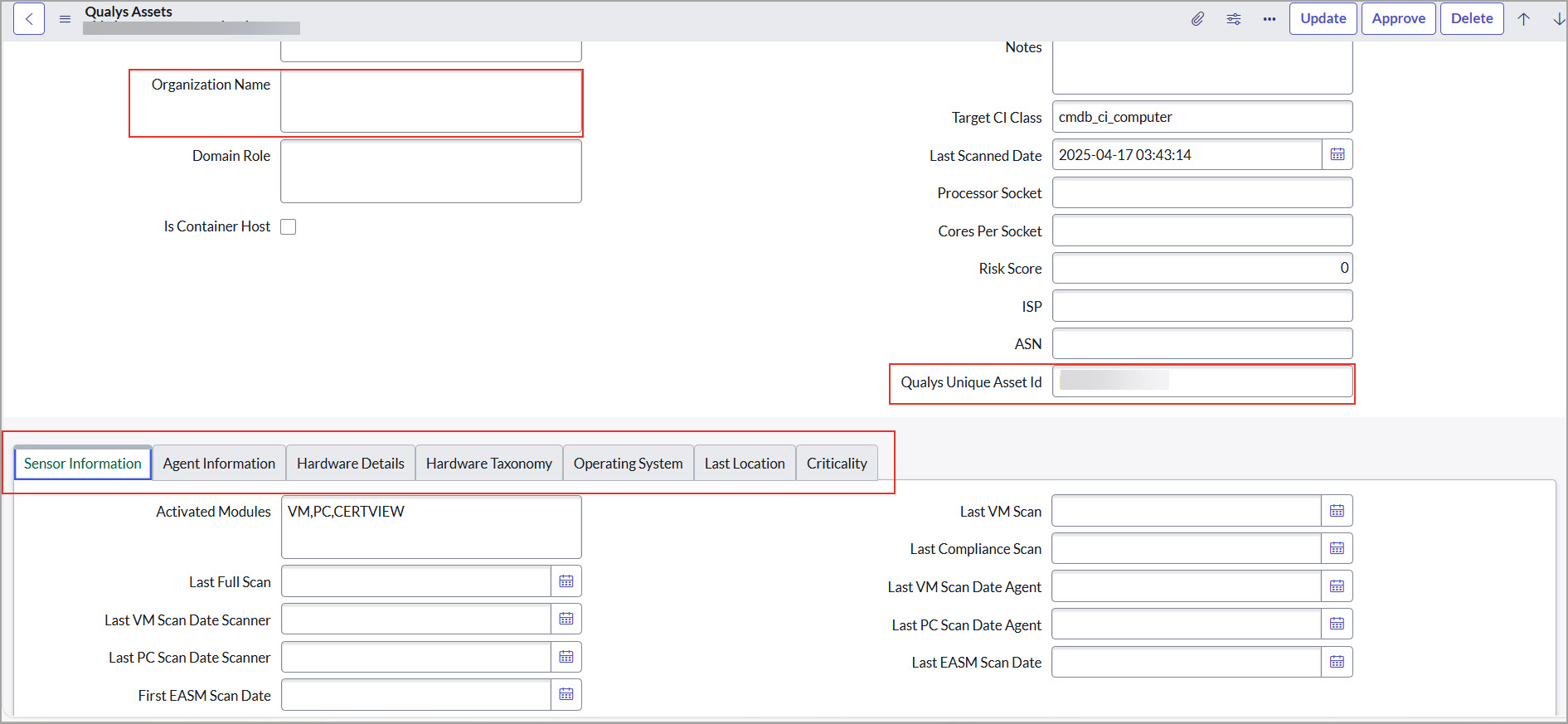
To view these tabs, navigate to the Approve Qualys Asset table and select the asset.
For more details, refer to View Asset Details. - Fixed an issue of duplicate software records in the Software Catalogs table.
- Implemented minor improvements and bug fixes.
Version 2.7.0
Release Date: January 22, 2025
The following are the improvements we have made in Qualys CMDB Sync App 2.7.0:
In this release,
- A new feature for One-Way Sync has been added. Using this feature Qualys CMDB app on the ServiceNow platform can sync the Asset Metadata and Business Information to Qualys without updating the CI records in CMDB.
For more details on the feature, refer to Enable One-Way-Sync.
- Added transformation for Cloud Asset data to Cloud CMDB-related table.
This is applicable only for transformation using IRE.
For more details, refer to Cloud Data Mappings.
- Enhancements to Software Catalog import flow. Software Catalog imports using Sync Queue and JSON parsing which helps in reducing errors while importing the catalog data.
- Added 'Ci's sync to Qualys' widget on the dashboard. The Ci's Synced to Qualys report lists the number of assets synced from ServiceNow to Qualys.
- Minor improvements and bug fixes.
Version 2.6.1
Release Date: September 02, 2024
The following are the improvements we have made in Qualys CMDB Sync App 2.6.1:
- In this release, an issue is fixed for third-party asset import.
- We have provided an option to decide the CI Operation approval 'Insert' or 'Update' or 'Insert and Update' the CI.
- In the Add IP, it sends 100 IPs in one API request.
- We have added a few improvements to Sync Certificate, such as Certificate API filter, Approve UI action, Auto Approve Certificates, Certificate Transform Map, and so on. For this, it requires a Certificate View and VMDR license.
- The properties page contains the Download Batch Size, Download Processing Batch Size, and Auto Approval.
- Introduced the 'Custom Attributes' feature added for ServiceNow to Qualys schedule.
- Introduced the 'Asset Identification Service' (BETA) feature added for ServiceNow to Qualys schedule.
- Added Sync Queue Types for different API calls.
Migration of Assets after Upgrade
We do not support backward compatibility once you upgrade to Qualys CMDB Sync App 2.1. Once you upgrade to the 2.1 version and before you sync assets or create schedules, we recommend that you migrate all assets (that belong to Computer Extended tables) to the CMDB production tables. We provide a scheduled job for this. For more information and detailed steps, refer to Migration Support.