WAS Scan Data
Configure settings for collecting Web Application Scanning (WAS) data.
To configure WAS settings, follow these steps:
- Navigate to Inputs and click Create New Input.
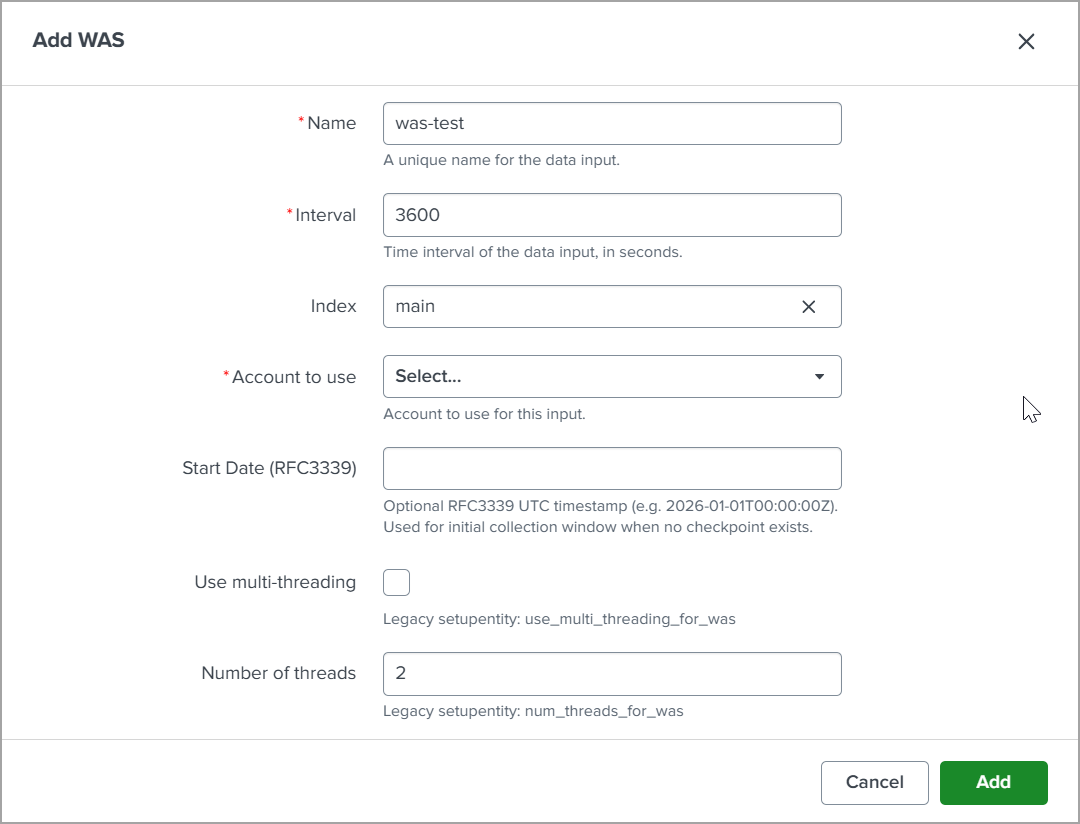
-
In the Name field, enter a unique name for the data input.
-
In the Interval field, specify the polling interval in seconds.
-
From the Index drop-down list, select the Splunk index where the collected data will be stored.
-
From the Account to use drop-down list, select the Qualys account to be used for data collection.
-
In the Start Date (RFC3339) field, optionally enter a UTC timestamp in RFC3339 format to define the initial data collection window. By default, it pulls data from the last 30 days.
-
Select the Use multi-threading for WAS check box to enable multi-threaded data collection. By default, it is unchecked.
-
In the Number of threads for WAS field, enter the number of threads to use for data collection. A maximum of 10 threads can be configured.
-
Click Add to create the WAS data input.
Source Types for Searching WAS Scan Data in Splunk
You can use event types to search for WAS scan data pulled in Splunk. For more information, refer to Source Types for Searching your Apps Data.