mROC Manage Customers - Overview
Learn more about the details you can see from the Qualys Managed Risk Operations Center (mROC) Manage Customers tab and the actions that you can perform.
Partners with the Manager role can see customers added by themselves.
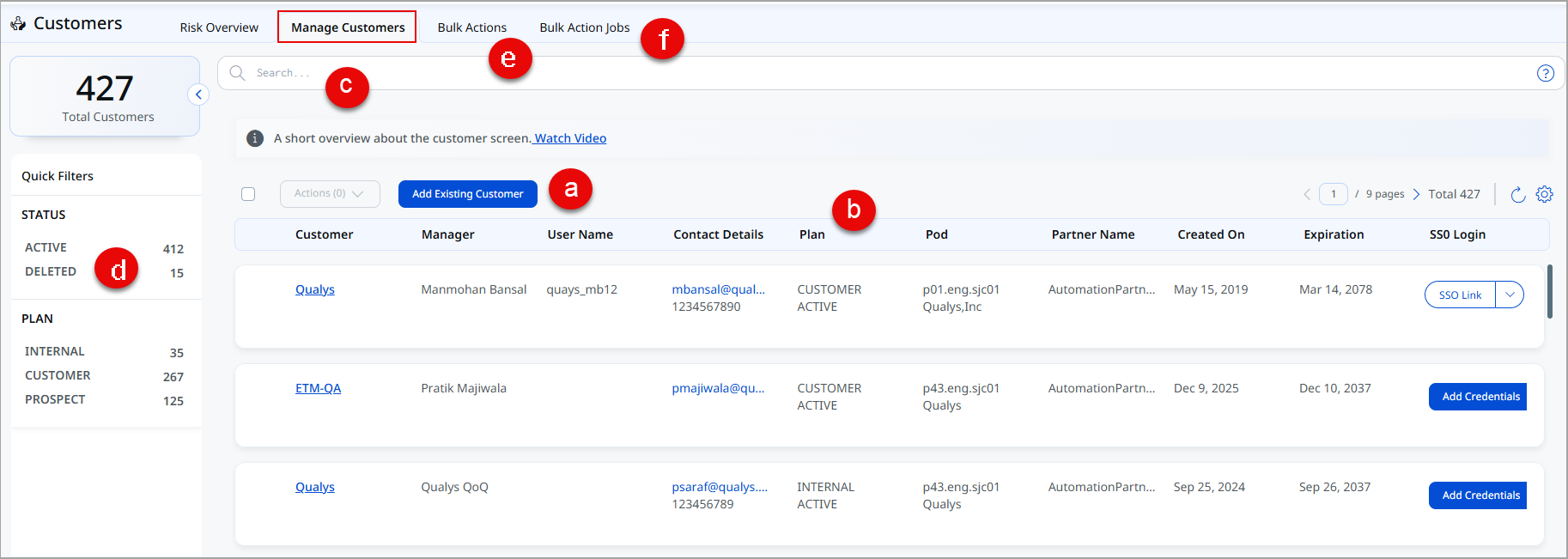
(a) You can add the customers that are already added from the back office. These customers are managed by you or your partners.
(b) You can see the customers that you or your partners directly manage. You can see the customer summary, such as customer name, manager name, plan, Pod added while creating the customer, SSO login, Date of creation and expiration, and so on.
You can see either Add Credentials or SSO Link under the SSO LOGIN column.
You can see the SSO link if you have added the customer. Click the SSO Link to access the Qualys platform.
You can see the Add Credentials link if someone else added a customer. In that case, you need to enter that customer's credentials, and then you can navigate to the Qualys platform.
(c) You can use Qualys Query Language (QQL) to filter customers.
Examples:
- You can find details of a particular customer based on the name of the customer.
- You can filter customers based on their status, such as ACTIVE or DELETED.
- You can filter customers based on the plan, such as CUSTOMER, PROSPECT, and so on.
- You can filter customers based on the Pod assigned at the time of customer creation.
(d) You can use the quick filterprovided in the left pane to filter the customers based on customer plan and status.
(e)You can create a bulk action for API calls and select to run it on one or more customers. You can also edit and delete these bulk actions.
(f) You can see the details of the bulk action job, such as Name, Status, Job Execution Date, and Result.