PCI Compliance Release 6.8
September 10, 2026
PCI Compliance 6.8 introduces Merchant User Account Deletion, giving the merchant Point of Contact (POC) an option to remove sub-user accounts that are no longer needed; for example, when an employee leaves the organization. The feature is designed to meet PCI data-retention requirements, so deleting a user never puts historical scan and audit records at risk.
Delete Merchant User Accounts
PCI Merchant Point of Contact (POC) users can now delete sub-user accounts directly from the PCI Compliance user interface (UI). This release gives merchants a proper offboarding workflow while keeping scan history, audit trails, and compliance records fully intact. Deleted users immediately lose access to PCI Compliance, and their accounts are permanently removed as per the Payment Card Industry (PCI) data-retention policy.
Previously, unwanted user accounts could only be disabled and had to remain in the system indefinitely.
Only the PCI Merchant POC users can delete their respective sub-users' accounts. Also, POC users cannot delete their own accounts.
To delete a PCI merchant sub-user account, navigate to the Account > Users tab. Edit the user you want to delete. In the Edit User window, select the Delete User checkbox.
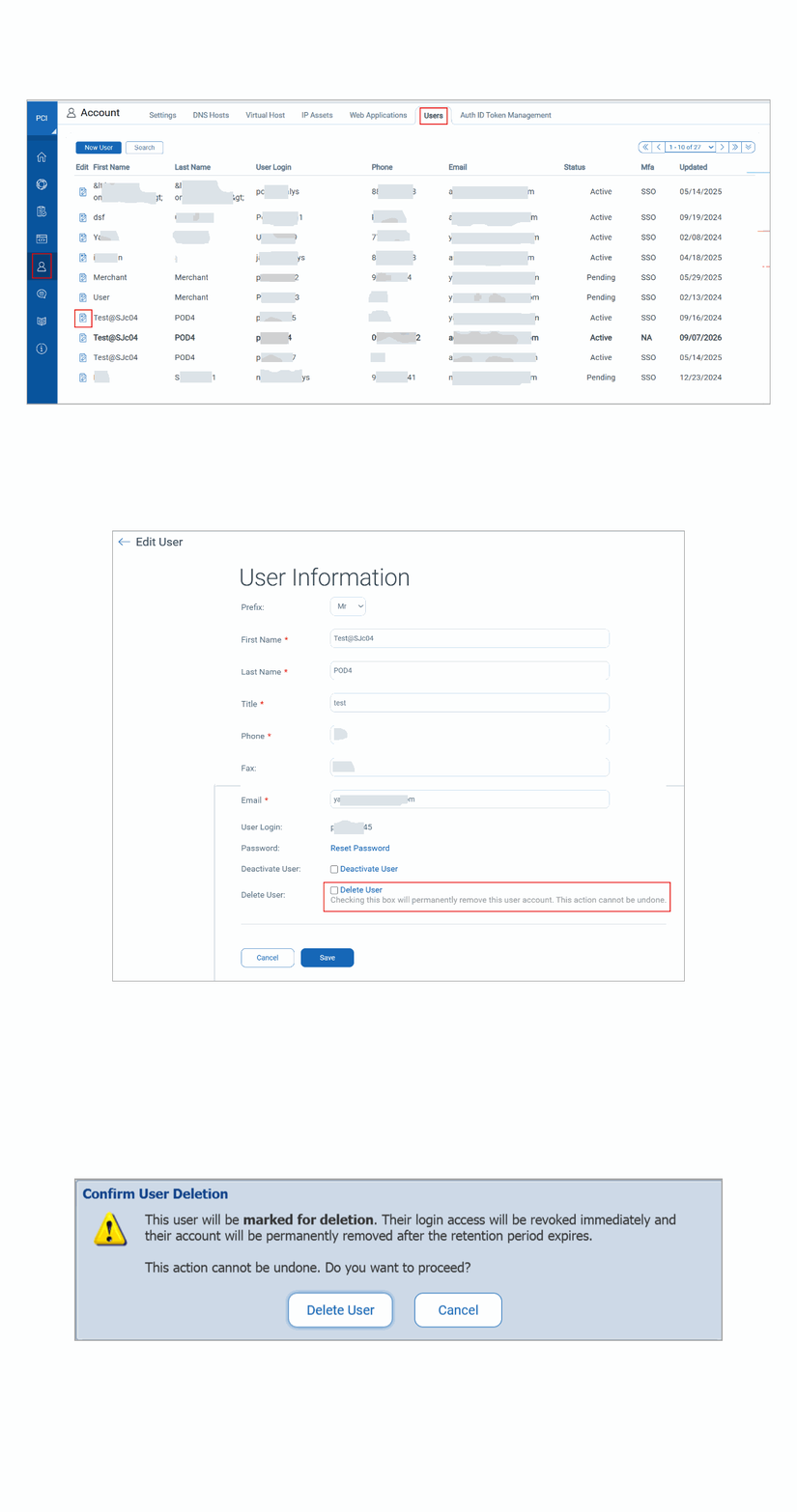
To learn more about deleting a merchant sub-user, refer to Editing Merchant Users.