Reviewing Missing Patches for Linux Assets
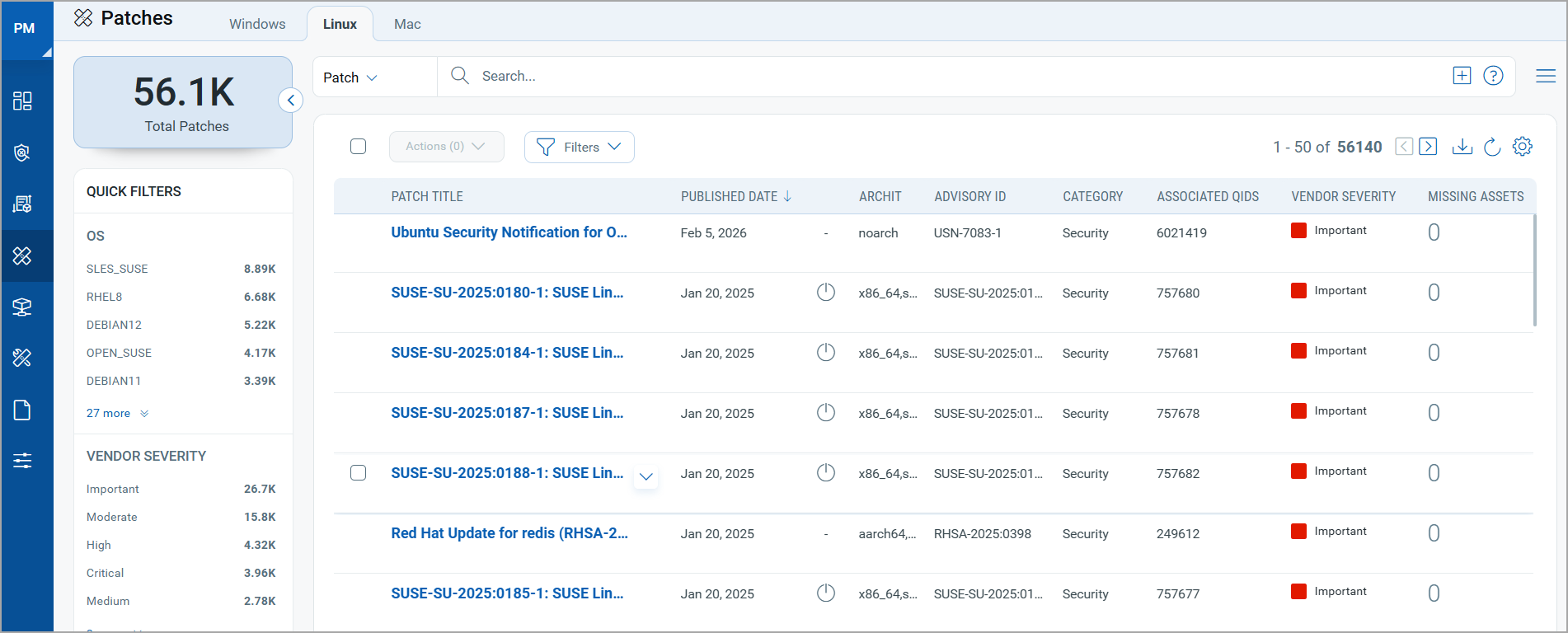
When you navigate to the Patches tab, the patches that are missing on your hosts that were detected using the vulnerability scan are shown. The vulnerability scan provides details about detected vulnerabilities. These detected vulnerabilities can be mapped to missing patches respectively on the Linux agent.
Vulnerabilities that are detected on active kernel only will be considered for missing patches in Linux.
After an asset is added to Patch Management, the details of missing patches are available after the next vulnerability scan happens and only if it contains active vulnerabilities. The default schedule for a vulnerability scan is 4 hours.
Alternatively, you can go to the Assets tab to view the missing patches count on particular assets. Once a deployment job on a Linux asset is executed, the missing patches on the assets will be updated when the subsequent vulnerability scan is completed.
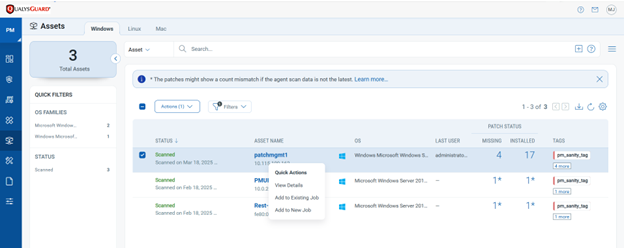
Sometimes, the count for the missing patches might not be correct. The data shown varies based on the latest agent scan. If new patches are made available before the next agent scan, the count might reflect the old patch count.
To detect non-security patches for the Linux assets, the system must be configured with the required repository for the respective operating system. For example, for Open SUSE, the Zypper repo and for RHEL, the yum repo must be configured.
The non-security updates patching is supported for the LXAG version 7.2.0.0 and higher.
For assets with an extended support subscription, such as Red Hat Enterprise Linux (RHEL) Extended Update Support (EUS), see Missing Patches for Assets with Extended Support Subscriptions.
Missing Patches for Assets with Extended Support Subscriptions
Some Linux vendors offer extended support subscriptions that keep a minor version of the operating system supported for longer, for example, Red Hat Enterprise Linux (RHEL) Extended Update Support (EUS). An asset with such a subscription installs patches from the vendor’s extended support repository, which are built for that exact minor version. An asset without the subscription installs patches from the standard repositories.
To show only the patches that each asset can actually install, TruRisk™ Eliminate checks whether the asset has an active extended support subscription. It uses the information-gathered (IG) QIDs that the vulnerability scan detects on the asset.
How Extended Support Is Detected
An asset is treated as an extended support asset when the vulnerability scan detects one of the following IG QIDs on it:
| QID | Title |
|---|---|
| 45233 | Red Hat Target on Extended Update Support (EUS) |
| 45580 | Red Hat Target on EUS and Update Services for SAP Solutions (E4S) |
| 45655 | Red Hat Enterprise Linux Extended Life Cycle Support (ELS) |
The missing patches for the asset depend on whether one of these QIDs is detected:
| IG QID on the asset | Missing patches shown | Example: asset on RHEL 8.6 |
|---|---|---|
| Detected | Patches from the extended support repository that match the asset’s exact minor version. | RHEL 8.6 EUS patches |
| Not detected | Patches from the standard repositories for the asset’s operating system. | Standard RHEL 8 patches |
Deployment jobs use the same information. When you deploy a missing patch, the job installs the version that matches the asset’s subscription.
Prerequisites
- The asset must be scanned for vulnerabilities, so that the IG QIDs are detected. Missing patches for Linux assets already depend on this scan. (Q: Are the IG QIDs detected by the Cloud Agent vulnerability scan, by network scans, or both? Does the asset need the VM (VMDR) module activated on the agent?)
- To get extended support patches, the asset must have an active extended support subscription and be configured to use the vendor’s extended support repository. The IG QID is detected only when the extended support repository is configured on the asset.
When the Subscription Status Changes
The extended support status is updated after each vulnerability scan. If you add, renew, or end an extended support subscription on an asset, the missing patches for the asset change after the next scan detects, or no longer detects, the IG QID.
For example, you move a RHEL 8.6 asset from the standard repositories to EUS. Until the next scan, the asset shows standard RHEL 8 patches. After the scan detects QID 45233, it shows RHEL 8.6 EUS patches.
Troubleshooting
If an asset shows standard patches instead of extended support patches, check the following in order:
- The asset has an extended support subscription. Without one, this is expected. The asset can install only patches from the standard repositories.
- The asset uses the extended support repository, not only the standard repositories.
- One of the extended support QIDs is detected on the asset. In VMDR, open the asset and check its detected vulnerabilities for QID 45233, 45580, or 45655. (Q: Is there a TruRisk Eliminate place (asset details or a QQL token) where users can check whether an asset is treated as an extended support asset? The design adds eusEnabled to the asset index.)
- A vulnerability scan has run since you configured the repository. If it hasn’t, wait for the next scan (by default, every 4 hours) and check the asset again.