Patch Management Release 3.11
January 27, 2026
AI-Powered Patch Reliability Assessment 

You can now make smarter deployment decisions with the new AI-powered (beta phase) Patch Reliability capability. Even before deploying a patch, this feature helps you access intelligent insights that highlight the stability, known issues, and its data sources. This enhancement is available for TruRisk Eliminate subscriptions only.
The AI assessment categorizes the patches into the following types:
- High: The patch is considered to be safe and reliable to deploy, with zero or minimal reported issues.
- Medium: The patch is mostly safe but may include a few reported issues.
- Low: The patch has lower reliability and may include more known issues compared to the High and Medium category.
- Unidentified: No AI information is currently available for this patch.
You can view patch reliability insights for Windows, Linux, and macOS patches on the Patches tab, as well as for applicable QIDs on the Eliminations tab.
The following gif displays the assessment results, detailed report window if applicable, on both Patches and Eliminations tab.

Create Custom Mitigation Scripts
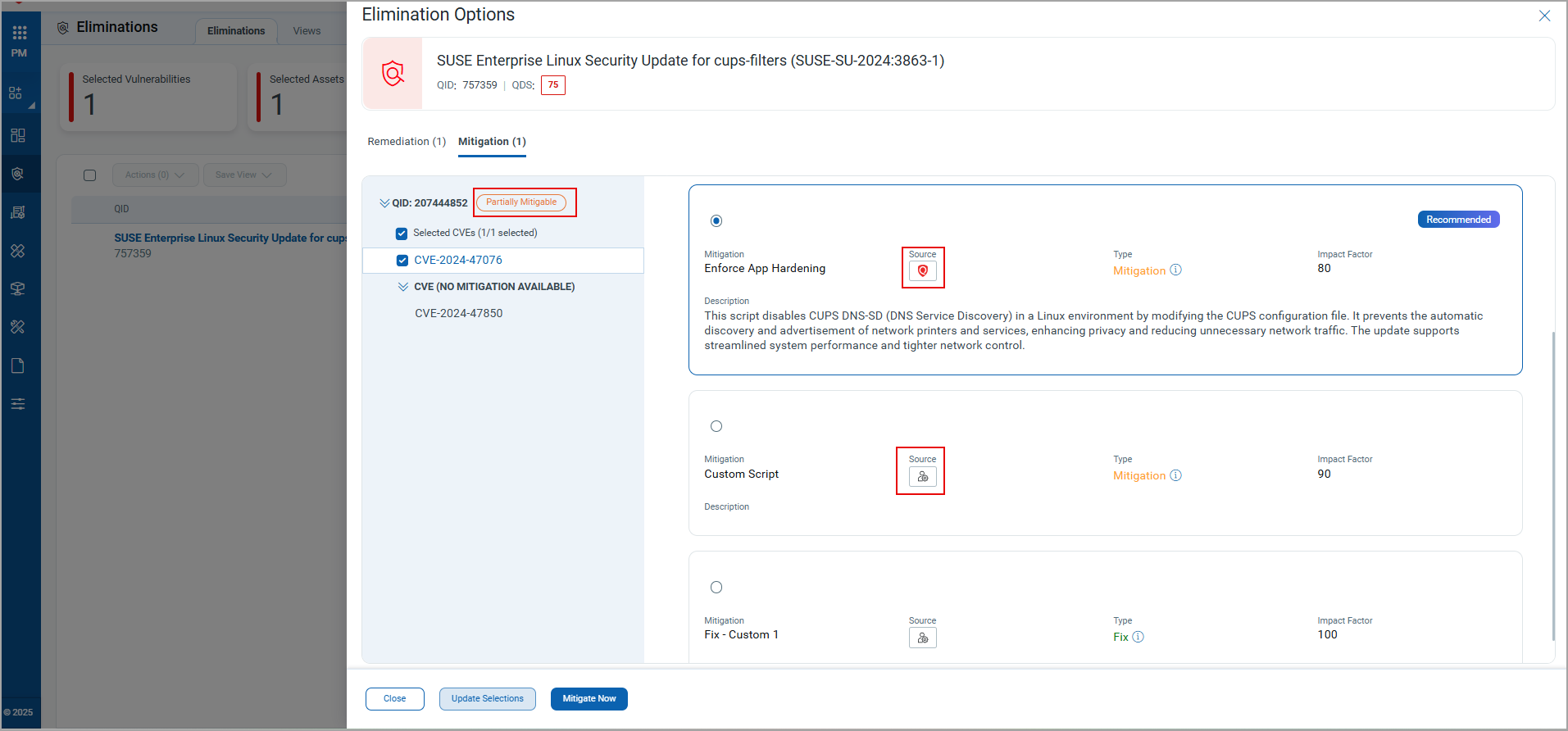
You can now create custom mitigation scripts in the Custom Assessment Remediation (CAR) application to mitigate CVEs. So you can select either the Qualys provided script or the custom script you create to perform the mitigation on the QIDs.
These customizable scripts can be defined as either temporary or permanent types. The following logic is used to select the default mitigation script; however, you can modify the selection as required:
- If Qualys provides a mitigation script, it is marked as default.
- If the Qualys script is not available, the custom script with the highest impact factor is selected as the default.
QID status is now updated based on the selected CVEs and their available mitigations:
-
Fully Mitigable – The QID is considered Fully Mitigable if mitigation scripts are available for all included CVEs.
-
Partially Mitigable – The QID is considered Partially Mitigable if mitigation scripts are not available for some of the included CVEs.
The following image displays the list of CVEs, and also the custom and Qualys-provided scripts.
Support for IPv6 in Isolation Exceptions 
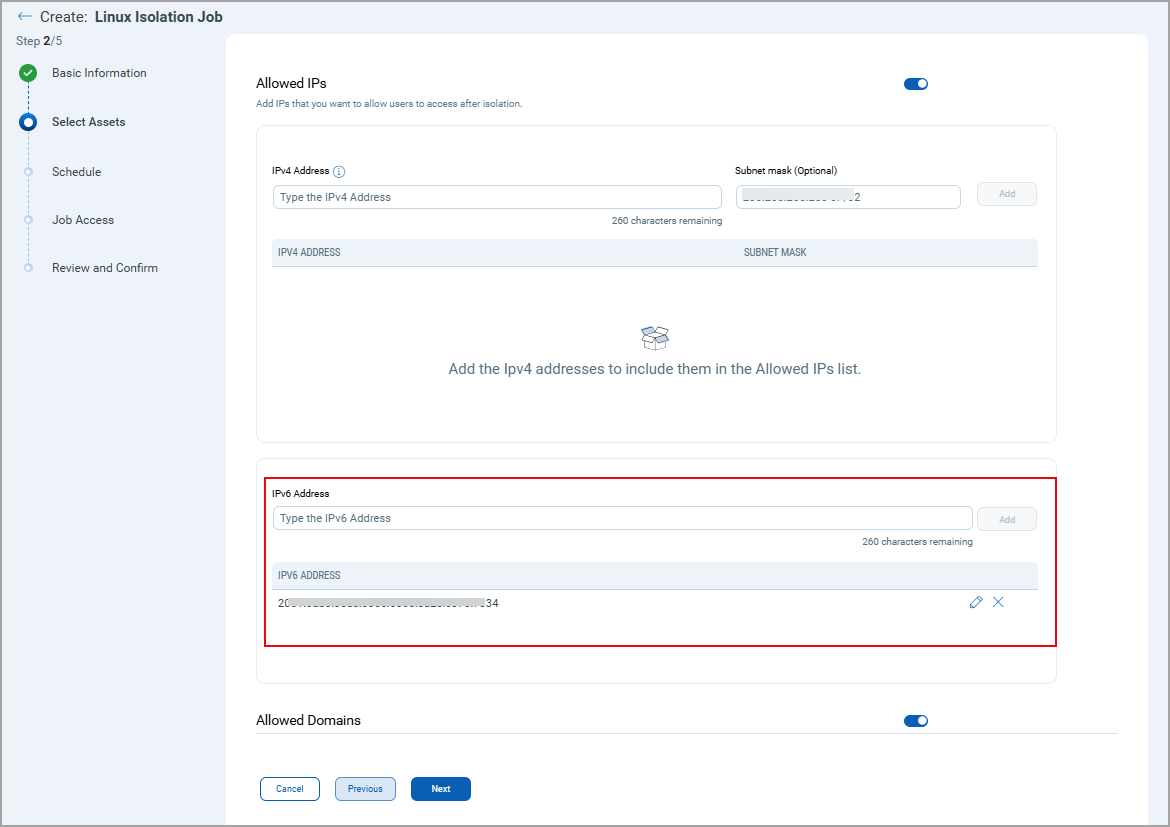
You can now add IPv6 addresses to the Isolation Exceptions list when creating the Isolation job for Linux assets. This enhancement allows isolated Linux assets to communicate with IPv6 machines.
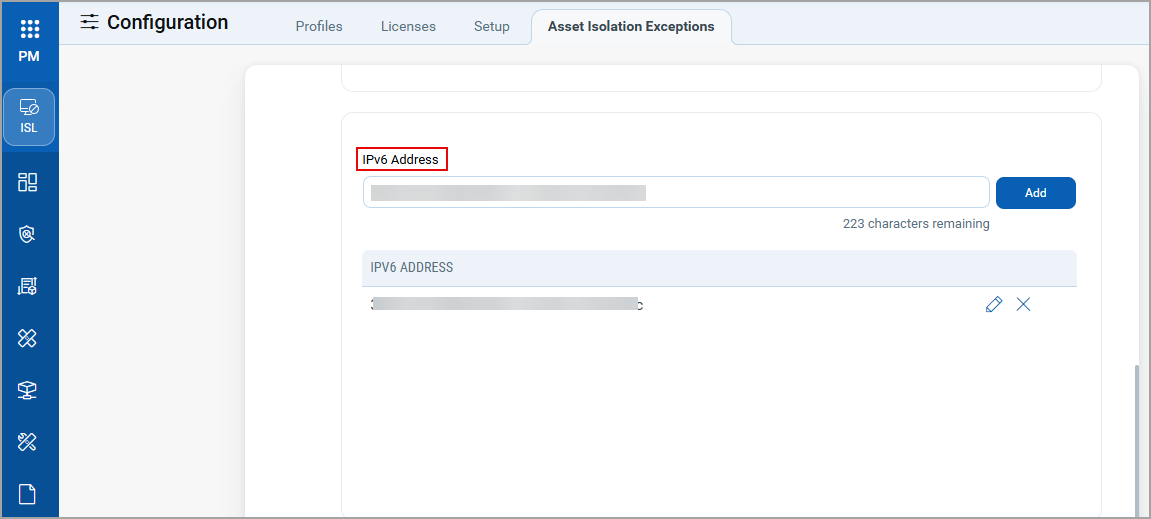
You can also add the IPv6 address through Configurations > Asset Isolation Exceptions > Allowed IPs.
This feature works with Linux Agent 7.3.0 and later.
Support Windows Feature Updates
We now support patching for Windows Feature updates. This ensures that your assets remain up-to-date with the Windows operating system enhancements. To enable these patches acquired from the vendor, you can now generate the SHA256 value using various utilities.
Execute Job Between 12 to 2.59 AM
All the monthly-day-of-the-week jobs scheduled to run between 12 to 2:59 AM when triggered, the job definition file of these jobs will now be sent to the Cloud Agent at 12.05 AM.
Restricted Commands in Job Actions Scripts
We have introduced restrictions on specific commands used in the custom scripts of the pre-action or post-action for the Windows deployment job. This precaution ensures uninterrupted patch deployment. The following commands are now restricted:
- Stop-Service -name "QualysAgent"
- Restart-Service -name "QualysAgent"
- sc.exe stop "QualysAgent"
- sc stop "QualysAgent"
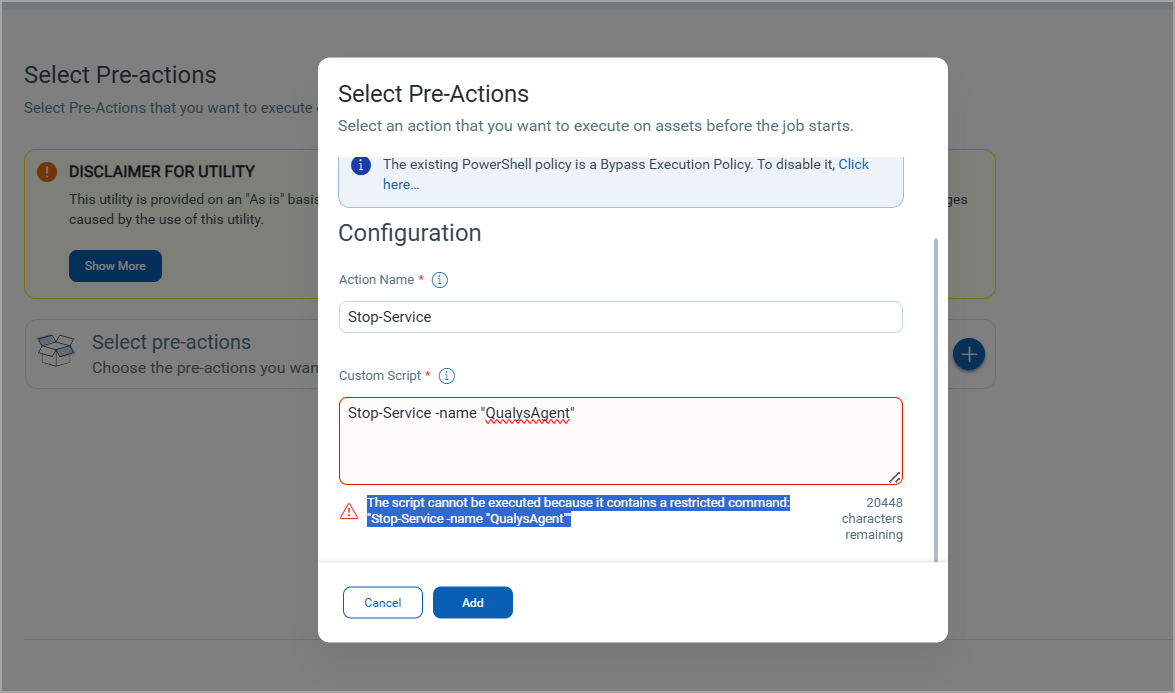
An existing job that contains a restricted command, if edited, an error message:
Job creation failed because the script includes a restricted command in action {actionName} is displayed while saving it.
Enhanced Report Download Options
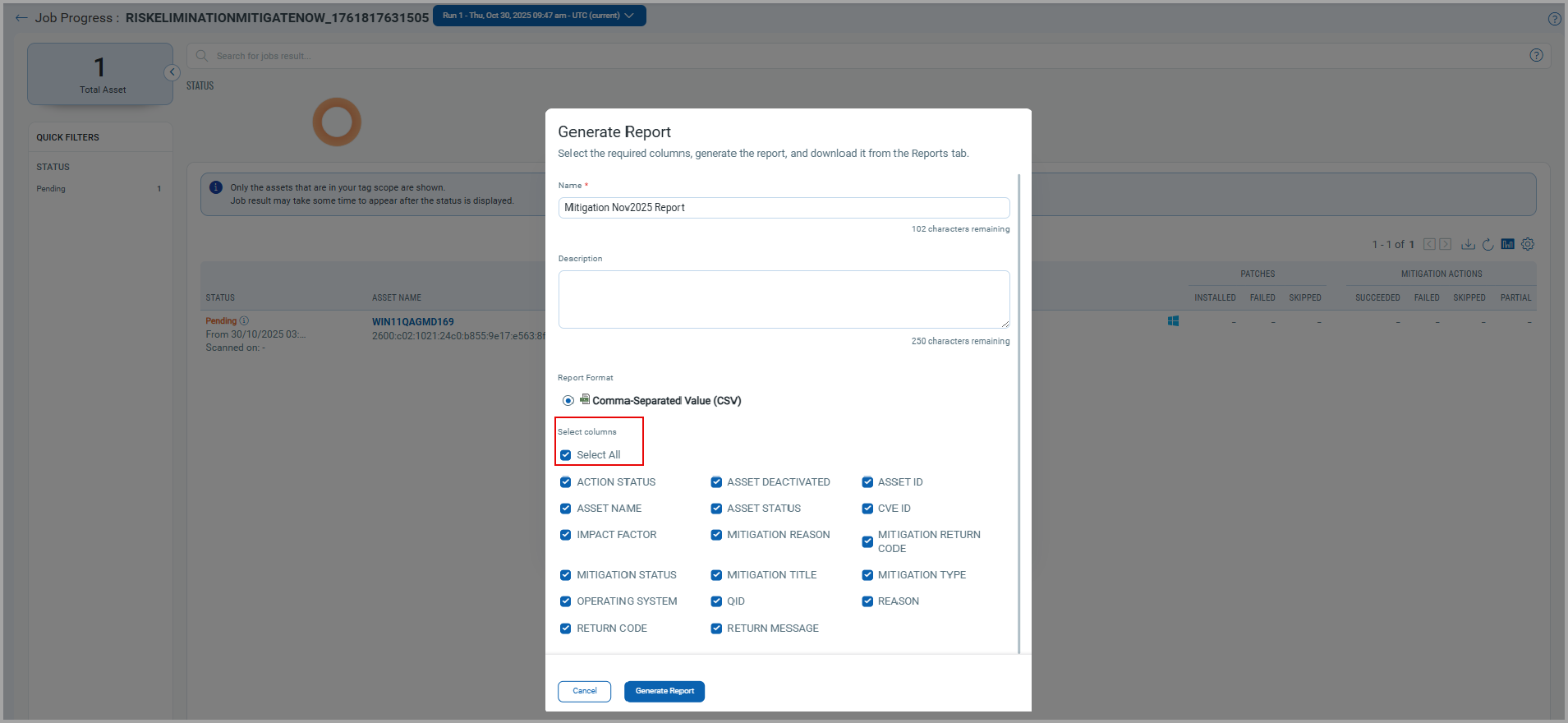
While downloading the report, you can now select the columns that you want to include in the report . This enhancement applies to reports from the Job Progress tab for Mitigation and Isolation application.
When you click Download, the Generate Report window opens. In this window:
-
All columns are pre-selected, you can further modify your selection of columns.
-
You must provide a report name and select at least one column.
Deactivated Asset Visibility in Job Progress
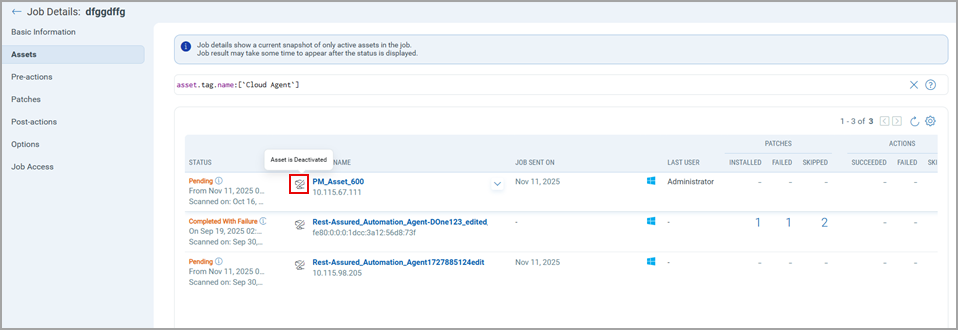
You can now see a deactivation indicator for an asset on the Job Progress page. If an asset was active during job execution but later becomes deactivated, an icon is displayed next to the asset name to highlight its deactivated status, as shown in the following figure.
New QQL Tokens
Refer to the following table to learn more about the new and updated tokens in this release.
| Tab | Token (New) | Usage |
|---|---|---|
|
asset.interface.ipv6Address | To find the asset that has the specified IPv6 address. |
|
patch.isFeatureUpdate | To fetch the list of feature updates for Windows. |
|
patch.reliability | To fetch the patches that have reliability value as Low, Medium or High. |
Issues Addressed
The following reported and notable customer issues are fixed in this release.
| Component/Category | Description |
|---|---|
| PM - Job Windows | An issue was observed in which the asset reboot was delayed. Although the Reboot Countdown toggle was turned off in a deployment job, the asset was rebooted an hour after the patch deployment was successful. This issue is now fixed, and the asset reboot occurs soon after the patch deployment. |
| PM - Job Windows | An issue was observed in which, for QQL-based deployment jobs, the deprecated patches incorrectly displayed the action indicator to fix them. This issue occurred because the patch list was refreshed for the next run, while the disabled patch belonged to the previous run. |
| PM - Assets | An issue was observed where some assets displayed an incorrect IP address or no IP address appeared on the Assets page. This issue is now fixed, and the assets display the correct IP addresses. |
| PM - Job Windows | We have introduced validations of the QQL query during deployment job creation. |
| PM - Configuration | An issue was observed patch job completion notification emails were delivered with a delay. This issue is fixed, and notification emails are now sent promptly. |
| PM - Reports | An issue was fixed in which the patch and asset reports for Windows and Linux platforms fetched incomplete data displaying an unexpected error message in the report. The issue is now fixed the reports display complete data. |
| PM - UI | An issue occurred where if a user clicked the Edit option for a deployment page and left the screen idle for five minutes, the page displayed "Unauthorized Access" error. |
| PM - UI | An issue occurred where, while creating a widget Vulnerabilities Fixed Based on Successfully Installed Patches, the data was visible in the Preview, but after adding the widget to the dashboard, the widget displayed no data. This issue is resolved and the widget on the dashboard displays the relevant data. |
| PM - Licensing | An issue was observed in which the assets that were included in the tag under the Licenses tab, were not actually licensed assets. This issue is now resolved and the assets included in the tags will be licensed assets. |
| PM - UI | An issue was fixed in which, the year 2026 was not shown in the calendar on the Schedule tab for the Windows, Mac and Linux deployment jobs. |
API Release Updates
For more details on the API updates for this release, see Patch Management API Release 3.11.