Patch Management Release 4.0
July 22, 2026
Enterprise TruRisk Management to TruRisk™ Eliminate Risk Remediation Workflow 
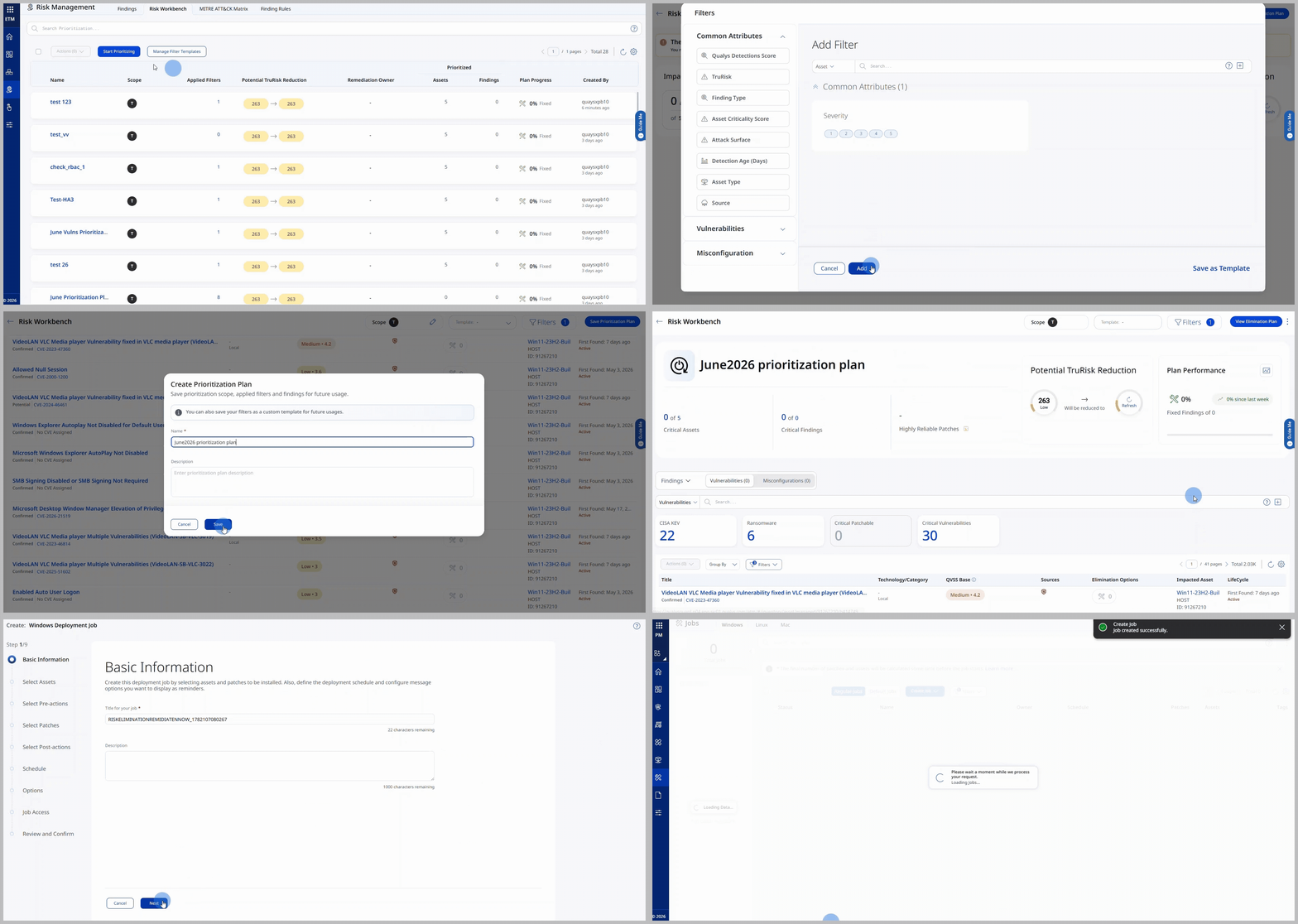
Enterprise TruRisk Management (ETM) now integrates directly with TruRisk Eliminate (TRE), providing a unified, risk-driven approach to vulnerability remediation. Unlike the VMDR workflow, which prioritizes vulnerabilities at the QID level, ETM focuses on CVE-based prioritization, allowing teams to assess and address risk at the vulnerability level and carry those priorities directly into remediation activities.
Security teams can identify and prioritize the most critical CVEs in ETM and seamlessly transition those priorities into TruRisk Eliminate, ensuring remediation efforts remain aligned with organizational risk objectives. This streamlined experience helps eliminate manual handoffs, improves collaboration between security and IT operations teams, and accelerates the path from risk identification to remediation.
As part of the ETM and TruRisk Eliminate integration, the Views tab is now renamed Risk Elimination Plan, providing clearer alignment with the risk-based remediation workflow.
Key Benefits are:
- Prioritize and remediate vulnerabilities based on CVE-level risk rather than QIDs.
- Align prioritization and remediation through a unified platform.
- Focus remediation efforts on the vulnerabilities that pose the highest business risk.
- Improve collaboration between SecOps and ITOps.
- Gain better remediation visibility through multiple pivot views of findings, affected assets, and available risk elimination options.
- Accelerate risk reduction by using risk elimination plans.
Prerequisites
- ETM version 1.11.0 or later.
- A user with any of the Patch Management roles can be assigned a Remediation Plan, but only users with the Create Job permission can create a job from that plan.
How to Get Started
- Navigate to ETM > Risk Management > Risk Workbench and prioritize vulnerabilities based on your desired scope and filters.
- Save the prioritization plan and replicate the plan to TRE, where it becomes a Risk Elimination Plan that can be used to review remediation options and create remediation jobs.
This enhancement enables organizations to move from vulnerability prioritization to remediation more efficiently, helping reduce exposure and improve overall remediation effectiveness. For more information, see Prioritize and Remediate Vulnerabilities from ETM.
TruRisk Eliminate brings together Patch, Mitigate, Isolate, and Custom Access Remediation (CAR) capabilities to help organizations reduce cyber risk. CAR provides the ability to create custom scripts. To better align with this change, Patch Management will be renamed to TruRisk Eliminate in the upcoming release.
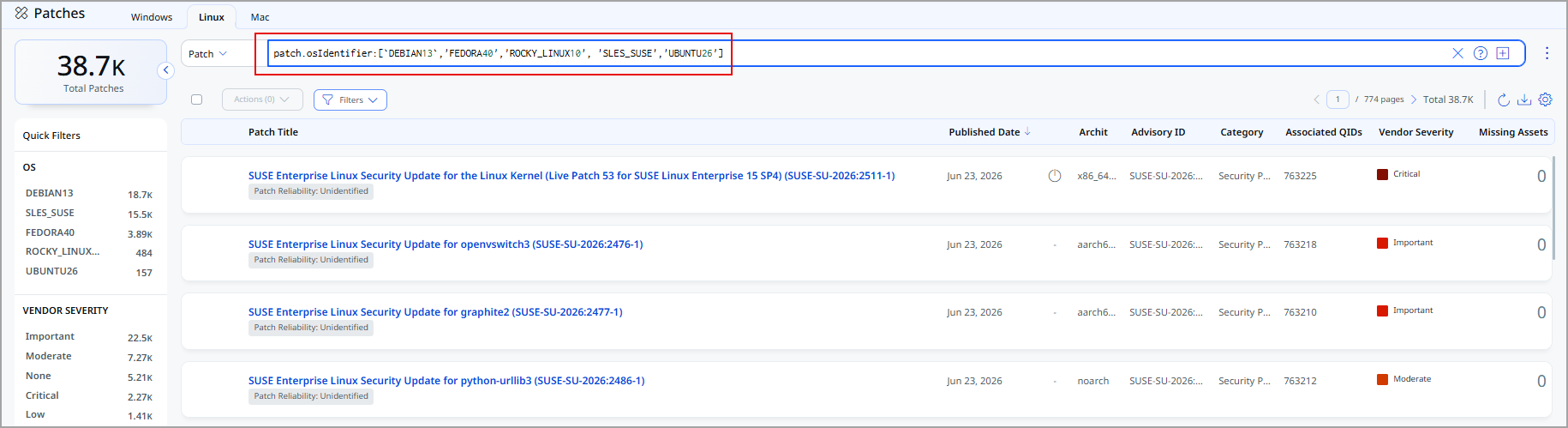
New Linux Operating Systems Support


We now support the following Linux operating systems across x86_x64, and ARM (aarch64) architectures. For complete list of Linux OS, see Supported Linux Operating Systems and NSU Supported Linux OS.
| Operating System | x86_64 | ARM (arch64) |
|---|---|---|
| Rocky Linux 10 | PM, MTG, NSU, Rollback | PM, NSU, Rollback |
| SUSE Linux Enterprise Server 16 and 16 SP1 | PM, MTG, NSU, Rollback | PM, NSU, Rollback |
| SUSE Linux Enterprise Server 15 SP7 | PM, MTG,ISL, NSU, Rollback | PM, NSU, Rollback |
| Debian 13 | PM, MTG, Rollback | PM, Rollback |
| Ubuntu 26.04 | PM, MTG, Rollback | PM, Rollback |
| Fedora 40, 41, 42, and 43 | PM, MTG, NSU, Rollback | PM, NSU, Rollback |
This enhancement expands Linux platform coverage across x86_x64, x64, and ARM (aarch64) environments, enabling broader and enhanced remediation capabilities.
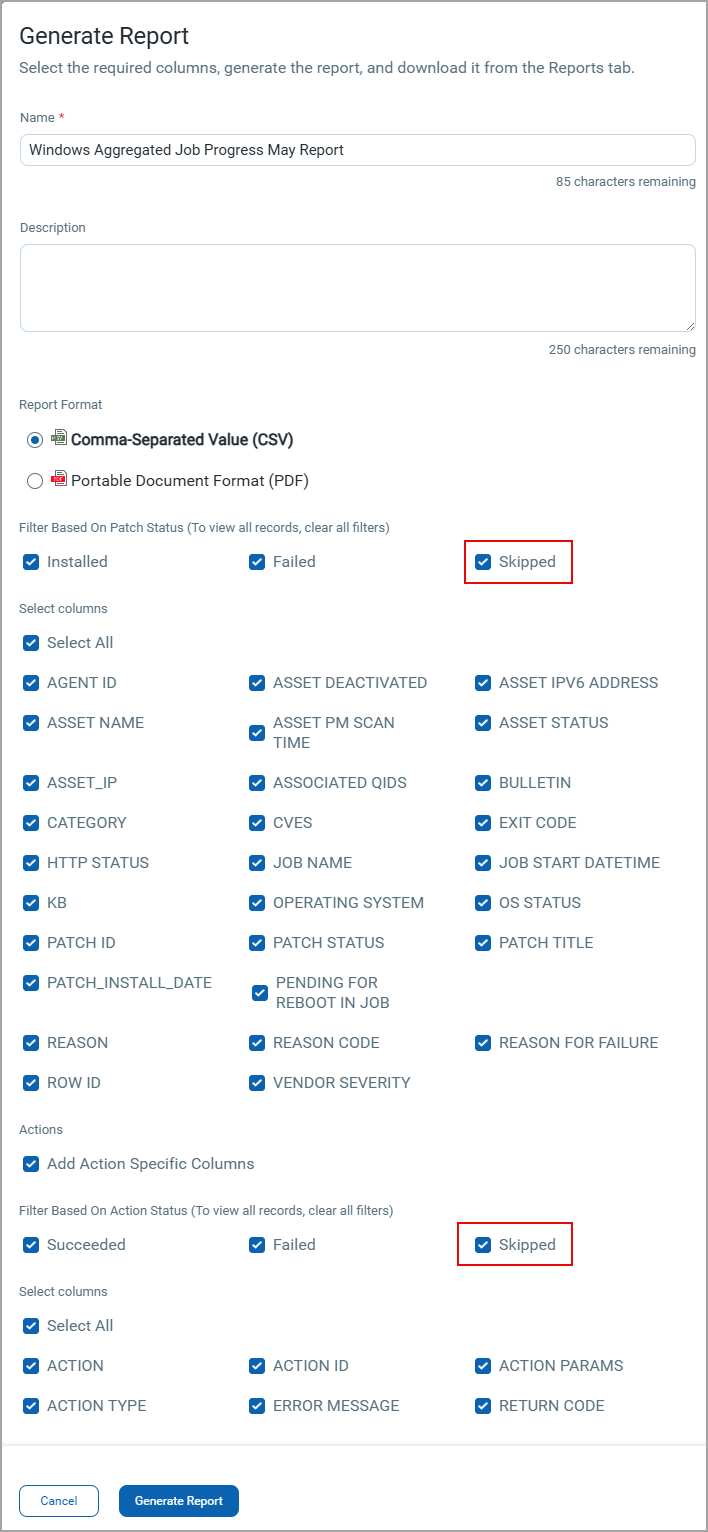
View Skipped Patches and Actions in Aggregate Job Progress Reports
You can now include Skipped patches and actions in the Windows Aggregate Job Progress Report using the new Skipped filter. This enhancement provides better visibility into skipped items, helping you quickly identify and review patches or actions that were not applied.
The report dynamically updates based on the selected filters. If no filters are selected, the report displays all rows by default. For moe information, see Generating Aggregated Job Progress report for Windows.
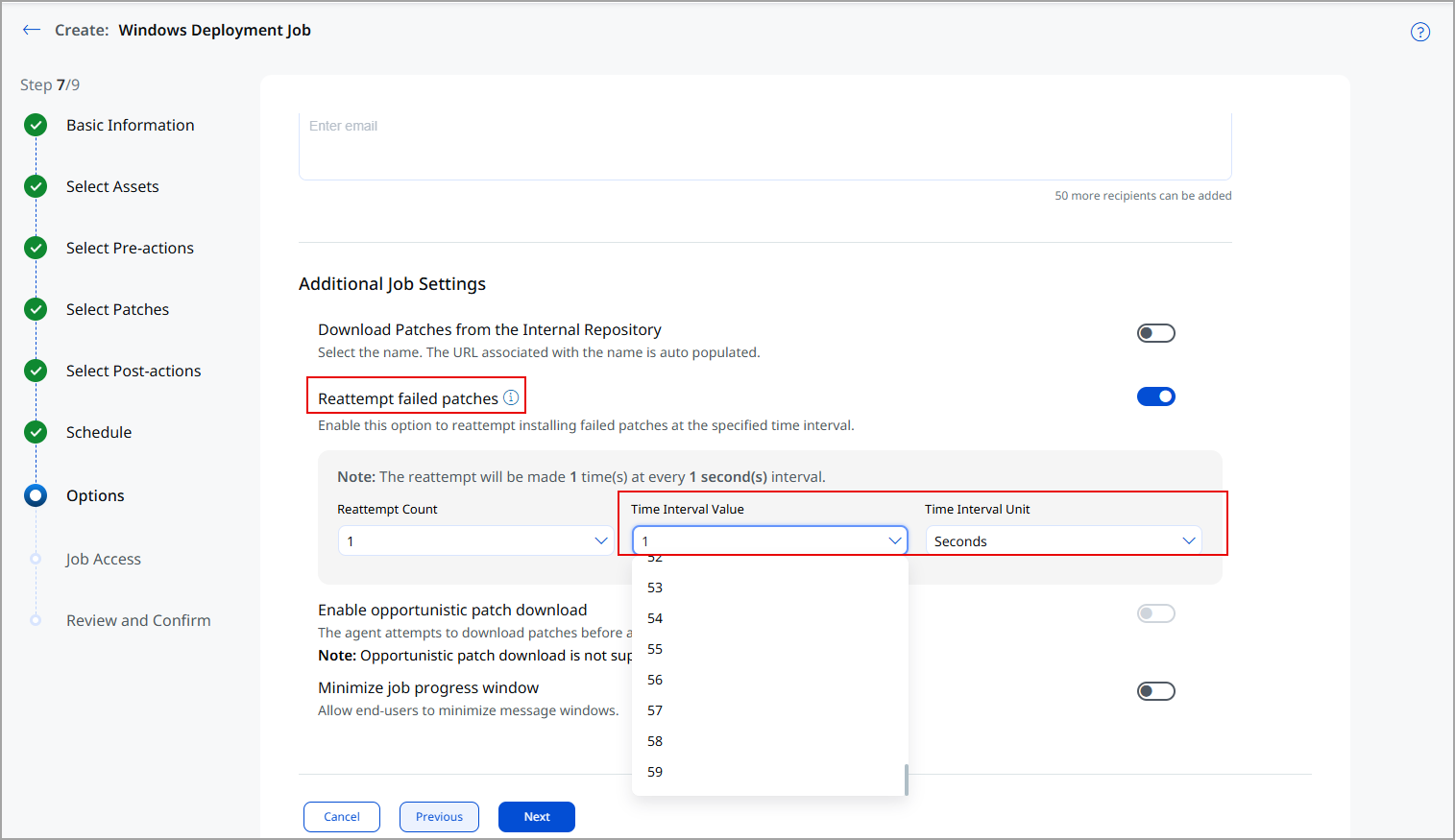
Enhanced Reattempt Failed Patch Time Interval
You can now configure the retry interval for failed patches from 1 second up to 59 minutes. This extended time window provides the Cloud Agent additional time to retry failed patch installations and improve deployment success rates.
Configure this setting in the Create Deployment Job workflow, under the Options > Additional Job Settings > Reattempt failed patches section. For more information, see Creating Patch Jobs for Windows Assets.
Improved Visibility into Skipped Patches
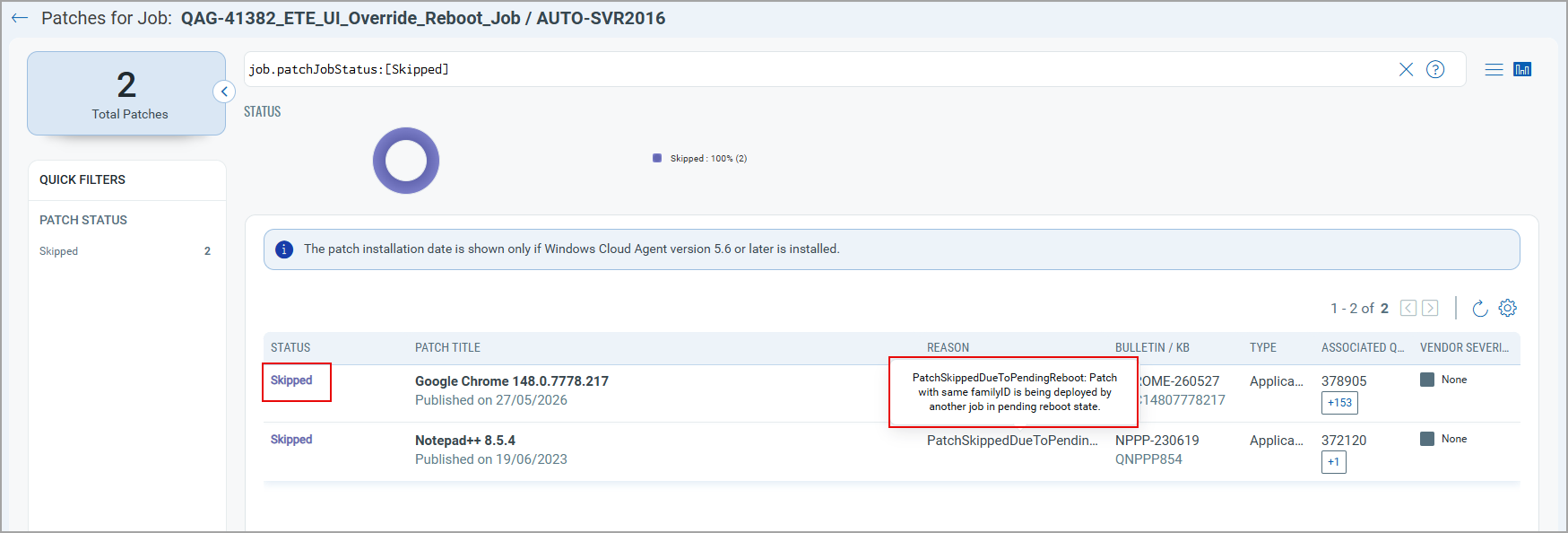
You can now gain better visibility into patch deployments, with clear explanations for patches skipped due to assets in the pending reboot state, helping you quickly identify and resolve deployment issues.
When you click the Skipped Patches count on the Job Progress page, the Patches for the Job page now displays the accurate reason when a patch is skipped because another patch from the same application family is awaiting a reboot from a previous deployment job.
Previously, such patches were incorrectly marked as Not Applicable, making it difficult to identify the actual cause. The UI now displays the message: Skipped because a patch from the same application family is in a pending reboot state.
When Override Reboot is enabled, patch deployment can continue for other application families, while patches from the affected family remain skipped until the system is rebooted.
Enhanced User Interface
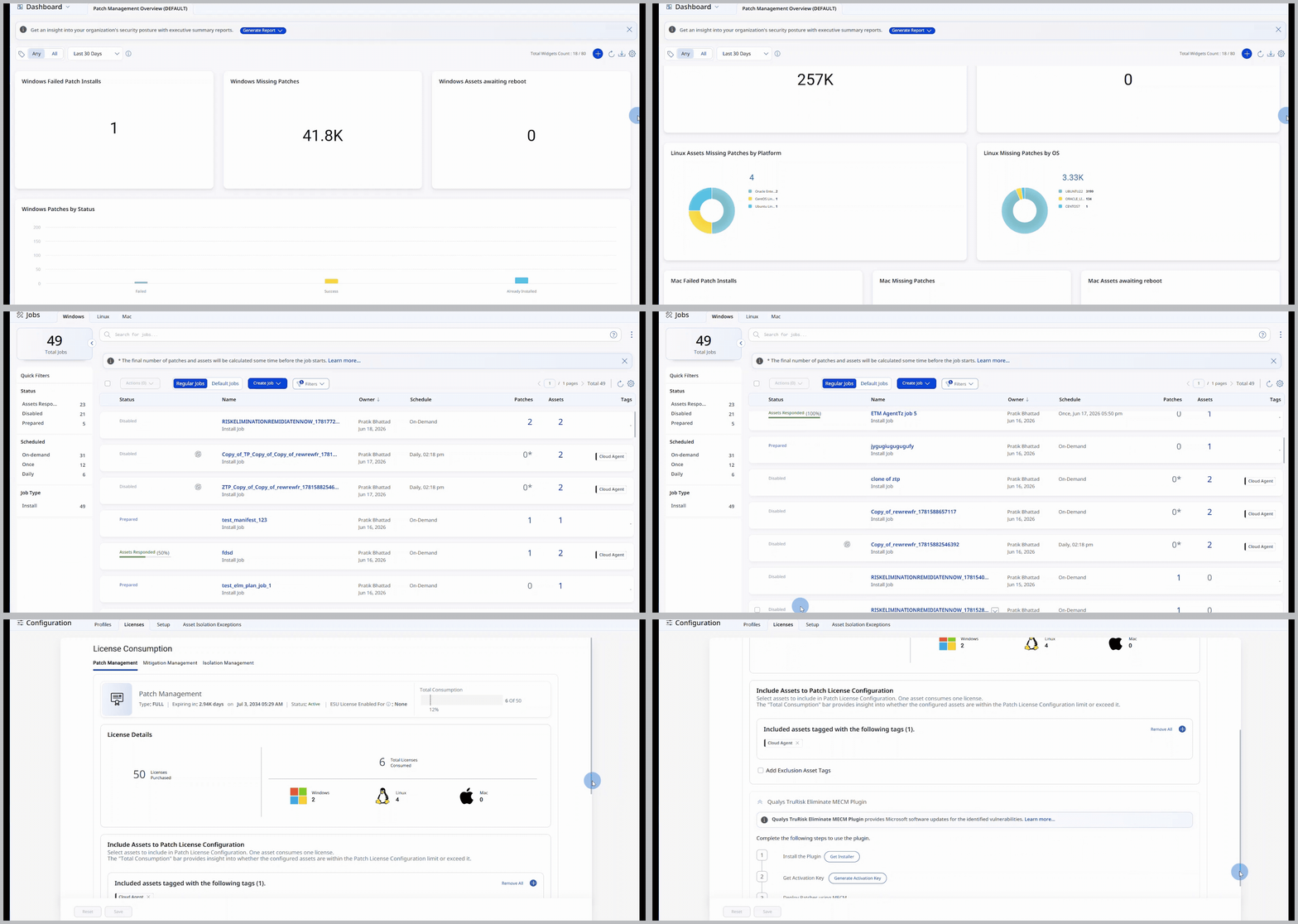
With this release, we have introduced an improved user experience across all TruRisk Eliminate pages. You can see updates across fonts, colors, typography, and buttons, making the interface more intuitive and easier to use. This release features User Interface and design system enhancements that improve visual consistency, readability, and usability across the application, resulting in a cleaner, more intuitive user experience.
In this release, we have enhanced the user experience on all TRE pages. You can notice updates to fonts, colors, typography, and buttons that make the interface more intuitive and user-friendly. This release features improvements to the User Interface and design system that enhance visual consistency, readability, and usability throughout the application, resulting in a cleaner and more intuitive User experience.
Key benefits are:
- Cleaner, more consistent screens
- Easier-to-read and understandable text
- Important information stands out better, with less clutter
- Faster comprehension of risk, status, and numbers
User Interface Consistency and Clarity
Introducing the new and improved User Interface with the following key upgrades:
- Easier-to-read labels and text, with ALL CAPS replaced by sentence-style text
- Consistent text style for status and source names across the application
- Uniform text colors in tables, filters, page numbers, and tabs
- Aligned colors and text styles for tabs and page navigation throughout the application
- Clear visual indicators for buttons and options, showing active, inactive, or secondary states
- Better emphasis on important information, with subtle styling for less critical details to help users focus
Charts, Metrics, and Data Presentation
You can view the following updates:
- Updated chart color schemes for improved clarity and accessibility
- Compact, more readable numeric formats for better visibility
- Refined color gradients for risk scores and meters to enhance interpretation
New QQL Tokens
Refer to the following table to learn more about the new token in this release.
| Tab | Token (New) | Usage |
|---|---|---|
|
patch.qualysPublishedDate | To find the patches published on the Qualys Patch Management platform on the specified date. |
Issues Addressed
The following reported and notable customer issues are fixed in this release.
| Component/Category | Description |
|---|---|
| PM - Assets |
An issue occurred where assets requiring a reboot were not displayed when using the asset.isPendingReboot: true query.The issue is now fixed, and accurate query results showing the assets with pending reboot status are displayed. |
| PM - UI |
An issue occurred in which misleading warning messages and Fix Job options were displayed for dynamic QQL-based jobs, even though these jobs automatically excluded deprecated patches. The issue is now resolved, and the system suppresses these warnings and options for dynamic jobs, and the UI reflects job behavior automatically without requiring manual actions. |
| PM - Job Windows |
An issue occurred where Patch Tuesday plus 7 (or more) days scheduled jobs did not execute at the configured time, despite correct setup and stable agent connectivity. The issue is resolved, and these jobs now execute as expected according to the defined schedule, ensuring reliable patch deployment. |
| PM - UI |
An issue occurred in which CDN URLs were not stored correctly when uploaded file names contained spaces. This issue is now resolved, and the CDN URLs are correctly stored with file names that contain spaces. |
| PM - Jobs - Scheduling |
An issue occurred where the Next Run field on the Job Details > Basic Information page displayed an incorrect patch job run time for a ring job. Now, the Next Run value is not displayed on the Job Progress > Basic Information page to resolve this issue. |
| PM - UI | An issue was fixed where file uploads to Qualys Cloud Storage could fail due to an incorrect 500 MB file size limit check. Users can now upload supported file sizes successfully without upload errors. |
| Apps - Patch Management | An issue was fixed where some assets remained in a Pending state in the PM UI even after the associated job had completed successfully. The issue is now resolved and the asset status is now updated correctly after job completion. |
API Release Updates
For more details on the API updates for this release, see Patch Management API Release 4.0.