Enterprise TruRisk™ Platform Release 3.23.1
March 10, 2026
With this release of the Enterprise TruRisk™ Platform, we are introducing the following new features and enhancements.
 |
Cloud Agent |
Token Updates for Cloud Agent
We have updated the following search tokens available for Cloud Agent:
| Existing Token | New Token | Description |
|---|---|---|
| asset.middlewareManifestVersion | qualys.agent.middlewareManifestVersion | Use this token to search the assets using specific middleware manifest version. Syntax: qualys.agent.middlewareManifestVersion: <manifest_version>Example: qualys.agent.middlewareManifestVersion: "VULNSIGS-MIDDLEWARE-SCAN-2.5.884-2"
|
| asset.pcManifestVersion | qualys.agent.pcManifestVersion | Use this token to search the assets using specific Policy Compliance manifest version. Syntax: qualys.agent.pcManifestVersion:<manifest_version>Example: qualys.agent.pcManifestVersion: "PC-MANIFEST-2.5.884-2"
|
| asset.paManifestVersion | qualys.agent.paManifestVersion | Use this token to search the assets using specific Policy Audit manifest version. Syntax: qualys.agent.paManifestVersion: <manifest_version>Example: qualys.agent.paManifestVersion: "PA-MANIFEST-2.5.884-2"
|
| asset.scaManifestVersion | qualys.agent.scaManifestVersion | Use this token to search the assets using specific SCA manifest version. Syntax: qualys.agent.scaManifestVersion: <manifest_version>Example: qualys.agent.scaManifestVersion: "SCA-MANIFEST-2.5.884-2"
|
| agent.qualysCorrelationId | qualys.agent.correlationId | Use this token to search the assets using specific agent correlation ID. Syntax: qualys.agent.correlationId: <correlation_id>Example: qualys.agent.correlationId: "12345678-ABCD-9876-EFGH-1234567890AB"
|
| asset.udcManifestVersion | qualys.agent.udcManifestVersion | Use this token to search the assets using specific UDC manifest version. Syntax: qualys.agent.udcManifestVersion: <manifest_version>Example: qualys.agent.udcManifestVersion: "UDC-MANIFEST-2.5.884-2"
|
| asset.vmManifestVersion | qualys.agent.vmManifestVersion | Use this token to search the assets using specific VM manifest version. Syntax: qualys.agent.vmManifestVersion: <manifest_version>Example: qualys.agent.vmManifestVersion: "VULNSIGS-VM-SCAN-2.5.884-2"
|
| sensor.activatedForModules | qualys.activatedForModules | Use this token to search the assets activated for specific modules. Syntax: qualys.activatedForModules: <module_name>Example: qualys.activatedForModules: VM
|
| agent.id | qualys.agent.id | Use this token to search the assets using specific agent ID. Syntax: qualys.agent.id: <agent_id>Example: qualys.agent.id: 123456789
|
| agent.configurationProfile | qualys.agent.configurationProfile | Use this token to search the assets using specific configuration profile. Syntax: qualys.agent.configurationProfile: <profile_name>Example: qualys.agent.configurationProfile: "Default Configuration Profile"
|
| agent.version | qualys.agent.version | Use this token to search the assets using specific agent version. Syntax: qualys.agent.version: <version>Example: qualys.agent.version: "5.0.0.0"
|
| agent.lastInventoryDate | qualys.agent.lastInventoryDate | Use this token to search the assets using last inventory date. Syntax: qualys.agent.lastInventoryDate: <date>Example: qualys.agent.lastInventoryDate: "2025-02-01"
|
| agent.lastCheckedInDate | qualys.agent.lastCheckedInDate | Use this token to search the assets using last check-in date. Syntax: qualys.agent.lastCheckedInDate: <date>Example: qualys.agent.lastCheckedInDate: "2025-02-10"
|
| agent.lastActivityDate | qualys.agent.lastActivityDate | Use this token to search the assets using last activity date. Syntax: qualys.agent.lastActivityDate: <date>Example: qualys.agent.lastActivityDate: "2025-02-12"
|
| openPorts.description | asset.openPorts.description | Use this token to search the assets using open port service description. Syntax: asset.openPorts.description: <description>Example: asset.openPorts.description: "HTTP"
|
| openPorts.detectedService | asset.openPorts.detectedService | Use this token to search the assets using detected open port service. Syntax: asset.openPorts.detectedService: <service_name>Example: asset.openPorts.detectedService:"SSH"
|
| openPorts.port | asset.openPorts.port | Use this token to search the assets using specific open port number. Syntax: asset.openPorts.port: <port_number>Example: asset.openPorts.port: 443
|
| openPorts.protocol | asset.openPorts.protocol | Use this token to search the assets using open port protocol. Syntax: asset.openPorts.protocol: <protocol>Example: asset.openPorts.protocol: TCP
|
| sensor.lastComplianceScanDate | qualys.scan.lastComplianceScanDate | Use this token to search the assets using last compliance scan date. Syntax: qualys.scan.lastComplianceScanDate: <date>Example: qualys.scan.lastComplianceScanDate: "2025-02-05"
|
| sensor.lastFullScanDate | qualys.scan.lastFullScanDate | Use this token to search the assets using last full scan date. Syntax: qualys.scan.lastFullScanDate: <date>Example: qualys.scan.lastFullScanDate: "2025-02-05"
|
| sensor.lastVmAgentScanDate | qualys.scan.lastVmAgentScanDate | Use this token to search the assets using last VM agent scan date. Syntax: qualys.scan.lastVmAgentScanDate:<date>Example: qualys.scan.lastVmAgentScanDate: "2025-02-05"
|
| service.description | compute.service.description | Use this token to search the assets using service description. Syntax: compute.service.description: <description>Example: compute.service.description: "Windows Update"
|
| service.name | compute.service.name | Use this token to search the assets using service name. Syntax: compute.service.name: <service_name>Example: compute.service.name: "wuauserv"
|
| service.status | compute.service.status | Use this token to search the assets using service status. Syntax: compute.service.status: <status>Example: compute.service.status: Running
|
| asset.totalMemory | compute.totalMemory | Use this token to search the assets using total memory value. Syntax: compute.totalMemory: <memory_value>Example: compute.totalMemory: 8192
|
| asset.timezone | compute.timezone | Use this token to search the assets using timezone. Syntax: compute.timezone: <timezone>Example: compute.timezone: "Asia/Kolkata"
|
| asset.lastBootDate | compute.lastBootDate | Use this token to search the assets using last boot date. Syntax: compute.lastBootDate: <date>Example: compute.lastBootDate: "2025-02-15"
|
| platform.type | qualys.agent.platform | Use this token to search the assets using agent platform type. Syntax: qualys.agent.platform: <platform_type>Example: qualys.agent.platform: Windows
|
| asset.lastLoggedOnUser | compute.lastLoggedOnUser | Use this token to search the assets using last logged-on user. Syntax: compute.lastLoggedOnUser: <username>Example: compute.lastLoggedOnUser: "Administrator"
|
| asset.hostId | compute.hostId | Use this token to search the assets using host ID. Syntax: compute.hostId: <host_id>Example: compute.hostId: 12345678
|
| agent.fimCapable | qualys.agent.fimCapable | Use this token to search the assets based on FIM capability. Syntax: qualys.agent.fimCapable: <true|false>Example: qualys.agent.fimCapable: true
|
| agent.iocCapable | qualys.agent.iocCapable | Use this token to search the assets based on IOC capability. Syntax: qualys.agent.iocCapable: <true|false>Example: qualys.agent.iocCapable: true
|
| agent.errorStatus | qualys.agent.errorStatus | Use this token to search the assets using agent error status. Syntax: qualys.agent.errorStatus: <status>Example: qualys.agent.errorStatus: "Error"
|
| agent.lastSwCAScanDate | qualys.scan.lastSwCAScanDate | Use this token to search the assets using last SWCA scan date. Syntax: qualys.scan.lastSwCAScanDate: <date>Example: qualys.scan.lastSwCAScanDate: "2025-02-05"
|
| asset.cpuCount | asset.noOfCpu | Use this token to search the assets using number of CPUs. Syntax: asset.noOfCpu: <cpu_count>Example: asset.noOfCpu: 4
|
| agent.status | qualys.agent.status | Use this token to search the assets using agent status. Syntax: qualys.agent.status: <status>Example: qualys.agent.status: Connected
|
| agent.swCAIdealCandidate | qualys.agent.swCAIdealCandidate | Use this token to search the assets based on SWCA ideal candidate status. Syntax: qualys.agent.swCAIdealCandidate: <true|false>Example: qualys.agent.swCAIdealCandidate: true
|
For Cloud Agent user interface, you can use both old and new tokens. To learn more about new token names for existing Cloud Agent tokens refer to Search Token Mapping.
 |
Security Assessment Questionnaire |
Remove Uploaded Questionnaire Attachments
We have introduced support to remove the uploaded questionnaire attachment files from the SAQ repository. Earlier, the option to remove these files was not available.
Removing the uploaded files has a permanent impact, as the removed files cannot be undone. However, this action does not affect your existing campaigns or questionnaires.
The attachment file can be deleted only by the user who has uploaded it.
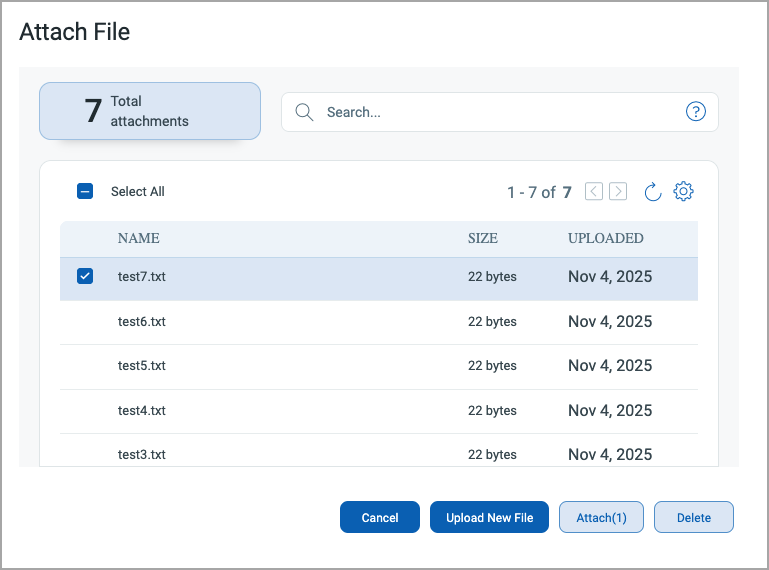
To delete an attachment, navigate to Attach List window and select the attachment you want to delete.
Current Scope
In the current scope of this feature, the deleted attachment files are displayed in the attachment list. These deleted files cannot be accessed and displays the Invalid Response error.
Issues Addressed
The following important and notable issues are fixed in this release:
| Category/Component | Application | Description |
|---|---|---|
| SwCA profile assignment | Cloud Agent | We fixed an issue where the default SwCA profiles for Cloud Agents could not be changed by making suitable code changes. |
| Remote log collection | Cloud Agent | We fixed an issue where empty remote log files were downloaded for MacOS Cloud Agents. |
| Threat Protection RTIs | Threat Protection | We fixed an issue where threat protection RTI filters were displaying incorrect data, and the live threats feed was taking longer to display data. Now, we have adjusted the threat protection RTI filters to correctly display filtered data and reduced the live threats feed time from 30 days to 2 days to load the data more quickly. |
| Action Logs | Administration | We fixed an issue where Action logs were taking a longer time to load due to excessive data. Now, we have cleaned up the older action log data to fix this issue. |
| User management | CSAM | We fixed an issue where a business unit manager user could delete the out-of-scope tags using the asset management API. |
| Asset Inventory | CSAM | We fixed the discrepancy in the inventory source on VMDR user interface and downloaded inventory. Now, we have consistent source information on user interface and downloaded inventory. |
| WAS Reporting | WAS | We fixed an issue where, for a Web Application, the CSV report formatting was distorted due to the large amount of data in one of the cells in the web application report. |
| Vulnerability count | Shared Portal | We fixed an issue where there was a discrepancy in the vulnerability count when filtered with published date and QDS range. |
| QQL Search token | Shared Portal | We fixed an issue where operating system-based search token was not working in Vulnerabilities tab of VMDR application. |
| QID Reporting | Shared Portal | We fixed an issue where CVSS score was missing when the QID data was downloaded from the Vulnerabilities tab in VMDR application. |
| TruRisk Score Reports | Shared Portal | We fixed an issue where there was discrepancy in the CVSS score displayed on the user interface and CVE and QID report. |