Enterprise TruRisk™ Platform Release 3.24
May 26, 2026
With this release of Enterprise TruRisk™ Platform, we are introducing the following new features and enhancements.
 |
Cloud Agent |
Support for New Module — Policy Audit Fix
We have introduced a new module, Policy Audit Fix (PAF), in the Policy Audit (PA) application. The PAF module helps you identify failed controls on your assets and remediate them to meet the policy audit standards. The controls are the set of configurations that must meet the standard Policy Audit guidelines.
Only the Manager and Unit Manager users can access PAF. No other PA users can access PAF.
PAF helps protect your assets from failed controls by providing the following benefits:
- Identify failed controls to highlight asset misconfigurations that can cause security threats.
- Remediate misconfigured controls automatically by using Custom Assessment and Remediation (CAR) scripts.
- Automate failed control remediation with PAF and CAR to help reduce potential cyber risks.
- Support policy compliance by remediating failed controls.
To activate the PAF, you must first activate the Policy Audit (PA) or Secure Configuration Assessment (SCA).
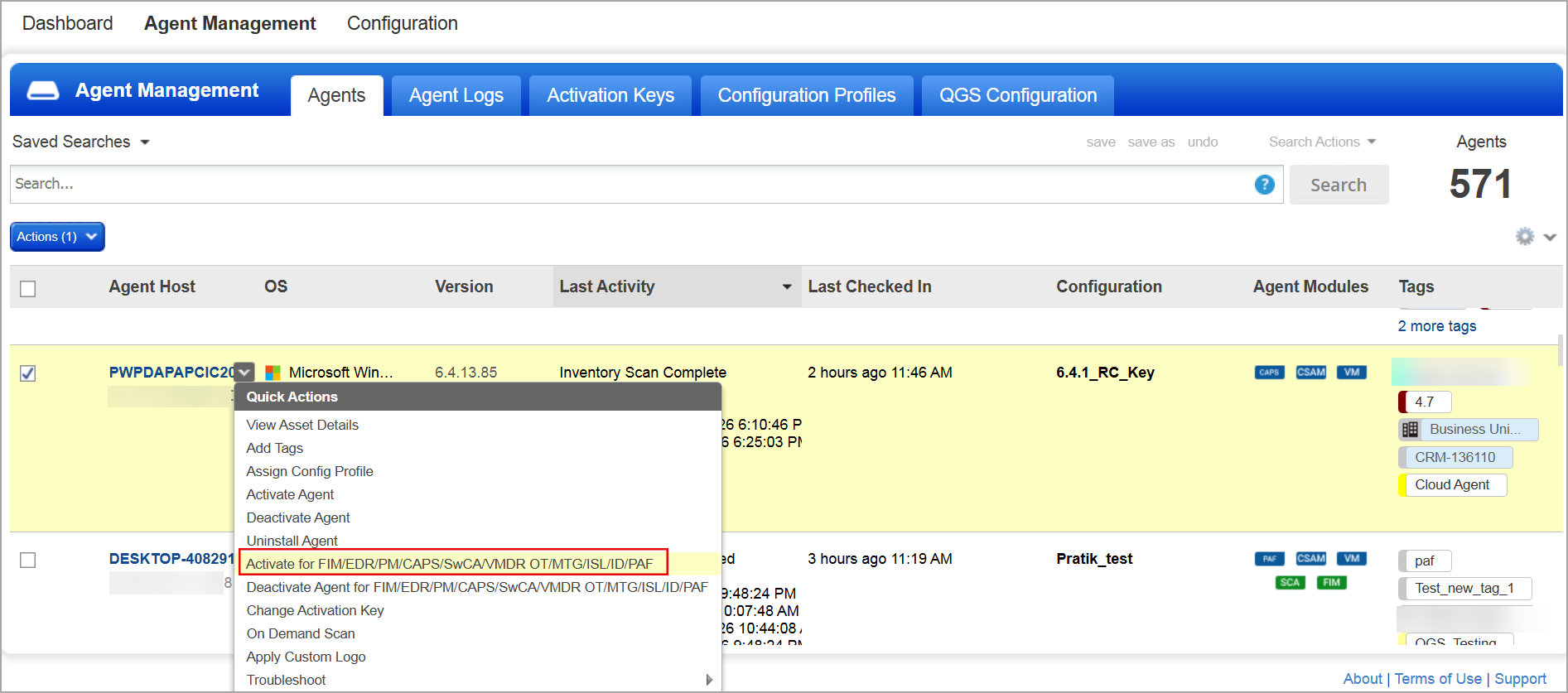
To activate PAF, in the Cloud Agent user interface, navigate to Agent Management > Agents tab. Select a Cloud Agent to activate PAF and select Activate for <Application> from the Quick Actions menu. To learn more about activating PAF, refer to Activate Cloud Agent for PAF.
| Required Application Version | Policy Audit 1.10 |
To learn more about Policy Audit Fix, refer to Policy Audit Online Help.
API Enhancements: Refer to the Enterprise TruRisk™ Platform Release 3.24 API.
Independent Activation for ETM Identity
You can now activate or deactivate ETM Identity independently. This update lets you manage the ETM Identity module without affecting dependent Qualys applications. It simplifies the configuration workflow and helps prevent errors by enabling independent management of related applications.
The following table illustrates the comparative analysis of managing ETM Identity:
| Operation | Independent Management | Dependent Management |
|---|---|---|
| ETM Identity Activation | No need to activate dependent Qualys applications, such as Vulnerability Management (VM), Policy Audit (PA), and File Integrity Monitoring (FIM). | Must activate the dependent Qualys applications. |
| ETM Identity Deactivation | No need to specify dependent Qualys applications for deactivation. | Must specify the dependent Qualys application for deactivation. |
We recommend activating VM and PA applications to fully leverage the ETM identity module.
API Enhancements: Refer to the Enterprise TruRisk™ Platform Release 3.24 API.
Issues Addressed
The following important and notable issues are fixed in this release:
| Category/Component | Application | Description |
|---|---|---|
| Cloud Agent Scans | Cloud Agent | We fixed an issue where Cloud Agent could not complete VM and SwCA scans on merged virtual machines. Now, Cloud Agent can complete VM and SwCA scans on merged virtual machines. |
| CSPM Connector | Enterprise TruRisk™ Platform | We fixed an issue where the Qualys CSPM Connector used the deprecated AWS SDK for Java 1.12. Now, the connector uses AWS SDK for Java to 2.x to ensure smooth operation. |
| Vulnerability Management | Enterprise TruRisk™ Platform | We fixed an issue where Asset Criticality Score (ACS) search tokens returned incorrect results. This affected the accuracy of search results. Now, the ACS search tokens return accurate results. |
| EC2 Scans | Enterprise TruRisk™ Platform | We fixed an issue where some of the regions could not be selected to launch EC2 scans. Now you can select all the regions for EC2 scans where EC2 connectors are installed. |
| Asset Activation | CSAM | We fixed an issue where stopped IPv6-enabled GCP instances could not be activated for Qualys applications due to a missing public IP address. Now, you can activate stopped GCP instances for Qualys applications even when the public IP address is not available. |
| WAS Scan Notification | WAS | We fixed an issue where multiple email notifications were sent for a web application scan (WAS). Now, we send only one email notification per WAS scan to avoid unnecessary notifications. |
| Vendor Risk Management | SAQ | Users encountered an issue where uploading evidence attachments failed when the filenames contained non-English characters, such as Arabic. This prevented a successful submission. The issue is now fixed. You can now upload a file with a non-English filename successfully. |
Known Issues, Limitations, and Workarounds
There are no known issues or limitations for this release.