Enterprise TruRisk™ Platform Release 3.25.1
October 16, 2026
This release introduces the new Administration application with RBAC 2.0 for centralized user and role management, lets you exclude specific usernames from inactivity deactivation, expands the Administrator role's permissions, and updates the activity.Source QQL token.
New Feature
Centralize User and Role Management with the New Administration Application
What's New for You
You can now give each user exactly the access their job needs, delegate specific admin tasks, and sync users from Microsoft Entra ID, all from the new Administration application.
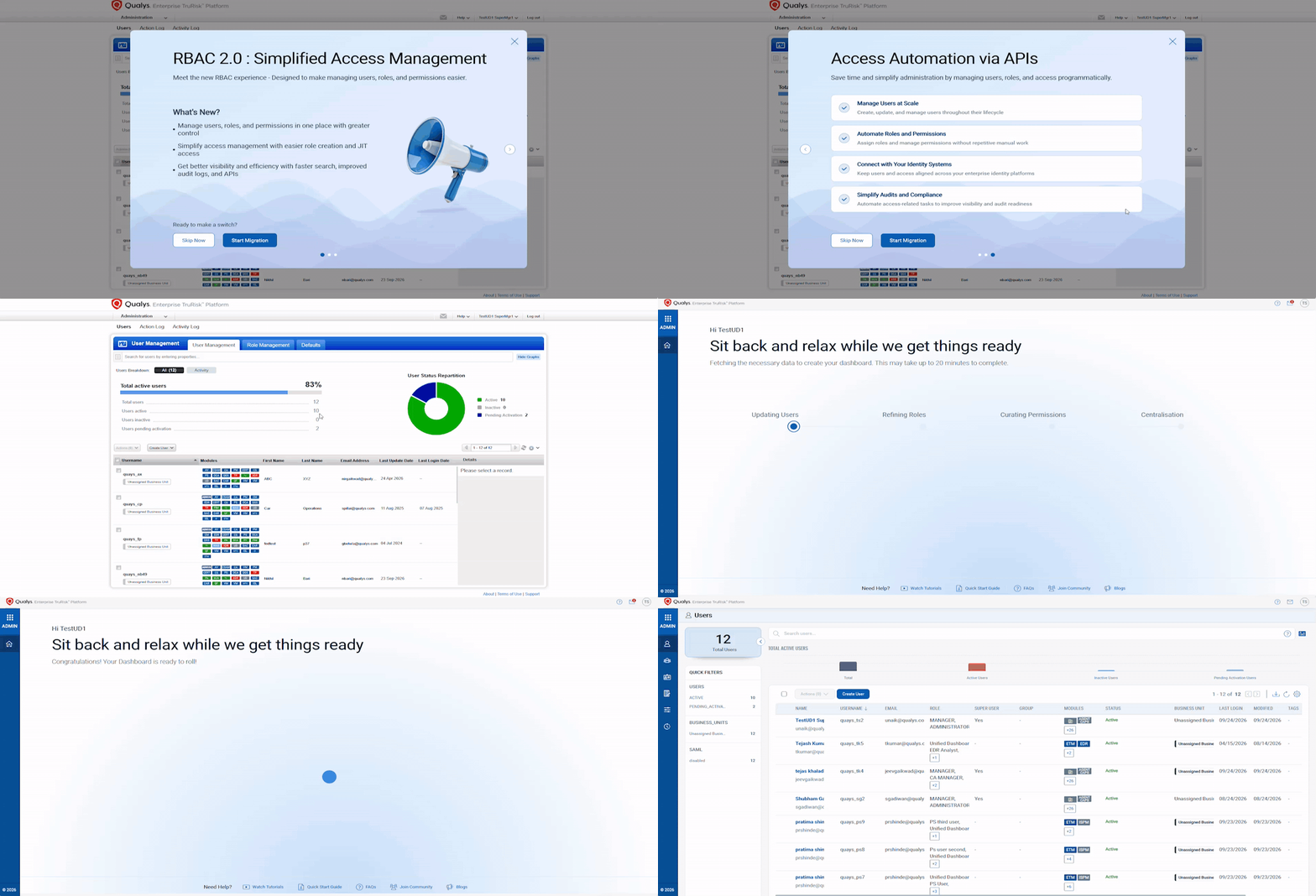
The new Administration application, powered by enhanced Role-Based Access Control (RBAC), brings user and access management into one place, making it easy to see who has access to what and manage permissions with confidence. With RBAC 2.0, you can manage users, roles, and permissions from a single location. This helps you give people the right level of access, reduce manual work, and improve security.
Key Benefits
| Role | Purpose |
|---|---|
| Administrator | Managing users, roles, and key administrative settings — and nothing beyond that. |
| Super User | Highly privileged, subscription-wide access reserved for break-glass continuity. |
| Dedicated VM and PC Manager | Clean separation between vulnerability management and policy compliance responsibilities. |
| Primary and additional roles | Layer roles together so access matches the actual job, not the closest available template. |
Assign a primary role plus any number of additional roles from the same workflow.
- Manage Users and Roles in One Place: You can create users, assign roles, and manage access from a single location instead of switching between applications.
- Job-Specific Roles, Assigned Your Way: You can assign the exact permissions users need without giving broader access than necessary.
- Delegate Admin Tasks Securely: You can allow admins to perform specific tasks without granting full administrative access. Granular administrative permissions let you delegate a single task, such as activating or deactivating users, without handing over broader admin rights.
- Automate User and Access Management: You can automate user and role management using APIs, helping your team save time and manage access at scale.
- Microsoft Entra ID Sync: You can automatically sync users, groups, and roles from Microsoft Entra ID, reducing manual setup and ensuring access stays up to date.
- Automated user creation, updates, and deactivation from directory changes.
- Reusable User Groups as templates for roles, permissions, and settings.
- Role mapping between Entra ID groups and Qualys User Groups, with incremental sync.
- SAML-enabled access via a consistent, unique identifier.
- Greater Visibility Into Sensitive Account Changes: RBAC 2.0 provides Activity Logs searchable by username, covering both browser and API activity, along with email notifications, for:
- Email address changes
- Privilege increases
- Account deactivation, reactivation, and deletion.
- Automatically Manage Inactive Accounts: Reduce risk from inactive accounts with automated account deactivation, reminder notifications, and easy account restoration.
- Faster Search with Qualys Query Language (QQL): Use new QQL tokens to quickly locate users, roles, user groups, and audit activity across your environment.
Why Migrate Now
What does moving to the new Administration application bring you:
- Centralize and simplify — one hub for every user, role, and permission, with faster on-boarding/off-boarding and less manual effort.
- Delegate with confidence — job-specific roles and task-level delegation, backed by stronger audit readiness and identity-system integration.
- Govern and reduce risk — real-time alerts, automatic account hygiene, and activity logs that keep access continuously accountable.
Important to Know
Your existing roles and permissions carry over, and your day-to-day access does not change automatically.
| Role | What Changes |
|---|---|
| Manager | Now called Super User. Permissions are preserved, and administration access is now governed by RBAC 2.0. |
| Unit Manager, Scanner, Auditor, Reader, Remediation User, Administrator User, Contact | No permission changes. |
You will get an in-platform notification as the roll out reaches you. To start the migration from the existing to the new Administration application, log in to your existing Administration application, and on the RBAC 2.0 migration pop-up window, click Start Migration. For more details to activate the new Administration application or Microsoft Entra ID Sync, contact your Technical Account Manager (TAM) or Qualys Support.
RBAC 2.0 Limitations for VM and PC
RBAC 2.0 centralizes user and role management, but Vulnerability Management (VM) and Policy Audit (PA) continue to use their respective role- and asset-access models.
Asset Access
- Asset visibility in VM and PA is still controlled through asset groups.
- Asset groups can be assigned only to Reader, Scanner, and Remediation User roles.
- Manager and Administrator roles can access all assets in the subscription.
- Tag-based, dynamic asset scoping, and full business unit-based asset scoping are not supported.
- This behavior remains unchanged from previous releases.
Roles and Permissions
- VM and PA support only predefined roles; granular permissions and custom roles are not supported.
- Changes made to predefined roles in Administration, such as renaming roles or modifying permissions, do not affect VM and PA.
- Custom roles created in Administration have no equivalent role in VM and PA.
- Predefined role names cannot be reused for custom roles.
Administration Restrictions
- Only Manager, Unit Manager, and Administrator roles can perform administrative tasks.
- Dedicated VM/PA Managers cannot be granted Manage External IDs for Users or Manage User Accounts permissions.
- Unit Managers cannot configure SAML SSO or VIP two-factor authentication for users in their business unit.
Enhancement
Keep Critical Accounts Active with Deactivation Exclusions
What Changed For You
You can now view, add, and remove specific usernames that are excluded from automatic inactivity deactivation, giving you direct control over which accounts remain protected regardless of activity level.
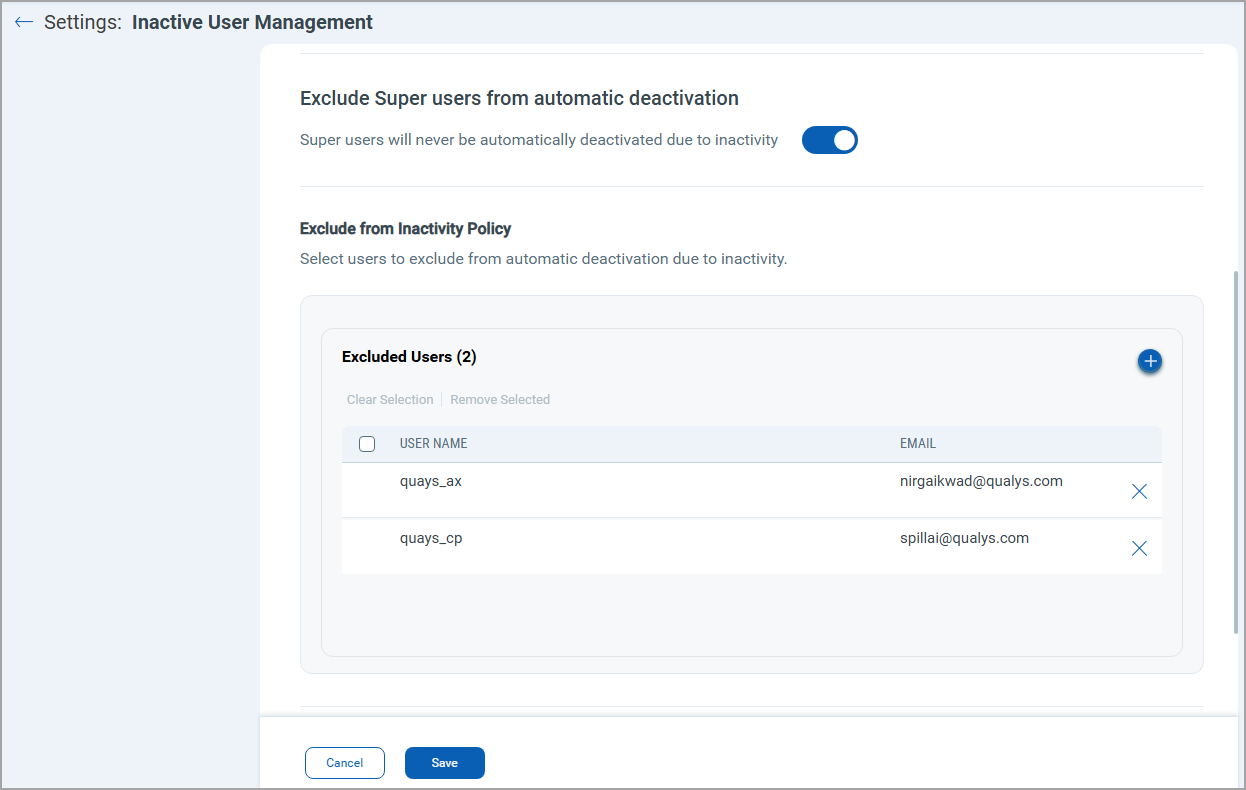
Previously, you could exempt users from the Inactive User Management policy only by role, or by marking them as a Superuser or POC User.
To manage your exclusion list, go to Administration > Configurations > Settings > Inactive User Management, and under Exclude from Inactivity Policy, select Select Users. From there, you can:
- View the full list of usernames currently excluded from automatic deactivation.
- Add any username to the exclusion list to protect it from being deactivated for inactivity.
- Remove a username from the list at any time to make that account eligible for automatic deactivation again.
Changes take effect immediately and are reflected the next time the inactivity deactivation job runs. If a username cannot be added, you'll see a clear validation message explaining why.
This gives you finer-grained control over your inactivity policy and enforces automatic deactivation broadly across your subscription while keeping the specific accounts you depend on active.
Enhancement
Get Full Administration Access with the Updated Administrator Role
What Changed For You
You no longer need to assign Administration application permissions one by one to your administrators.
The ADMINISTRATOR role now includes all Administrator application permissions, except the Qualys Units (QLU) permissions. Administrators get full access to the Admin application's features without having to assign each permission manually. This change applies to both new and existing administration users, including users being migrated.
Token
Updated QQL Tokens
Refer to the following table to learn more about the updated tokens in this release.
| Tab | Token (Updated) | Usage |
|---|---|---|
| Activity Logs | activity.Source | To find the source of the activity log. The source may be a browser or an API. Earlier, this token was named the client token. |
API Release Updates
For more details on the API updates for this release, see Enterprise TruRisk™ Platform Release 3.25.1 API.