Appliance Connectivity and Interfaces
The appliance has two types of interfaces:
- Management Interface
- Sniffing Interface
Management Interface
The management interface is used for connecting to the Qualys Cloud Platform and for streaming asset metadata to the Qualys Cloud Platform, as well as performing management and maintenance activities remotely from the Qualys UI.
You can assign an IP address to the management interface either statically or using DHCP. DHCP is enabled by default. Configuring the management interface is required for the Network Passive Sensor to have Internet connectivity and to connect to the Qualys Cloud Platform.
Sniffing Interface
One or more traffic sniffing interfaces are used to receive mirrored traffic to the Network Passive Sensor. Once the traffic that needs to be monitored is identified:
- Configure the switch that sees the traffic in question by mirroring the traffic to a port.
- Connect that mirrored port to the passive sensor sniffing interface of the sensor.
- Enable “Promiscuous Mode” on the respective vSwitch and port group.
You must not assign an IP address to the sniffing interface.
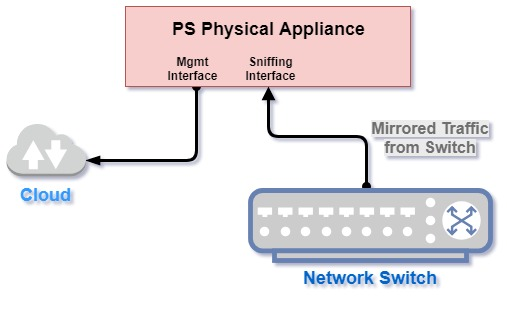
The following diagram shows connectivity for a physical appliance. The appliance's sniffing interface is connected to the network switch, and mirrored traffic is fed from the switch to the appliance. The management interface connects to the cloud.
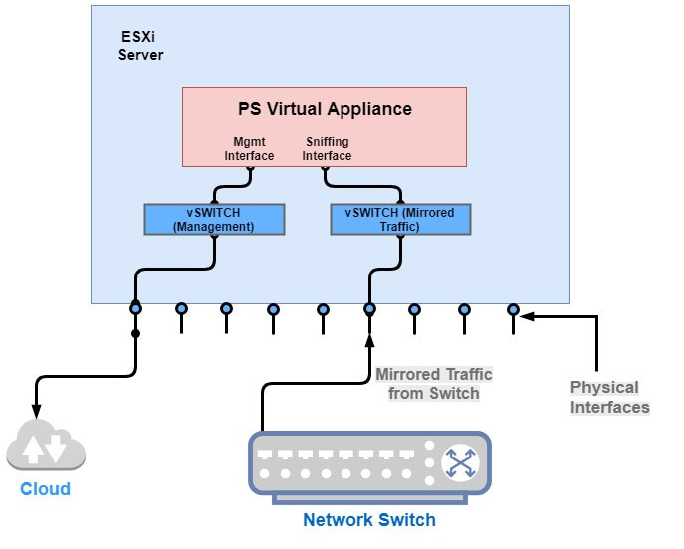
The following diagram shows connectivity for a virtual appliance. The virtual appliance is supported on the VMware ESXi Server virtualization platform and Microsoft Hyper-V. Again, the sniffing interface is fed mirrored traffic from the network switch. The management interface is configured to connect to the cloud.