Deployment of Virtual Network Passive Sensors to Support Exceeding Volume of Traffic
Qualys Virtual Network Passive Sensor is a virtual machine that can perform deep network packet inspection by listening to real-time network traffic. This can be accomplished by tapping to an appropriate choke point in the network using either VLAN mirroring or Port mirroring. Qualys recommends configuring VLAN mirroring.
A single Qualys Virtual Network Passive Sensor with 16 processor cores and 24GB memory can process 2 Gbps network traffic.
If the traffic throughput from a single source exceeds the capability of a Virtual Network Passive Sensor, the entire traffic needs to be split into a number of lower bandwidth mirrored network traffic streams. The same shall be mirrored in different sessions depending on the support and capability of the source switch.
Let’s take an example, assume a network switch is carrying 4 Gbps of network traffic across 6 different VLANs (VLAN IDs- 10,20,30,40,50,60) which need to be analyzed using the Virtual Network Passive Sensor. To do so, firstly, the 4 Gbps network traffic originating from 6 different VLANs need to be split. Assuming VLAN IDs 10,20 and 30 carry 2 Gbps of network traffic, and VLAN IDs 40, 50, and 60 carry the remaining 2 Gbps of network traffic, the traffic can be split and fed to two Virtual Network Passive Sensors in the following two ways:
Configuring Local SPAN in the physical switch and feeding the network traffic to Virtual Network Passive Sensors:
- Create monitor session 1 with VLAN IDs 10,20 and 30 as source.
- Configure destination as port Gi1/0/1.
- Create monitor session 2 with VLAN IDs 40,50 and 60 as source.
- Configure destination as port Gi1/0/2.
- Connect both the destination mirror port to two respective NICs of the virtualization host (e.g., ESXI Server).
- Configure two Vswitch inside the virtualization host and map them with the two above NICs, which relate to the mirrored ports of the physical switch (e.g., NIC1 to virtual switch 1 and NIC2 to virtual switch 2).
- Configure two port groups to collect the mirrored traffic from the above two created mirror sessions (e.g., Mirror Traffic Port Group-1 & Mirror Traffic Port Group-2).
- Configure a port group to send collected traffic to Qualys cloud (e.g., Management Traffic Port Group).
- Deploy two Qualys Virtual Network Passive Sensors and connect the sniffing interfaces of the same with respective mirror traffic port groups. i.e., connect one sensor with Mirror Traffic Port Group-1 and another sensor with Mirror Traffic Port Group-2.
- Connect both the sensors with the Management Traffic Port Group to send the data to the Qualys cloud.
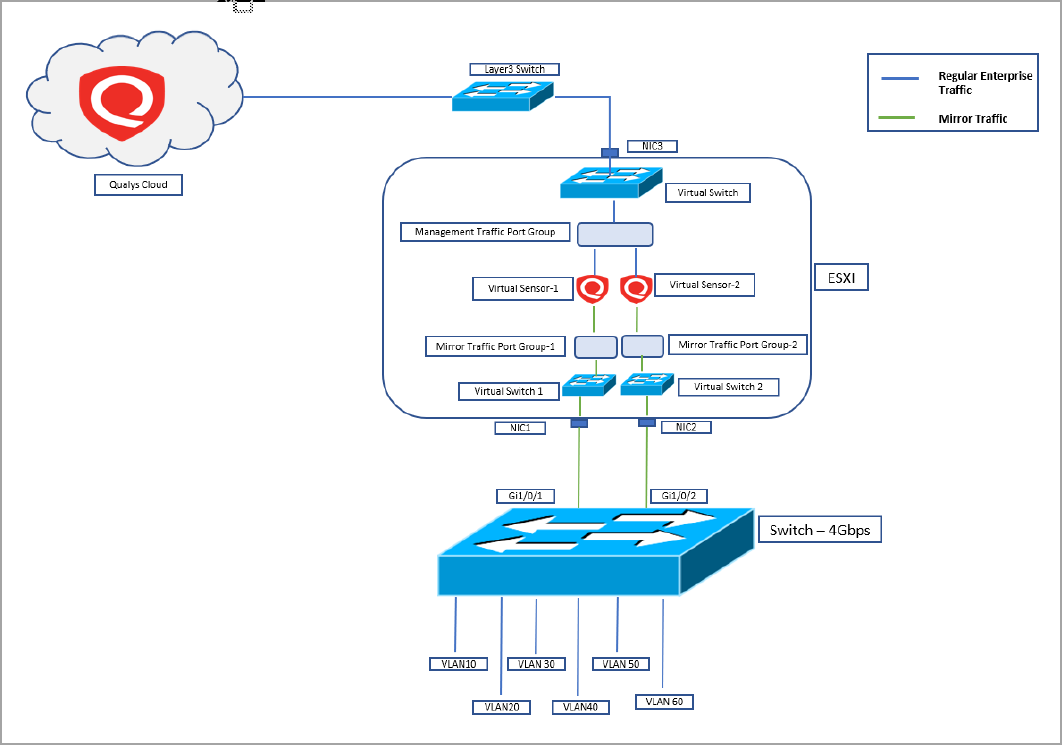 Diagram- Configuring Local SPAN in the physical switch and feeding the network traffic to Virtual Network Passive Sensors:
In this deployment scenario, an equal number of NICs per mirrored session shall be available in the virtualization server containing the Virtual Network Passive Sensors.
Configuring RSPAN in the physical switch and feeding the network traffic to Virtual Network Passive Sensors via virtual network distributed switch (vDS)
- Create two RSPAN VLANs (e.g., VLAN ID – 100 and VLAN ID - 200) in the physical switch.
- Create monitor session 1 with VLAN IDs 10,20, and 30 as a source.
- Configure destination as the above created RSPAN VLAN, i.e., VLAN ID -100.
- Create monitor session 2 with VLAN IDs 40,50 and 60 as source.
- Configure destination as the above created RSPAN VLAN, i.e., VLAN ID – 200.
- Configure trunk port and allow the RSPAN VLANs, i.e., VLAN ID – 100 and VLAN ID – 200.
- Connect the trunk port to the physical NIC of the virtualization host (e.g., ESXI).
- Configure a vDS and map the uplink to the physical NIC of the virtualization host where the trunk port carrying RSPAN VLANs and regular enterprise traffic VLANs is physically connected.
- Create a distributed port group to collect the mirrored traffic (e.g., Mirror Traffic distributed Port Group).
- Create a distributed port group to send the collected traffic to Qualys cloud (e.g., Management Traffic Distributed Port Group).
- Navigate to the “Port Mirroring” page of the vDS, and under “Add New Port Mirroring” select “Remote Mirroring Destination.”
- Configure remote mirroring destination sessions with source as above RSPAN VLAN IDs (VLAN ID – 100 and VLAN ID - 200).
- Configure destination as destination port IDs of each session where the sniffing interfaces of virtual sensors are connected with vDS (e.g., VLAN ID – 100 to Port ID 10 and VLAN ID – 200 to port ID 20).
Diagram- Configuring RSPAN in the physical switch and feeding the network traffic to Virtual Network Passive Sensors via virtual network distributed switch (vDS):
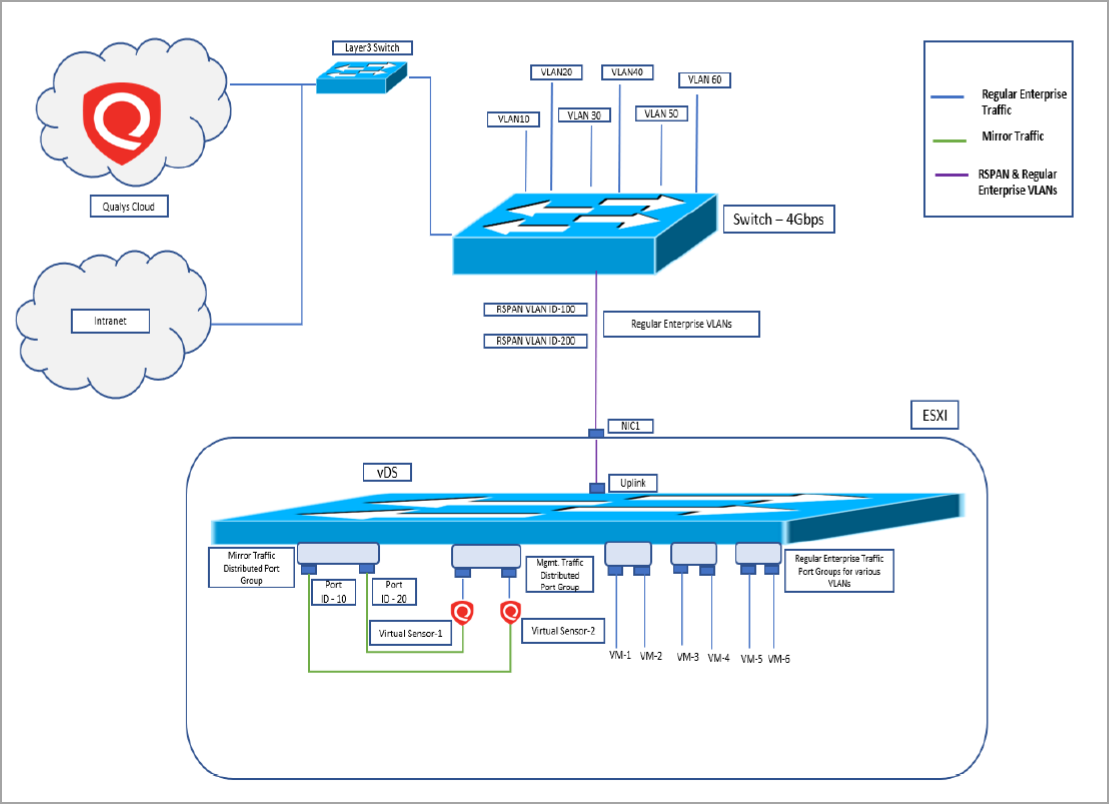
If vDS is not feasible in the ESX virtual host environment, then the ERSPAN solution can be used.