ERSPAN
In order to monitor traffic across a WAN or different networks, use Encapsulated Remote Switch Port Analyzer (ERSPAN). The ERSPAN feature supports source ports, source VLANs, and destination ports on different switches, which provides remote monitoring of multiple switches across your network.
Some enterprises may have a requirement to passively monitor their networks, including those remotely located, and it may not be possible to install a sensor in each of the remote locations. To cater to such requirements, Encapsulated Remote Switch Port Analyzer (ERSPAN) should be used. ERSPAN allows mirrored traffic to be encapsulated and transported over the L3 network to a remote destination. This requires that each location have switches having ERSPAN capability and the switches be configured to tunnel mirror traffic to a destination L3 switch/router interface.
In this method, the appliance is deployed at a remote location that is reachable over the Layer 3 (L3) network.
Following diagram shows a sample topology that explains the above deployment scenario:
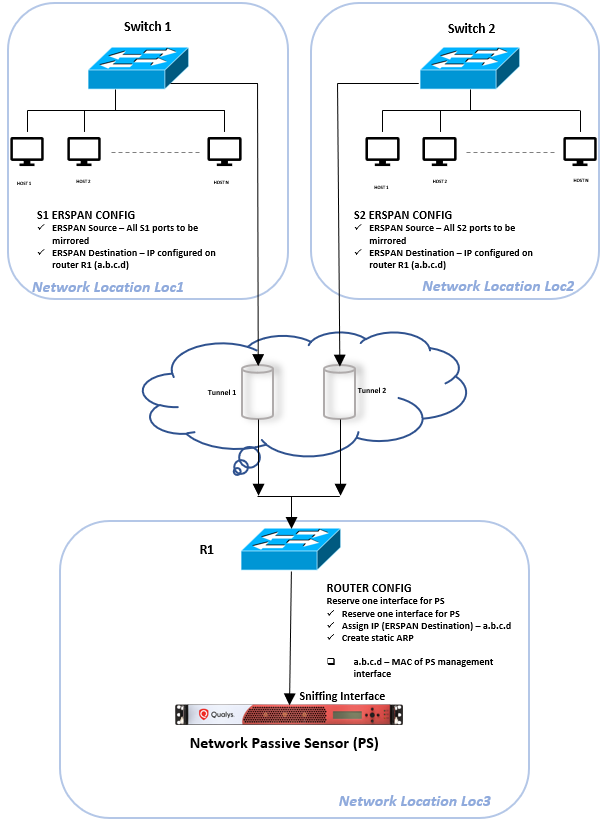
There are 3 networks seen in the diagram - Loc1, Loc2 and Loc3. The passive sensor appliance is deployed at location Loc3.
Switches S1 and S2 at Location Loc1 and Loc2 respectively, have to support ERSPAN source capability.
At location Loc3, on Router R1, reserve an interface and connect it to the sniffing interface of PS.
Configure switch S1 with ERSPAN source and destination. Similarly configure S2. On Router R1, reserve an interface and configure it with an IP address that serves as the ERSPAN destination for S1 and S2. For details see sample configurations done for Cisco catalyst 9300 in the subsequent section.
Sample ERSPAN Configurations for Physical Appliance
Sample Configurations for Cisco Catalyst 9300 Switch
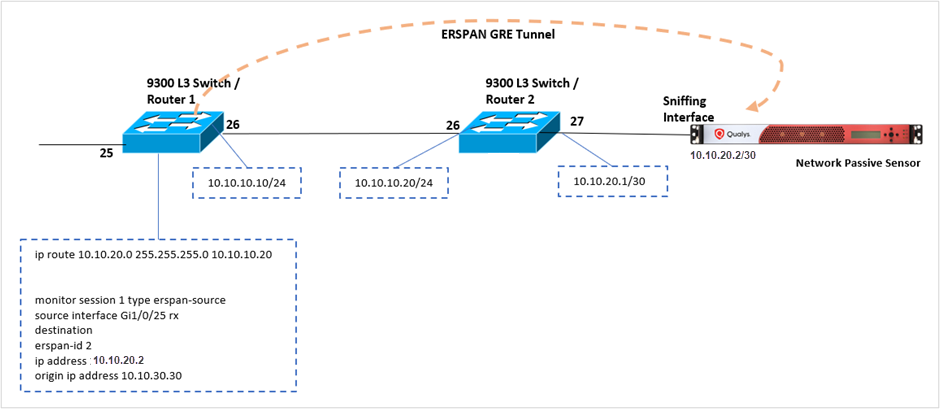
- 9300 L3 Switch/Router 1 config
- Assign an IP address to interface Gi1/0/26
interface GigabitEthernet1/0/26no switchportip address 10.10.10.10 255.255.255.0 - Add routes to send ERSPAN traffic to PS sniffing interface
ip route 10.10.20.0 255.255.255.0 10.10.10.20 - Add ERSPAN-source configuration and define source interface & src, dst IP address of GRE tunnel
monitor session 1 type erspan-sourcesource interface Gi1/0/25 rxdestinationerspan-id 2ip address 10.10.20.2origin ip address 10.10.30.30
- Assign an IP address to interface Gi1/0/26
- 9300 L3 Switch/Router 2 config
- Assign IP address to interface Gi1/0/26
interface GigabitEthernet1/0/26no switchportip address 10.10.10.20 255.255.255.0 - Assign IP address to interface Gi1/0/27
interface GigabitEthernet1/0/27no switchportip address 10.10.20.1 255.255.255.252no keepaliveno cdp enable
- Assign IP address to interface Gi1/0/26
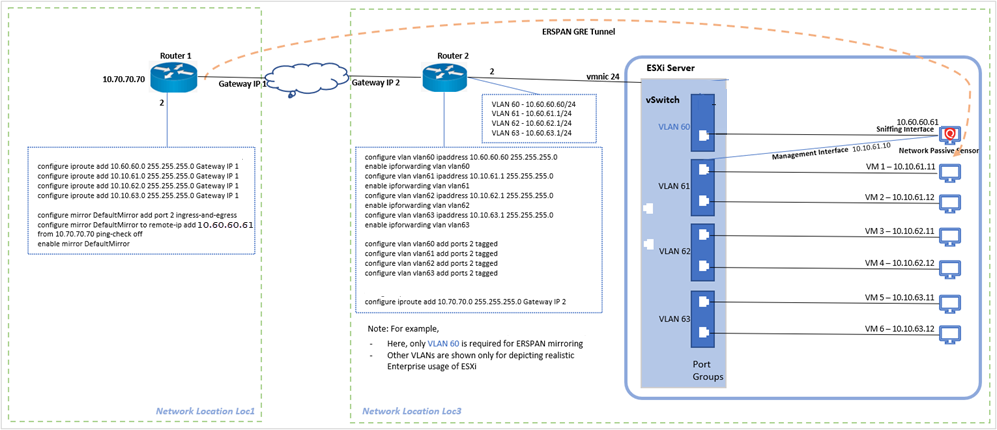
Sample ERSPAN Configurations for Virtual Appliance