Mirroring Techniques – Ruggedcom
Ruggedcom is an ethernet industrial network switch manufactured by Siemens and is widely used across ICS infrastructure consisting of devices of Siemens. Ruggedcom is widely found across the utility industry, such as power transmission and distribution.
Mirroring configuration in Ruggedcom switches can be performed from its web interface. Following are the generic mirroring configuration steps for Ruggedcom i800, i801, i802, i803 series switches:
- Log in to the switch.
- Navigate to Ethernet Ports and then Configure Port Mirroring.
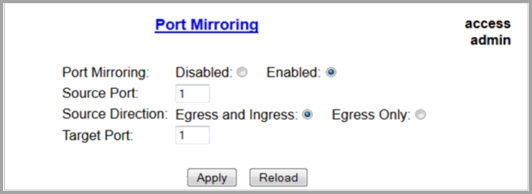
- Configure the following mirror configurations:
- From Port Mirroring, click Enabled.
- From Source Port, specify the port(s) to monitor.
- From Source Direction, specify the data stream (Egress and Ingress, Egress Only)
- From Target Port, specify the destination port to monitor the mirrored port.
- To start mirroring, select Apply.
For more information on mirroring techniques for Ruggedcom Switches, refer to the Official website.