Mirroring Techniques - Stratix
Stratix is the proprietary industrial ethernet switch by Allen-Bradley (Rockwell Automation). It is designed to support the connectivity among layer 2 supervisory devices and layer 1 devices such as PLCs and DCS controllers. The switch is widely used across various industrial infrastructures, especially Allen-Bradley manufactured controllers.
Mirroring configuration in Stratix switches could be performed from their web interface.
Following are the mirroring steps for Stratix 5400, 5410, 5700, 8000, and 3000:
- Log into the switch.
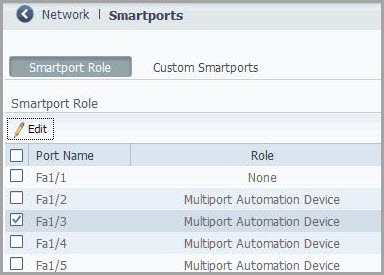
- Choose Smartports from the configure menu.
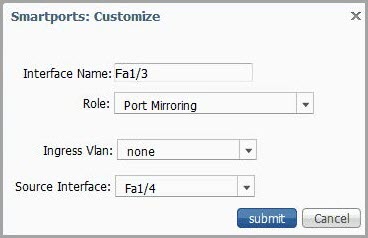
- Select the checkbox next to the port for monitoring and then click Edit.
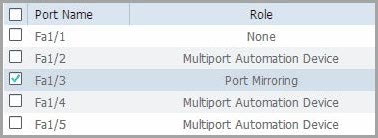
- Complete the fields and submit.
- Verify the port mirroring configuration.
For more information on mirroring techniques on Stratix switches, refer to the Official website.