QScanner Release 4.5.0
August 14, 2025
Added Support for Secret Scans
Running a Secret scan helps detect hard-coded credentials early, reducing the risk of security breaches. It also supports compliance and integration into CI/CD workflows that can fit your specific environments.
With this release, QScanner can run Secret Scans on your container images. The Secret scan result is available in the Tabular format on CLI as well as, on your Qualys Enterprise TruRisk™ Platform account under Container Security > Images > Image Details > Secrets.
When QScanner is launched with Secret scan enabled (--scan-type secret),
- QScanner downloads the Secret Config file (secret_config.json) from the Qualys Enterprise TruRisk™ Platform.
The Secret Config file is a JSON file that defines custom rules, patterns, and policies for detecting secrets. - Stores the downloaded Config file in the Cache directory (<QScanner Cache Directory Path>/secret_config.json) so that for subsequent Scans, it does not download the Secret Config file again.
- Perform Secret Scan using the Secret Config file.
- Upload the secret result to the Qualys Enterprise TruRisk™ Platform.
To support this feature, the following flags are introduced.
| Flag | Description |
|---|---|
| --secret-config-refresh-duration <duration> | Provides duration for downloading the latest Secret Config file. Default value: 24 hours |
| --force-refresh-secret-config | Triggers a new Secret Config file download; otherwise, the current config file is used. |
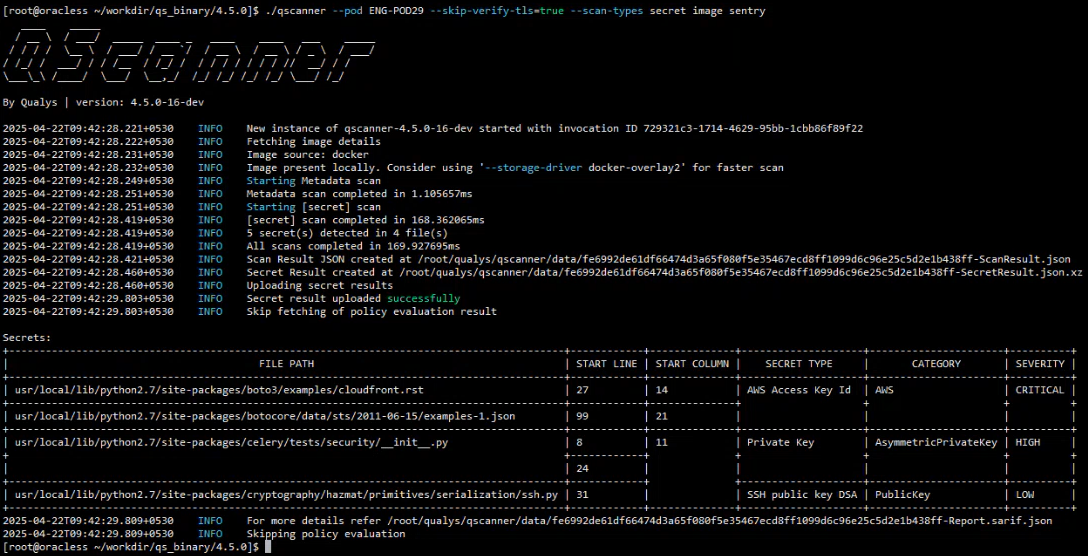
You can carry the Secret scan along with OS and SCA scans by mentioning pkg and secret both during the QScanner launch.
--scan-types pkg,secret
Update in Software Composition Analysis
With this release, QScanner has upgraded its Software Composition Analysis (SCA) by improving the collection of software language packages. Packages of the following languages are upgraded.
- Golang
- Java
New Vulnerability Tabular Report Format
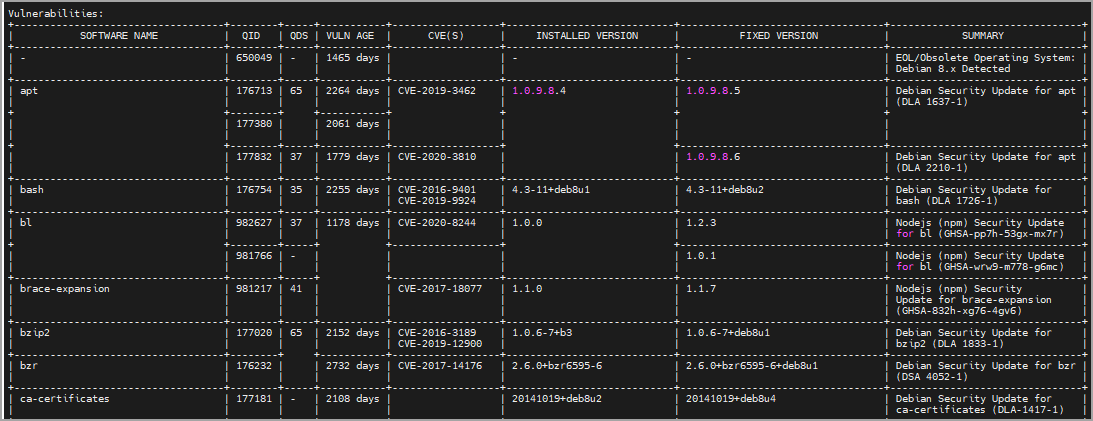
With this release, the vulnerability report in Tabular format is changed to be software-name-oriented instead of QID-oriented, making it more user-friendly. This enhancement allows you to see the software name in the first column, followed by the QIDs found in that software. Along with this, the new Tabular report format shows two new columns -
- QDS - The Qualys Detection Score (QDS) is assigned to vulnerabilities detected by Qualys. To know more about QDS, refer to Container Security Online Help > TruRisk™ Score and QDS in Container Security.
- VULN AGE - The amount of time that has passed since the QID was first released.
An example of the new Tabular format report is shown below.
New Flag for Report Filtering
Sometimes, the vulnerability tabular report may display an extensive list of issues, and you might want to focus specifically on the most critical ones. To cater to such a situation, QScanner has introduced a new flag --qds-threshold <value>. Using this, you can list all vulnerabilities (QIDs) having the QDS more than the value submitted by you in the --qds-threshold flag.
- This flag is applicable only to the Tabular report format. SARIF and JSON report formats remain unchanged.
- It has no functional impact on the policy evaluation. The Centralized Policy Evaluation remains unchanged.
- This flag is applicable even in the case of get-report mode where the centralized policy evaluation is not applicable.
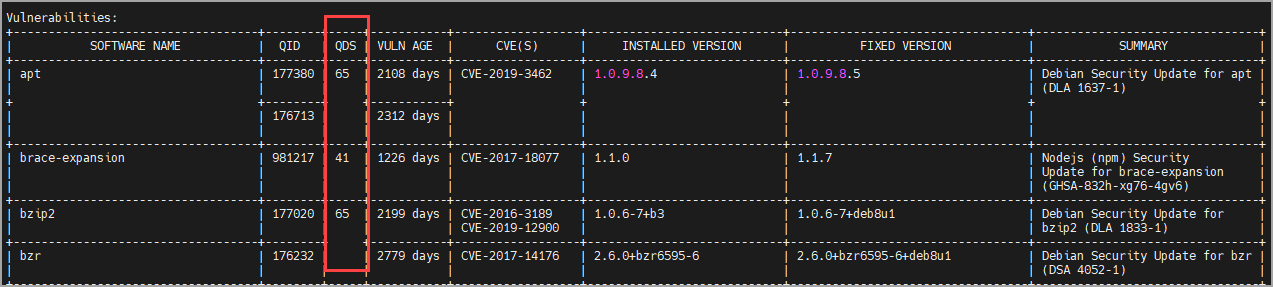
For example, if you want to see the vulnerabilities having more than 40 QDS, use the following flag during the QScanner launch.
--qds-threshold 40
The image below shows the Tabular report after using --qds-threshold 40. It shows details of the three vulnerabilities, which have QDS values of 65, 41, and 65, respectively.
Update in java.db Download
QScanner downloads java.db to enable Java-specific vulnerability detection. With this release, QScanner downloads java.db only if .jar files are present in an image. GitHub Container Registry (GHCR) acts as a default repository to host the java.db and QScanner downloads the java.db from the GHCR.
With this release, QScanner has introduced '--java-db-update-interval' flag to set the frequency of the java.db download. Using this flag, you can decide the number of days after which QScanner updates the java.db present in the cache directory.
As of today, the default value of this flag is '15' (15 days).
Detection Behavior
When QScanner performs any scan along with OS scan, it keeps track of files that were installed by OS package manager. It uses this list of files to filter out the final scan result (SCA, and Secret) so that such files are not reported. This is done to avoid false positives. If you still want to report such files, you can perform scan with --detection-priority comprehensive.
The --detection-priority flag lets you specify the detection priority with this format: --detection-priority <priority>.
The following priority flags are applicable to this flag.
| Priority | Description |
|---|---|
| comprehensive | Aims to detect more security findings at the cost of potential false positives. |
| precise | Minimizes false positives. This is the default value. |
Local Cache Support
With this release, QScanner enables cache as the default option. This improves performance and availability by avoiding repeated image analysis. To enable this support, QScanner has changed the default value of the --cache flag from 'none' to 'local'.
Retry Mechanism for Vulnerability Report
In the previous QScanner release 4.4.0, Qualys introduced the retry mechanism in the case of Changelist.db or SBOM upload failure. With this release, QScanner now supports the retry mechanism in case of failure in fetching the Vulnerability report and policy evaluation result. When a Vulnerability report generation fails, QScanner retries the report generation after a certain interval.
Upcoming 'Environment Variable Deprecation'
With the upcoming QScanner 4.6.0 release, XDG_RUNTIME_DIR environment variable will be deprecated for the Podman runtime. With this change, PODMAN_SOCKET_PATH will be used to read the absolute socket path for the Podman runtime.
The value of PODMAN_SOCKET_PATH should be an absolute socket path.
To see existing usage of XDG_RUNTIME_DIR, refer to QScanner Online Help > Supported Container Runtimes.
Issue Addressed
The following issue has been fixed with this release.
| Category | Issue |
|---|---|
| Offline Scan | Fixed an issue where fallback to offline-scan was not working in case of java-db download failure. |