Qualys Scanner Capacity Calculator
|
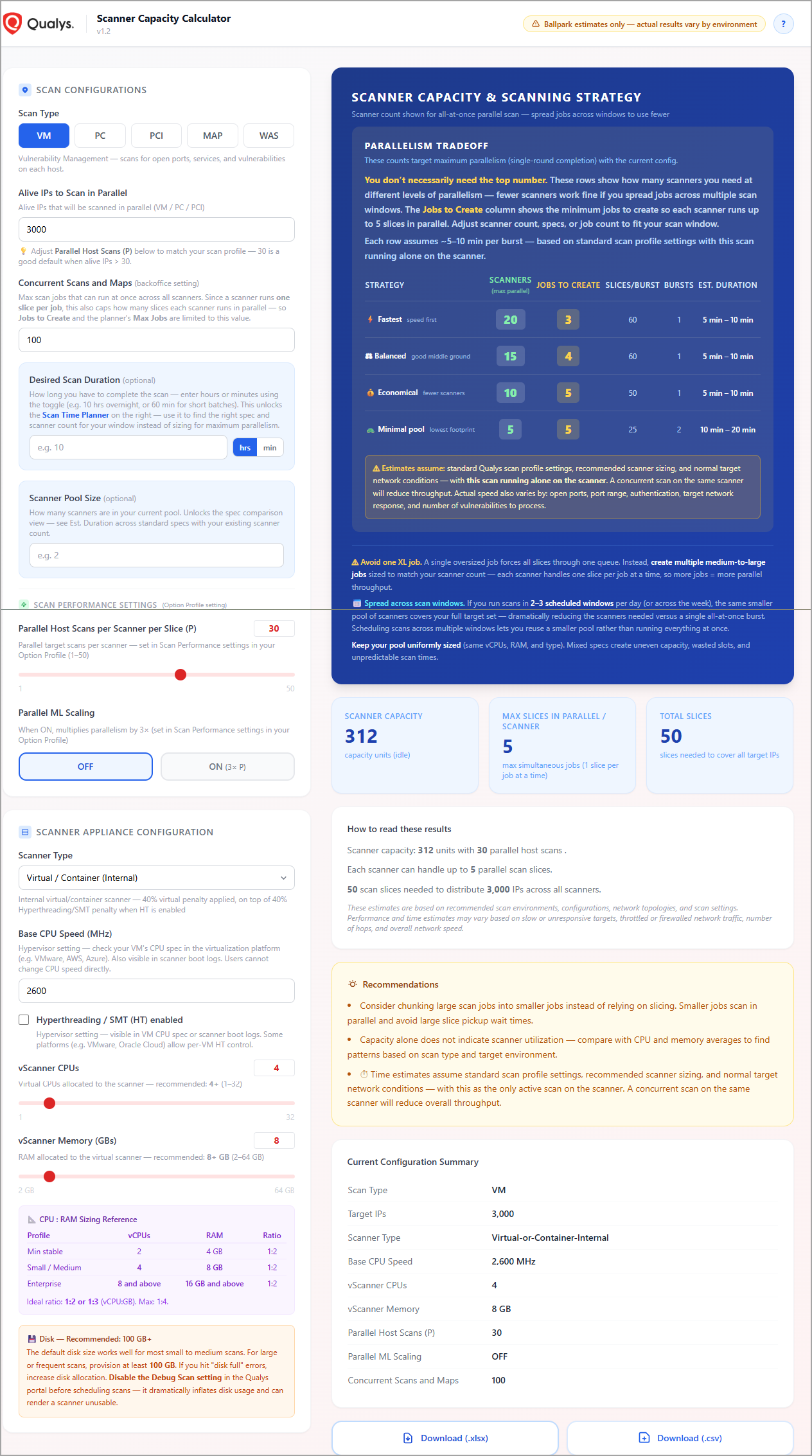
The Qualys Scanner Capacity Calculator helps you estimate the scanner resources needed to complete your network scans within a target time. Based on your scan workload, scanner configuration, and performance settings, it estimates the number of scanners required, the recommended number of scan jobs, and the expected scan duration. The calculator provides planning estimates only. Actual scan performance may vary depending on factors such as network conditions, scan configuration, target responsiveness, and available scanner resources. The Scanner Capacity Calculator is a lightweight, single-page web application that requires no installation or server. Once the page loads, you can use it offline. BenefitsThe scanner capacity calculator allows you to:
|
 |
How Does it Calculate the Capacity?
The calculator estimates scanner capacity by evaluating CPU and memory resources. The effective scanner capacity is determined by the lower of the CPU-based and memory-based capacities. For virtual and containerized scanners, an additional capacity adjustment is applied.
Key Concepts
The following table describes the key concepts used in the Scanner Capacity Calculator workflow and capacity estimation process:
|
Term |
Description |
|---|---|
|
Slice |
A scan job is divided into one or more slices, each covering up to P target IPs.
|
|
Job |
A job is a configured scan in Qualys (target list + scan profile). A job dispatches one slice per scanner at a time. To run more slices in parallel on the same scanner, split large jobs into multiple smaller jobs. |
|
Round |
A round is one parallel wave of slice execution across the entire scanner pool. |
|
Burst |
A burst is a single pass in which all scanners process their assigned slices in parallel. When all slices fit in a single burst, all target IPs are scanned simultaneously. |
|
Concurrent Jobs Cap |
Since a scanner runs one slice per job, the effective max slices per scanner = min(capacityMaxJobs, ConcurrentScansAndMaps). When the limit is below what the hardware could run, a bigger spec will not reduce time — only raising the limit or adding scanners helps. WAS uses the Concurrent WAS Scans limit instead. |
|
Capacity Units |
Scanner capacity is estimated from hardware specs:
Capacity per slice: 100 units (ML Scaling OFF) or 300 units (ML Scaling ON). |