Scan Time Planner
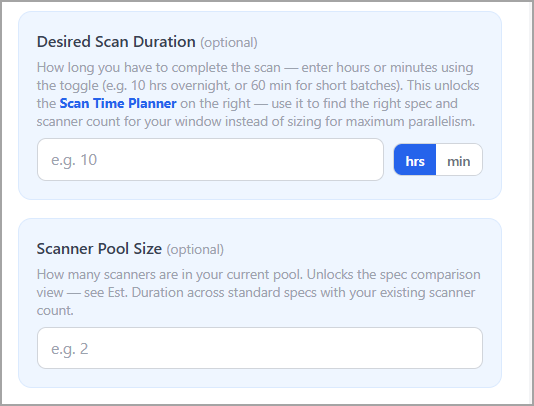
You can specify the time window during which the scan workload must be completed. The calculator uses this value to estimate the scanner specifications and the required scanner count to complete scans within the defined time frame. This is an optional step.
The Scan Time Planner is displayed inside the blue card when you enter a Desired Scan Duration or a Scanner Pool Size.
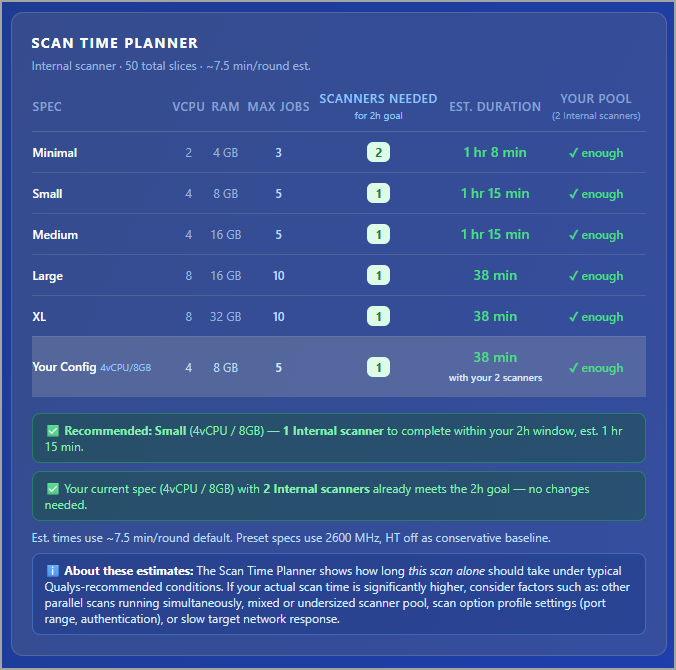
It shows a comparison table across standard scanner specs plus your current configuration. You can view this table just below the Scanner Capacity and Scanning Strategy table.
|
Column |
Description |
|---|---|
|
Spec |
Displays the scanner specification tier, such as 2 vCPU / 4 GB, 4 vCPU / 8 GB, 8 vCPU / 16 GB, or Your Config. |
|
vCPU |
Displays the number of virtual CPUs assigned to the scanner specification. |
|
RAM |
Displays the amount of memory assigned to the scanner specification. |
|
Max Jobs |
Displays the effective maximum number of slices per scanner for the selected specification after applying the Concurrent Scans and Maps limit. |
|
Scanners Needed |
Displays the minimum number of scanners required to complete the scan within the specified goal duration. |
|
Est. Duration |
Displays the estimated scan duration calculated using the number of rounds and the predefined average scan time for the selected scan type. |
|
Your Pool |
Indicates whether the current scanner pool is sufficient to meet the specified scan duration goal. |
|
Rounds |
Displays the number of scan rounds required for the selected specification tier based on the current scanner pool size. |
|
vs Current |
Displays the percentage improvement or degradation compared to the current scanner configuration. Faster configurations are shown as positive improvements, while slower configurations are shown as reductions. |
The Concurrent Scans and Maps limit the Max Jobs per scanner. Once a spec reaches that cap, a larger spec cannot reduce time further until you raise the limit or add scanners. A note is displayed in the table when this cap is the bottleneck.
Smart Recommendations
When you set both a Desired Scan Duration and a Scanner Pool Size, the planner assesses your current spec against the goal and offers clear, actionable options:
|
Recommendation |
Description |
|---|---|
|
Pass / Short verdict |
Indicates whether the current scanner configuration meets the scan goal. If the setup falls short, it displays the number of additional scanners required at the current specification. |
|
Add scanners |
Displays the minimum number of additional scanners required by the current specification to meet the scan goal. For Perimeter scanners, this value is capped at the External Scanners to Use limit. |
|
Upgrade spec |
Recommends the smallest standard-scanner specification tier that meets the scan goal, given the existing scanner pool size. |
|
Split the target list |
Suggests dividing the scan target list into smaller groups to complete the scan within the desired time window without adding or upgrading scanners. |
|
Enable ML Scaling (x3) |
Shows the projected impact of enabling Parallel ML Scaling, which increases processing capacity without requiring hardware changes. |