Static IP Configuration
When you are in OFFLINE SCANNING mode, DHCP is used by default to get an IP address for your scanner. You can, however, set up a static IP configuration if you prefer.
Configure Static IP using the following steps:
- Under Network Settings, choose Manual.
- Enter the IP address, netmask, default gateway, and DNS servers.
Each time you are in OFFLINE SCANNING mode, the static IP configuration is used.
We always use DHCP in CLOUD SYNC mode.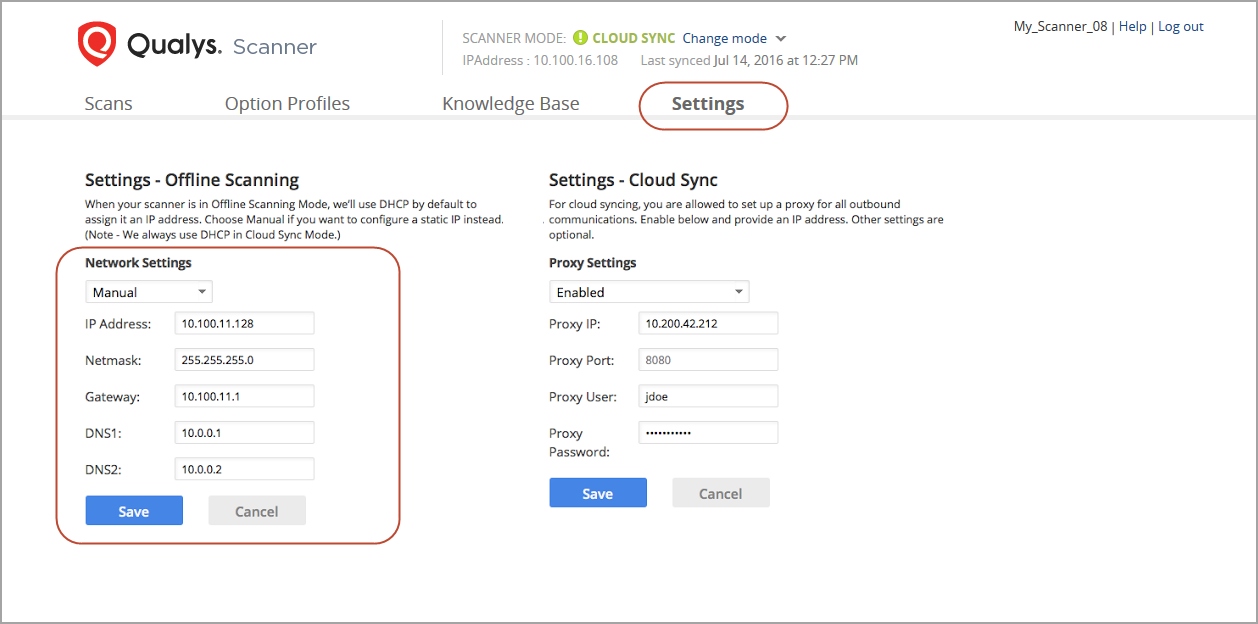
When to Configure Static IP?
You can do this at any time, in either mode.
- If you are in OFFLINE SCANNING mode, changes are made from DHCP to Static immediately, and a network refresh is performed.
- If you are in CLOUD SYNC mode, your settings are saved and are applied the next time you switch to OFFLINE SCANNING mode.