Qualys Scanner Types
Qualys offers a wide variety of Scanner Appliances. The Qualys scanner appliances can scan internal systems, devices, and web applications for security issues and help to identify vulnerabilities.
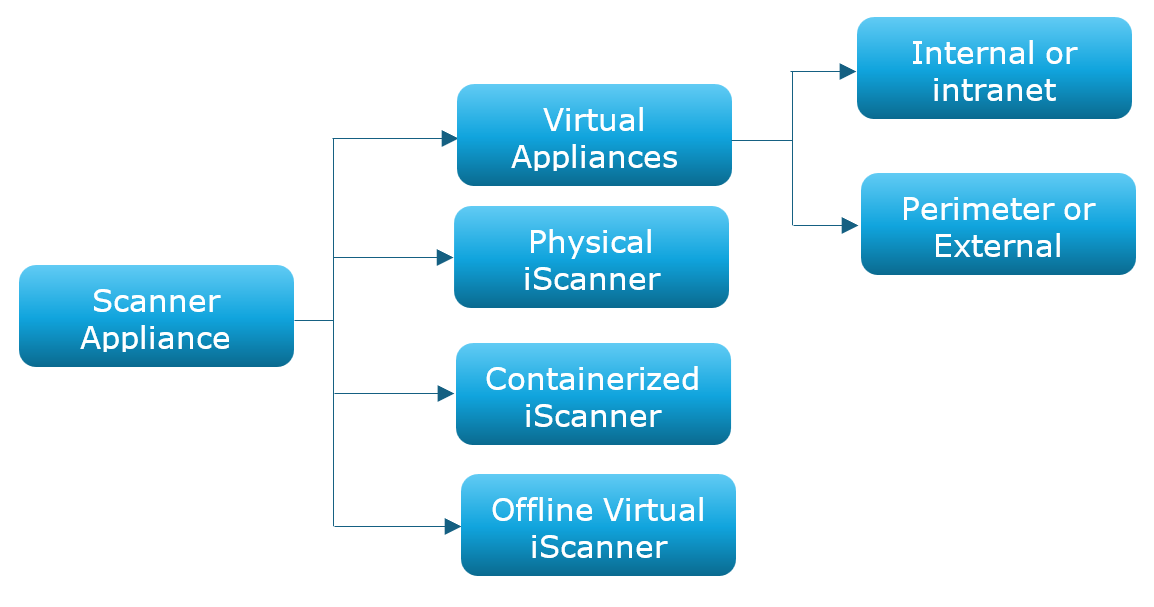
Internal or Intranet Virtual Scanner Appliance
This is the most popular type of scanner appliance due to the virtualization options it offers. This scanner type is intended for intranet scanning requirements and is used for private LAN scanning. Scanners require consistent connectivity to the Qualys Enterprise TruRisk™ Platform for scanning details and required updates.
In just a few minutes, you can add a virtual scanner to your account. Then, you are ready to scan network devices and web applications on your internal network.
For details on adding virtual scanners, refer to the Virtual Scanner Appliance User Guide.
Physical Scanner Appliance
Scanners are available in hardware formats. Physical Scanners were Qualys's first scanner flavor and the only sensor solution for almost a decade before virtual scanners were introduced. This scanner supports scanning functionality and network configurations that can be performed using its own hardware.
Hardware scanners are ideal for use cases that require dedicated hardware resources such as CPU, memory, and storage. Having dedicated resources allows a natural advantage for physical scanners to have better performance compared to any shared virtual resources. A rack space is required for a hardware scanner.
For details on adding physical scanners, refer to the Physical Scanner Appliance User Guide.
Offline Scanner Appliance
The offline scanner is meant for users who need to scan targets in air-gapped and secure environments without internet access. Unlike regular scanners, the offline scanner is designed to only perform scan jobs offline or disconnected from the internet.
Current offline scanners support the following scan types:
-
VM (Vulnerability Management)
-
PC (Policy Compliance)
-
MAP (Network Mapping)
The scanning features are enabled only in offline, disconnected, or air-gapped mode. Online mode is used only for scanning data uploads and auto-updates. Scan data is uploaded all at once after the scan finishes, contrary to regular scanners, where scan data is uploaded as the scan finishes per IP. Additionally, you can view and download the scan results locally before uploading to the Qualys platform.
You can add an offline scanner to your account in just a few minutes. Then, you are ready to scan devices in your secure air gap network.
For details on adding offline scanners, refer to the Offline Scanner Appliance User Guide.
Qualys Containerized Scanning Service (QCSA)
Qualys Containerized Scanner Appliance is the newest addition to the Scanner type. This type of scanner supports container runtime environments, such as Docker and Podman. All scan features are supported, just like other scanner flavors. Unlike a VM-based scanner, which runs as a full system with its own OS and dedicated resources, a container-based scanner relies entirely on the Docker or Podman host's resources and network capacity. Scan performance is limited by the host's configurations and the permission limitations of the Linux user that owns the scanner container.
This flavor is preferred by users who need more control over the Host OS and Kernel, speed of scanner creation and maintenance, deployment flexibility, and ease of automation.
For details on adding Qualys Containerized Scanners, refer to the Qualys Containerized Scanner Appliance.
Perimeter or External Scanner Appliance
This scanner is deployed in DMZs and data centers to scan the infrastructure from the outside with an attacker's perspective. This type of scanner is intended for targets with external or public-facing IPs and web servers. For example, the public-facing login page of a web application.
These scanners reside in Qualys POD, managed and maintained by Qualys. Contact Qualys Support for more information.