Configure a Proxy Server in IPv6-only Mode (Optional)
To configure proxy configuration in IPv6-only mode,perform the following steps:
- Access the Scanner Console.
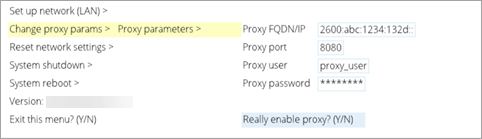
- Select Enable Proxy, and then select Change proxy params,
- Select Proxy parameters.
- Press the Right arrow to enter proxy settings.
- When you are done, select Really enable proxy? and type Y to confirm (or N to cancel).