View AI SaaS
The AI SaaS tab displays accounts and groups associated with SaaS-based AI applications detected in your environment. It provides visibility into sanctioned and unsanctioned AI SaaS activity across your organization.
The tab includes two views: Users and Groups.
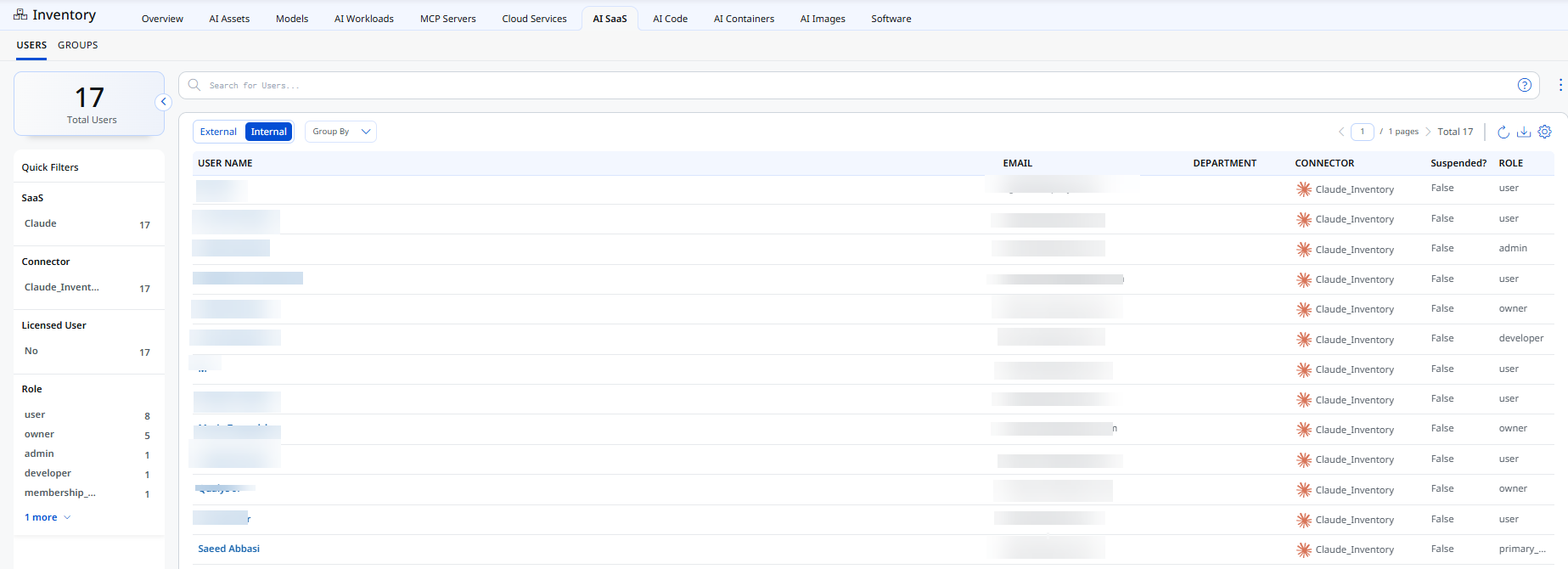
Users Tab
The Users tab displays account-level detail for every AI SaaS connection detected in your environment.
This tab provides:
- The total count of detected accounts, displayed at the top left of the tab
- An External/Internal toggle, to filter accounts by origin
- A Group By dropdown, to organize the list by a selected attribute
- A search bar, to locate accounts by name, email, or department
For each account, the list displays name, email, department, connector, status, and role.
Use the Quick Filters panel to filter the list by SaaS, Connector, Licensed User, and Role.
Groups Tab
The Groups tab displays group-level detail for AI SaaS access across your organization.
This tab provides:
- The total count of detected groups, displayed at the top left of the tab
- A search bar, to locate groups by name
For each group, the list displays group name, connector, access, and member count.
Use the Quick Filters panel to filter the list by Access, SaaS, Connector, and Entity Type.