Overview
Spreadsheets cannot keep up with how fast AI models, agents, and MCP servers spread across your environment. The Overview tab gives you a live answer. It consolidates everything TotalAI has discovered, including AI models, workloads, and their runtime and visibility posture, into a single view, so you always know what AI exists in your environment before you drill into any one asset.
The tab shows:
- AI model distribution by runtime
- AI workload distribution by visibility
- Summary counts for AI assets and workloads
Select any summary or chart to go directly to the corresponding inventory list.
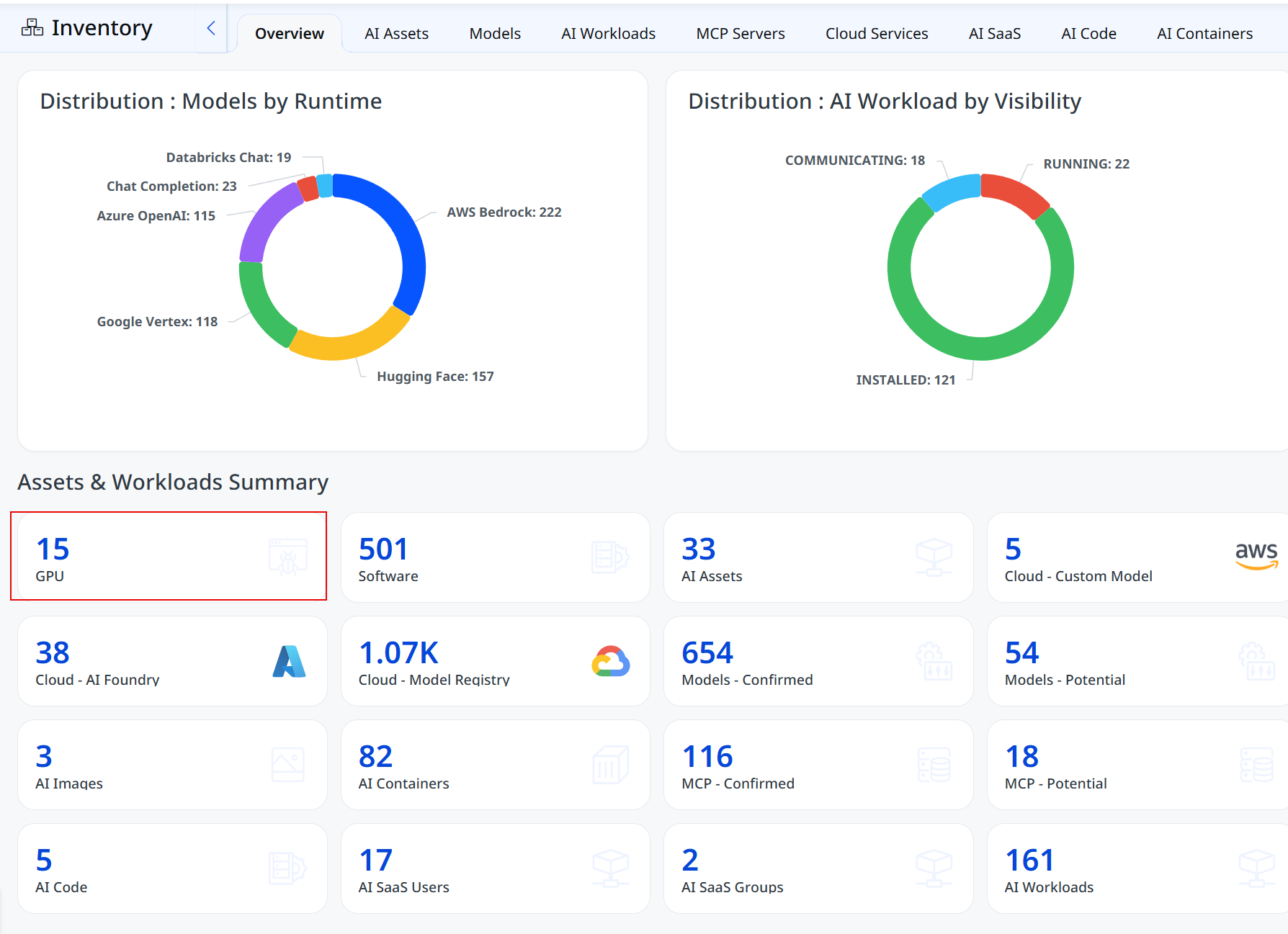
Distribution: Models by Runtime
Security teams often cannot say which cloud or platform their AI models actually run on until something breaks. The Models by Runtime chart answers that question directly by showing where every discovered model is hosted.
This chart shows:
- The total count of AI models grouped by runtime platform.
- Model distribution across AWS Bedrock, Azure OpenAI, Google Vertex, Hugging Face, Databricks Chat, and Chat Completion.
- Which platforms carry the largest share of your AI footprint.
- Where model concentration creates the highest exposure.
This view helps you identify which cloud or AI platform requires the most governance attention, before an incident forces that answer.
Distribution: AI Workload by Visibility
Not every AI workload is fully accounted for. Some are actively monitored, others are only partially visible. The AI Workload by Visibility chart shows exactly where each workload stands.
This chart shows:
- The total count of AI workloads grouped by visibility status.
- Workloads currently communicating, running, or installed.
- The proportion of workloads with full visibility versus partial visibility.
- Where monitoring gaps exist across your AI environment
This view helps you separate workloads TotalAI has full insight into from workloads that still need review, so unmonitored AI does not become unmanaged risk.
Assets and Workloads Summary
This section displays a consolidated summary of AI assets and workloads based on the data available in your environment, including infrastructure, models, MCP servers, code, and SaaS usage. Card values update automatically as TotalAI discovers new AI assets, giving you a live count without manual tracking.
Category cards are displayed only when data is available for that category.