View AI Images
The AI Images tab displays base images that contain AI-related components, such as MCP servers and GPU data, along with associated vulnerability data from the Container Security application.
The AI Images tab provides details on image architecture, repository, tags, containers, creation date, and associated vulnerability and compliance data.
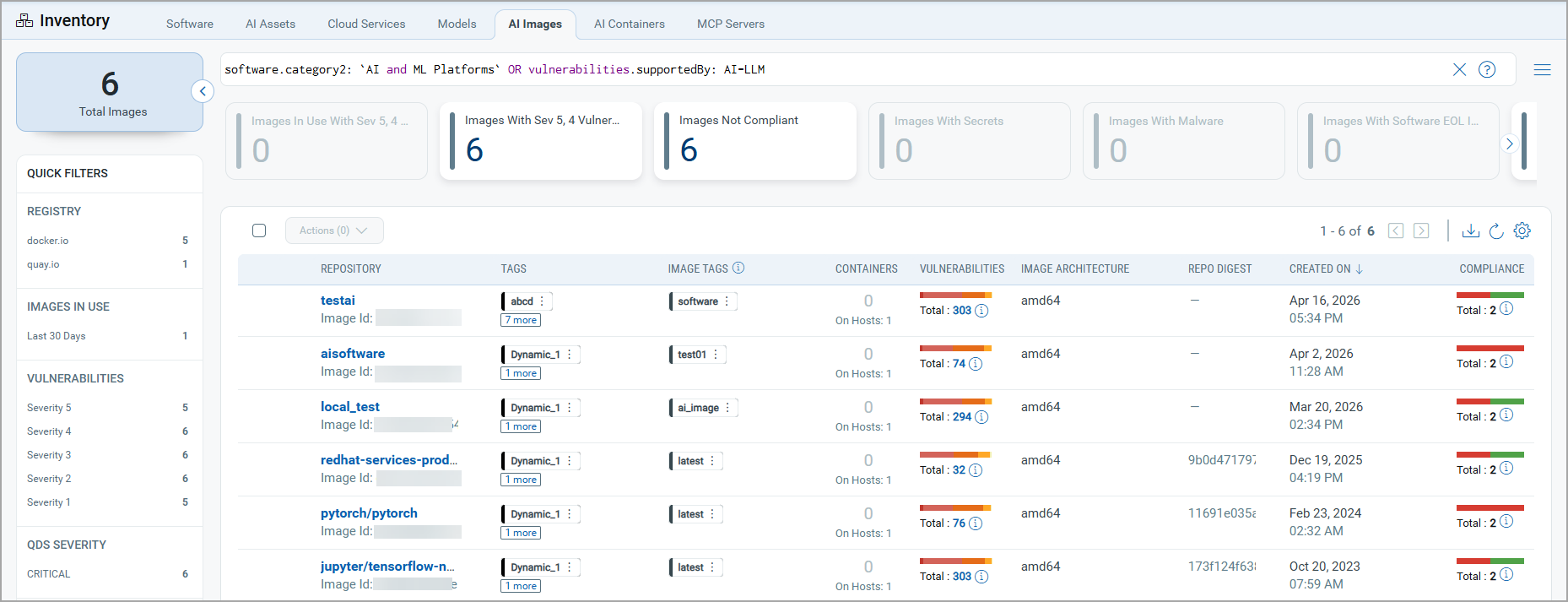
Currently, you can only view the AI images and image details.
Using the Quick Actions menu, you can perform the following actions on the AI Images:
- View details of the selected image. This includes a comprehensive view of an image's security and configuration across multiple sections. It covers everything from a high-level Summary (vulnerabilities, compliance, associated containers, and key metadata) to granular details, including installed software with patch availability, layer composition, detected malware, secrets, and compliance controls.
- Add tags to the image.
- Delete the selected image from the TotalAI inventory.
- Download the Software Bill Of Material (SBOM) report in one of the following formats:
- SPDX - This is the default SBOM report format offered by Qualys. The SPDX SBOM package primarily consists of three elements: Documents (metadata about the SBOM), Packages (groups of elements), and Files (single files). It is managed by 'The Linux Foundation'. To know more about SPDX SBOM, refer to https://spdx.dev/about/overview/
- CycloneDX - The CycloneDX Software Bill of Materials (SBOM) includes metadata and outlines a collection of software elements, organized into components, services, and dependencies. Additionally, the SBOM defines relationships between these elements through a specific architecture. It is managed by OWASP. To know more about CycloneDX, refer to https://cyclonedx.org/.