Cloud Posture
The Cloud Posture tab shows how your cloud accounts measure up against the controls in your assigned policies. Select Amazon Web Services, Microsoft Azure, or Google Cloud Platform to view results for that provider.
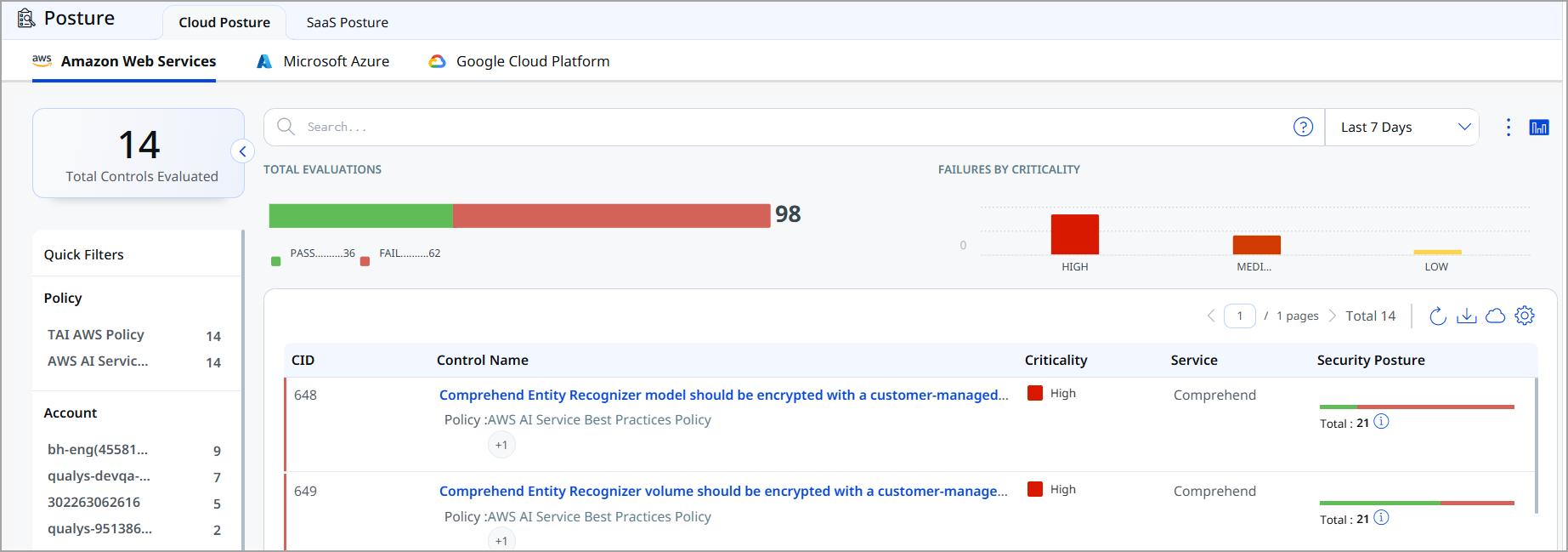
Total Controls Evaluated
Shows the total number of controls evaluated for the selected provider, based on the time range you choose, such as Last 7 Days.
Total Evaluations
Shows the overall pass and fail count across all control evaluations for the selected time range.
Failures by Criticality
Shows the number of failed evaluations grouped by criticality: High, Medium, and Low.
Quick Filters
Use the Quick Filters panel to narrow the control list by:
- Policy - Filter by the policy a control belongs to, such as TAI AWS Policy or AWS AI Service Best Practices Policy.
- Account - Filter by the connected cloud account.
- Services - Filter by the cloud service the control applies to, such as Bedrock, Comprehend, Kendra, or Translate.
- Control Criticality - Filter by the control's risk level.
Controls List
The controls list displays the following details for each control:
| Column | Description |
|---|---|
| CID | Unique identifier for the control. |
| Control Name | Describes the configuration or security setting the control checks. The policy the control belongs to is listed underneath. If the control belongs to more than one policy, a +N badge shows how many additional policies apply. |
| Criticality | The risk level of the control, such as High or Medium. |
| Service | The cloud service the control evaluates, such as Comprehend or Bedrock. |
| Security Posture | A pass/fail breakdown of every resource evaluated against this control, along with the total number of resources evaluated. |