API Authentication Record - Authentication Methods
On this page, configure how your API requests are authenticated. Choose Bearer Token for token-based authentication, API Key for key-value pair authentication, or OAuth 2.0 for OAuth-based authentication.
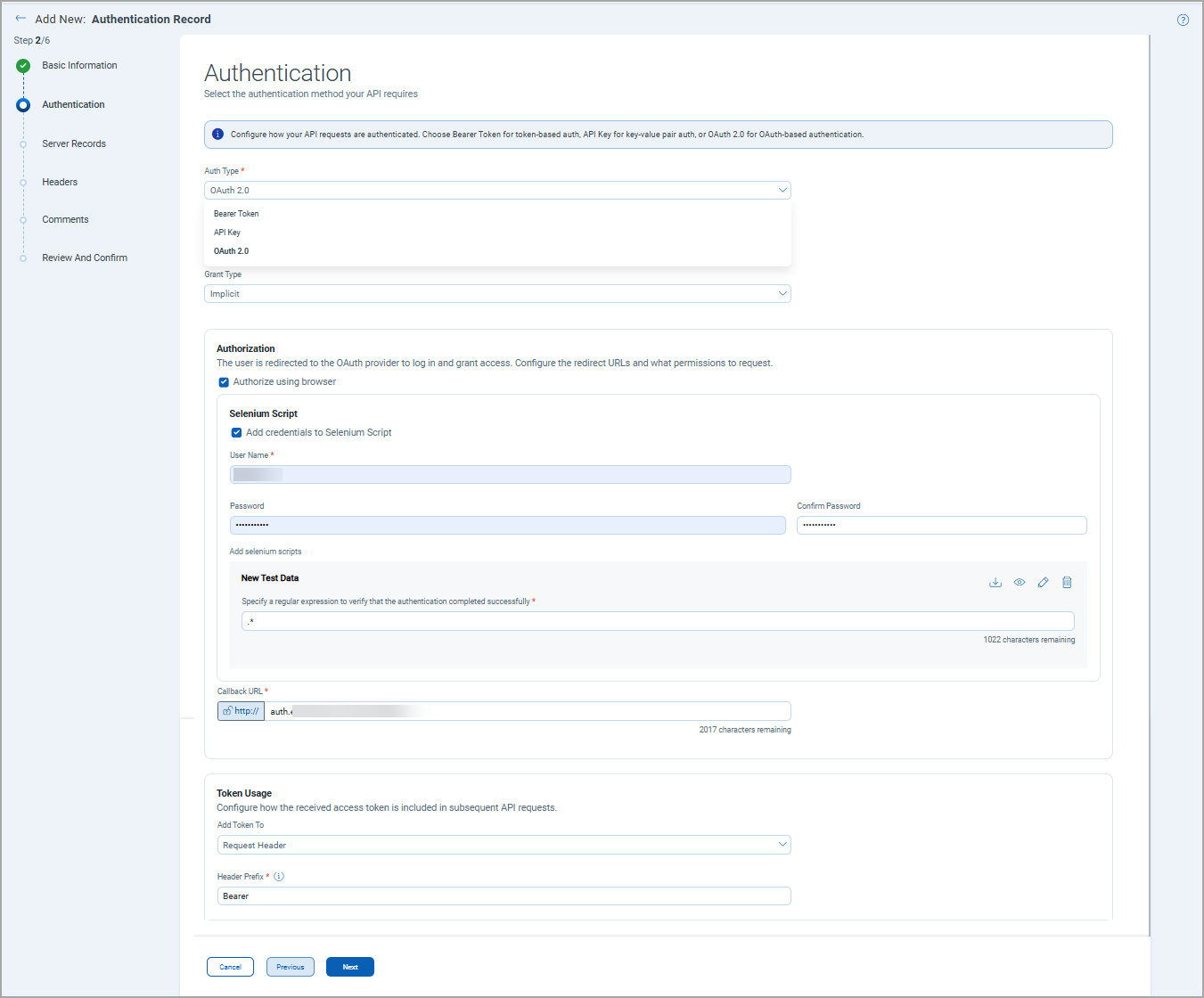
Auth Type
Select one of the following authentication type:
Bearer Token - Select this type if you expect a bearer token in the API request header.
API Key - Select this type when the API provider issues a static key to authenticate requests, without the need for user authorization or token-based flows.
OAuth 2.0 - Select this type when the target API issues tokens that must be obtained or refreshed programmatically, rather than accepting a static key you can paste directly into a header.
Bearer Token Configuration
- Token Prefix: Specifies the prefix sent with the token in the Authorization header. Defaults to Bearer. Can be customized if your API server expects a different prefix.
- Token: The bearer token value.
API Key Configuration
Use this type to authenticate using a key/value pair.
- Key: The name of the API key parameter.
- Value: The API key value.
- Send In: Specifies where the key/value pair is appended — either the request Header or Query Parameters.
OAuth 2.0
Select the grant type, that is, the method by which an application requests an access token from an authorization server.
- Authorization Code - Use when the API requires a token that can only be obtained by a user logging in through an authorization server (common with APIs that also serve web or mobile clients).
- Authorization Code (With PKCE) - Use when the API requires a token obtained through user login via an authorization server, and the client cannot securely store a client secret (common with mobile apps and single-page applications), with Proof Key for Code Exchange (PKCE) added to prevent authorization code interception.
- Implicit - Use when the application runs entirely in a browser and cannot securely store a client secret, so the token is returned directly in the redirect URL without a back-channel exchange.
- Password Credentials - Use when the application is fully trusted and can directly collect and submit the user's username and password to the token endpoint, without redirecting through a login page.
- Client Credentials - Use when the application itself is the resource owner; no user is involved and the API grants access based on the application's own identity (client ID and secret).
The following table provides a list of fields, descriptions, and grant type applicability for each field.
| Field Name | Description | Applicable to Grant Types |
|---|---|---|
| Authorization | The user is redirected to the OAuth provider to log in and grant access. Parameters for configuring redirect URLs and the permissions to request. | |
|
Authorization URL |
The provider's endpoint URL to which the user is redirected to log in and grant permissions to your app. |
Authorization Code, Authorization Code (With PKCE), Implicit |
|
Authorize using browser |
Select the check box to open the authorization URL in the user's browser to complete the login/consent flow. |
Authorization Code, Authorization Code (With PKCE), Implicit |
|
Callback URL |
The redirect URL registered with your OAuth provider. After the user grants consent, the provider redirects back to this URL with the authorization code. Must exactly match what is registered on the provider side. |
Authorization Code, Authorization Code (With PKCE), Implicit |
|
Scope |
Defines the level of access or permissions your app is requesting from the provider.
|
Authorization Code, Authorization Code (With PKCE), Implicit |
|
State |
A random string generated by your app and sent with the authorization request. |
Authorization Code, Authorization Code (With PKCE), Implicit |
| Custom Authorization Parameters | Parameters to configure additional key-value pairs appended as query parameters to the Authorization URL redirect request to customize the behavior of the authorization request at the OAuth provider's login page. | |
|
Key |
The parameter name to be added to the authorization URL request. |
Authorization Code, Authorization Code (With PKCE), Implicit |
|
Value |
The value associated with the key sent in the authorization request. |
Authorization Code, Authorization Code (With PKCE), Implicit |
|
Sensitive |
Whether to mask this value in logs and user interface. Select Yes or No from the list depending on whether to mask this parameter's value in logs and user interface, preventing it from being exposed. |
Authorization Code, Authorization Code (With PKCE), Implicit |
| Credentials | Parameters to provide application credentials registered with your OAuth provider. | |
|
Client ID |
The public identifier registered with the OAuth provider. |
Authorization Code, Authorization Code (With PKCE), Implicit, Password Credentials, Client Credentials |
| Client Secret | The private secret for the Client ID. | Authorization Code, Authorization Code (With PKCE), Password Credentials, Client Credentials |
|
Is Sensitive |
Whether to mask the client ID value in logs and user interface. Select the checkbox to mask the value. | Authorization Code, Authorization Code (With PKCE), Implicit, Password Credentials, Client Credentials |
| Token Exchange | The parameters for exchanging the authorization grant or credentials for an access token at the provider token endpoint. | |
|
Access Token URL |
The provider's endpoint that issues access tokens. |
Authorization Code, Authorization Code (With PKCE), Password Credentials, Client Credentials |
|
Scope |
The permissions or access levels requested during the token exchange at the provider's token endpoint. |
Password Credentials, Client Credentials |
|
Access token expired message pattern |
Regular expressions (Regex) or text that the OAuth provider returns when the token expires. |
Authorization Code, Authorization Code (With PKCE), Password Credentials, Client Credentials |
|
Client Authentication |
How credentials are sent to the token endpoint. Select one of the following values:
|
Authorization Code, Authorization Code (With PKCE), Password Credentials, Client Credentials |
| Custom Access Token Request Parameters | ||
|
Key |
Custom parameter name to send with the token request. |
Authorization Code, Authorization Code (With PKCE), Password Credentials, Client Credentials |
|
Value |
Value for the custom parameter. |
Authorization Code, Authorization Code (With PKCE), Password Credentials, Client Credentials |
|
Send In |
Where the parameter is included. Select one of the following values:
|
Authorization Code, Authorization Code (With PKCE), Password Credentials, Client Credentials |
|
Sensitive |
Whether to mask this value in logs and user interface. Select Yes or No from the list. |
Authorization Code, Authorization Code (With PKCE), Password Credentials, Client Credentials |
| Token Usage | Parameters to configure how the received access token is included in subsequent API requests. | |
|
Add Token To |
Where the access token is attached in API requests. Select one of the following options:
|
Authorization Code, Authorization Code (With PKCE), Implicit, Password Credentials, Client Credentials |
|
Header Prefix |
The prefix string is appended before the token value in the Authorization header. Default value: Bearer. This field is available only when the Add Token To is set to Request Header. |
Authorization Code, Authorization Code (With PKCE), Implicit, Password Credentials, Client Credentials |
| Token Refresh | Parameters to configure automatic renewal of expired access tokens using a refresh token. | |
|
Refresh Token URL |
The provider endpoint used to exchange a refresh token for a new access token. If left empty, it defaults to the Access Token URL |
Authorization Code, Authorization Code (With PKCE), Password Credentials |
|
Add Custom Refresh Request Parameters |
Extra parameters specifically for refresh token requests. If the checkbox is selected, enter a key-value pair to use as custom refresh request parameters. |
Authorization Code, Authorization Code (With PKCE), Password Credentials |