TotalAppSec Release 2.10 | Web Application Scanning Release 1.30
August 06, 2026

 TotalAppSec and Web Application Scanning
Scan Listing: Application Type Column and Scan Type Filter
You can now view the Application Type directly in the Scans list, making it easy to identify whether a scan is associated with a Web Application or an API without opening the scan details.
In addition, you can now filter the Scans list by Scan Type to quickly locate specific scan categories, including Vulnerability, Discovery, API Discovery, Compliance, and Authentication Test.
Benefits
- Identify whether a scan is for a Web Application or an API directly from the scan list.
- Filter scans by type to quickly locate the scans you need.
Subdomain Validation Enhancements
We have enhanced the validation behavior for the Subdomain field in the Add New wizard. The field now validates subdomain entries against the configured main URL, providing more accurate and predictable validation during web application setup. For example, if the URL is an IPv4 or IPv6 address, the subdomain scope option does not apply. To configure the Subdomain field, navigate to Web Applications > New Web App > Add New > Crawl Settings.
When the base URL is an IP address, the Subdomain option is disabled.
Search Token Update
We have renamed the Qualys Query Language (QQL) search tokens by renaming vulnerability tokens to finding tokens. For example, vulnerability.id is now finding.id.
Optional Distribution Group
You can now create a report schedule without specifying a distribution list or additional recipients in the Notifications section. If you do not specify recipients, Qualys automatically sends notification emails to users who own or have access to the associated web application assets.
Navigate to Reports > Schedules > New Report Schedule. In the Notification, configure the notification settings for the report schedule.
Detection Score Filter for Detection Groups
You can now filter detections using the Detections > Group By > Detection Score. The detection score ranges from 1 to 100, so you can sort and prioritize detections by score for easier analysis and management.
Enhanced User Interface
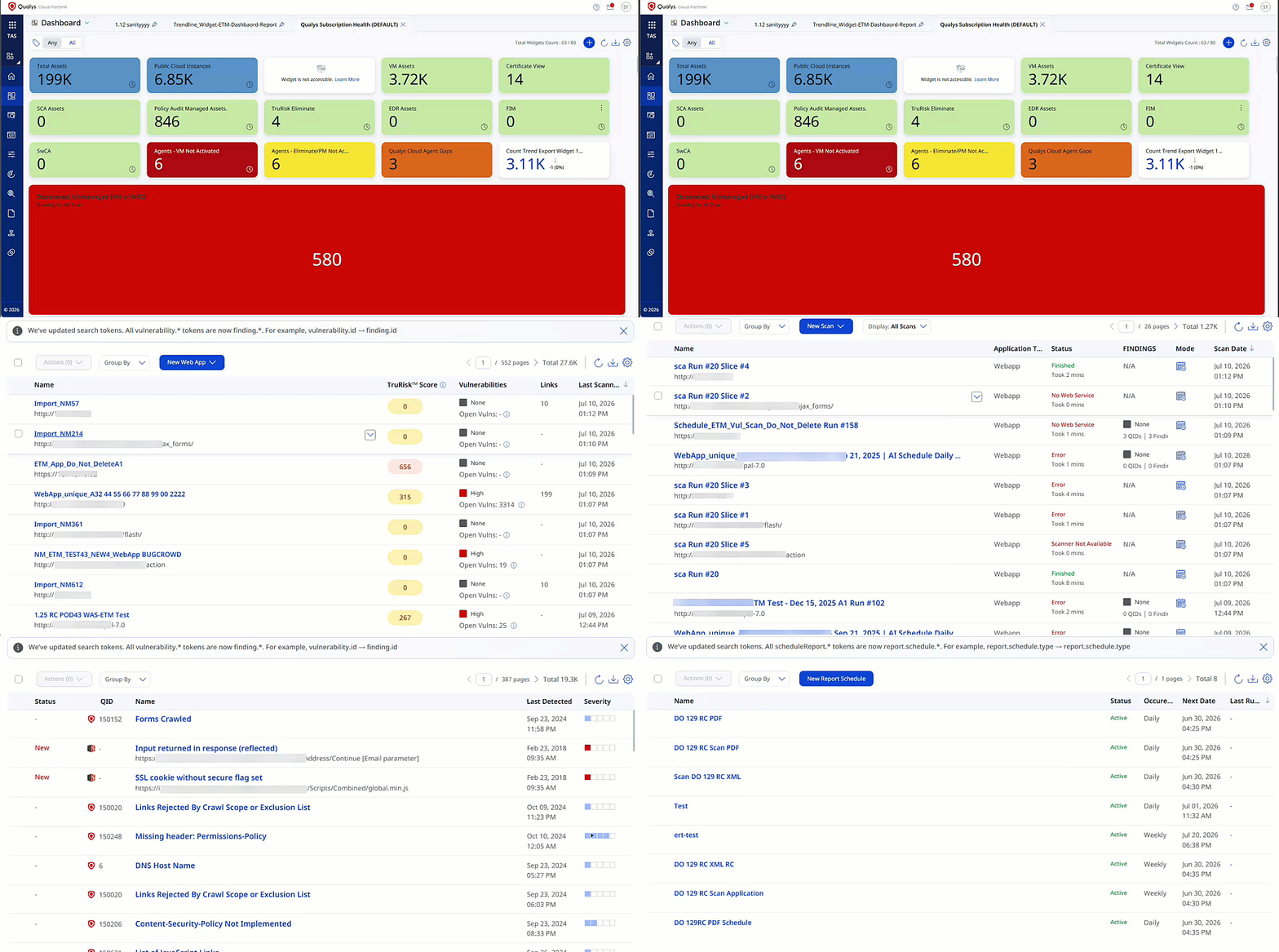
With this release, we have introduced an improved user experience across all TotalAppSec and Web Application Scanning pages. You can see updates across fonts, colors, typography, and buttons, making the interface more intuitive and easier to use. This release features User Interface and design system enhancements that improve visual consistency, readability, and usability across the application, resulting in a cleaner, more intuitive user experience.
Key benefits are:
- Cleaner, more consistent screens
- Easier-to-read and understandable text
- Important information stands out better, with less clutter
- Faster comprehension of risk, status, and numbers
User Interface Consistency and Clarity
Introducing the new and improved User Interface with the following key upgrades:
- Easier-to-read labels and text, with ALL CAPS replaced by sentence-style text
- Consistent text style for status and source names across the application
- Uniform text colors in tables, filters, page numbers, and tabs
- Aligned colors and text styles for tabs and page navigation throughout the application
- Clear visual indicators for buttons and options, showing active, inactive, or secondary states
- Better emphasis on important information, with subtle styling for less critical details to help users focus
Charts, Metrics, and Data Presentation
You can view the following updates:
- Updated chart color schemes for improved clarity and accessibility
- Compact, more readable numeric formats for better visibility
- Refined color gradients for risk scores and meters to enhance interpretation
Asset Action Renaming
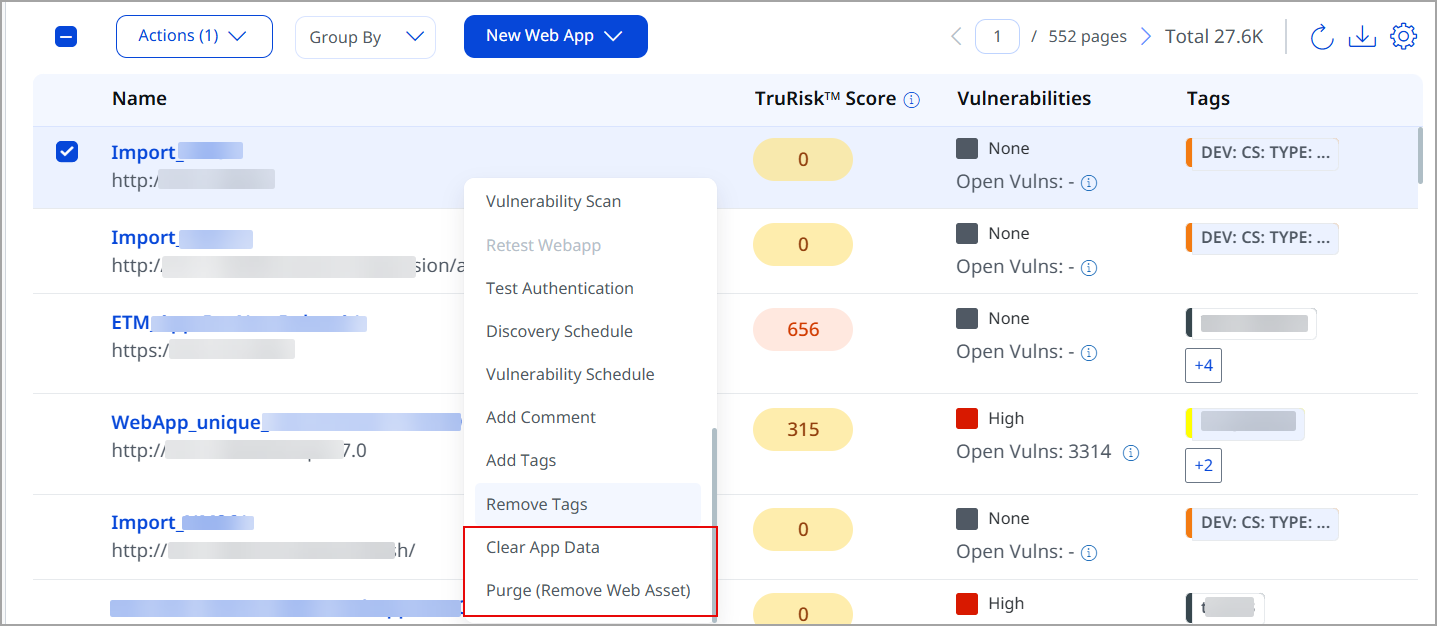
To improve consistency across the platform, we have renamed the following asset actions for Web Application and API assets:
- Purge is now Clear App Data, which removes only scans and detections while retaining the asset.
- Remove/Delete is now Purge (Remove Web Application/API Asset), which removes the asset from the subscription.
| Old permission_name | New display_name |
|---|---|
| PURGE | Clear App Data |
| DELETE | Purge (Remove Web Asset/API Asset) |
The meaning of Purge has changed between releases. If you're relying on its previous behavior, upgrading could accidentally delete an asset instead of clearing its data.
Standardized "Client" Field Values in Activity Log
You can now use the standardized Client field in QQL filters on the Activity page to accurately distinguish UI-driven activity from API-driven activity. For example, use client:Browser or client:API to filter results based on the source of the activity.
With this release, the Client field is standardized to exactly two values:
- Browser – Indicates that the action is initiated through the user interface.
- API – Indicates that the action is initiated through an API call.
Column Hiding for Data List Pages
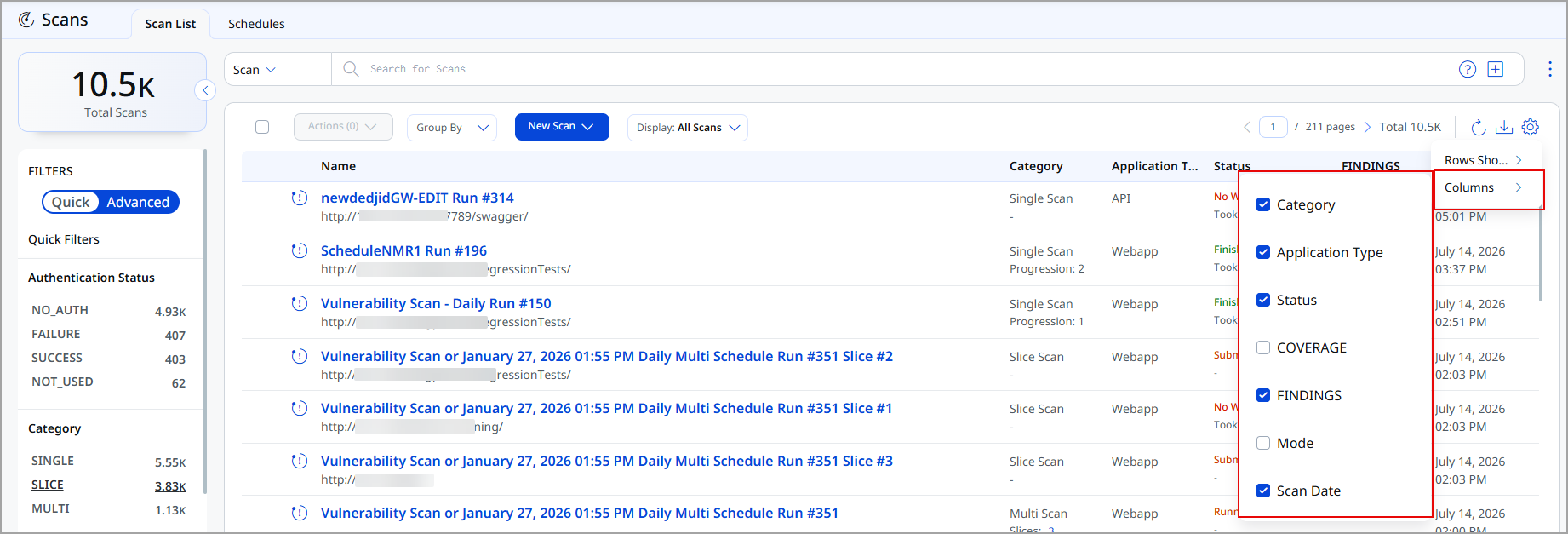
You can now customize data list pages by showing or hiding columns using the Columns option. This enhancement allows you to customize the list view to your needs, making it easier to focus on the most relevant information while reducing visual clutter.
The Column Hiding is supported on all data list pages across the platform.
Click on the  icon and select Columns. Select or clear the check boxes for individual columns to show or hide them on the page.
Column visibility preferences are unique to each data list page. Changes made to the columns on one page do not affect other data list pages.
Issues Addressed
The following reported issues are fixed in this release.
| Component | Description |
|---|---|
|
Online Reports |
We fixed an issue where the Edit button appeared disabled for API-generated Online Reports after the QSS Reports migration. |
|
Scan Launch and Processing Flow |
We fixed an issue where scheduled WAS scans failed to launch with the error More than one row with the given identifier was found. Query-level handling has been introduced to prevent duplicate records, and database uniqueness is now enforced for Scan IDs. |
|
Detection & Web Application Search |
We fixed an issue where searches using the finding.url QQL token failed and returned an error when the URL contained SQL injection payload patterns. Users can now search detections and web applications using finding.url, including URLs containing vulnerability payloads, and records are retrieved correctly. |
|
Adding Web Application |
We fixed an issue where users were unable to create a Web Application in the WAS module when a Potential Web Application with the same name already existed in the EASM module. Users can now successfully create and save a WAS Web Application using the same name as an EASM Potential Web Application, while duplicate names across WAS-managed assets continue to be prevented. |
|
Scan Status Display for Non-QSS Schedules |
We fixed an issue where successfully completed scans were reported as Error in the UI due to schedule validation logic rather than an actual scan failure. Scan status reporting now accurately reflects the real execution outcome, ensuring completed scans remain in their correct state. |
|
API Scan Reporting |
We fixed an issue where certain API vulnerability findings displayed NA for the Response section in API Scan Reports even though valid request and response data was available in the scan results. |
|
TruRisk Score |
We fixed an issue where TruRisk scores were not displayed in the data list. TruRisk scores are now displayed correctly and consistently for affected web applications. |
|
TAS Scheduled Reports Visibility |
We fixed an issue where users with access to a Parent Tag could view web applications associated with Child Tags but were unable to see TAS Scheduled Reports associated with those same Child Tags. |
|
Vulnerability Closure on Non-Found URL |
We fixed an issue with the Close Vulnerabilities on Non Found URL feature where findings closed due to a missing vulnerable URL were recorded with an incorrect status message. Findings closed because the vulnerable URL cannot be located are now recorded using the appropriate status NOT_TESTED: Vulnerable URL cannot be found anymore, accurately reflecting the scan outcome. |
|
Tag Permissions |
We fixed an issue where users without Tag management permissions could still view and modify Tags within Authentication Records when assigned editor permissions. Tag access validation is now applied consistently across Authentication Records and Web Applications, ensuring that only users with the appropriate Tag permissions can view, assign, or modify Tags. |
|
API Authentication |
We fixed an issue where API Authentication Records did not provide a None authentication type option. API Authentication Records now include a None option in the Authentication Type dropdown, allowing Server and/or Header authentication to be configured without requiring an unrelated authentication. |
|
Ignored Findings Reason and Comment Synchronization |
We fixed an issue where findings that were globally ignored from the Knowledge Base were correctly marked as Ignored in the Detections module, but the Reason and Comment entered during the ignore action were not displayed in Detection Details > Additional Information. |
|
Scheduled Scan Launch After QSS Migration |
We fixed an issue where scheduled scans stopped launching after QSS migration and failed with the message There is already a scan with this title in your subscription. The issue occurred when schedules that exceeded the new QSS run-count limit were deactivated and later reactivated. |
|
Scheduled Scan Proxy Validation |
We fixed an issue where users were unable to create or modify schedules using global proxies. The validation logic now allows proxies that are either associated with the Web Application or configured as global proxies. |
|
Scheduled Scan Launch Reliability |
We fixed an issue where scheduled scans were not triggered as scheduled and eventually became permanently skipped after database connection timeouts occurred during schedule processing. |
|
Data Loading Reliability |
We fixed an issue where users intermittently saw No Data Available on the Applications, Authentication Records, Scan List, and Option Profiles pages, even though data existed and the user had the appropriate permissions. Data for these modules now loads correctly and is displayed consistently without requiring repeated page refreshes. |
|
Scan Status Display for QSS Schedules |
We fixed an issue where long-running progressive or scheduled scans were incorrectly displayed as Error in the user interface even though scan execution completed successfully and valid results were generated. |
|
Scan Launch via Scanner Pool |
We fixed an issue where the scan launch process took longer than expected to determine scanner availability and initiate scans. Scan launches now complete more efficiently and consistently. |
|
Active Scan Schedules |
We fixed an issue where active and valid scan schedules were incorrectly displayed under the Invalid quick filter and returned by the QQL search token for invalid schedules. The validation logic has been corrected so that schedules are now classified accurately. |
|
Authentication Records Management |
We fixed an issue where some authentication records that relied only on server authentication and/or header authentication were incorrectly classified as WEBAPP authentication records. The authentication record classification now correctly reflects the configured authentication method. |