TotalAppSec Release 2.12 | Web Application Scanning Release 1.32
november 03, 2026
This release widens how you find what to scan. Your VMDR scan detections become a discovery source for web applications, deployed MuleSoft APIs are discovered with their live runtime endpoint, and the MuleSoft connector can now be pointed at the Government Cloud and EU control planes or at your own MuleSoft URL. It also lets you choose which scan outcomes send you a completion email, set the page you land on after signing in, maps Burp Suite Informational findings to Information Gathered, rebrands the free web application scanning report, and moves scorecard CSV, CSV_V2, and XML reports to the new reporting flow.
New Feature
Discover Web Applications from VMDR Detections
Applies to: TotalAppSec
What's New for You
Your VMDR scan detections are now a discovery source in the Discovery tab, so web applications found on your VM-scanned hosts appear alongside your other discovered assets.
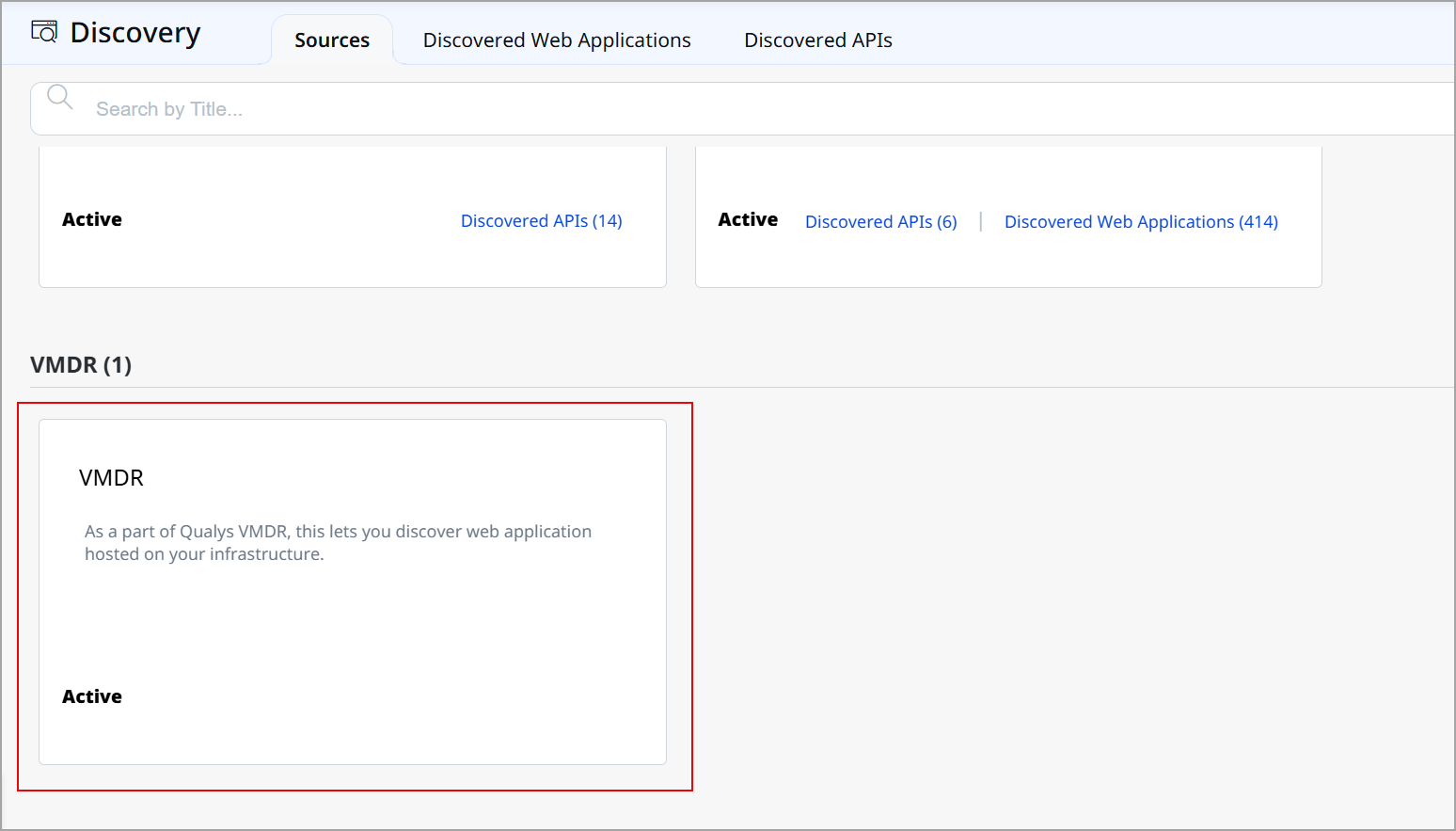
VMDR is now one of the sources feeding your discovered web applications. Detections from your VM scans are analyzed to identify hosts that are serving a web application, and these are listed under Discovered Web Applications with the FQDN, IP address, and port, ready to onboard.
Previously, the classic Catalog tab drew on a small, fixed set of detections to suggest web applications running on your VM assets. That gave a narrow view, and it sat outside the discovery workflow you use for every other source.
With this release, a wider set of detections is analyzed, including web server and application server evidence, and the results are filtered so that hosts that only resemble a web application are not surfaced as scan candidates. The actions available on a VMDR-discovered entry are the same as for any other discovered application.
How It Works
- Discovery from VMDR runs once a day, overnight. Each run processes only the detections that are new or have changed since the previous run.
- Entries are matched on the URL. If a URL has already been discovered, the existing entry is updated; no duplicate is created.
- A VMDR source card appears on the Sources tab. Unlike a connector, the card is read-only and needs no configuration.
Because the analysis runs once a day, results from a VM scan appear after the next overnight run, not immediately after the scan completes.
The classic Catalog tab is unchanged and continues to show the same entries as before, so some hosts appear in both places.
Discovery from VMDR reads the findings of your VM scans, so VMDR must be part of your subscription.
Benefits
- Web applications on your VM-scanned hosts surface in the same Discovery workflow as every other source.
- The analysis covers a wider set of detections than the Catalog tab did, so fewer real applications are missed.
- Filtering keeps low-confidence detections out of the list, so there is less to work through before onboarding.
Enhancement
Select the MuleSoft Control Plane for Your Connector
Applies to: TotalAppSec
What Changed For You
You can now point the MuleSoft connector to Government Cloud, the EU control plane, or your own MuleSoft URL, rather than being limited to the US commercial control plane.
When you configure a MuleSoft connector, a Control Plane list lets you choose where your MuleSoft organization runs, so that authentication and API discovery reach the correct host.
Previously, every MuleSoft API call was fixed to the US commercial control plane. If your organization was on Government Cloud or the EU control plane, you could not use the connector at all because every call went to the wrong host, and discovery either failed silently or returned errors.
With this release, authentication and all API calls use the control plane you select. Existing connector configurations continue to work without reconfiguration.
Choosing Your Control Plane
- Select US, EU, or GovCloud (Government Cloud) for a control plane hosted by MuleSoft.
- Select Custom / Private for a MuleSoft deployment you host yourself. A Custom Base URL field then appears, and you must enter your Anypoint Platform URL in it.
Benefits
- MuleSoft APIs on Government Cloud and the EU control plane can be discovered and onboarded.
- A MuleSoft deployment you host yourself can be reached directly by the connector.
- Existing connectors keep running with no change.
Enhancement
MuleSoft API Discovery Now Includes Deployed Runtime Endpoints
Applies to: TotalAppSec
What Changed For You
A MuleSoft API you have deployed is now discovered with the live runtime URL, so you can scan the endpoint your consumers actually call.
The MuleSoft connector pulls from both Anypoint API Manager, for API instances and their runtime endpoints, and Anypoint Exchange, for specifications. When an API connection is deployed, it is discovered as its own API candidate, carrying the runtime endpoint URL where the API is live.
Previously, discovery returned only the specification. That carries the implementation URL, not the URL the API is reachable on once deployed, so the scan target had to be inferred and a scan could find nothing there.
With this release, the connector reads the deployment details for each API instance and uses the actual runtime endpoint as the scan target. If you run several environments from the same API connection, each deployment is discovered as its own API candidate.
Supported Runtimes
Runtime URL support in this release covers CloudHub 2.0. CloudHub 1.0, Runtime Fabric, and Hybrid deployments are not supported in this release.
All of Your API Manager APIs Are Now Discovered
Discovery now pages through the full list of APIs in Anypoint API Manager. Previously, only the first page was fetched, so if your organization held more than 100 APIs, the rest were never discovered.
There are two things to expect in your discovered list. An API deployed by uploading a JAR directly to Runtime Manager is not discovered because there is no API connection for the connector to read, and because the specification and the discovered API candidate are not merged, the same API can appear twice.
Existing connectors continue to work without reconfiguration and return the runtime endpoints at their next scheduled run.
Benefits
- Scans target the live runtime endpoint instead of a URL inferred from the specification.
- Separate environments deployed from one API connection appear as separate scan targets.
Enhancement
Burp Suite Informational Findings Mapped to Information Gathered
Applies to: TotalAppSec and Web Application Scanning
What Changed For You
Burp Suite Informational findings you import now land in your Information Gathered category rather than counting toward Low-severity vulnerabilities, giving you a cleaner severity-based view.
Burp Suite findings with Informational severity are now classified as Information Gathered during import, instead of being imported as Low-severity vulnerabilities. This gives you a more accurate vulnerability count by keeping informational findings out of severity-based reporting and remediation queues.
Previously, the Burp Suite import always placed findings into the standard severity 1 to 5 vulnerability range, with no way to reclassify Informational-severity items as Information Gathered, a category otherwise reserved for Qualys-native findings.
With this release, importing Burp Suite findings maps Informational-severity items to the same Information Gathered category you already use for Qualys-detected discovery information.
This mapping is applied automatically for all customers. No configuration is required to turn it on.
This mapping applies to newly imported Burp Suite findings. It does not change the classification of findings that were imported in earlier imports.
Because Informational findings are no longer counted as Low-severity vulnerabilities, your Low-severity counts may decrease after the next Burp Suite import. Review any dashboards, alerting, or service-level targets that are based on severity counts so that you can adjust thresholds before the change takes effect.
Enhancement
Landing Page Preference for Default Module
Applies to: TotalAppSec and Web Application Scanning
What Changed For You
You can set the module and the view you want to open automatically when you sign in, instead of starting on the home page every time.
Go to View Profile > Landing Preferences, choose the module you want to open and the Default View you want to see within it, and save. The next time you sign in, you go straight there.
For example, setting Detections as your default view takes you directly to your detections after signing in. You can edit the preference at any time.
If you have not set a landing preference, the home page loads as before.
The tabs available to you reflect your permissions, so you only see and can select the ones you are entitled to. For example, the Integration tab appears if you have access to either Burp Suite or Bugcrowd, and the Discovery tab appears only when discovery is enabled for your subscription.
A landing preference cannot be set for a submodule. Submodules continue to behave as they did before.
Enhancement
Choose Which Scan Outcomes Send a Completion Email
Applies to: TotalAppSec and Web Application Scanning
What Changed For You
You can choose which scan outcomes send you a completion email (successful, failed, canceled, or any combination) instead of being emailed about every scan that finishes.
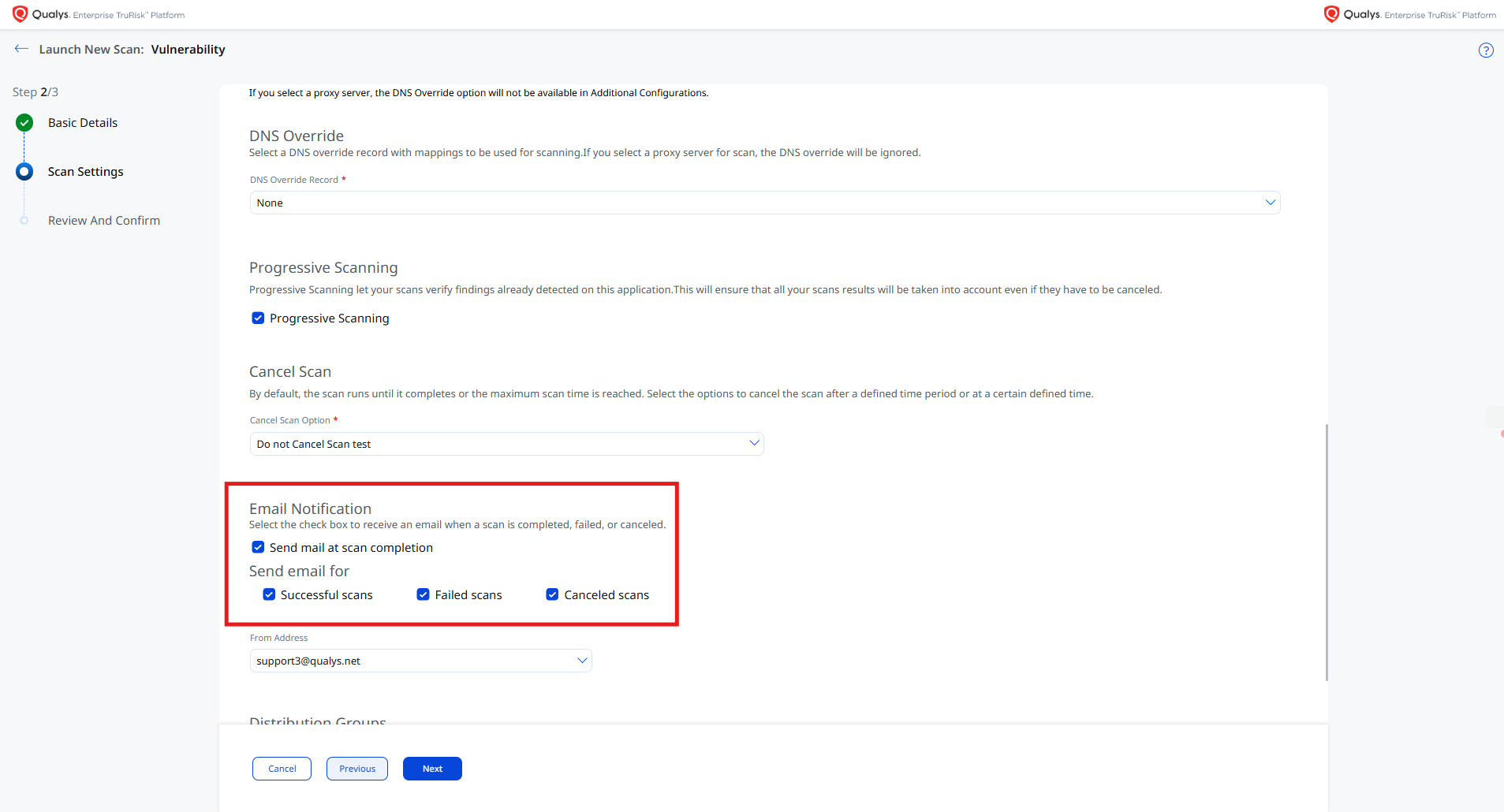
When you select a Send mail at scan completion in scan settings, a Send email for section lets you choose the outcomes you want to hear about: Successful scans, Failed scans, and Canceled scans.
Previously, a completion email was sent for every scan that finished, regardless of the outcome, which made it harder to spot scans that needed attention.
All three outcomes are selected by default for both manual scan launches and scan schedules. At least one must stay selected while the completion email is enabled.
Each completion email names the outcome that triggered it in a new Triggered By line.
For a multi-scan, what you receive depends on your email setting. If you get one email per scan, the individual scan emails are filtered by your selection and a parent email still confirms that the run finished. If you get one combined email per multi-scan, it is sent when any scan in the run matches an outcome you selected, and lists only those outcomes.
The outcome is now determined by the scan's final consolidated status, which accounts for result processing rather than only how the scan run ended. A scan that finished but produced a terminal non-success result, such as no host alive, now counts as Failed rather than Successful. If you select only successful scans, you will stop receiving email for scans that end this way. Select Failed scans to continue receiving them.
Existing scan configurations and schedules are unaffected and continue to send completion emails for every outcome.
See the API release notes for the corresponding public API fields.
Fix
Fixes
The following reported issues are fixed in this release.
| Component/Category | Applies to | Description |
|---|---|---|
|
API Report Generation |
TotalAppSec and Web Application Scanning |
We fixed an issue where creating a web application PDF report using the API failed with a module not supported error for accounts with RSV2 enabled. Now, PDF report creation through the API completes successfully for RSV2-enabled accounts. |
|
Report Formats |
TotalAppSec and Web Application Scanning |
We investigated a reported discrepancy between the CSV and PDF report formats, in which a CSV-downloaded report did not show the severity of each individual detection. Severity is available for every detection in the CSV_V2 format, matching the per-detection severity shown in the PDF report. Select CSV_V2 as the report format where you need detection-level severity in an export. |
|
Scan Job Records |
TotalAppSec and Web Application Scanning |
We fixed an issue where the customer UUID was not included in the job details sent when a web application scan was launched, so those scan jobs were recorded without it. Now, the customer UUID is included when a web application scan is launched. Scans without a customer UUID continue to launch as before. |
|
Scanner Capacity |
TotalAppSec and Web Application Scanning |
We fixed an issue where the capacity a web application scan reserved on a scanner did not reflect the amount those scans consumed. This weight is set by Qualys and is not configurable by you. Scan behavior and scan results are unchanged. |