Set Landing Preference
The landing page lets you choose the module and the tab within that module that opens when you sign in to Qualys.
The landing page is displayed when you sign in, and you have not yet saved a landing preference. After you save it, Qualys opens the module and tab that you selected each time you sign in, so you go straight to the work you do most often. You can change your landing preference at any time.
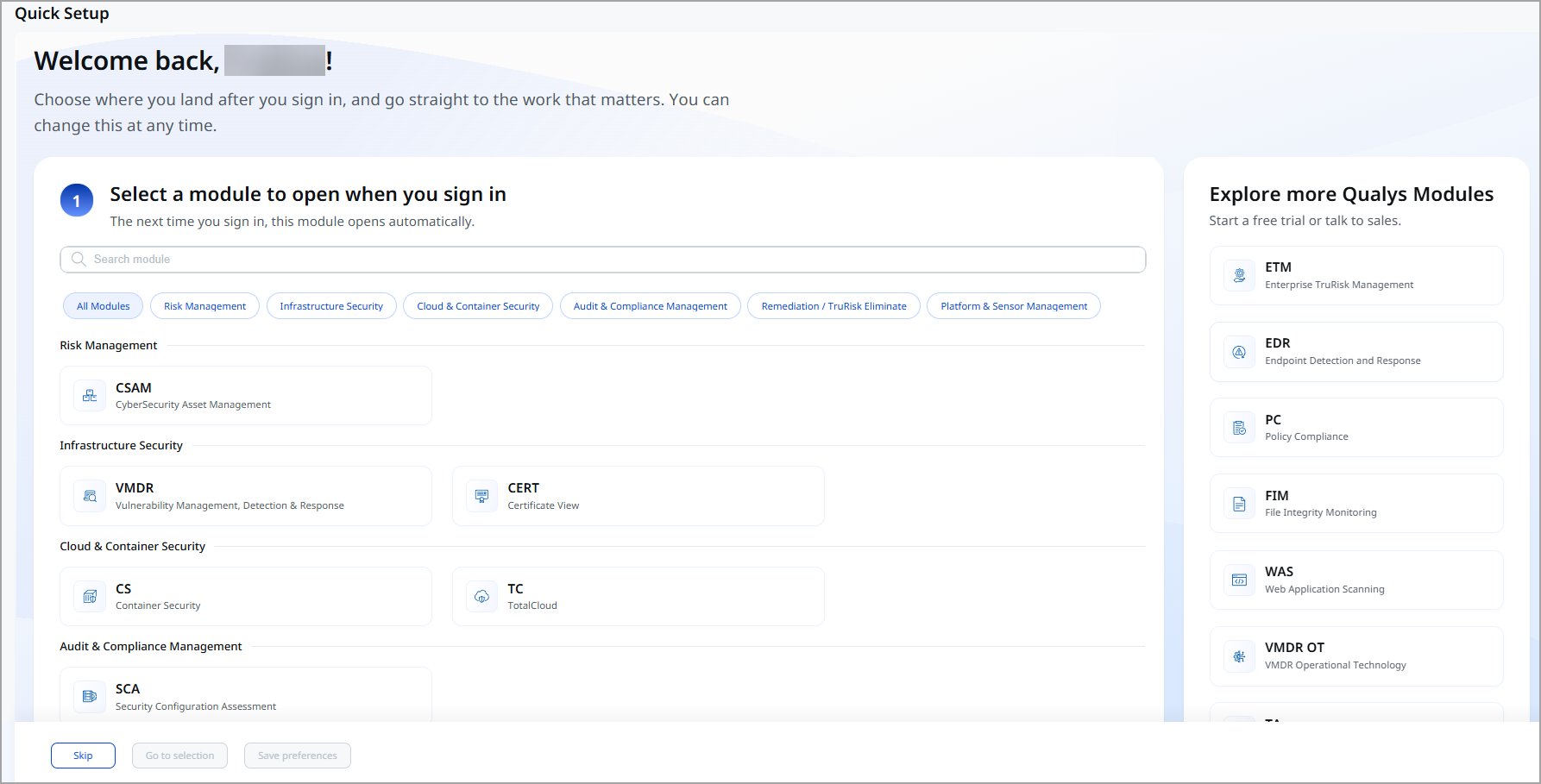
Options on the Landing Page
| Area | Description |
|---|---|
| Select a module to open when you sign in | Lists the modules in your subscription, grouped by category. Each module shows its short name and full name. For example, VMDR (Vulnerability Management, Detection & Response). |
| Select a tab to open in <module name> | Appears after you select a module. Lists the tabs in the selected module. For example, Vulnerabilities, Prioritization, and Dashboard for VMDR. |
| Explore more Qualys Modules | Lists Qualys modules that are not in your subscription. For details, see Explore More Qualys Modules. |
| Skip | Closes the landing page without saving a landing preference. |
| Go to selection | Opens the selected module and tab once, without saving them as your landing preference. |
| Save Preferences | Saves the selected module and tab as your landing preference. |
The module categories are:
- All Modules
- Risk Management
- Infrastructure Security
- Cloud & Container Security
- Audit & Compliance Management
- Remediation / TruRisk Eliminate
- Platform & Sensor Management
Save Landing Preference
- Sign in to Qualys. The landing page is displayed.
- Under Select a module to open when you sign in, click the module that you want to open when you sign in. To find a module quickly, type its name in the Search module box, or click a category to show only the modules in that category.
- Under Select a tab to open in <module name>, click the tab that you want to open.
- Click Save Preferences.
Qualys saves your landing preference. The next time you sign in, the module and tab that you selected open directly.
Open Module Once
To go to a module and tab once, without saving them as your landing preference:
- On the landing page, select a module and a tab.
- Click Go to selection. A confirmation message shows the path that you selected, for example, Vulnerability Management, Detection & Response > Prioritization, and reminds you that your selection is not saved.
- Click Yes to open the module and tab. To go back to the landing page instead, click No.
To open the same module and tab every time you sign in, select them, then click Save Preferences.
Skip Landing Preference
If you do not want to set a landing preference now, click Skip on the landing page. You can set your landing preference later from your profile. For details, see Change Landing Preference.
Change Landing Preference
- Click your profile icon, and then click View Profile.
- Go to Landing Preferences > Edit Preferences.
- Select the module and the tab that you want to open when you sign in.
- Save your changes.
The next time you sign in, the new module and tab will open.
Explore More Qualys Modules
The Explore more Qualys Modules panel on the right side of the landing page lists Qualys modules not included in your subscription. The modules in this panel depend on your subscription. Click a module to start a free trial or to talk to sales about adding it to your subscription.