Email Vulnerability Count Mismatch Between Notification and Scan Result
Problem
Sometimes, the vulnerabilities summary count in the email notification differs from the count shown in the scan results. The email notification summary depends on scan processing status. If processing is not complete, the email may show zero vulnerabilities even when issues exist.
The following is an example of vulnerabilities’ summary count received through an email notification:
Email scan summary by Qualys
Scan Title : Example1

Start Date : 03/28/2023 at 04:42:30 AM (GMT+0000)

Duration : 00:50:14

Target Groups : Newton Website

Hosts Scanned : 1

Active Hosts : 1

Option Profile : Payment Card Industry (PCI) Options

Launched By : Qualys User

Company : Qualys

Launch Type : On demand

Scan Status : Finished

Next Action : None

------------------------------------------------------------------------------------------------------------------------------------------

Summary of discovered Vulnerabilities (Trend)

Severity 5 "Urgent" : 0 (0,0,0,0)

Severity 4 "Critical" : 0 (0,0,0,0)

Severity 3 "Serious" : 0 (0,0,0,0)

Severity 2 "Medium" : 0 (0,0,0,0)

Severity 1 "Minimal" : 0 (0,0,0,0)

Total : 0
Summary of Potential Vulnerabilities

Severity 5 "Urgent" : 0 (0,0,0,0)

Severity 4 "Critical" : 0 (0,0,0,0)

Severity 3 "Serious" : 0 (0,0,0,0)

Severity 2 "Medium" : 0 (0,0,0,0)

Severity 1 "Minimal" : 0 (0,0,0,0)

Total : 0

Total (Confirmed + Potential) : 0 (0,0,0,0)

Vulnerability Trend Status: (NEW,REOPENED,ACTIVE,-CLOSED) processed for this scan

(note that TOTAL = NEW + REOPENED + ACTIVE for this scan, with CLOSED already fixed)
Summary of Information Gathered

Severity 3 "Serious" : 0

Severity 2 "Medium" : 0

Severity 1 "Minimal" : 0

Total : 0

------------------------------------------------------------------------------------------------------------------------------------------

Click here to view your full scan report:

https://qualys_platform.com/fo/report/report_view.php?ref=scan/12345.12345&authfirst=true&em=1
The following is an example of the summary of vulnerabilities in the scan results:
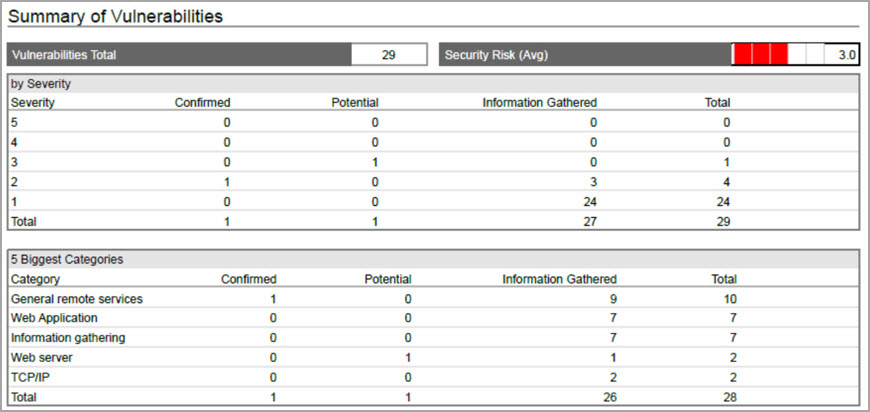
Cause
The asset is DNS-tracked, and the hostname is not resolved during the scan. The QID 6 displays 'No registered hostname', so scan processing does not complete, and the email shows zero vulnerabilities. Additionally, the host IP address is not added to Address Management (license container).
Solution
- Check the scan result for QID 6 (DNS Hostname). If the hostname is unresolved, ensure DNS resolution works for the target asset.
- Verify whether the asset IP is added to Address Management.
- Update asset configuration and relaunch the scan.
- Review the updated scan result and email summary.
Related Topics