SAML 2.0 Single Sign-On (SSO)
Qualys acts as a SAML 2.0 Service Provider (SP) and establishs a trust relationship with any customer’s SAML 2.0 Identity Provider (IdP).
You can use SAML 2.0 Single SignOn (SSO) authentication with your Qualys subscription. When implemented, you can seamlessly open a session using your corporate credentials and your web browser.
You can use any SAML 2.0 IdP vendor of your choice including but not limited to Ping Identity, Shibboleth and Oracle Identity Federation.
Benefits
Enabling SAML 2.0 SSO with Qualys provides you the following benefits:
- Provides full control over authentication of hosted user accounts that can access Qualys.
- Allows you to use your corporate credentials to open a Qualys session.
- Automatically enforces password policies applied centrally and reduces the risk of having weak passwords or lost passwords by enforcing a single password policy that is unique to the your SAML deployment.
- Simplifies the process of granting and removing the access to Qualys from a central management console.
- Reduces the time that you spend to remember and manage multiple passwords.
On Boarding Process
To start using SAML 2.0 SSO to open Qualys sessions, complete the following onboarding process:
- Contact Qualys Support (www.qualys.com/support) to request SAML 2.0 SSO activation for your subscription.
A CRM ticket creates automatically and used as a reference and tracking for all discussions concerning the activation of your SAML 2.0 SSO.
Qualys Support replies to the ticket to share and request technical information used to establish the trusted relationship between your IdP and the Qualys SP as follows:- Questions about your SAML 2.0 Identity Provider (IdP)
- Technical information about Qualys SAML 2.0 Service Provider (SP) that will be used to configure your IdP.
For more details, refer to the Appendix.
Note: This information might not be up-to-date. Support will share the latest version when the request is filled.
- Upon receipt of your response, Qualys configures the trust relationship between your Idp and the Qualys SP. This process takes approximately one week to complete.
- Qualys will set up the trust relationship and notifies you once SAML is enabled for your subscription. Then Qualys provides a new unique URL specific to your subscription that you must use to open a session with SAML SSO (for example https://qualysguard.qualys.com/fo/login.php?idm_key=XYZ, where XYZ is a unique numerical identifier generated by Qualys to identify your subscription).
How to test
At this point you can start testing that SAML SSO has been properly configured for your subscription using the following procedure:
- A Qualys Manager enables SAML for a test user as shown in the following screenshot:
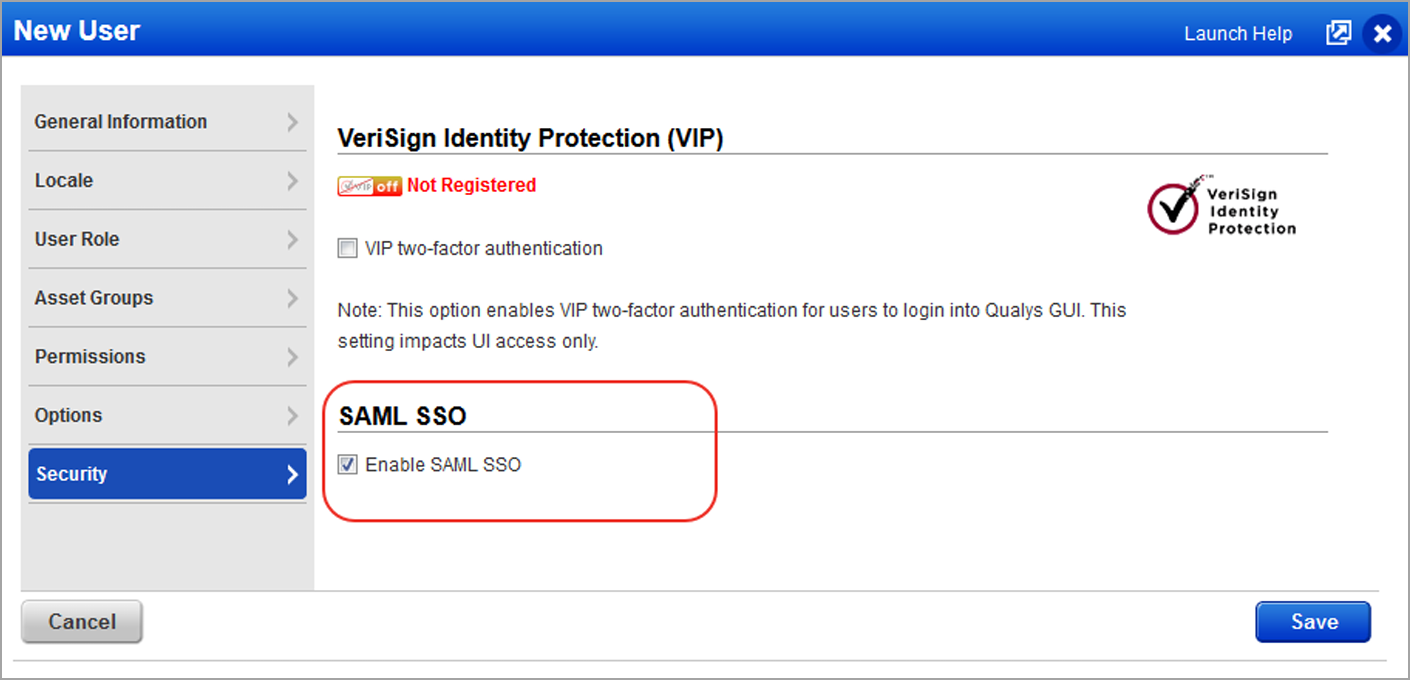
Optional: if your chose to identify yourself using the External ID field in the Qualys user settings, this information needs to be added as shown in the following screenshot. For more details, refer to the User Provisioning section.
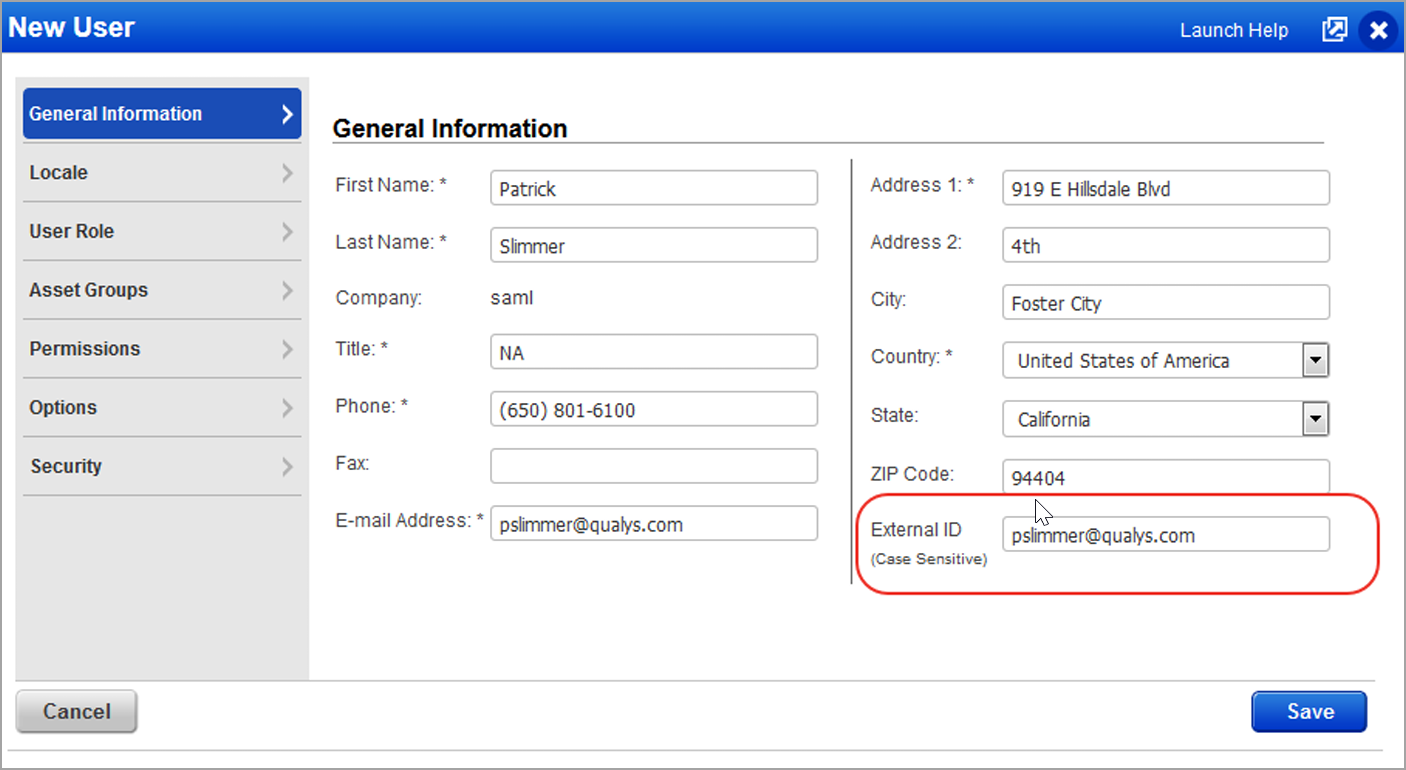
In the example above, the email address is used for the External ID. - For testing SAML SSO, follow these steps:
- Use a web browser and open the unique URL provided by Qualys.
- As a result the web browser should be redirected to your SAML SSO page where you can enter your corporate login/password (for instance the Active Directory username and password).
- Upon successful authentication, the web browser should be redirected to Qualys and a valid session should be opened with the expected user identity.
- When logging out from Qualys, the web browser should be redirected to the optional exit URL that you provided.
User Provisioning
Qualys SAML 2.0 supports Single SignOn authentication for user accounts that already exist in your subscriptions. You need to create a process to provision Qualys user accounts whether it is a manual process using the Qualys User Interface or an automatic process using the Qualys API.
To properly identify each user authenticated using SAML SSO, a mapping between the your user identity (in the user store) and the Qualys accounts must be provided using one of the methods as described below. You can choose the method that is most convenient for your environment:
- Add Qualys user login names to the SAML user identity (in the user store).
- Update Qualys accounts to add a unique user identifier in the “External ID” user property.
If you who would like to use the Qualys API for user creation and provisioning, you need to develop a software program. This program will combine your account data extracted from your user store (such as first name, last name, email address, etc) and additional Qualys specific user information including the required Qualys user role (Manager, Unit Manager, Scanner, Reader, etc) and user scope (list of asset groups). For example, the Qualys user role and scope can be derived from a group membership user information in your user store. In this case the framework that describes the mapping logic between these groups and Qualys user roles and scopes must be created by you.
If you have questions, contact Qualys Support (www.qualys.com/support).
Appendix 1: Customer On Boarding Questionnaire
In order to get started with this feature, provide the following information, (refer to the information sent by Qualys support for the latest details). Your responses will be entered directly into a request for our Operations team to begin the SAML integration, so filling in the questions individually and completely
assist in efficient turnaround of your request.
- EntityID string from your IdP (SAML Identity Provider) (typically has a format like urn:mace:incommon:example.com)
- Public key certificate for the IdP (your organization’s IdP certificate)
- Your organization’s SAML IdP SSO URL (SP initiated authentication requests)
- Subscription (Qualys Manager Primary Contact username for the subscription, such as abcd_ef)
- Custom exit URL for a subscription (Optional). This is the URL where you are redirected when logging out from Qualys. For instance it can be the URL of your corporate web site.
For your information, Operations has provided the following:
- QWEB SP entityID: QualysGuard_SharedPlatformSAML20SP
- ACS URL for QWEB: https://qualysguard.qualys.com/IdM/saml2/
- Managers are able to enable SAML support for sub-accounts after the feature is functioning on your subscription.
You get an update when SAML integration is complete, or if you need to provide any additional information.
Appendix 2: FAQ
Tell me about the unique Qualys SSO URL provided by Qualys
The unique URL https://qualysguard.qualys.com/fo/login.php?idm_key=XYZ provided by Qualys as part of the on boarding process must be used to open a Qualys session using SAML SSO. You need to share this URL with all user who will access Qualys with SAML SSO. You can bookmark the URL in your web browsers. If you log in from your security intranet, you can insert the URL into a web page within your environment.
Tell me about two factor authentication
You can choose to implement two factor authentication at your discretion and if your SAML IdP implementation supports this. It is the responsibility of the customer to enable/enforce a two factor authentication mechanism for their SAML SSO IdP.
How does a user change their password?
When SAML SSO is enabled for a user, passwords are not managed by Qualys. Instead, the user should be able to change their SAML SSO password according to its company’s policy.
Tell me about Qualys API access
Qualys API requires valid user credentials for authentication, and SAML SSO can not be used for this. A normal Qualys login/password must be used for all Qualys API requests.
Tell me about users who have two accounts in the same Qualys subscription
Upon successful authentication, Qualys prompts you to pick the user account that you would like to use.
What if a customer has two Qualys subscriptions?
The on boarding process needs to be done twice. Once per Qualys subscription. You will receive two unique URLs, one URL for each subscription.
Are there any special Qualys account requirements?
Yes, the subscription must have the New Data Security Model enabled.
Does Qualys support SAML 1.1 or 2.0?
As of August 2012, Qualys only supports SAML 2.0.
Is it IDP initiated SSO or SP initiated?
Both Identity Provider (IDP) initiated and Service Provider (SP) initiated.
Which SAML 2.0 binding?
For SP initiated, Qualys will be using the HTTP Redirect binding to send the user to IDP and expects the SAML response via HTTP POST. For IDP initiated, Qualys expects the SAML response via HTTP POST.
When SAML is turned on for our account, can we use our own internal Active Directory user IDs or do we need to have a field in our AD user accounts that match the Qualys usernames (for example “aem_dp”)?
You have the option to either store in your Active Directory the Qualys username in each user record, or use a unique ID coming from your AD and stored in Qualys user profile under the External ID field. For more details, refer to the User Provisioning section in this document.