Identifying Your Riskiest Assets
Qualys TruRisk™ determines the business criticality of the asset using multiple approaches. It is designed to quickly identify high-value assets with critical vulnerabilities, with asset criticality playing a key role in identifying high-value assets.
Asset Criticality Score (ACS)
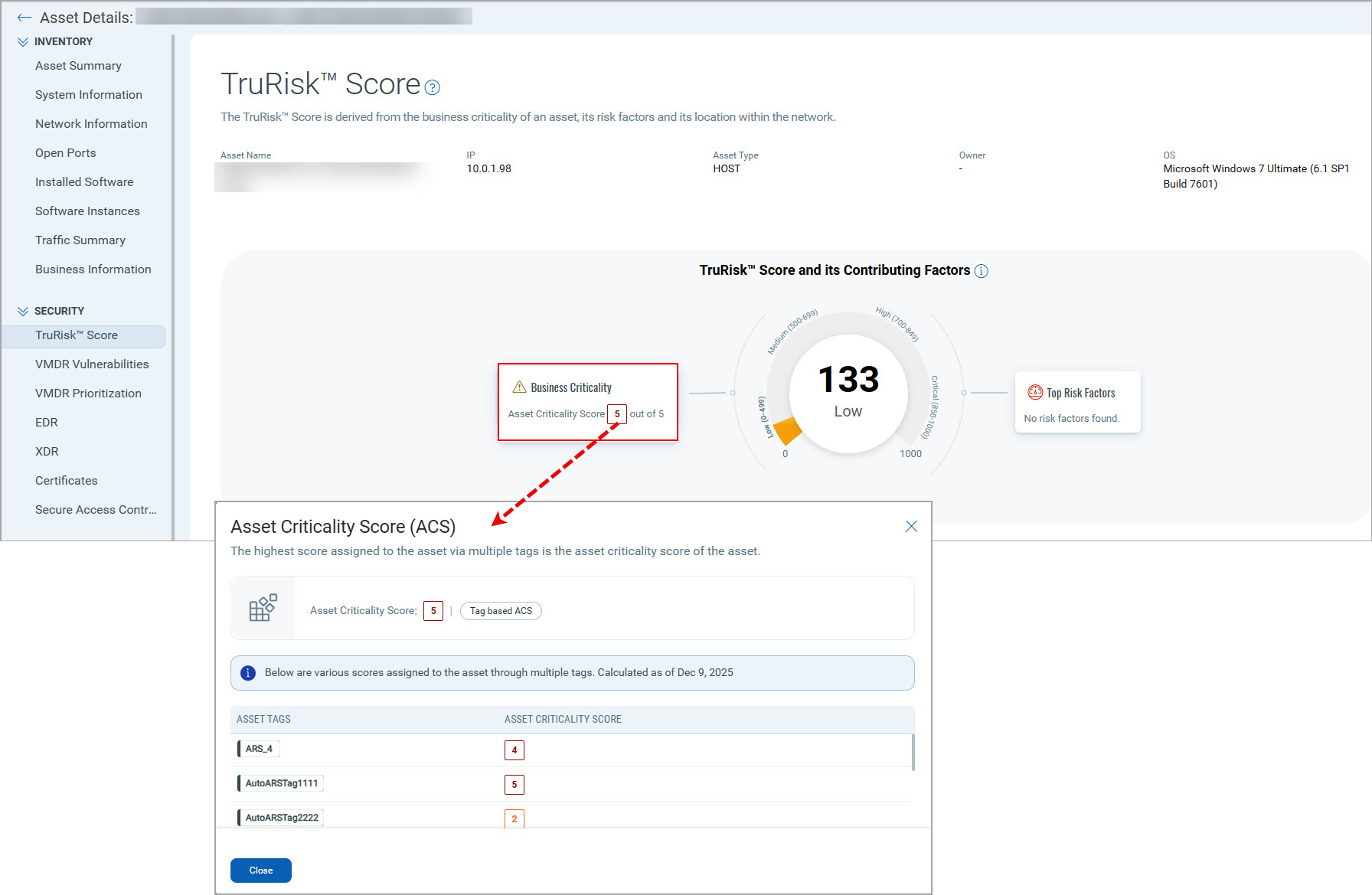
The Asset Criticality Score (ACS) is a component of the TruRisk™ calculation that represents the criticality of an asset to your organization's operations. ACS acts as a multiplier in the TruRisk™ calculation, ensuring that vulnerabilities on critical assets receive higher priority scores than the same vulnerabilities on less important systems. You can set ACS for each asset. If you do not specify the ACS value, then it defaults to 02.
For example: Is the asset part of a production system, a system hosting a production database, or is it purely an internal system used for development and test purposes? Production assets should be rated higher than test systems.
How to Assign ACS to an Asset
You can assign asset criticality in the following ways:
Create Tags
You can configure asset tags with criticality scores to organize and prioritize assets in your organization. Tags can be either static (manually assigned) or dynamic (automatically assigned based on search criteria). We recommend using dynamic tags to automatically associate criticality scores with assets based on predefined rules, reducing manual effort and ensuring consistent classification. See: Configure Tags.
Dynamic Tagging for Asset Criticality
You can create static and dynamic tags based on your requirements. However, we recommend using dynamic tags to automate asset association based on search criteria in dynamic tagging rules.
The following dynamic tag examples demonstrate how to track dynamic risk associated with assets:
Server Asset Management
Basic Server Classification
Servers are a critical component of asset inventory. Create a dynamic tag "Server Criticality 3" using the QQL:
operatingSystem.category:Server and hardware.category2:`Server`
Assign criticality as 3. Upon evaluation, this dynamic tag will automatically assign the tag and criticality to all existing server assets detected in your ecosystem, and will also apply to newly added servers in the future.
EOL/EOS Server Risk Management
When a server's OS becomes EOL/EOS, that server's criticality should be higher compared to servers without EOL/EOS operating systems. Create a dynamic tag "Server Criticality 5" for EOL/EOS OS using QQL
operatingSystem.category:Server and operatingSystem.lifecycle.stage:EOL/EOS and hardware.category2:`Server`
Dynamic tags on evaluation check if any EOL/EOS OS is running on servers. If found, they automatically assign the tag and increase criticality to 5, bringing these assets into focus for remediation action.
Cloud Asset Management
Public-Facing Cloud Assets
Tracking public-facing assets is important as they are riskier than internal-facing assets. Cloud environments are inherently dynamic, and the same applies to cloud instances. Create a dynamic tag "AWS Public Instances" for public-facing AWS Assets using QQL
aws.ec2.publicIpAddress:*
Assign criticality as 4. On evaluation, this will assign the tag and criticality to all public-facing AWS EC2 instances for better tracking.
Software-Based Asset Management
Specific Software Tracking
To track assets with specific software installed, create dynamic tags using QQL
name:openssl
Assign criticality based on your requirements. Replace 'OpenSSL' with any software name you want to track and assign criticality accordingly.
Create dynamic tags based on asset names using QQL
asset.name:pci
Assign criticality based on your requirements.
Criticality Scoring Rules
Multiple Tag Priority
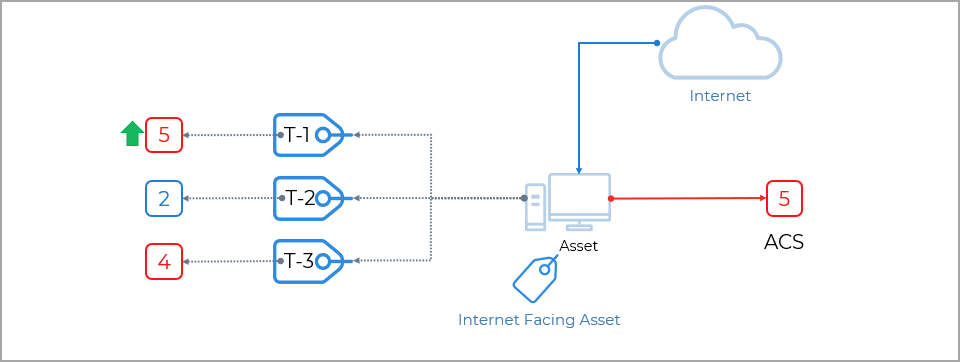
If an asset has multiple tags associated with different asset criticality scores, the maximum asset criticality score among the tags will be considered. For example, if the maximum asset criticality score among the tags is '4', then '4' is set as the criticality score.
Default Scoring
If tags associated with your assets do not have a criticality score set, by default, the asset criticality score '2' will be applied to that asset. We recommend setting an asset criticality score to ensure accurate risk evaluation.
For more information on configuring Asset Criticality, watch this video.
You can assign business criticality to assets using APIs. See: Asset Management & Tagging API.
Configure Asset Groups
You can configure asset groups. Asset groups give you a convenient way to make logical groupings of the assets you want to scan and report on. You can add your assets (hosts, domains, appliances) to multiple groups as needed. When an asset group is created, Qualys assigns an equivalent asset tag and asset criticality score based on the defined business impact. See: Configure Asset Groups.
Integrate CMDB for Business Context
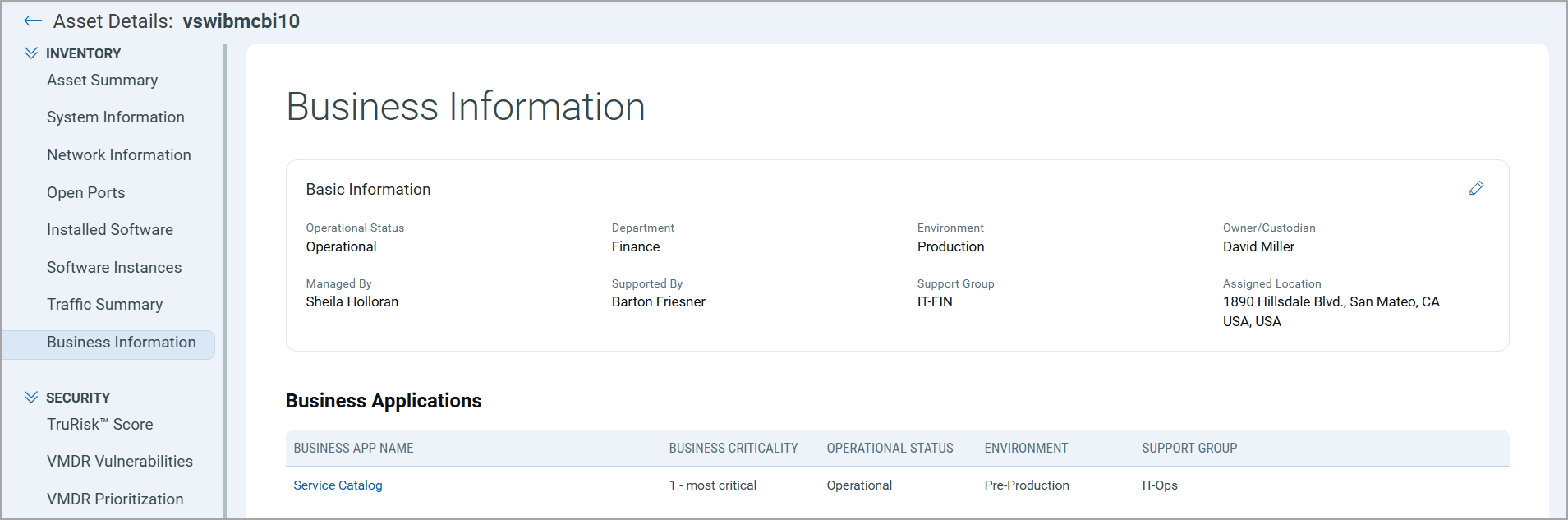
When integrated with ServiceNow CMDB, Qualys VMDR automatically imports business criticality for assets.
You must have a Qualys CSAM subscription to use CMDB functionality.
Business Criticality Mapping
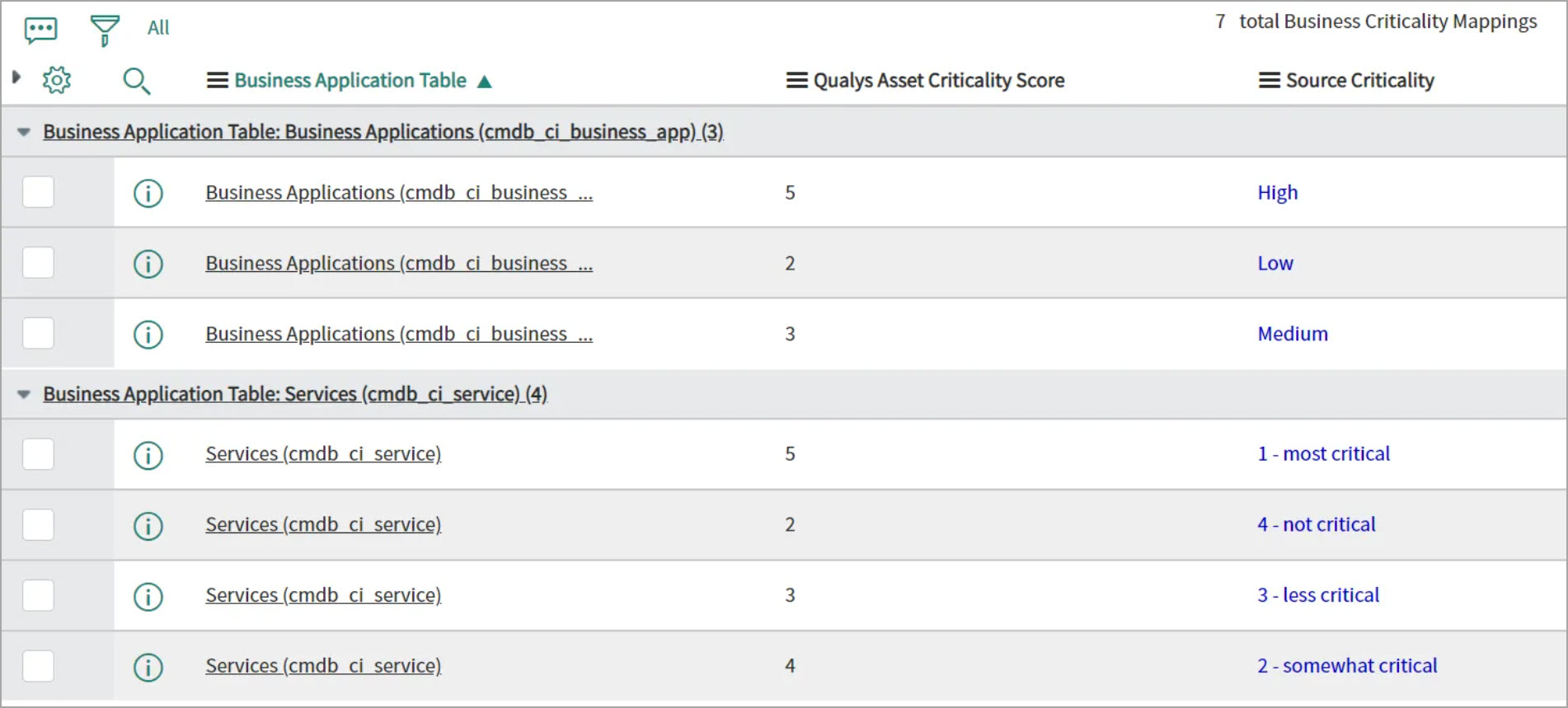
The mapping of business capabilities is a crucial step in calculating the Asset Criticality Score from App/Service Business Criticality.
The business criticality mappings provide a connection between the Business Applications Criticality and the Qualys Criticality. The business-criticality mapping will be used when creating the tags for the asset criticality score. Asset criticality will be mapped to Business Name tags only.
When CMDB Is Not Available
For organizations without an accurate CMDB, asset tagging is a key capability for operationalizing Qualys TruRisk™.