Privilege Level for Cisco Wireless LAN Controller
A Cisco Wireless LAN Controller (WLC) is a centralized platform that manages and controls wireless access points, security policies, and WLAN configurations across an enterprise network. The controller’s configuration and security settings are securely collected to evaluate policy compliance.
This provides accurate visibility into wireless security posture, reduces compliance gaps and audit findings, and enables faster, risk-based remediation of misconfigurations.
Configuration of Cisco Wireless LAN Controller
Users can be added through both the User Interface and Command Line Interface (CLI). Follow the steps to configure the username and password.
Configuring username and password on Graphical User Interface
- Login to your Cisco account.
- Click Advanced > Management > Local Management Users > New.
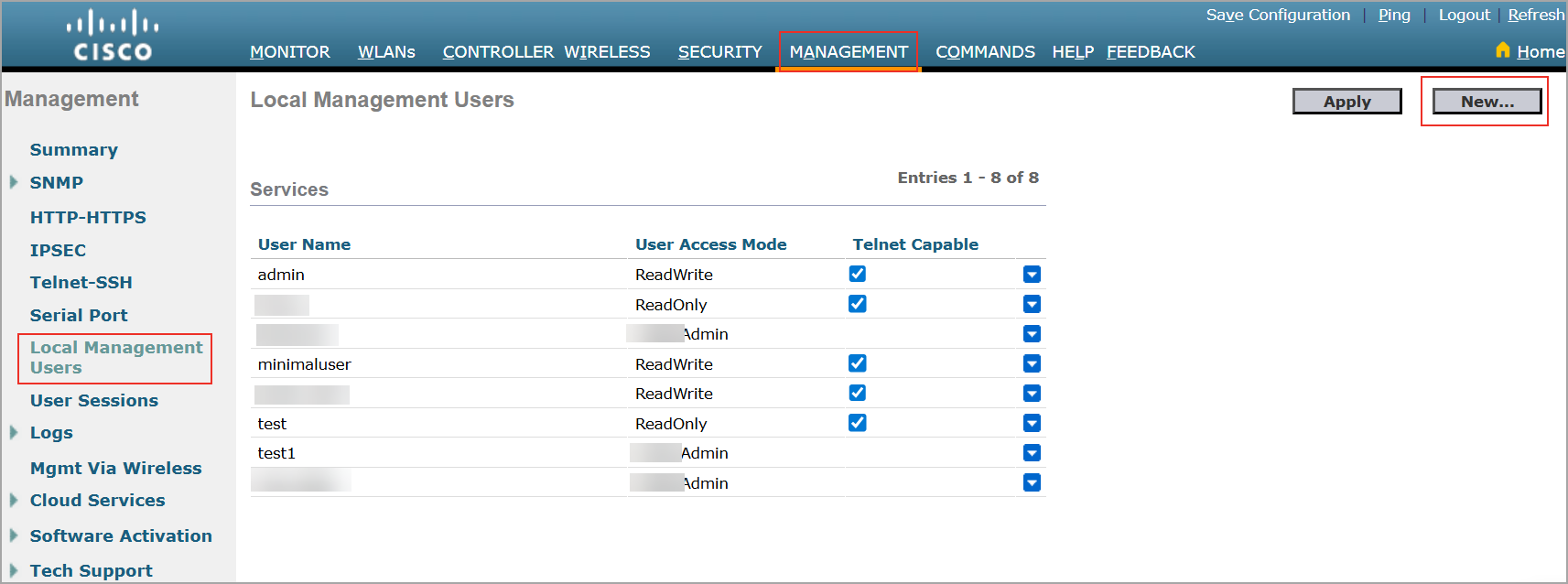
- Enter the User Name, Password, and Confirm Password.
Username and password are case-sensitive and can contain up to 24 ASCII characters. Username and password cannot contain spaces.
- Select User Access Mode as ReadWrite from the list.
- Click Apply.
Configuring username and password on Command Line Interface (CLI)
- Enter the command
config mgmtuser add username password read-write descriptionto configure a username and password.
This creates a username-password pair with read-write privileges. For example,config mgmtuser add scanuser user@123 read-write "user with read-write permission". -
Enter the command
show mgmtuserto list the configured users.
Users with read-write privileges can run all required commands for signatures. It is recommended to have read-write permission to scan & execute all commands.