Reopening Tickets
Resolved and Closed tickets may be reopened automatically by the service or selectively by users. The following diagram illustrates how Resolved and Closed tickets are reopened.
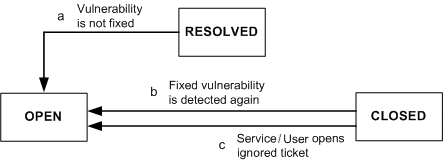
Tickets may be reopened by the following methods
- If a user moves a ticket to the Resolved state and the related vulnerability is detected during the next scan, the ticket is automatically reopened. A user may also reopen a ticket from the Resolved state by editing the ticket.
- If the service moves a ticket to the Closed/Fixed state and the related vulnerability is detected during the next scan, the ticket is reopened.
- If a ticket is in the Closed/Ignored state, then a user may reopen the ticket at any time by editing the ticket. You can also automatically reopen Closed/Ignored tickets at a set time.