Policy Audit Release 1.17
October 12, 2026
This release introduces improved control statements for System Defined Controls (SDCs) and email notifications when a compliance scan fails. It also adds import and export support for Network UDCs, auto discovery for IBM DB2 and PostgreSQL authentication records, recurring timeframe options in policy report templates, and new QQL tokens to search policies. Policy Audit now supports Nutanix CVM, PostgreSQL 18.x, Oracle Database 26ai, Cisco NX-OS 8.x, 9.x, and 10.x, and VMware NSX Manager and NSX Edge 4.x, along with new Unix technologies for UDCs and several customer-reported fixes.
NEW FEATURE
Improved Control Statements for SDCs
What's New for You
You can now use clearer, more accurate control statements for system defined controls.
You can now use clearer, more accurate control statements for System Defined Controls (SDCs). Each new statement names the setting, service, or parameter that the control checks.
Previously, control statements lacked sufficient information, making it difficult to understand what each control evaluates. However, when the new control statements are enabled, you can see exactly what each control checks without opening its details.
| Improved Control Statements | Existing Control Statements |
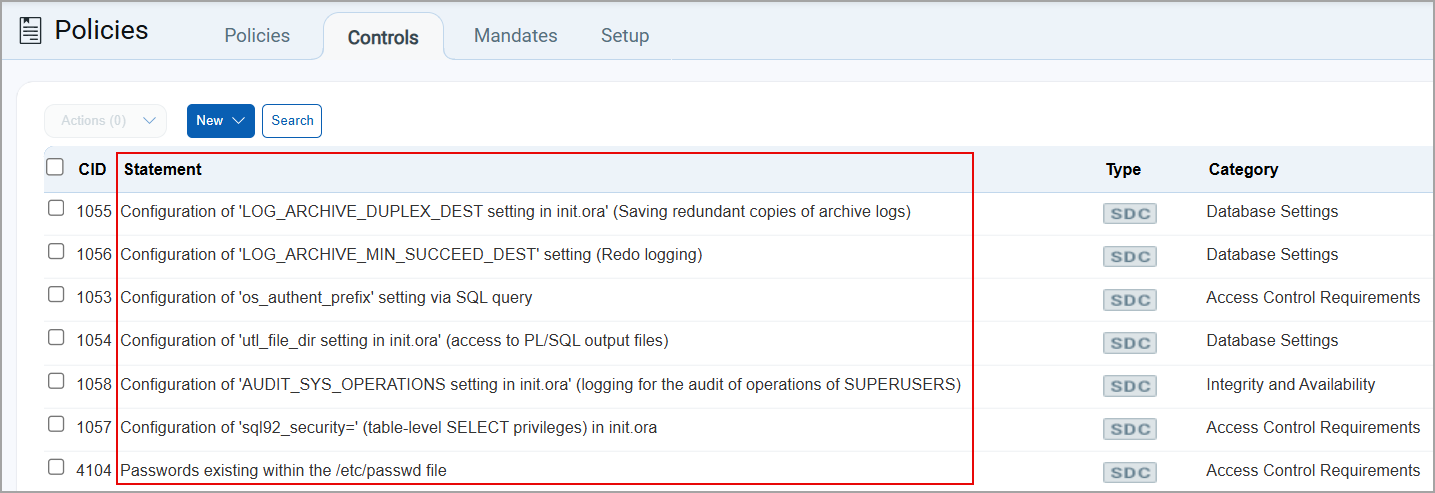 |
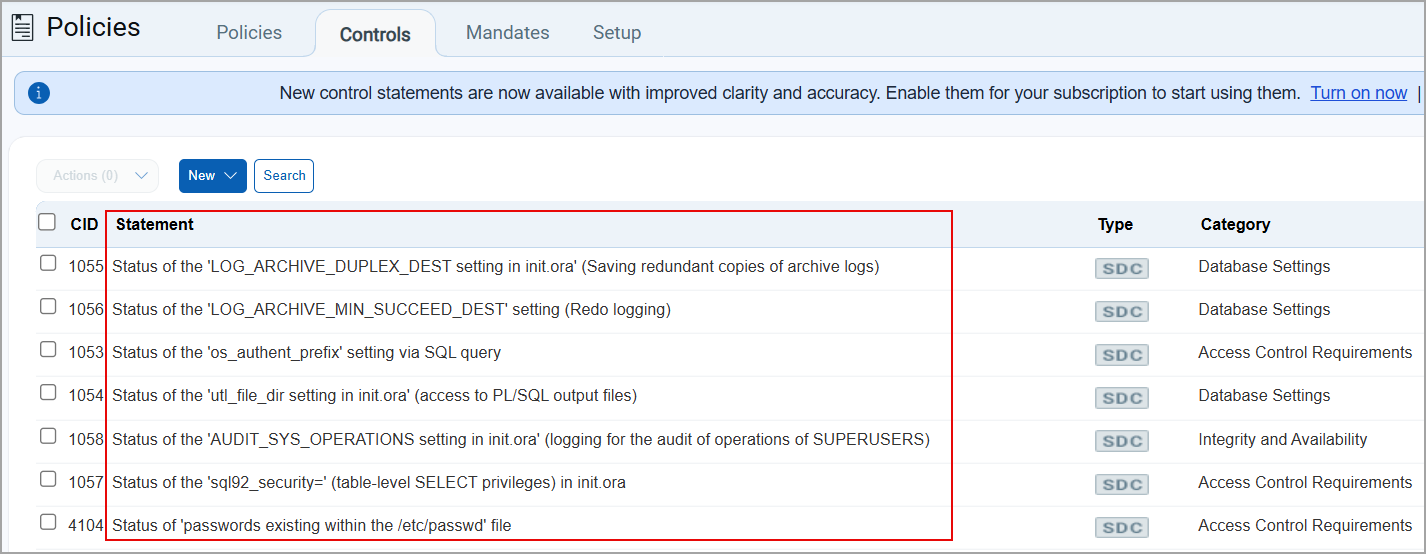 |
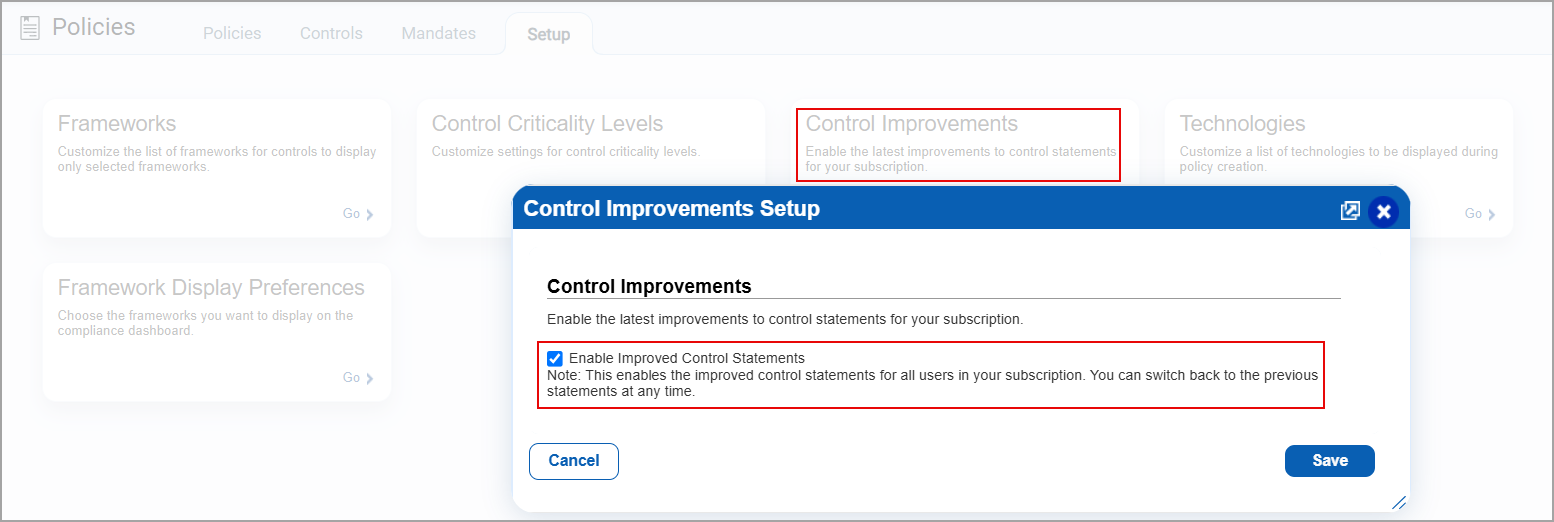
To enable the new control statements, navigate to Policies > Setup > Control Improvements. The Control Improvements Setup window is displayed.
Select Enable Improved Control Statement. A confirmation message is displayed. Select Save.
The new control statements are displayed in the Controls tab for SDCs.
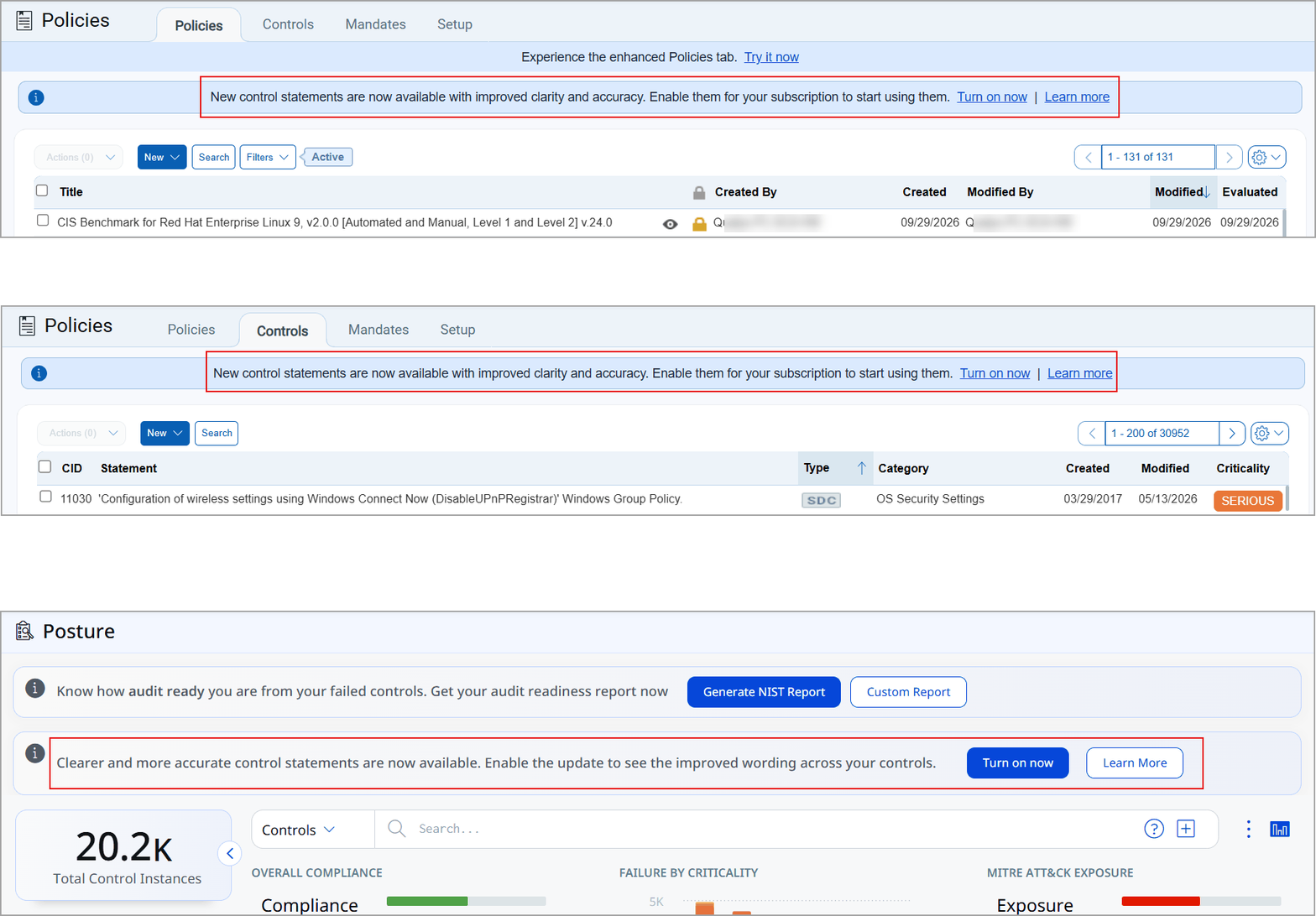
You can also enable the new control statements from the Policies, Controls, and Posture tab. In the new banner, select Turn on now. The Control Improvements Setup window is displayed.
Select the Enable Improved Control Statements checkbox. Select Save.
The new control statements are displayed in the Controls tab for SDCs.
- Only manager users can enable or disable improved control statements option.
- By default, the improved control statements are disabled. You can enable them from the Setup tab or using the banner in the Policies, Controls, or Posture tab.
NEW FEATURE
Get Notified When a Compliance Scan Fails
What's New for You
You can now receive email notifications when a compliance scan enters an error state, helping you identify scan failures without manually checking scan status.
Previously, notifications were available for scan completion and certain pre-launch conditions, but no notification was sent when a scan failed after launch.
When the scan notification is enabled, an email is sent to the scan owner and the following users when a scan enters an error state:
- Managers, auditors, and users with compliance access who are assigned to the asset groups in the scan.
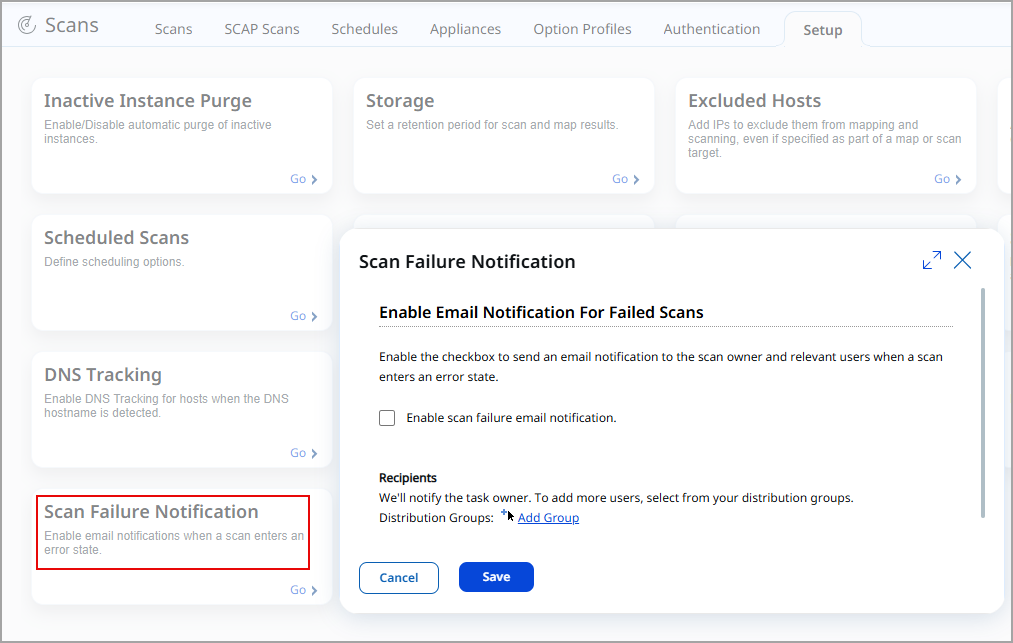
- Any additional recipients from distribution groups you add on the Scan Failure Notification setup page (up to 50 distribution groups).
The notification includes the following scan details to help you identify and address scan failures more quickly:
- Scan title and scan reference
- Scan date and launch type (Scheduled or On demand)
- Targets in the scan
- Scan status
- Failure time and failure reason
To enable the email notification, navigate to Scans > Setup > Scan Failure Notification. You can enable or disable scan failure email notification and configure additional recipients using Distribution Groups.
- Only manager users can enable or configure this setting.
- Scan Failure Notification is disabled by default.
- At least one Distribution Group must already exist in your subscription if you want to add additional recipients.
- Configure this setting once at the subscription level to cover all your scan schedules.
New Feature
UDC Support for New Technologies
What's New for You
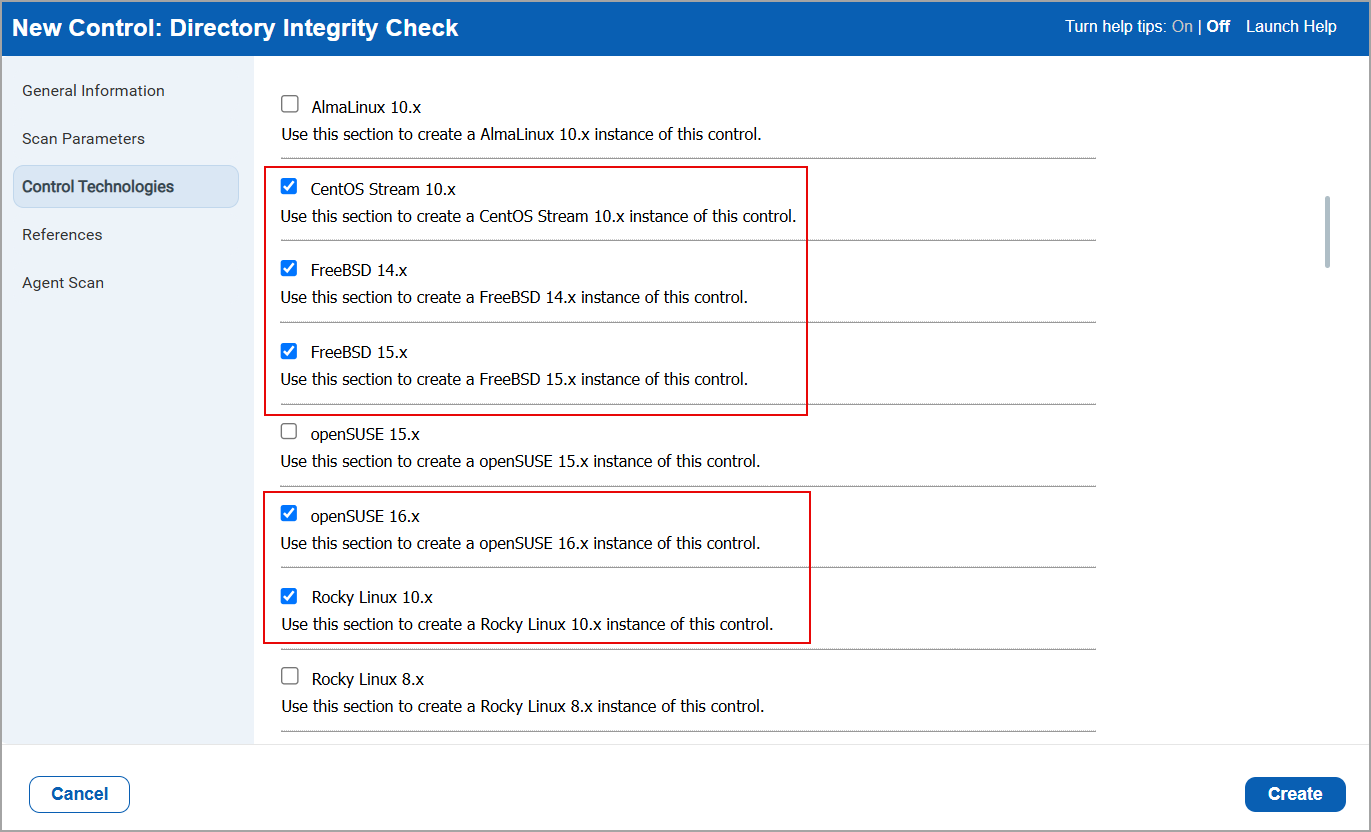
You can now select CentOS Stream 10.x, FreeBSD 14.x, FreeBSD 15.x, openSUSE 16.x and Rocky Linux 10.x technologies when creating a new control for Unix control types.
The new technologies are supported for scanner based compliance scans. To select these technologies, navigate to:
- Policies > Controls > New > Control > UDC.
The New Control window is displayed. - In the left pane, select Unix Control Types > From the displayed control types, select a control type of your choice.
- Select the technologies CentOS Stream 10.x, FreeBSD 14.x, FreeBSD 15.x, openSUSE 16.x, and Rocky Linux 10.x in the Control Technologies section.
Enhancement
Import and Export Support for Network UDCs
What Changed For You
You can now import and export Network User Defined Controls (UDCs) and policies containing Network UDCs.
Just like UDCs such as Windows, Unix, and Database UDCs, you can now import and export Network UDCs in XML format.
Previously, you could not import or export Network UDCs. Import and export worked only for other UDC types.
Import and Export Network UDCs
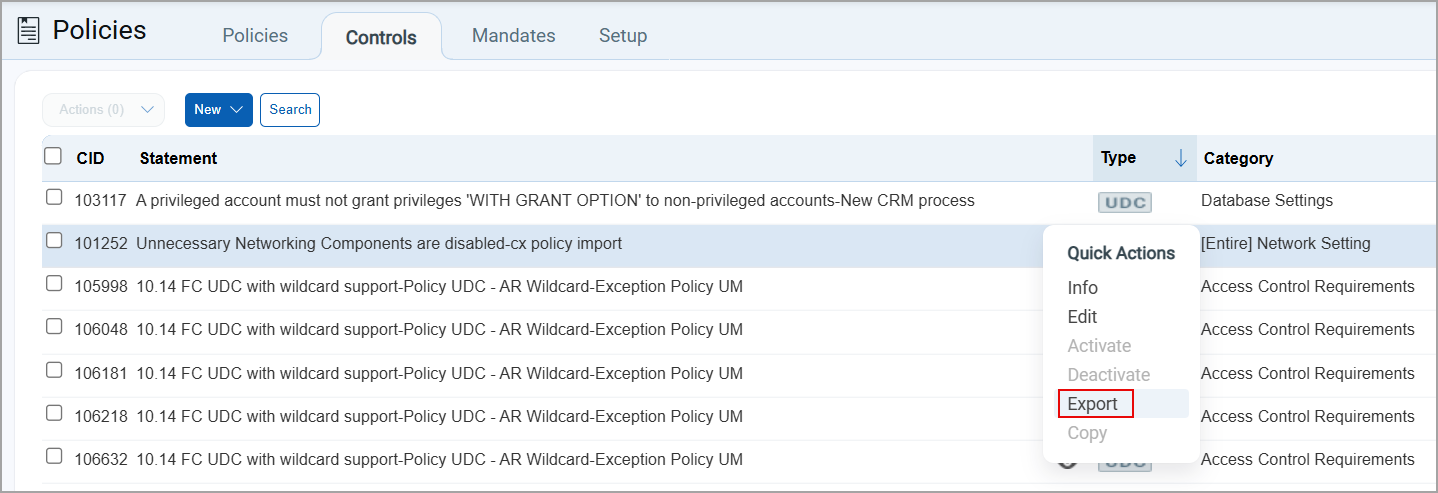
- Export - Navigate to Policies > Controls, select a Network UDC, and then select Quick Actions > Export.
- Import - Navigate to Policies > Controls > New > Import an XML file. In the Import Controls window, select the required UDC file and select Import.
Import and Export Policies with Network UDCs
- Export - Navigate to Policies > Policies, select the required policy, and then select Quick Actions > Export.
- Import - Navigate to Policies > Policies > New > Policy > Import from XML.
Enhancement
Auto Discovery Support for IBM DB2 and PostgreSQL Database Authentication
What Changed For You
You can now use instance discovery and auto-record creation for IBM DB2 and PostgreSQL authentication.
You can automatically generate an authentication record for IBM DB2 and PostgreSQL by scanning your IP address to discover all required information.
Previously, creating authentication records for IBM DB2 and PostgreSQL required manual effort. With this enhancement, you can reduce the time and effort required to create authentication records.
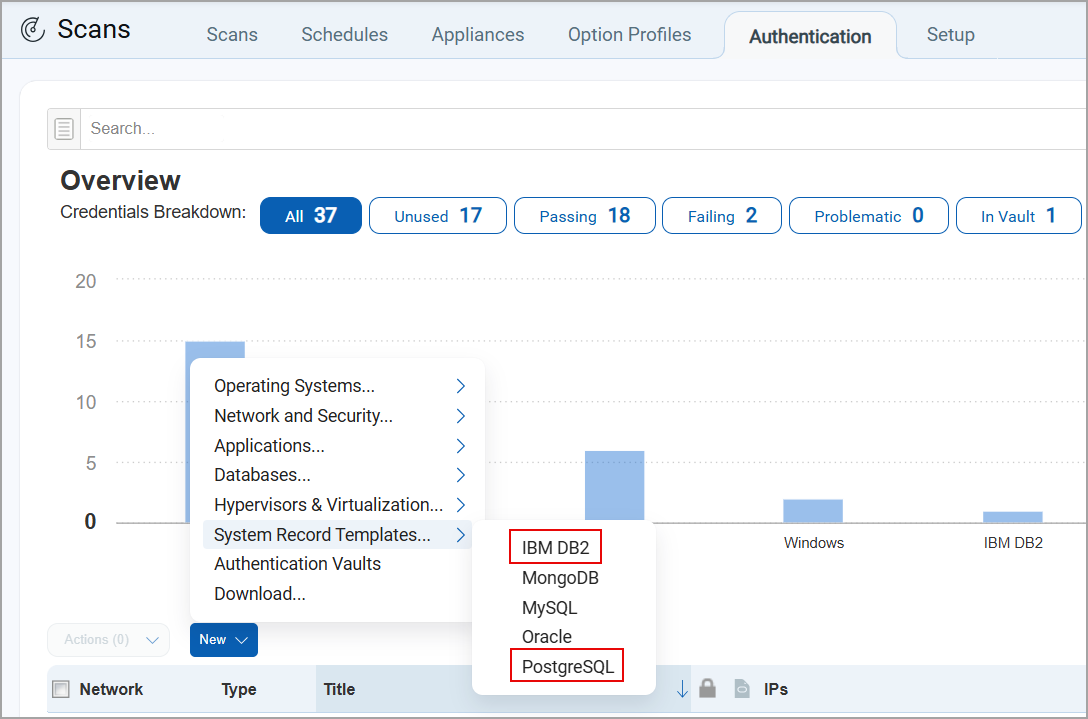
To create a system record template for these technologies, navigate to Scans > Authentication > New > System Record Template.
Select either IBM DB2 or PostgreSQL.
Enhancement
New Timeframe Options in Compliance Policy Report Templates
What Changed For You
You can now have two new timeframe options: the date of every month and the day of every week for policy report templates.
Compliance policy report templates now offer two new timeframe options: Date of every month and Day of every week.
Previously, you could limit the report timeframe only to a fixed date or a predefined relative period. To report on the current month or week, you had to manually update the Limit Timeframe date in each template at the start of every reporting period.
With the new timeframe options, the template automatically determines the date range each time the report is generated. The range starts from the selected date or day and ends on the day the report is generated.
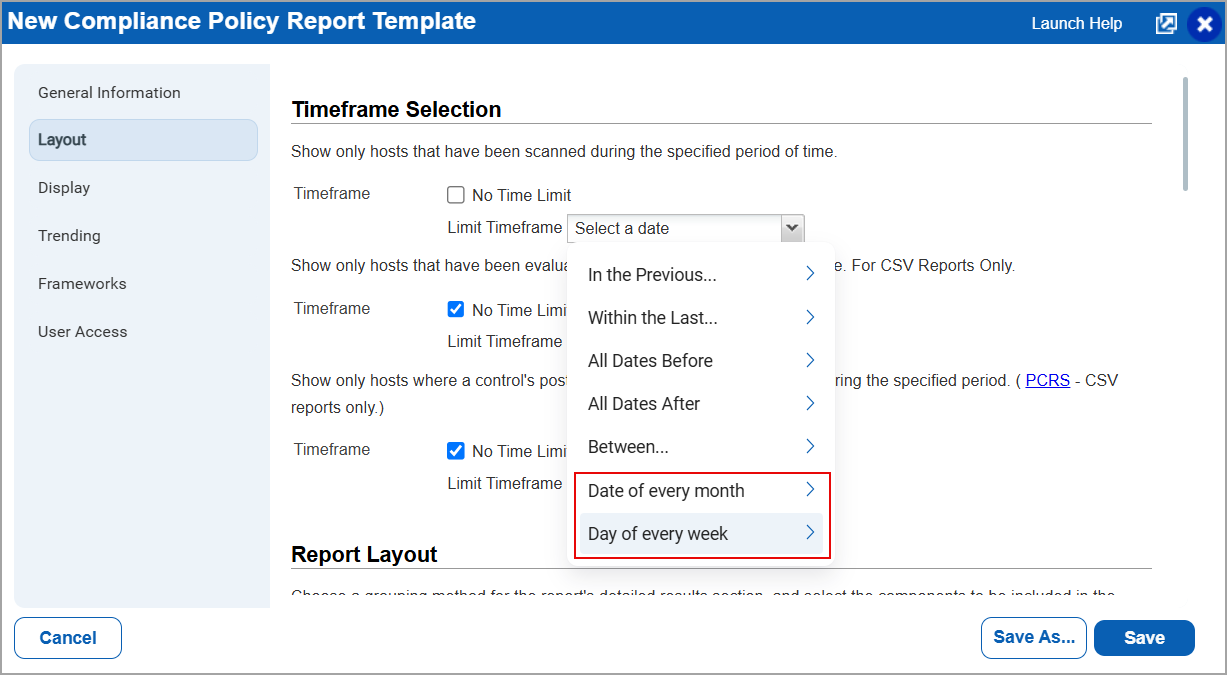
You can select the day and date from the following options:
- Date of every month - Select a date from 1 to 31. The report includes data from the selected date of the current month till today. If the selected date has not yet occurred in the current month, the report starts from that date in the previous month. For example, if you select 1, the report includes data from the first day of the current month till today.
- Day of every week - Select a day from Monday to Sunday. The report includes data from the most recent occurrence of the selected day till today. For example, if you select Monday, the report includes data from the beginning of the current week till today.
You can use these new timeframe options with all three timeframe filters available in the template:
- Limit Timeframe (scan date)
- Evaluation Limit Timeframe
- Last Updated Limit Timeframe
To configure a timeframe, go to Reports > Templates > New > Policy Template > Layout > Timeframe Selection, select Date of every month or Day of every week, and then select the required date or day.
You can also apply these timeframe options to existing policy report templates. The selected options are retained when you copy a template using Save As.
Token
New QQL Tokens to Search Policies
What Changed For You
You can now search for policies using Qualys Query Language (QQL) tokens based on the user who modified them, the modified date, and their related asset groups.
We support the following three new QQL tokens:
- asset.groups
- policy.modifiedBy
- policy.modifiedDate
We have introduced the following new QQL tokens that help you search and filter policies more efficiently:
| Token | Description |
|---|---|
asset.groups |
Search policies based on the asset group associated to the specific policy.
Example:
The asset groups with the 'Windows server 2012' is displayed in the result.
The asset groups with '10.11.70.44 STIG AG - AR','WIN_AG' is displayed in the result. |
policy.modifiedBy |
Search for policies modified by specific users.
Example:
Policies modified by John Doe are displayed. |
policy.modifiedDate |
Use this token to search for policies modified on a particular date.
Example:
Policies modified in the date range are displayed. |
New Feature
Support for New Technologies
What's New for You
We have now added support for the technologies Nutanix CVM, PostgreSQL 18.x, Oracle Database 26ai, Cisco NX - OS 8.x, Cisco NX - OS 9.x, Cisco NX - OS 10.x, VMware NSX Manager 4.x, and VMware NSX Edge 4.x.
Nutanix CVM
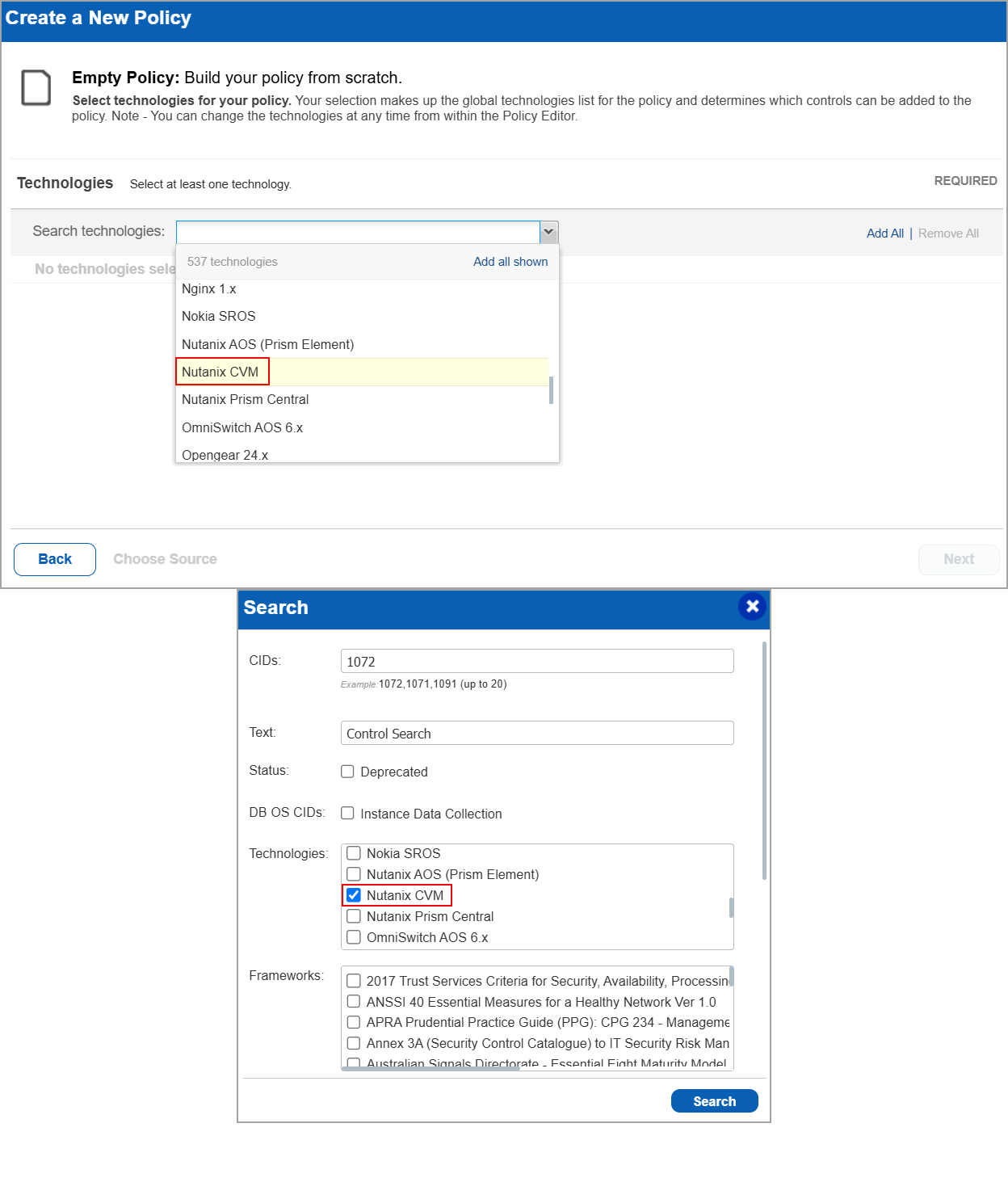
Nutanix CVM technology is now supported for Policy Audit authenticated scans using scanners. This technology is now available for use at the following places:
Policy Editor - When you create or edit a policy, Nutanix CVM is now available in the list of supported technologies.
Search Controls - When you search for controls, you see Nutanix CVM in the list of technologies. Go to Policies > Controls > Search and under Technologies, select Nutanix CVM in the list.
Authentication Report
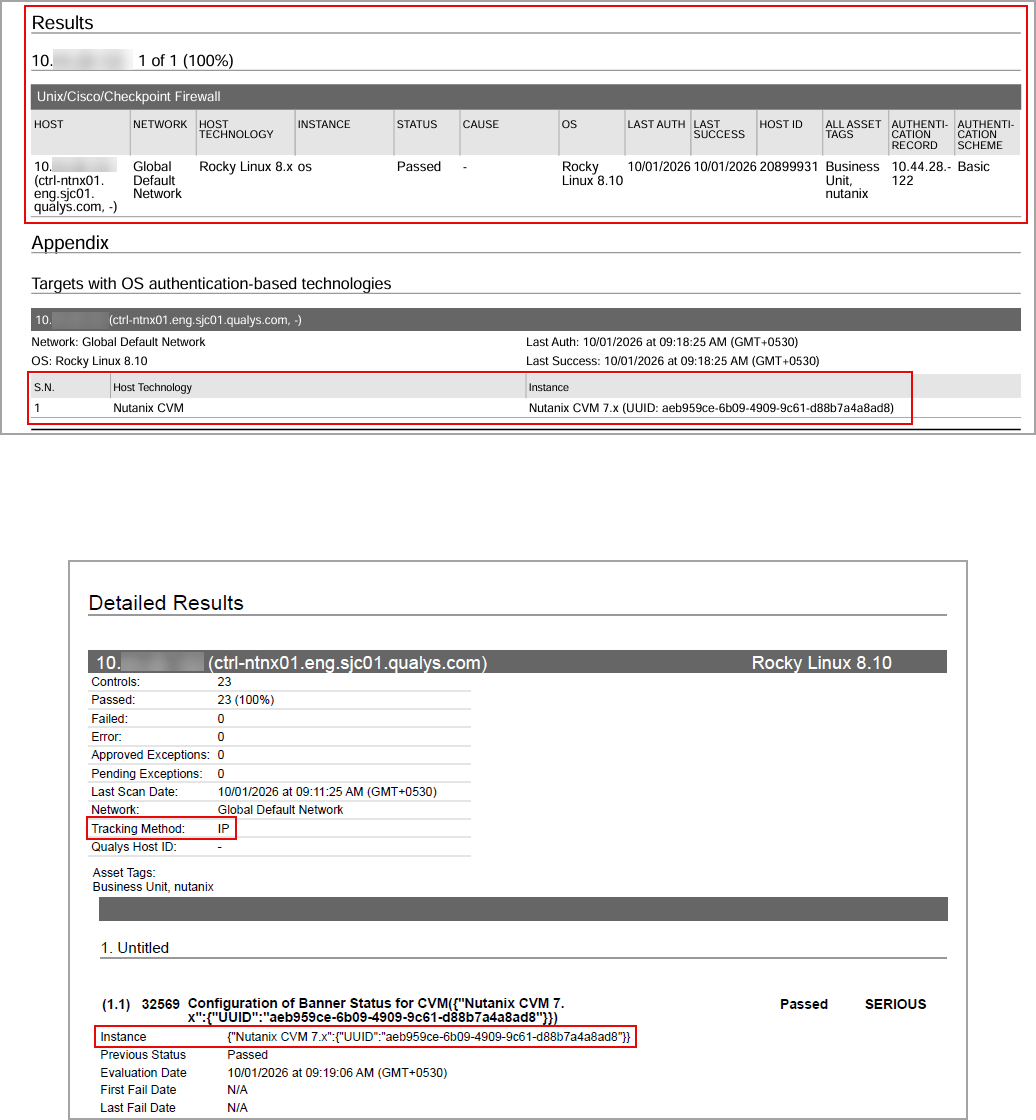
You can view Nutanix CVM in the authentication report. In the Results section of the report, the Nutanix CVM details are displayed.
Sample Report
The sample report displays the tracking method and the instances for the scanner.
In Compliance Reports, you can view the instances of Nutanix CVM for scanned hosts. The sample report displays the scanner's tracking method as IP with an instance of Nutanix CVM.
PostgreSQL 18.x
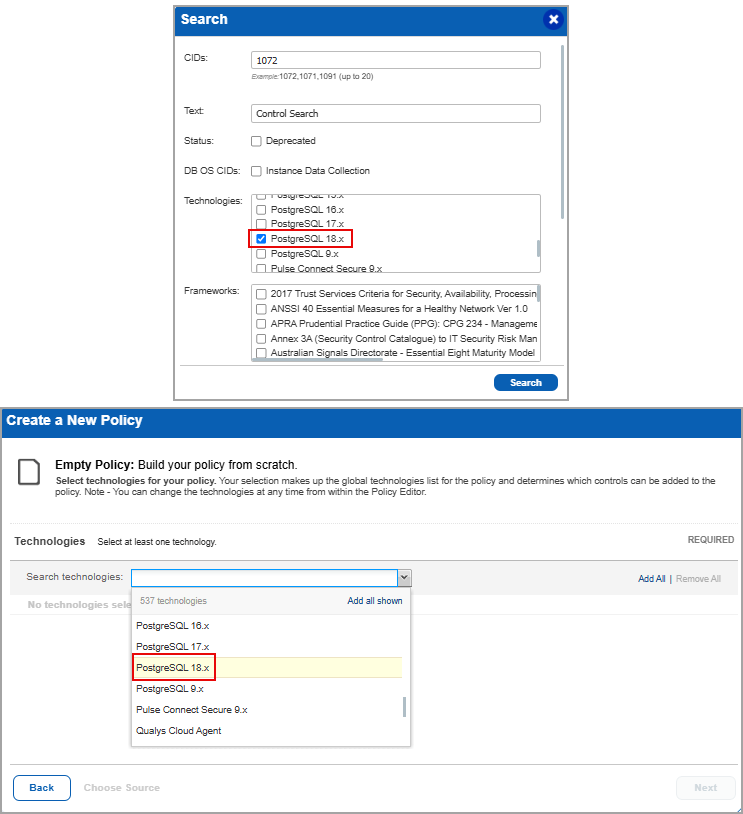
PostgreSQL 18.x technology is now supported for Policy Audit authenticated scans using agent and scanner. This technology is now available for use at the following places:
Policy Editor - When you create or edit a policy, PostgreSQL 18.x is now available in the list of supported technologies.
Search Controls - When you search for controls, you see PostgreSQL 18.x in the list of technologies. Go to Policies > Controls > Search and under Technologies, select PostgreSQL 18.x in the list.
Authentication Report
You can view the PostgreSQL 18.x in the authentication report. In the Results section of the report, the PostgreSQL 18.x details are displayed.
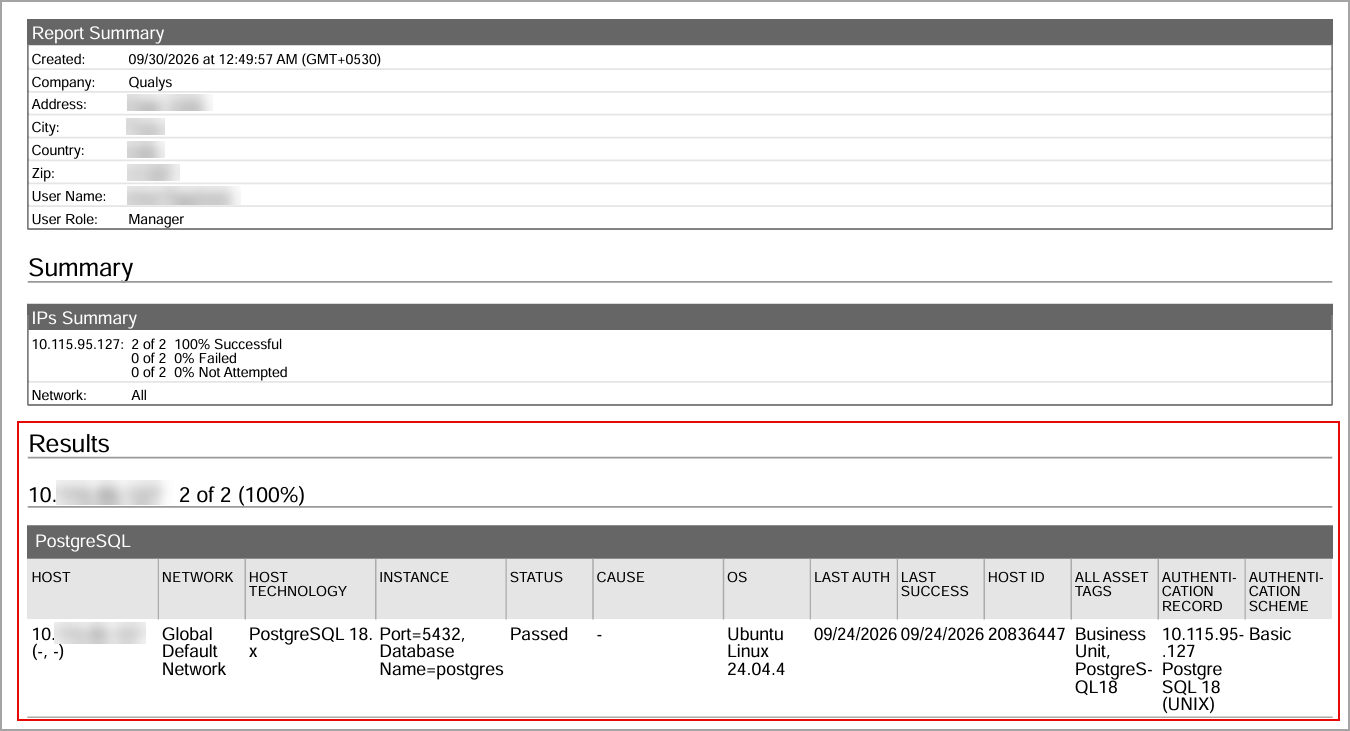
Sample Report
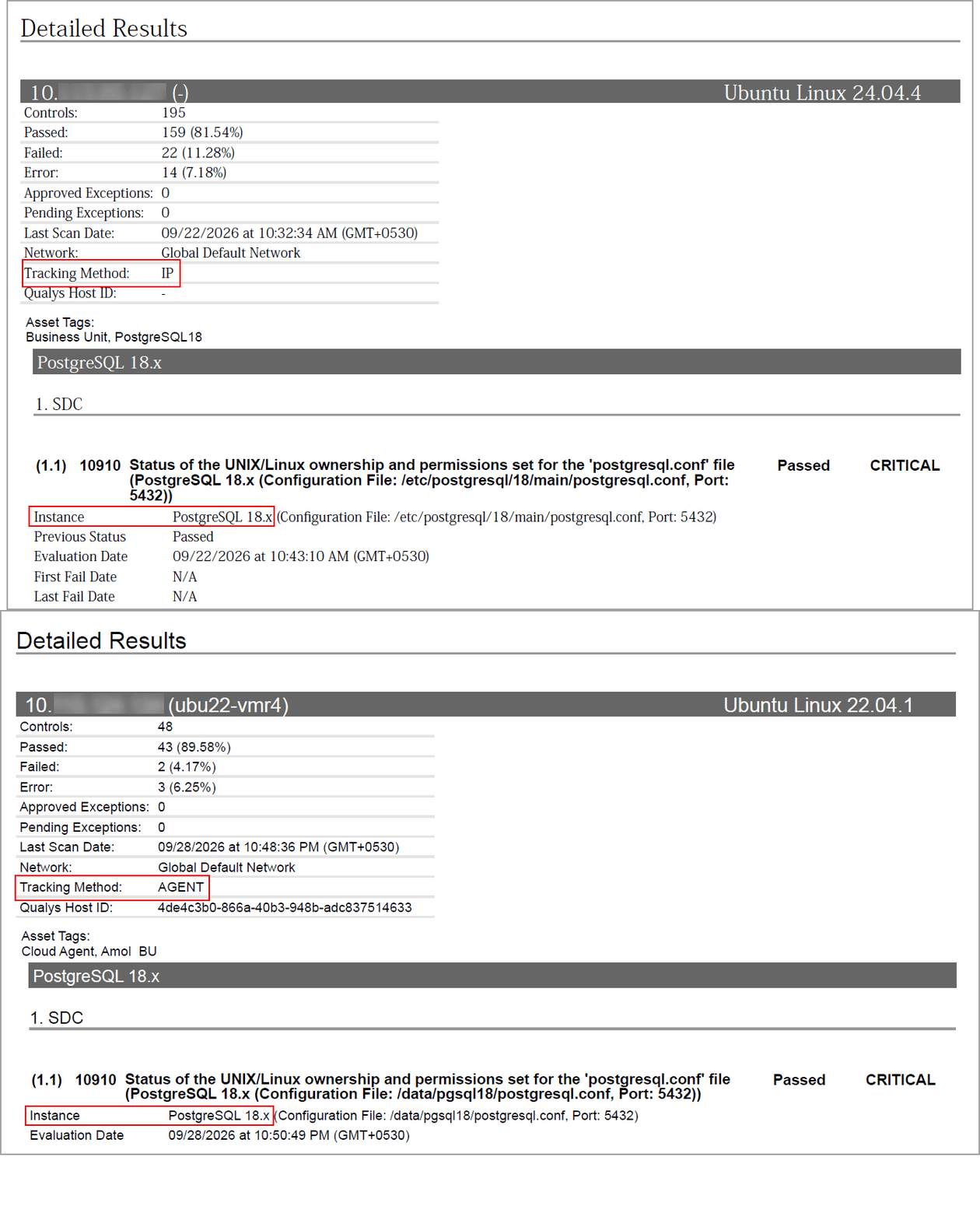
The sample report displays the tracking method and the instances for the scanner and the agent:
- Scanner - In Compliance Reports, you can view the instances of PostgreSQL 18.x for scanned hosts. The sample report displays the scanner's tracking method as IP with an instance of PostgreSQL 18.x.
- Agent - In Compliance Reports, you can view the instances of PostgreSQL 18.x for scanned hosts. The sample report displays the tracking method for the agent as AGENT with an instance of PostgreSQL 18.x.
Oracle Database 26ai (Multitenant)
Oracle Database 26ai technology is now supported for Policy Audit authenticated scans using agent and scanner. This technology is now available for use at the following places:
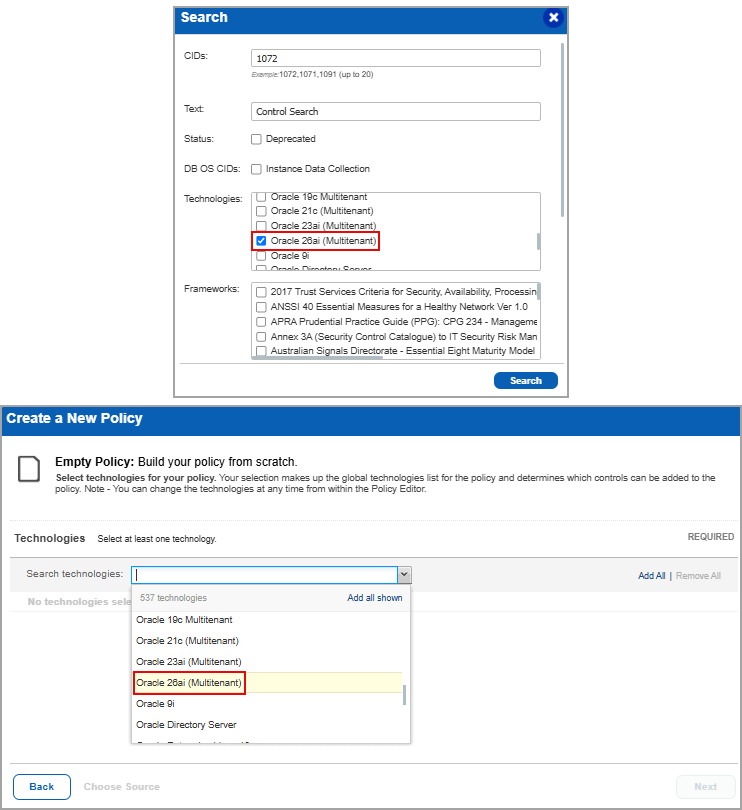
Policy Editor - When you create or edit a policy, Oracle Database 26ai (Multitenant) is now available in the list of supported technologies.
Search Controls - When you search for controls, you see Oracle Database 26ai (Multitenant) in the list of technologies. Go to Policies > Controls > Search and under Technologies, select Oracle Database 26ai (Multitenant) in the list.
Authentication Report
You can view the Oracle Database 26ai (Multitenant) in the authentication report. In the Results section of the report, the Oracle Database 26ai (Multitenant) details are displayed.
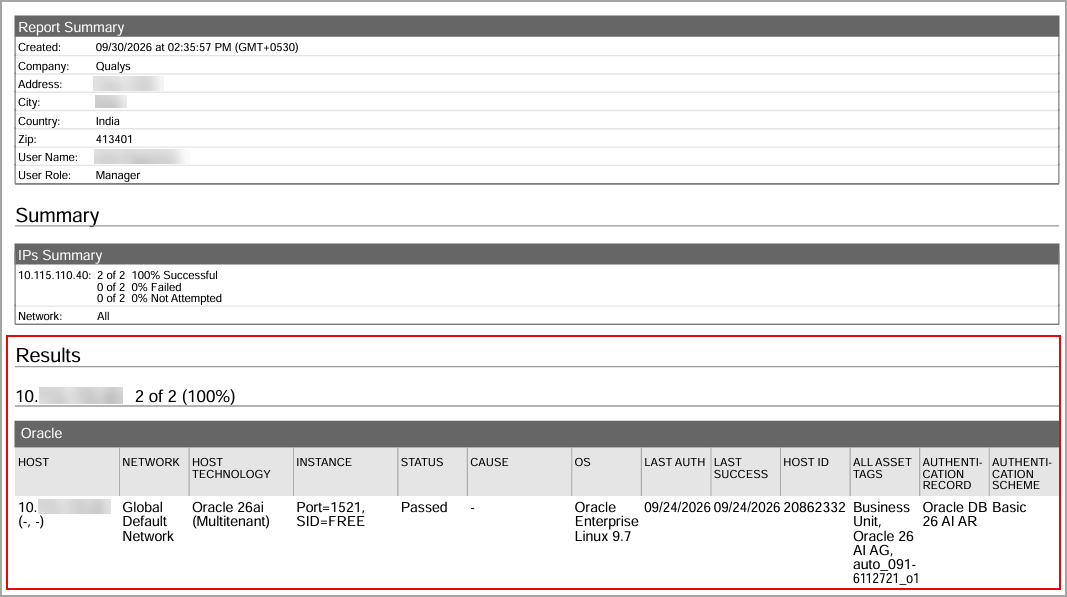
Sample Report
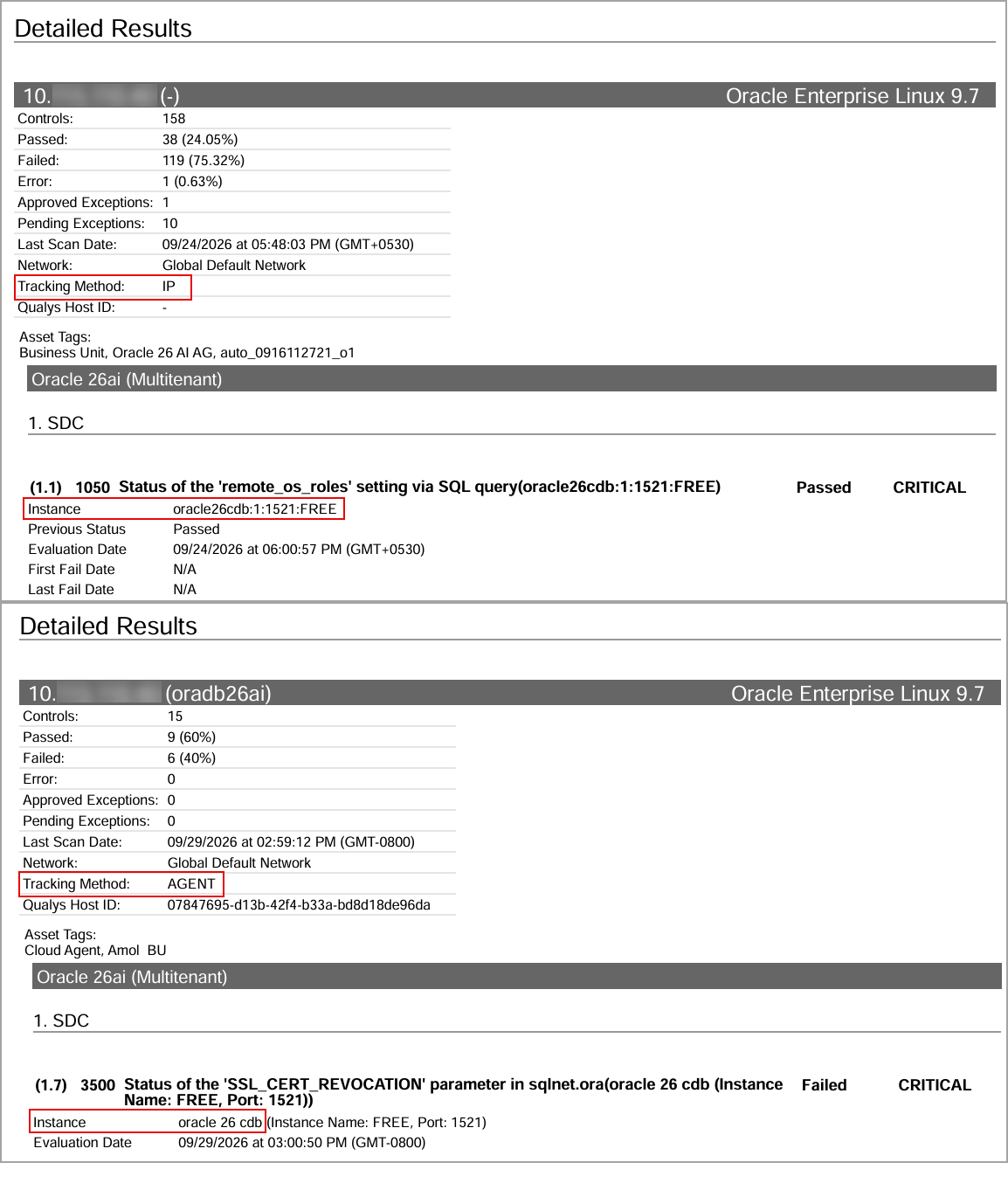
The sample report displays the tracking method and the instances for the scanner and the agent:
- Scanner - In Compliance Reports, you can view the instances of Oracle Database 26ai (Multitenant) for scanned hosts. The sample report displays the scanner's tracking method as IP with an instance of Oracle Database 26ai (Multitenant).
- Agent - In Compliance Reports, you can view the instances of Oracle Database 26ai (Multitenant) for scanned hosts. The sample report displays the tracking method for the agent as AGENT with an instance of Oracle Database 26ai (Multitenant).
Cisco NX-OS 8.x, 9.x, and 10.x
Cisco NX-OS 8.x, 9.x, and 10.x technologies are now supported for Policy Audit using Out-of-Band Configuration Assessment (OCA). This technology is now available for use at the following places:
Policy Editor - When you create or edit a policy, Cisco NX-OS 8.x, 9.x, and 10.x are now available in the list of supported technologies.
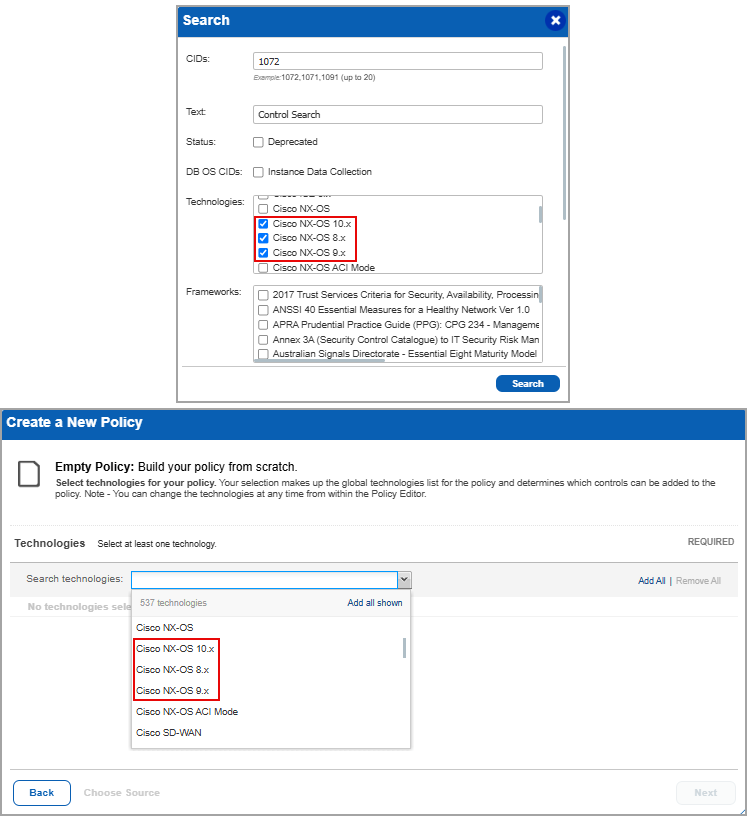
Search Controls - When you search for controls, you see Cisco NX-OS 8.x, 9.x, and 10.x in the list of technologies. Go to Policies > Controls > Search and under Technologies, select Cisco NX-OS 8.x, 9.x, and 10.x from the list.
Policy Report
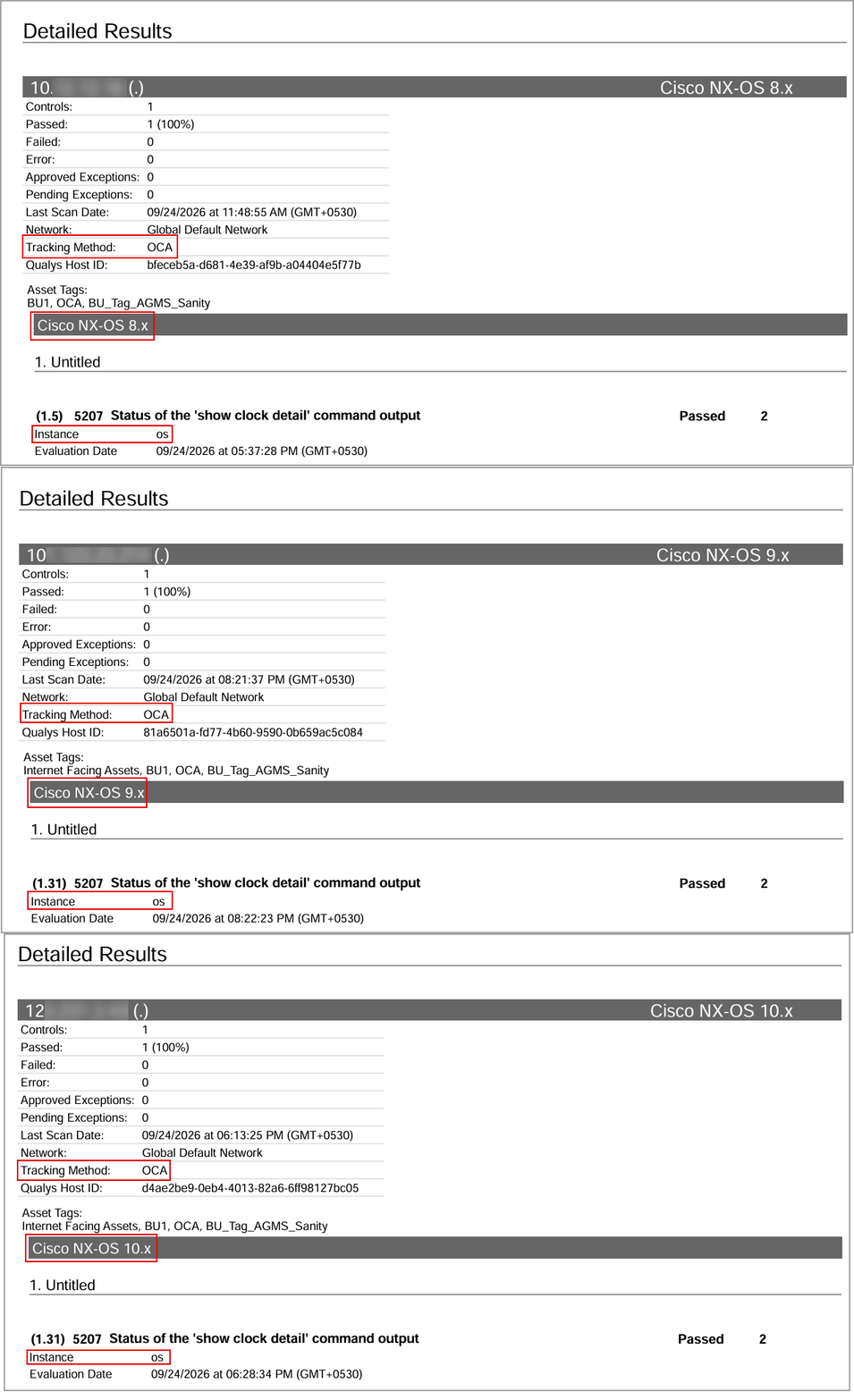
You can view the Cisco NX-OS 8.x, 9.x, and 10.x in the policy report. In the Detailed Results section of the report, the Cisco NX-OS 8.x, 9.x, and 10.x details are displayed.
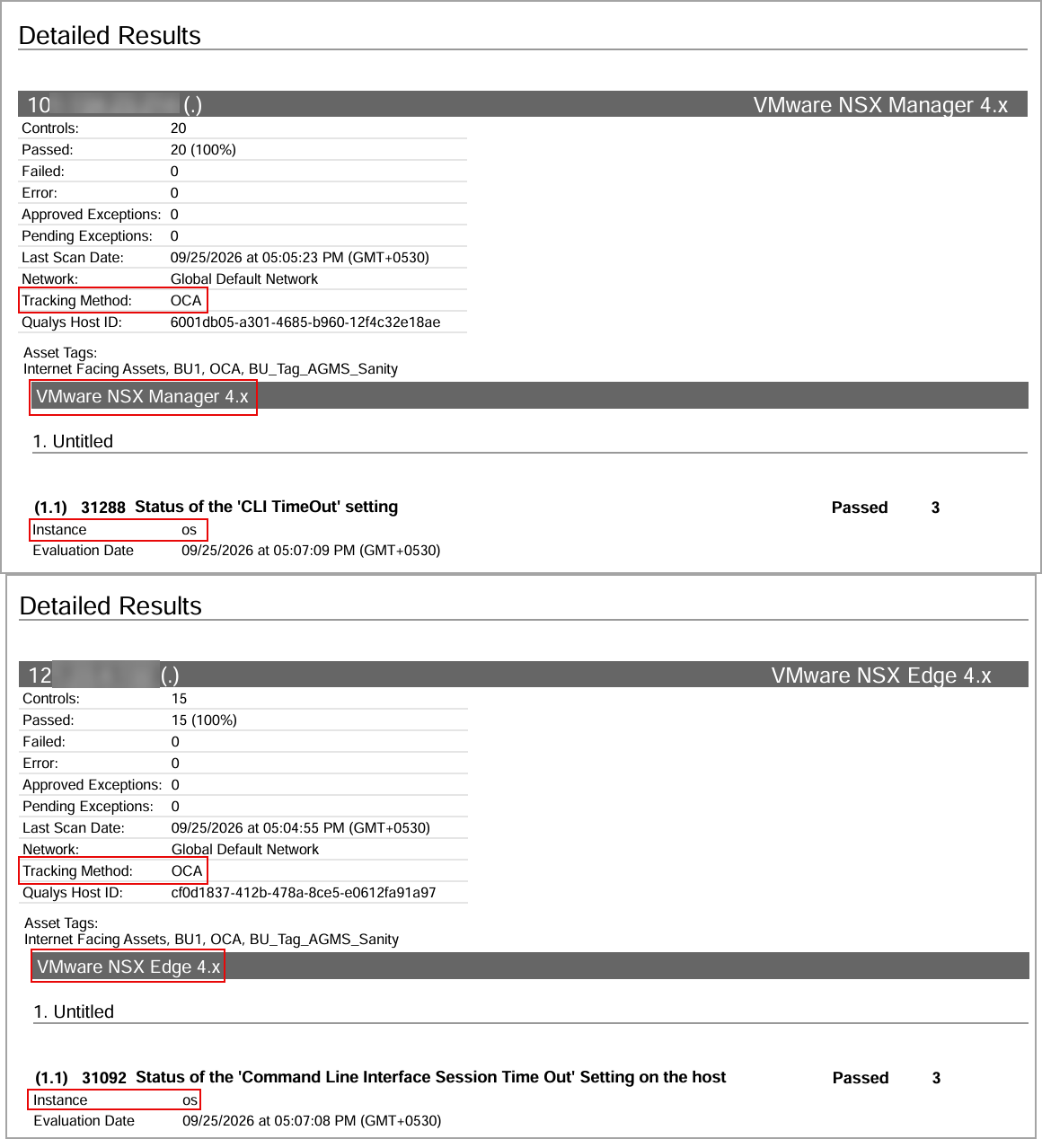
VMware NSX Manager 4.x and VMware NSX Edge 4.x
VMware NSX Manager 4.x and VMware NSX Edge 4.x technologies are now supported for Policy Audit using Out-of-Band Configuration Assessment (OCA). This technology is now available for use at the following places:
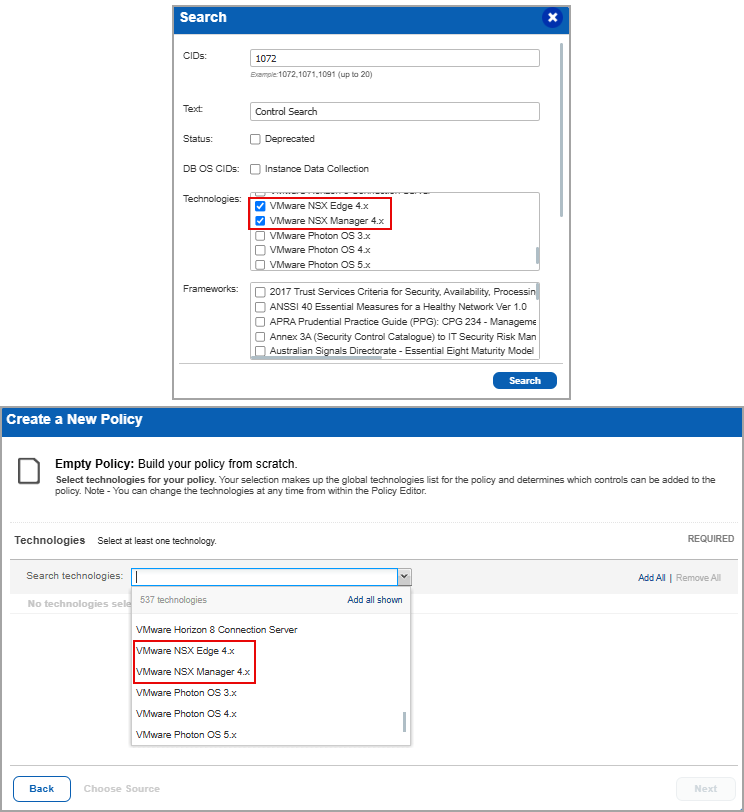
Policy Editor - When you create or edit a policy, VMware NSX Manager 4.x and VMware NSX Edge 4.x are now available in the list of supported technologies.
Search Controls - When you search for controls, you see VMware NSX Manager 4.x and VMware NSX Edge 4.x in the list of technologies. Go to Policies > Controls > Search and under Technologies, select VMware NSX Manager 4.x and VMware NSX Edge 4.x in the list.
Policy Report
You can view VMware NSX Manager 4.x and VMware NSX Edge 4.x in the policy report. In the Detailed Results section of the report, the VMware NSX Manager 4.x and VMware NSX Edge 4.x details are displayed.
Fix
Issues Addressed
The following reported and notable customer issues are fixed in this release:
| Component/Category | Description |
|---|---|
| PA - Network UDC | When users selected Info from the Quick Action menu for a Network User Defined control, the Technologies Included tab on the Technical Control Information page did not show the scan parameter values. This is now resolved. The tab shows the scan parameter values for the Network User Defined Control. |
| PA - Scan Schedule | When users scheduled scans with a duration limit, the scans paused but did not resume automatically. The scans remained in the Paused status. This issue is now resolved. The scans now resume automatically at the configured time. |
| PA - New UI | When users searched for posture data in the Posture tab, a discrepancy was observed between the asset count on the posture listing page and the count in the exported CSV file. This is now resolved. The count now matches the exported data. |
| SCA | When users launched Compliance or SCA scans on Cloud Agent assets in subscriptions with native IPv6 enabled, the Cloud Agent scan completed successfully. However, the last scan date was not updated for some assets. This is now resolved. Scan results are now processed successfully for these assets, and the scan dates have been updated as expected. |