Qualys Enterprise TruRisk Platform (VMDR)
Limited Customer Release Notes
Version 2.3
April 01, 2025
What is a TruRisk Report
In this release, we have introduced a new type of report, the TruRisk Report. This report provides a clear and actionable assessment of your enterprise's security posture, highlighting critical vulnerabilities and risks while offering strategic guidance for their mitigation.
The TruRisk Report empowers decision-makers at all levels:
- CISOs: Support for board-level reporting and strategic resource allocation
- Security Teams: Focused remediation guidance that maximizes impact with available resources
- Executives: Clear visibility into security posture without technical complexity
By moving beyond traditional vulnerability metrics to business-centric security intelligence, the TruRisk Report enables organizations to make informed security decisions aligned with enterprise risk management objectives.
What Insights Does This Report Offer
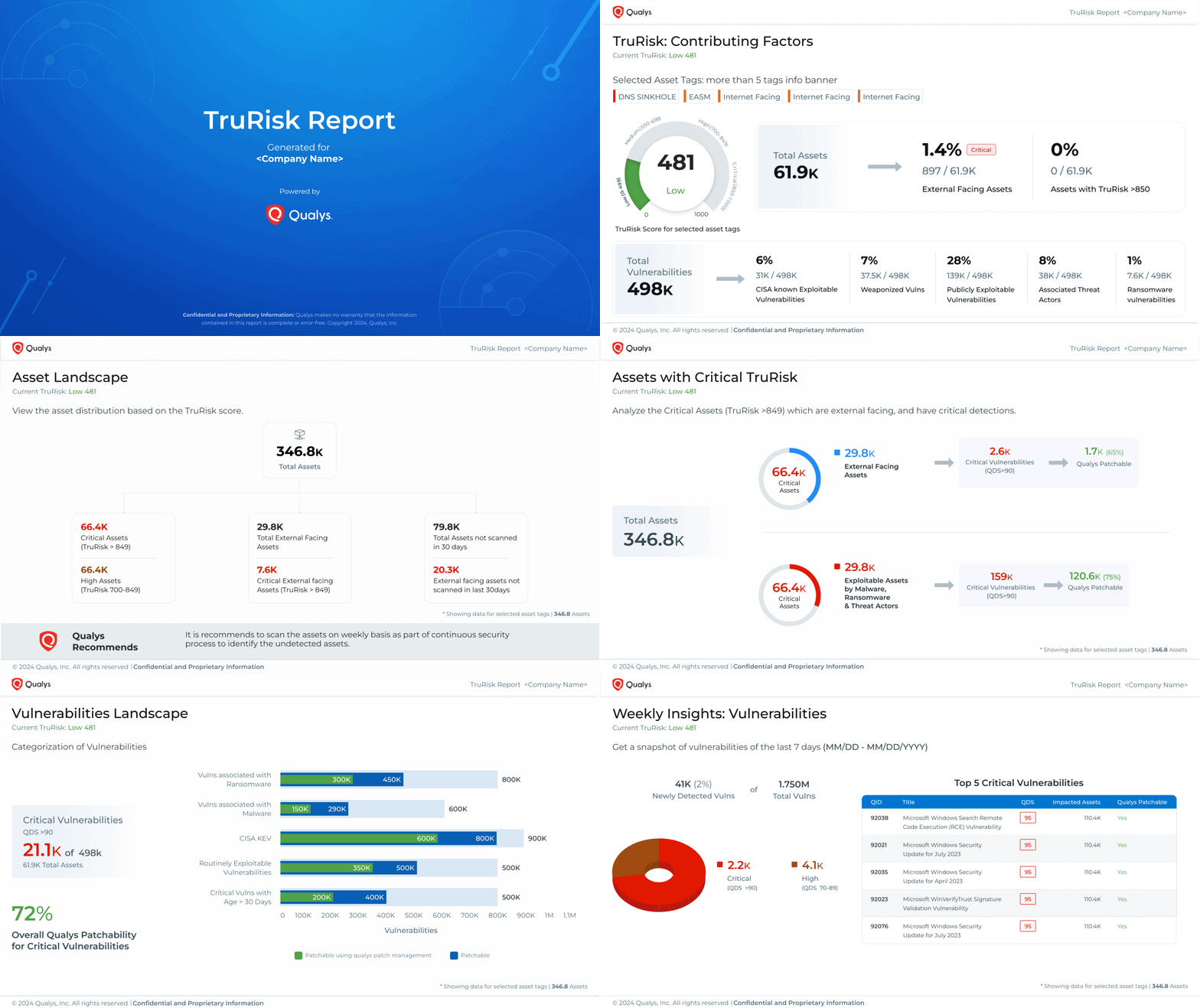
Key Insights in the TruRisk Report
The report provides the following insights:
| Key Insights | Descriptions |
| TruRisk Contributing Factors |
Gain a detailed breakdown of factors influencing the TruRisk score, such as associated threat actors, external-facing assets, and other risk indicators for selected asset tags. |
| External Asset Landscape | Analyze exploitable assets and critical vulnerabilities, including ransomware vulnerabilities, CISA-listed threats, weaponized exploits, malware, and more. |
| Tags Analysis | Identify the top risky asset tags based on their TruRisk score, helping teams focus on the most critical areas. |
| Asset Landscape | Evaluate the vulnerable asset landscape based on contributing TruRisk factors, providing a clear picture of exposure levels. |
| Assets with Critical TruRisk | Assess high-risk external-facing assets and those with critical vulnerabilities, enabling targeted mitigation. |
| Weekly Insights Assets | Get a seven-day snapshot of assets, tracking newly detected TruRisks and changes over time. |
| Vulnerabilities Landscape | Analyze critical vulnerabilities, their types, affected assets, and patch availability, streamlining remediation efforts. |
| CVSS vs Qualys Detection Score (QDS) | Compare vulnerabilities using CVSS, EPSS (Exploit Prediction Scoring System), and QDS, enabling risk-based prioritization. |
| Weekly Insights Vulnerabilities | View a seven-day summary of newly detected vulnerabilities, helping security teams stay ahead of emerging threats. |
Risk Reduction Recommendation
The Appendix section of the TruRisk Report provides additional security insights, offering deeper visibility into asset risks, vulnerability trends, and exploitability.
| Security Insights | Recommendation |
| Asset Criticality Overview | Understand asset importance and risk exposure based on the Asset Criticality Score (ACS). |
| Risk Distribution | Analyze asset risk levels using score ranges and assess the vulnerability landscape with the Qualys Detection Score (QDS). |
| MITRE ATT&CK® Matrix | Gain insight into your environment's MITRE ATT&CK® prioritization metrics from an attacker's perspective. |
| MITRE Top 10 Vulnerabilities | Identify the top 10 vulnerabilities linked to MITRE ATT&CK® tactics and techniques. |
| Top 10 CISA Known Exploited Vulnerabilities | Track vulnerabilities that are actively exploited, as identified by CISA. |
| Top 10 Ransomware Vulnerabilities | Pinpoint vulnerabilities frequently targeted by ransomware attacks. |
| Risk Overview | Identify assets running End of Support (EOS) software and operating systems, along with relevant patch details. |
How Do You Access this Report
Here are the various navigation options available to generate the TruRisk Report:
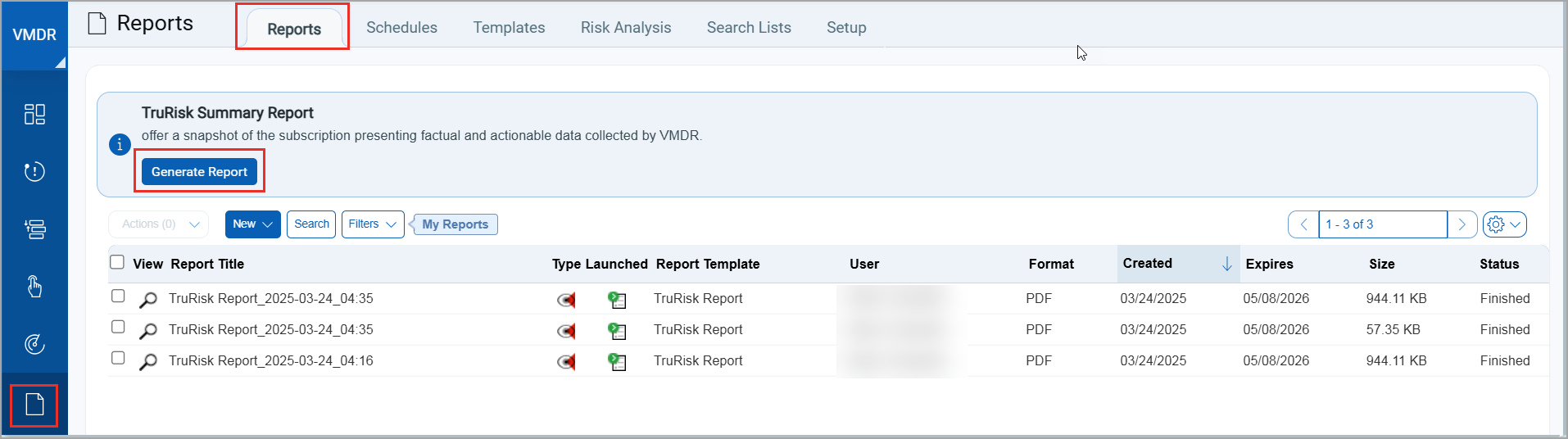
- Navigate to VMDR > Reports > TruRisk Summary Report banner > click Generate Report.
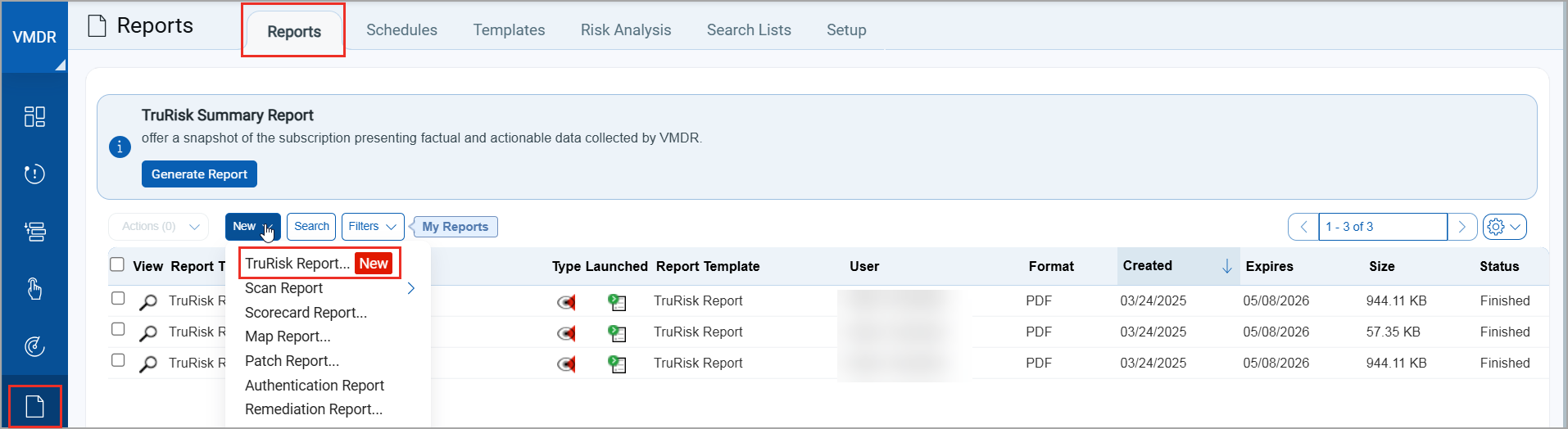
- Navigate to VMDR > Reports > New > TruRisk Report.
- Navigate to VMDR > Dashboard > TruRisk Report banner > click Generate.

- Navigate to VMDR > Dashboard > Platform Inbox > Notifications > click Generate.
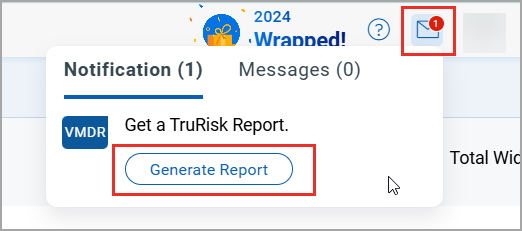
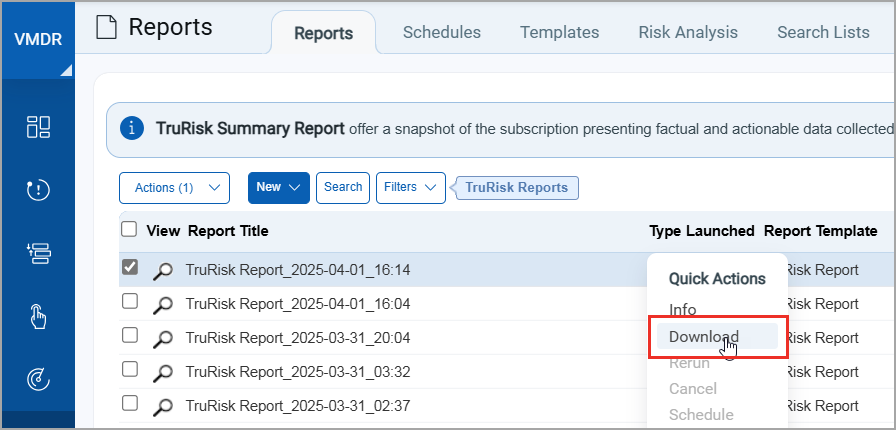
When you generate a TruRisk Report, providing an email allows the report to be sent directly to that address. You can also download it from the Reports > Quick Actions menu. This report is only accessible to Manager Users.
What Are the Steps to Generate This Report
To generate this report, perform the following steps:
- Use one of the various navigation options listed in this section to generate this report.
- Click Generate Report.
- In the TruRisk Report window, perform the following steps:
- Select asset tags when generating a TruRisk Report, though this step is optional. If no tags are selected, the report will be generated based on all assets in your subscription.
- Add recipients to send the report as a PDF; this step is optional.
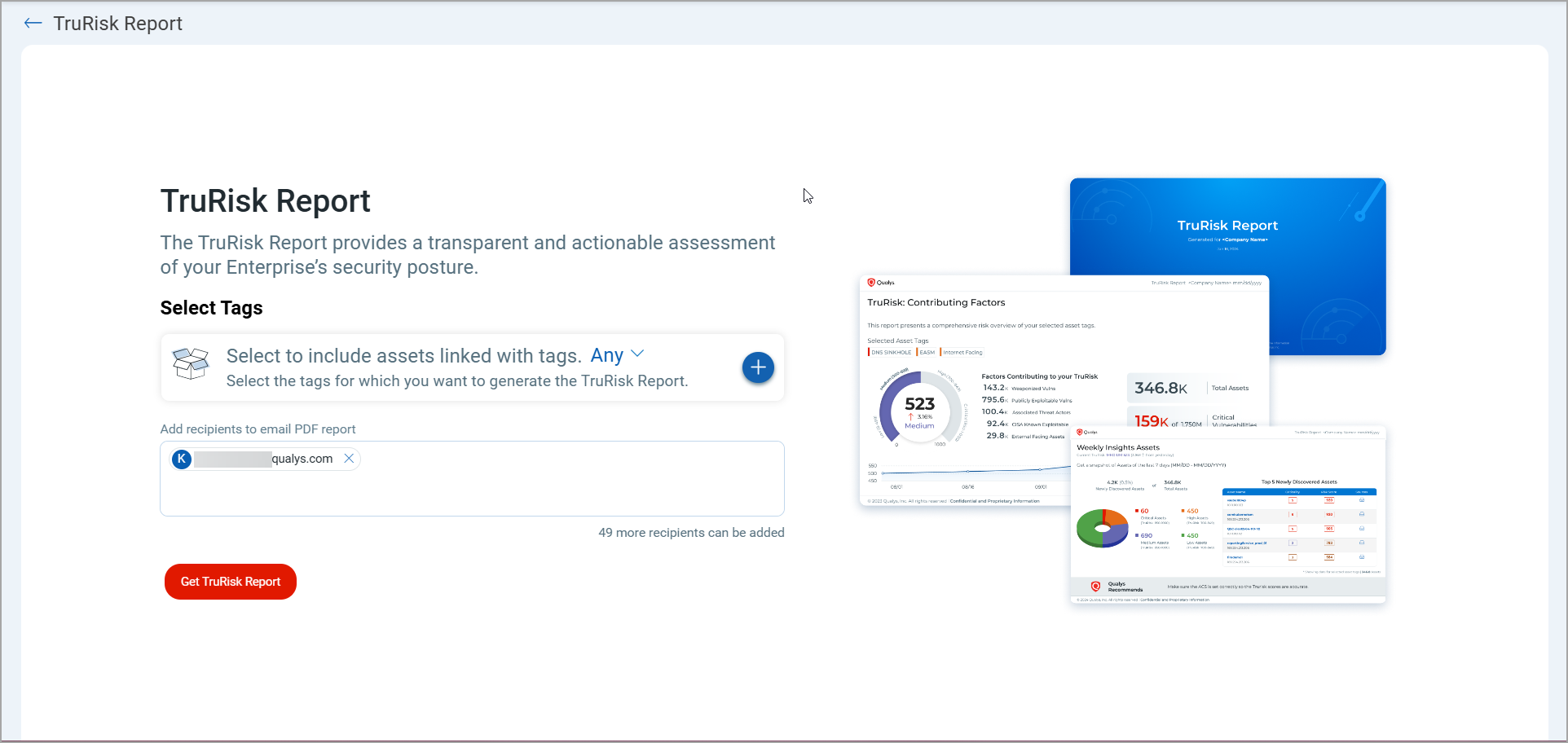
- While your report is being generated, you will receive a UI notification indicating that it will be available on the Report Listing page once ready. You can also click the URL to view the report status.

- Navigate to Reports. In the Reports tab, filter by TruRisk Reports.
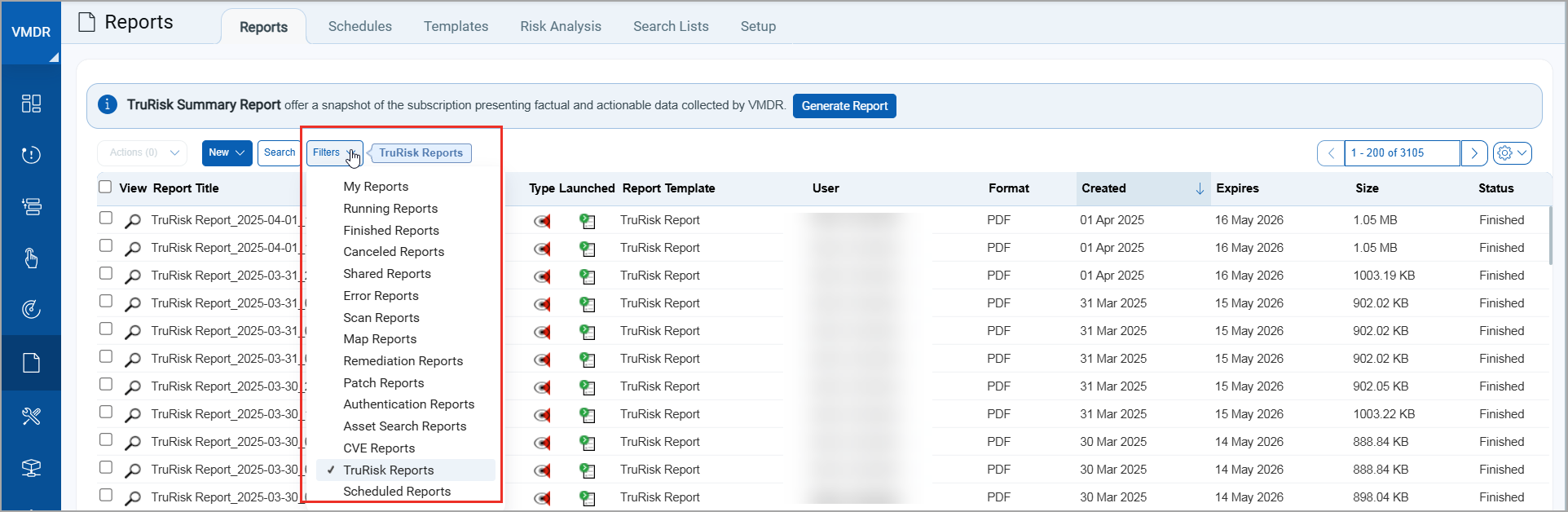
- Locate your report in the Report listing. Hover your mouse to see the Quick Actions menu.
- Click the Quick Actions menu and then click Download. The report will be downloaded to your local system.