VMDR Release 2.9
March 12, 2026
Customize Column Visibility in Vulnerabilities and Assets Tabs
In this release, we have introduced column visibility control in the Vulnerability and Asset tabs in VMDR. You can use this feature to control which columns to display or hide in the listing tables. This helps you to tailor the table view for your specific needs.
To add or remove columns on the Vulnerability and Asset tabs of the Vulnerabilities page, on the menu bar, click Settings  > Columns > select or clear the checkboxes, as required.
For example, on the Vulnerability tab, if you want to add the columns Title, Sources, and Severity, select these check boxes in the Columns list. The selected columns appear in the table on the Vulnerability tab.
The following is an example:
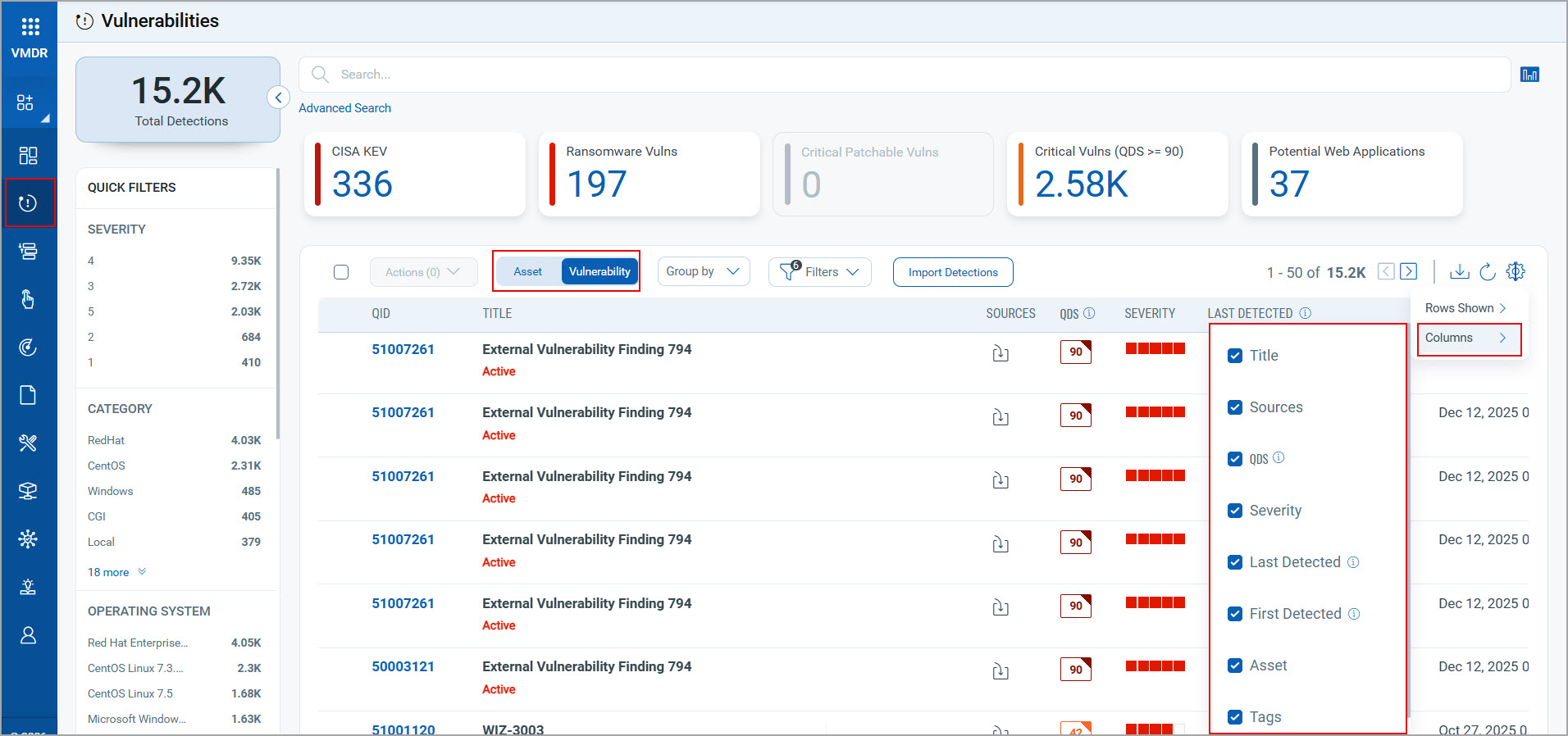
The column QID on the Vulnerability tab and the column Name on the Asset tab remain unchanged. You may add or remove the other available columns as required, apart from the QID and Name columns.
For more information about the column visibility control on the Vulnerability and Asset tabs, see Asset Details and Vulnerability Details.
Implementation of QQL Token Standardization
We have now implemented Qualys Query Language (QQL) token standardization across all the Qualys applications. As part of this enhancement, VMDR tokens are updated to new token names that follow a standard and consistent nomenclature.
The new token format follows the syntax: entity.attribute
For example, in the new token vulnerabilities.firstFoundDate, vulnerabilities is the entity, and firstFoundDate is the attribute.
Key Enhancements:
- Standardized Token Naming: The Vulnerabilities, Asset, Asset Inventory, and AWS EC2 tokens now follow the standardized naming convention. The tokens common to all Qualys applications are also updated.
- Search Bar Updates: New tokens are also available in the auto-suggestion in the search bars within the UI. Also, if you type the old token name manually, the QQL query still works. The old tokens are not visible in the auto-suggestions on the UI.
- Backward Compatibility: The existing Dashboard widgets and Saved Search Queries continue to support the old tokens in edit mode.
- Improved Interoperability: Standardized tokens make search queries easy to copy and reuse across applications. They eliminate the need to remember different token names for similar searches.
For the list of old and new token mappings, see Old and New Search Token Mappings.
QQL Token Standardization Updates in the Online Help
As part of QQL Token Standardization, Vulnerability, Alerting, and Asset and Compute token names are updated, and new Finding tokens are added to the VMDR Online Help. For more information, see Search Tokens for VMDR.
New Tokens
The following new Finding tokens are added to the Vulnerability tab:
| Rule Query | Tokens |
| Vulnerability |
For more information, see Finding Tokens in Search Tokens for VMDR. |
Issues Addressed
The following reported and notable customer issues are fixed in this release:
| Category/Component | Issue |
| Vulnerabilities page | We fixed an issue where the Instance column under CSAM > Inventory > Asset Details > Vulnerabilities page was not displaying any data. Now you can view the detected instances correctly in the Instance column in the Vulnerabilities page. |
|
Vulnerabilities Page |
We fixed an issue where the vulnerability data did not appear when clicking the View All link on VMDR > Vulnerabilities > Asset Details > VMDR Vulnerabilities. You can now view the vulnerability data correctly when you click the View All link in the Vulnerabilities page. |
| Vulnerabilities Page | We fixed an issue where selecting the View Missing Patches option from the Vulnerabilities page > Actions opened the Windows tab instead of the Linux tab for the Linux assets. Now, when you click View Missing Patches from the Actions menu, the Linux tab opens correctly for the Linux systems. |
|
Vulnerabilities Page |
We fixed an issue where the operatingSystem.name QQL token did not return search results in the Vulnerabilities page in the VMDR module, even though it returned correct results in CSAM.Now, the operatingSystem.name QQL token works consistently across both CSAM and the VMDR modules. |
| Prioritization Page | We fixed an issue where the Asset Name column on the Assets tab of the VMDR Prioritization page did not display the first character of the IP, MAC, and IPv6 addresses. This resulted in displaying incomplete values. You can now view all IP, MAC, and IPv6 addresses fully and correctly in the Asset Name column on the Assets tab of the VMDR Prioritization page. |
| Reporting Schedule on Dashboard |
We fixed an issue where the Dashboard > Now, the scheduled and emailed Dashboard PDF report for the Asset with Unpatchable Vulnerabilities widget correctly displays data. |