Enterprise TruRisk™ Platform Release 10.39.2
August 13, 2026
Qualys Vulnerability Management (VM)
Select Cloud Agent Version During Cloud Agent Deployment
You can now select the agent version to deploy when you launch a Cloud Agent Deployment scan. This helps when you need to install a specific supported version instead of always using the latest available version.
Previously, Cloud Agent Deployment used the latest Cloud Agent version automatically and did not provide a version selection option in the deployment workflow.
With this update, you can choose from recent available versions for the selected platform before launching the deployment. This gives you more control over rollout planning and helps you align deployments with your environment requirements. This helps you to deploy a version that matches your operational or compatibility requirements.
Before you can select a Cloud Agent version during deployment, ensure that Cloud Agent Deployment is enabled from Scans > Setup > Cloud Agent Deployment.
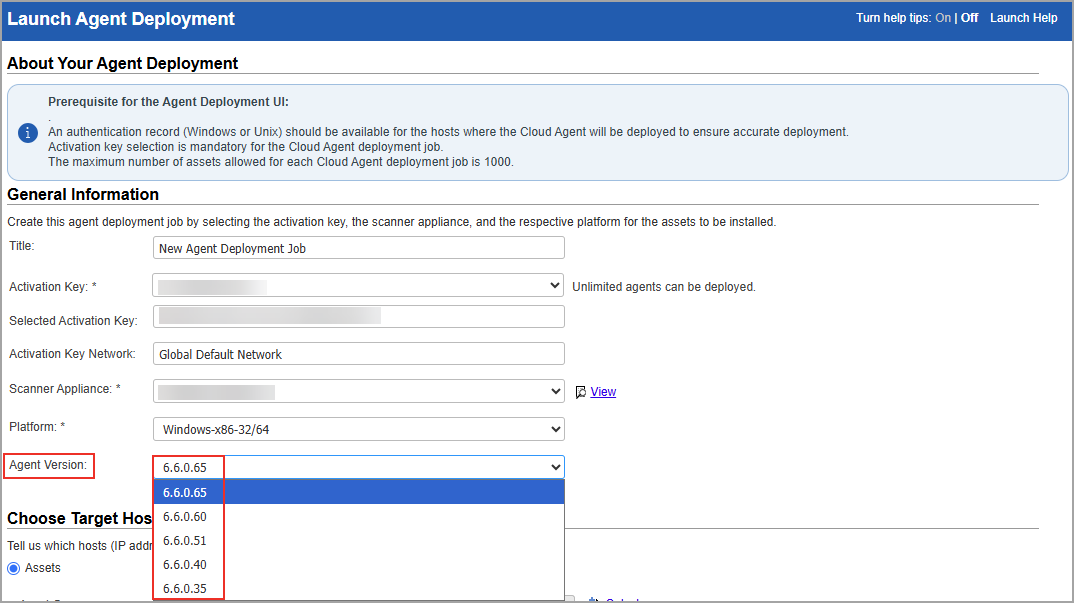
You can then select the Cloud Agent version by navigating to Scans > New > Cloud Agent Deployment. Select the Activation Key, Scanner Appliance, and Platform. Once you select a supported platform, the Agent Version field displays the available versions for that platform.
What's New
- You can select an agent version during Cloud Agent Deployment.
- The available versions are shown based on the platform you select.
- The Agent Version field displays the latest five available versions for the selected platform.
- The latest available version is selected by default.
Expected Behaviour
- Version selection is available for Windows and Linux platforms.
- The version list updates when you change the selected platform.
- If version information is unavailable for the selected platform, a validation message is displayed. To start the deployment, select a valid option.
HashiCorp Vault AD Secrets Engine Support for Unix/SSH Root Delegation
You can now retrieve root delegation passwords for Unix/SSH authenticated scans with root delegation from the HashiCorp Vault Active Directory (AD) Secrets Engine.
Previously, Unix/SSH root delegation supported only standard HashiCorp key-value secrets, while AD Secrets Engine integration was available for Oracle, Network SSH, PostgreSQL, MongoDB, and VMware/vCenter authentication records.
This enhancement extends AD Secrets Engine support to Unix/SSH root delegation, giving you greater flexibility in managing credentials through HashiCorp Vault.
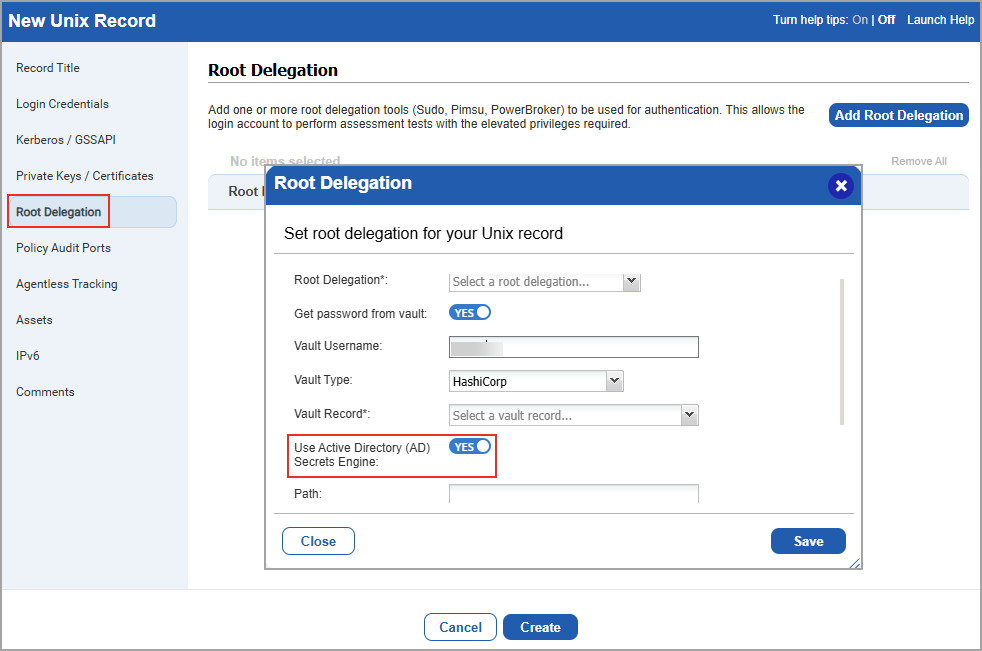
You can enable this option by navigating to Scans > Authentication > New > Operating Systems > Unix > Root Delegation > Add Root Delegation. Select a root delegation record and enable Get Password from Vault. Then, select the Vault Type as HashiCorp and enable Use Active Directory (AD) Secrets Engine to retrieve the root tool password from the HashiCorp AD Secrets Engine during an authenticated scan.
Expected Behaviour
- When Use Active Directory (AD) Secrets Engine is enabled, specify the Custom Path and Secret Name used by the AD Secrets Engine.
- When Use Active Directory (AD) Secrets Engine is disabled, specify the Key Name, Secret Name, and Path to identify the secret value stored in HashiCorp Vault.
- If the password is retrieved through the AD Secrets Engine, the Key Name field is optional.
Qualys API Support for HashiCorp Vault AD Support Engine
For this enhancement, we have updated the Authentication API: /api/4.0/fo/auth/unix. For more information, refer to Enterprise TruRisk Platform Release 10.39.2 API.
Cloud Perimeter Scan Support for Oracle Cloud Infrastructure
You can now discover and scan Oracle Cloud Infrastructure (OCI) assets using Cloud Perimeter Scan. Previously, Cloud Perimeter Scan supported AWS, Azure, and Google Cloud Platform (GCP), requiring organizations with OCI workloads to use separate processes to identify and assess exposed OCI resources. This enhancement extends Cloud Perimeter Scan support to OCI, enabling a consistent vulnerability management experience across major cloud platforms.
Cloud Perimeter Scan now supports OCI compute instances, allowing you to discover and assess OCI assets using the same workflows available for other supported cloud providers. With the OCI support, Qualys strengthens its multi-cloud security posture, allowing you to seamlessly secure workloads across AWS, Azure, GCP, and OCI from a single platform.
With this enhancements, you can:
- Launch Cloud Perimeter Scans for OCI environments.
- Select OCI connectors when configuring Cloud Perimeter Scans.
- Include OCI Load Balancer and Application Gateways IP addresses and DNS names in perimeter scans. Click Add to manually enter the entries.
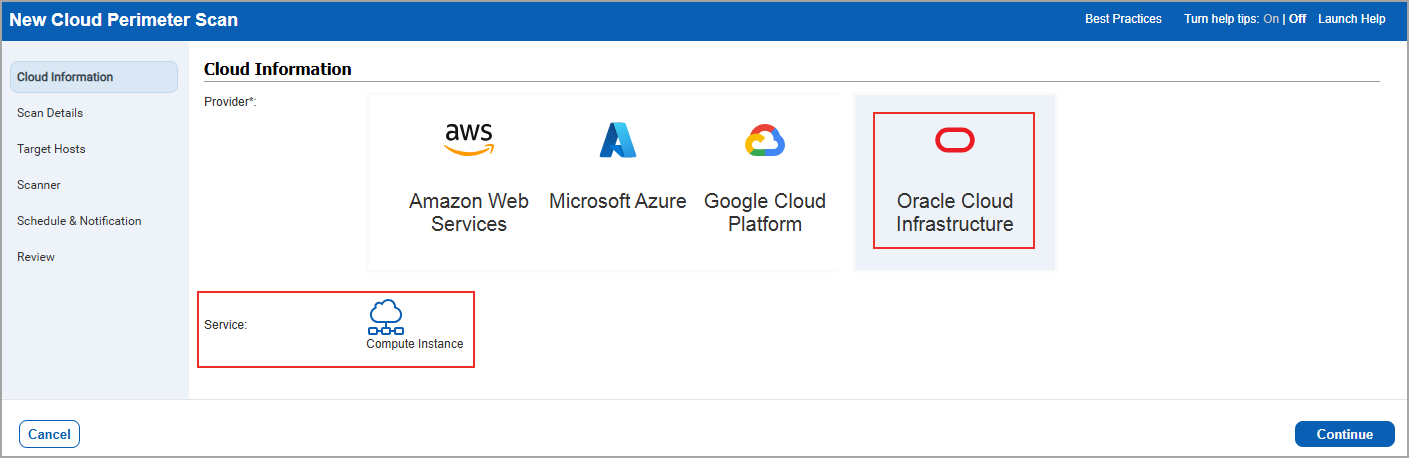
You can configure OCI Cloud Perimeter Scan by navigating to Scans > New > Cloud Perimeter Scan > Cloud Information > Oracle Cloud Infrastructure. You can create or update OCI Cloud Perimeter Scans. Once you launch the scan, you can generate the reports and it supports all file formats such as PDF, DOCX, CSV and XML.
You can search for the OCI assets by navigating to Assets > Asset Search and selecting the following fields:
- OCI Instance ID
- OCI Instance State
- Tracking Method selected as OCI Compute Instance
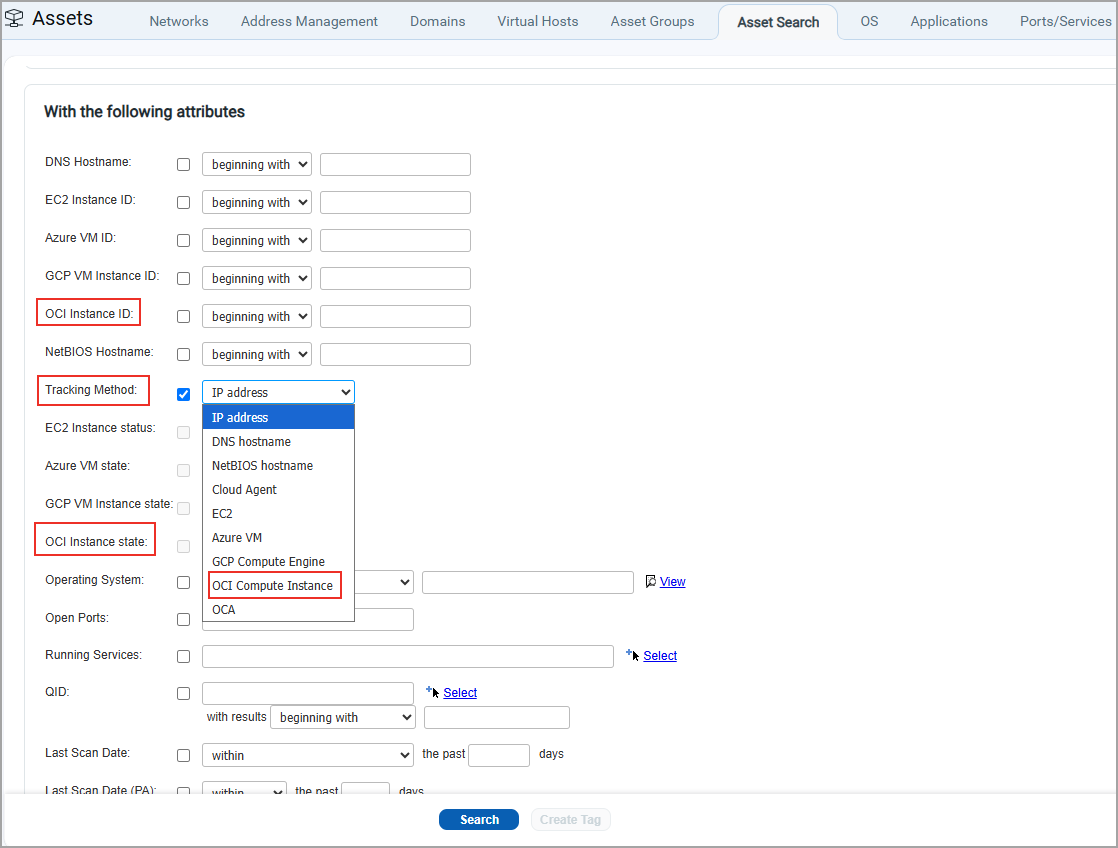
- The OCI Instance State is available only after you select OCI Instance ID.
- You can select only one cloud-specific asset identifier at a time: EC2 Instance ID, Azure VM ID, GCP VM ID, or OCI Instance ID. When one of these fields is selected, the remaining fields are automatically disabled.
Benefits
- Discover and scan OCI assets using the same Cloud Perimeter Scan workflow available for AWS, Azure, and GCP.
- Identify vulnerabilities in publicly exposed OCI resources and strengthen your security posture.
- Generate reports for OCI assets using existing Qualys reporting workflows.
- Gain visibility into supported OCI resources, including compute instances, load balancers, and application gateways.
- Use a consistent scanning, reporting, and management experience across major cloud providers.
Qualys API Support for Oracle Cloud Infrastructure
For this enhancement, an updated version of the following API's are available:
Host List API: /api/6.0/fo/asset/host/
Host List Detection API: /api/6.0/fo/asset/host/vm/detection/
For more information, refer to Enterprise TruRisk Platform Release 10.39.2 API.
Extended Password Length Support for Unix/SSH Authentication Records
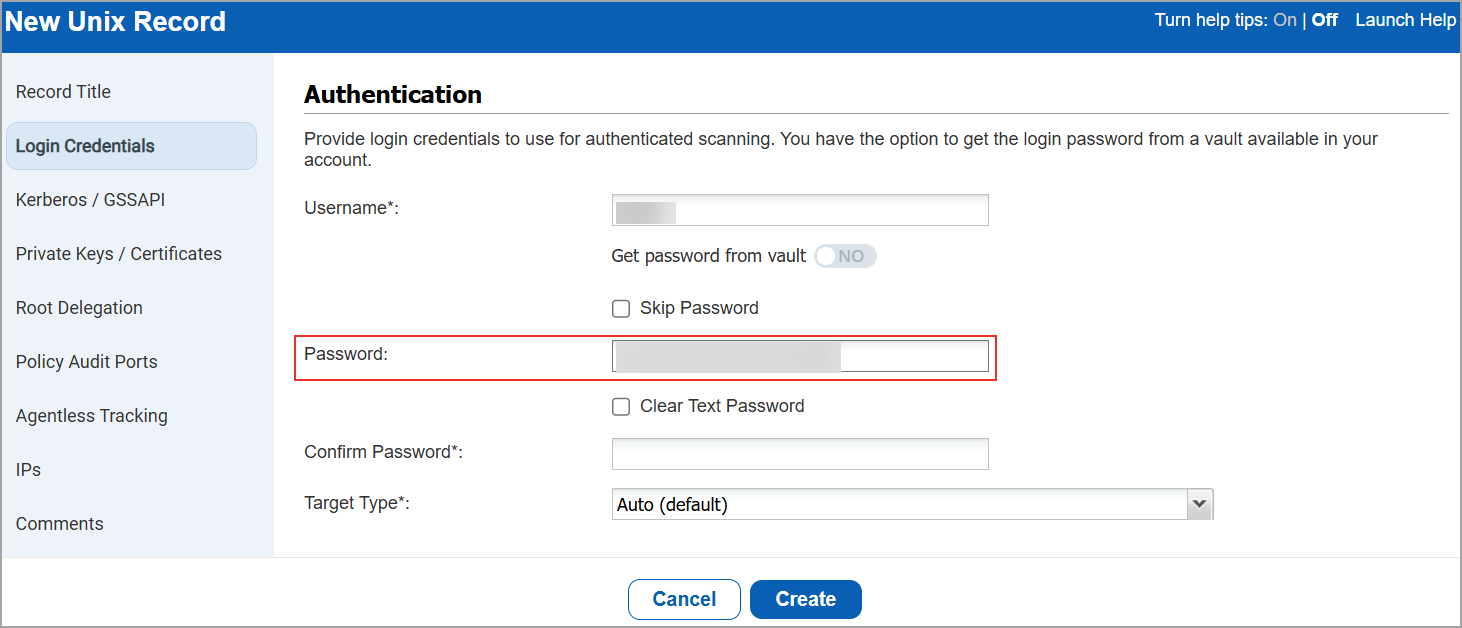
You can now create and update Unix/SSH authentication records using passwords up to 200 characters long. Previously, the maximum supported password length was 100 characters, which could prevent you from using authentication credentials that met your organization's password requirements.
Now, The maximum supported password length for Unix/SSH authentication records has increased from 100 to 200 characters. This enhancement increases the supported password length for only Unix/SSH authentication records while maintaining existing behavior for other authentication types. This helps to align authentication record configuration with enterprise password policies.
Navigate to Scans > Authentication > New > Operating Systems > Unix. You can enter passwords of up to 200 characters when configuring login credentials for a Unix/SSH authentication record.
Issues Addressed
The following reported and notable customer issues are fixed in this release:
| Component/Category | Description |
| VM - User Management | When users opened the Users tab, the page was taking significantly longer to load, especially in subscriptions with a large number of user accounts. This issue is now resolved, and the Users tab loads more efficiently. |
| VM - Report Schedule | When users launched scheduled or on-demand reports, the reports did not launch and were not displayed in the report list. This issue is now resolved, and reports are retained correctly during processing and are displayed in the report list as expected. |
| VM - IP License Container | When users compared the Unique Hosts Scanned count with the asset counts displayed in Vulnerability Management, a discrepancy was observed in the VM unique host. This issue is now resolved. We have now documented this in the Online Help, which clarifies that the Unique Hosts Scanned count includes only unique hosts with a VM scan date. |
| VM - Certificates | When users searched for API support for bulk certificate deletion, the available certificate management capabilities were unclear. We have updated the API Guide to clarify that bulk certificate deletion through the API is not currently supported. |
| VM - Assets | When users viewed the Vulnerabilities tab for assets with a large number of vulnerabilities, the page was taking a take a long time to load. This issue is now resolved, and the Vulnerabilities tab loads more efficiently, providing faster access to vulnerability information. |
| VM - Host List Detection API | When users generated host-based reports with large vulnerability datasets, report generation could take longer than expected, impacting performance. This issue is now resolved, and host-based reports that include vulnerability information, vulnerability reopen data, vulnerability transitions, and Information Gathered (IG) details are generated more efficiently. |
| VM | When users viewed scan or map retention information, the remaining retention days were being calculated based on the retention policy of the logged-in user instead of the scan or map owner. This issue is now resolved, and retention days are calculated based on the retention policy configured by the owner of the scan or map, ensuring consistent and accurate retention information across user accounts. |