Enterprise TruRisk™ Platform Release 10.39.3
September 2, 2026
Qualys Vulnerability Management (VM)
View Recepient Email Addresses in Schedule Reports
You can now view the recipient email addresses for a scheduled report directly from the Run History page. To view this information, navigate to Reports > Schedules > Select a report from the report listing page > Select Info under the Quick Actions menu > Run History.
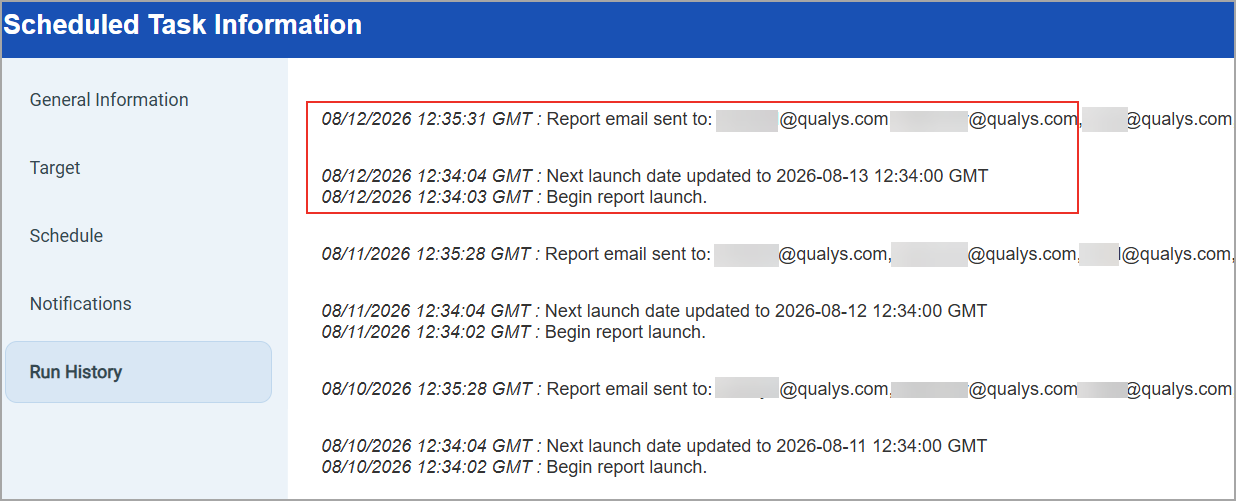
Previously, the Run History displayed only scheduling status messages, such as "Next launch date updated to" or "Begin report launch." Although scheduled report emails were sent to every recipient in the associated Distribution Group, the list of recipients who received the email was not visible in the Run History.
With this enhancement, the Run History displays every recipient email address for a scheduled report. Email addresses are displayed alongside the existing scheduling status messages.
To use this capability, when you create the report (Reports > New > Scan Report > Template Based), ensure to enable Scheduling and Notifications. Additionally, add the recipient email addresses under Distribution Groups in the Email To field under Report Options.
Issues Addressed
The following reported and notable customer issues are fixed in this release:
| Component/Category | Description |
| VM - UI General | When users opened a scheduled vulnerability scan directly in Edit mode from the Quick Actions menu, the resize handle at the bottom-right corner of the window was too small to locate and drag, preventing users from resizing the window as needed. This issue is now resolved. The resize handle is now larger and clearly visible, allowing users to resize the Edit window as expected. |
| VM - Scans | When users set up a scheduled scan with dynamic tags to include or exclude certain assets, an asset expected to be excluded still appeared in the scan results, which created confusion. This happened because dynamic tags update in real time, so whether an asset is included or excluded depends on which tags it matches when the scan runs, not when it is scheduled. This behavior is now documented in the Online Help. |