Vulnerability Management, Detection, and Remediation - Operational Technology Release 1.7.1.0
October 19, 2026
This release introduces support for reports with more than 10,000 records, so you can capture complete OT data in a single report, and passive sensor filtering to help you analyze the traffic each sensor detects. It also makes vulnerabilities and alerts easier to review with clearer CISA KEV naming and readable timestamps, adds new QQL tokens for more precise searches, and improves API reliability.
Enhancement
Analyze Complete OT Data in a Single Report
What Changed For You
You can now create reports with more than 10,000 records, with no limit on the maximum number of records included.
You no longer need to split data across multiple reports. With complete data in a single report, you can simplify audit preparation, management reviews, and trend analysis across your operational technology environment.
The following reports support more than 10,000 records:
- Asset Details Report
- Vulnerability Report
- Network Details Report
- Monitoring Details Report
To create a report, navigate to the Reports tab and select the required report type from the Create Report list.
For more information on creating reports, refer to the VMDR OT Online Help.
Enhancement
Analyze Asset Communications by Passive Sensor
What Changed For You
You can now filter and analyze asset communications detected by a specific passive sensor in your network.
This helps you understand the network traffic detected by each passive sensor and analyze communications between assets based on the sensor that detected them. For example, you can verify a sensor’s network coverage or identify a sensor that may be missing expected traffic.
To filter asset communications by passive sensor, use these tokens in the Network > List View tab:
- qualys.passiveSensor.id
- qualys.passiveSensor.name
- qualys.passiveSensor.location
For more information, refer to the New QQL Tokens section.
Enhancement
Identify CISA Known Exploited Vulnerabilities
What Changed For You
You can now identify vulnerabilities using the updated CISA Known Exploited Vulnerabilities threat indicator name. Previously, this indicator was displayed as CISA Known Exploited Vulns.
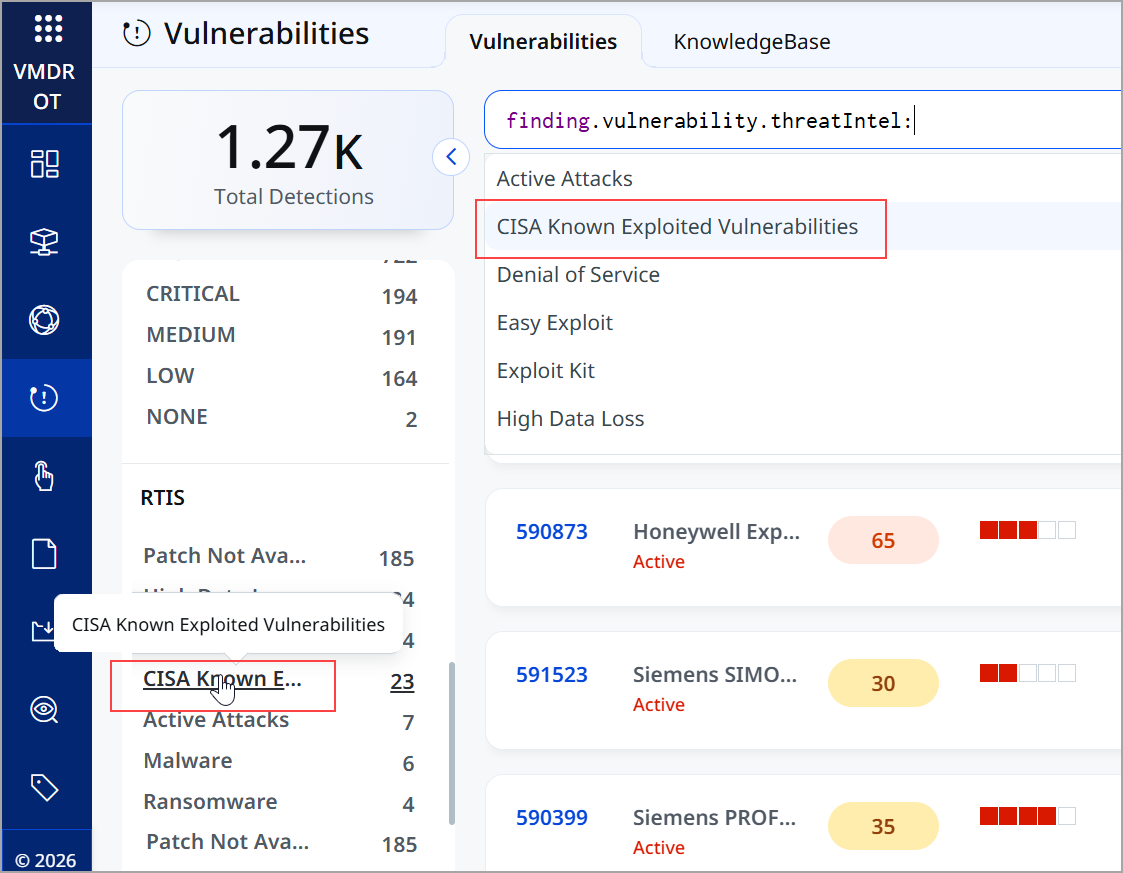
The updated name provides a clearer and more consistent way to identify vulnerabilities listed in the Cybersecurity and Infrastructure Security Agency (CISA) Known Exploited Vulnerabilities (KEV) Catalog.
The updated threat indicator name displays in the following locations:
- Vulnerabilities tab: Select CISA Known Exploited Vulnerabilities from the quick filter under the RTIS section.
- QQL Token: Use CISA Known Exploited Vulnerabilities as a value for the finding.vulnerability.threatIntel token to find vulnerabilities with this indicator.
Enhancement
Readable Timestamps in Alert Email Notifications
What Changed For You
You can now view date and time values in alert email notifications as human-readable GMT timestamps instead of epoch timestamps.
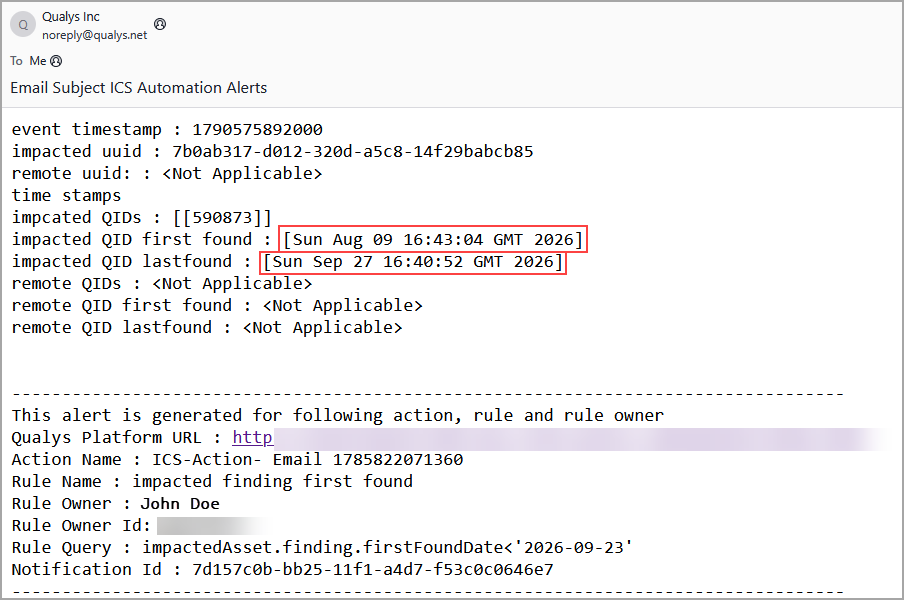
The timestamp is now displayed in a format such as Sep 30, 2026 10:45:32 GMT instead of an epoch value.
With human-readable timestamps, you can:
- Identify when an event occurred, such as when a vulnerability was first or last found, without converting epoch values.
- Review and compare alerts with other events, logs, and reports.
The following image displays an example alert email with timestamps in GMT.
You can create alert rules from Responses > Rule Manager. For more information, refer to the VMDR OT Online Help.
Token
New QQL Tokens
This release adds the following new QQL tokens:
| Token | Tab | Description |
|---|---|---|
| event.impactedAsset.label | Monitoring > Events | Use this token to search for events by the label assigned to the impacted asset.
Labels are custom names that you create in the NPS application to identify external assets. For more information about creating labels, refer to the NPS Online Help. Example:
|
| event.remoteAsset.label | Monitoring > Events | Use this token to search for events by the label assigned to the remote asset.
Labels are custom names that you create in the NPS application to identify external assets. For more information about creating labels, refer to the NPS Online Help. Example:
|
| qualys.passiveSensor.id | Network > List View | Use this token to search asset communications detected by a specific passive sensor using its sensor ID.
Example:
|
| qualys.passiveSensor.name | Network > List View | Use this token to search asset communications detected by a specific passive sensor using its sensor name.
Example:
|
| qualys.passiveSensor.location | Network > List View | Use this token to search asset communications detected by passive sensors at a specific location.
Example:
|
Fix
Fixes
The following reported and notable customer issue is fixed in this release:
| Component/ Category | Description |
|---|---|
| VMDR OT - API | We have fixed an issue where the following APIs intermittently returned a 404 error:
These APIs now return your asset and detection data as expected. |