Self-Protection Feature
Qualys self-protection feature helps prevent non-trusted processes to make unwanted changes to Qualys Cloud Agent.
Self-protection feature prevents the following:
- Uninstallation of Cloud Agent
- Termination of Cloud Agent processes
- Tampering with Cloud Agent files and directories - overwriting, deleting, renaming, modifying, and memory mapping
- Tampering with Cloud Agent driver - unloading or detaching the driver
- Tampering with Cloud Agent registry keys:
- Overwriting, deleting, and modifying the registry key and value
- Renaming the registry key
- Prevents the debugger from attaching to the Qualys Cloud Agent service
- Prevents user-defined scripts, that is, the scripts uploaded by Custom Assessment and Remediation (CAR), and Patch Management, from making changes to the protected areas.
This feature is not enabled by default. To enable the feature, contact your Qualys representative.
Disable Self-Protection
You can disable the self-protection feature if you want to access the agent data and artifacts required for debugging, such as log files.
You can generate a key to disable the self-protection feature for an agent for a defined time interval. By default, the generated key is valid for one day. However, you can define the validity of the key.
Users with the CA Manager role have permission to generate the self-protection key.
Steps to disable Self-Protection for Cloud Agent
- In the Cloud Agent UI, navigate to Agent Management > Agents tab.
- Select a Cloud Agent and in the Quick Actions menu, click Troubleshooting > Generate Key to Disable Self Protection.
- In the Generate key tab to disable self protection window, specify the key validity and click Generate Key.
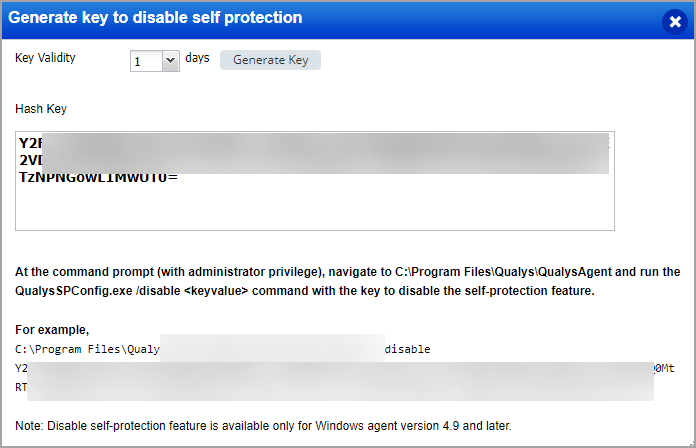
To generate a subscription level key for disabling self protection, refer to Disable Self Protection for Subscription. - Follow the on-screen steps to disable self-protection for the Cloud Agent.
This feature will be available only when it is supported by the Cloud Agent for Windows. For the supported platform and Cloud Agent for Windows version, refer to Features by Agent Version section in the Cloud Agent Platform Availability Matrix.
To learn more enabling or disabling Cloud Agent Self-Protection Feature from Configuration Profile, refer to Enable Self Protection.