Cloud Agent for MacOS Apple Silicon Release 7.1
October 30, 2026
Cloud Agent for macOS Apple Silicon 7.1 supports an independent patch management tool for reliable patching. Also, you can now automate macOS updates with saved credentials and get patch management notifications with an updated notification header.

New Feature
Independent Patch Management for Seamless Patching
What's New
MacOS Apple Silicon Cloud Agent now provides a separate, independent patch management tool.
This feature reduces dependency on the Cloud Agent and provides a seamless patching experience. Previously, the patch management and Cloud Agent were packaged and executed as a single unit.
The independent patch management tool offers the following benefits for efficient patching:
- Reduced Dependency: The independent patch tool reduces the risk of blocking core patch management operations due to Cloud Agent-side issues.
- Efficient Maintenance: The independent patch tool makes it easier to update, patch, or replace the Cloud Agent without any re-validation.
- Seamless Patch Management: The Independent patch tool provides seamless patching operations even if the Cloud Agent is updated or changed.
You can find the logs for the patch management tool at /Library/Application\ Support/QualysCloudAgent/Logs/ under the qualys-patchmanagement.log.
Enhancement
Automate MacOS Update Installation with Saved Credentials
What Changed For You
MacOS Apple Silicon Cloud Agent now has the support to save credentials for installing operating system (OS) updates.
This enhancement automates OS updates on macOS Apple Silicon platforms by using saved credentials. Previously, you were required to provide credentials every time an OS update was installed.
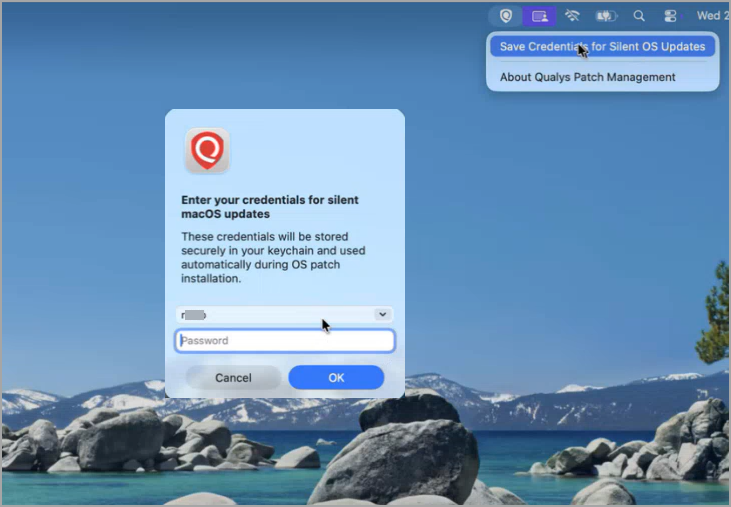
To save the credentials for OS update installation, click Save Credentials for Silent OS Updates in the patch management Quick Access menu. After providing the system credentials, the connection is saved. Also, select the Save User Credentials checkbox while creating a job to use the saved credentials.
Similarly, when credentials are updated or expired, you can remove the saved connection (credentials) and create a new entry with the updated credentials.
Unified TruRisk Eliminate
What Changed For You
Traditional patch management, isolation, and mitigation capabilities are brought into a single umbrella called TruRisk Eliminate. All the match management notifications now show the TruRisk Eliminate in the header.
All the patch management and related Qualys applications are now brought into an umbrella product, TruRisk Eliminate. With this update, all the patch management-related notifications on macOS assets now use TruRisk Eliminate in the notification header.
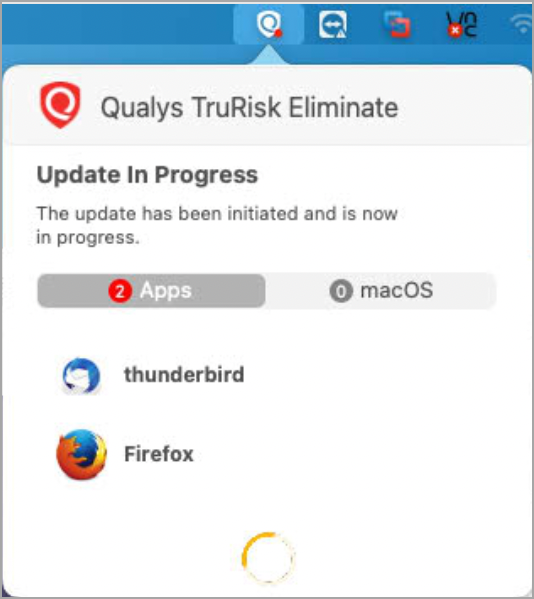
This new update does not affect the existing patch management and Cloud Agent workflows.
To learn more about TruRisk Eliminate, refer to the TruRisk Eliminate Release Notes.