Custom Assessment and Remediation Release 2.8.2
April 24, 2026
Script Imports with Custom GitLab Domains and Host Names
We have made the following updates to the URL and Path Parameters options when importing a script from GitLab.
Seamlessly Import Scripts from Custom or Self-hosted GitLab Domains using URL
While importing the script from GitLab, the URL option on the Script Details page (Scripts > Create > New Script > Script Details) now supports custom and self‑hosted GitLab domains. It allows you to securely import scripts from GitLab.
When you click the URL option in the Private and Public Repository, you can enter any valid GitLab host, such as gitlab.yourcompany.com, or hostname, or domain name.
Configure a Custom GitLab Host with Path Parameters
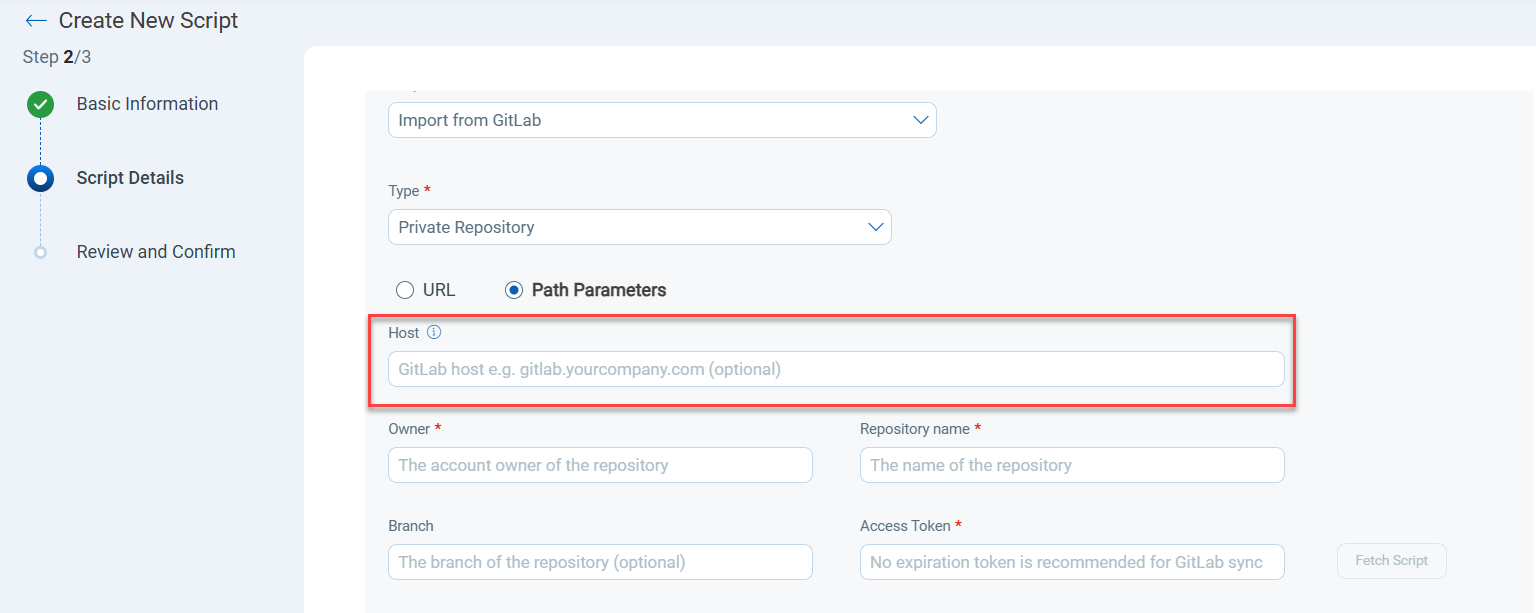
We have added a Host field to the Script Details page to enter a host name. You can use this field to enter a custom GitLab hostname or domain name.
The Host field is available when you select Path Parameters for a Public and Private Repository while importing a script from GitLab.
The following screenshot shows the Host field when selecting Path Parameters.
Repository Type: Private Repository
Ensure that the self-hosted GitLab Host URL is accessible from the Qualys Enterprise TruRisk™ platform. If the URL is not accessible, contact your Technical Account Manager (TAM) for assistance.
For more details, refer to Create Custom Scripts.
Tag‑Based User Scope Extended to Reports
We have added a new CAR entity- Reports for the Tag-based User Scope feature (Get Started > Tag-based User Scope in CAR). Now, a user with tag‑based user scoping enabled can create, download, and delete reports within the assigned scope.
For more details, refer to Tag-based User Scope.
Issues Addressed
There are no issues addressed in this release.