Azure EventGrid Delta Sync Connector
Azure EventGrid Delta Sync
The Azure EventGrid Delta Sync retrieves Azure resource change events and updates Qualys TotalCloud accordingly, using Azure EventGrid. During the next scheduled connector run, the Delta Sync detects changes to resources since the last update, avoiding the need to rescan your entire Azure environment. This results in quicker inventory updates and more efficient evaluation cycles.
What is Azure EventGrid Delta Sync?
Azure EventGrid captures resource change events and forwards them to TotalCloud. When Delta Sync is enabled, TotalCloud uses these events to determine which resource types have changed and limits inventory and evaluation runs to only those resource types. Resource deletions are processed immediately upon receipt of the deletion event.
A full scan of the entire Azure environment runs automatically every 48 hours to ensure consistency. Manual connector runs always perform a full scan regardless of the Delta Sync setting.
Delta Sync requires a one-time deployment of a Qualys-provided Azure EventGrid package in your Azure environment before activation.
Configure the EventGrid Delta Sync
To configure the EventGrid Delta Sync, you must deploy the Qualys-provided package and then select the EventGrid Delta Sync in the Connector configuration wizard.
Read more about How to Configure the EventGrid Delta Sync.
How Delta Sync Works
Delta Sync reduces connector run time by limiting inventory and evaluation to only the resource types that have changed. The diagram below shows how the changed resource data is sent to Qualys TotalCloud.
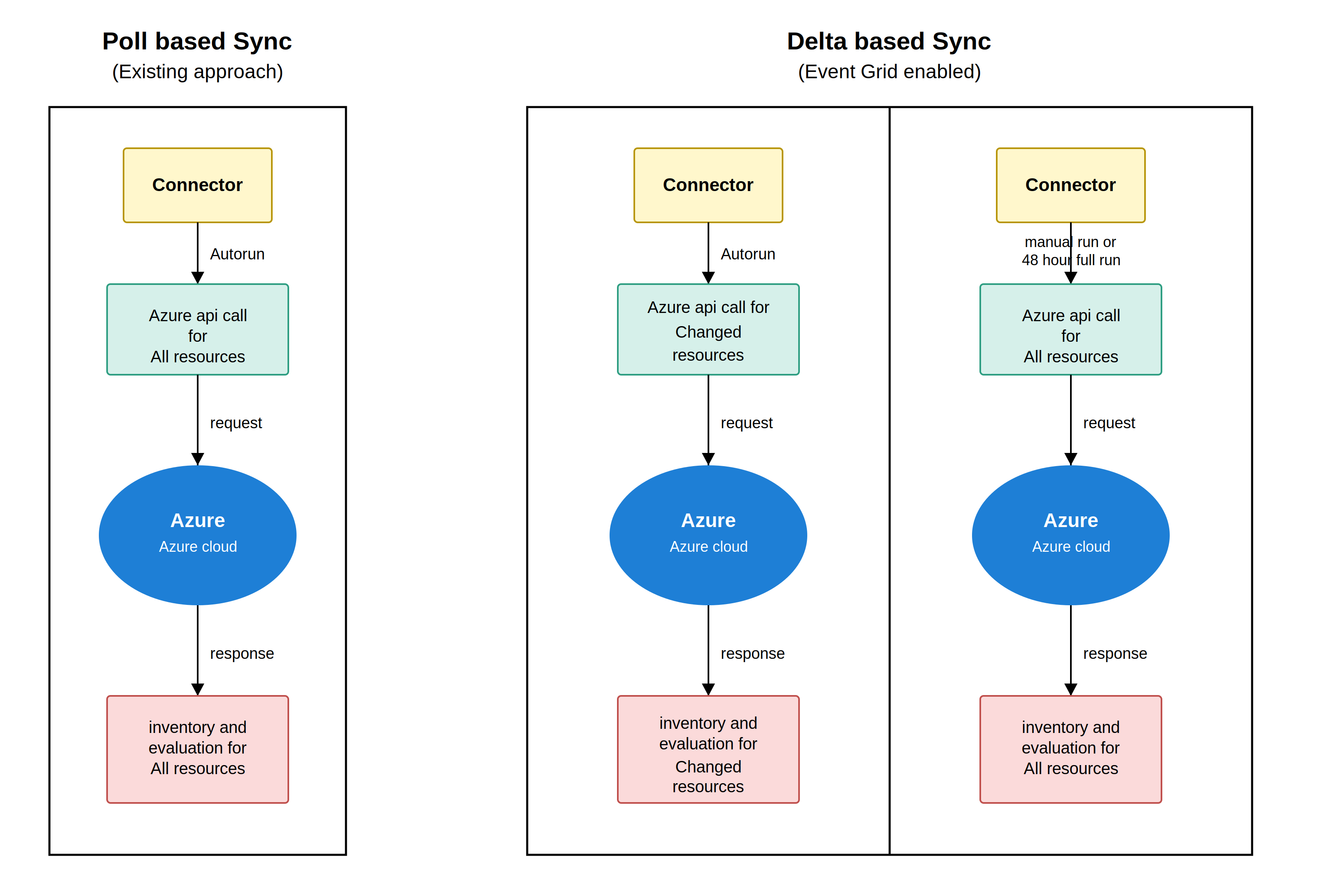
The following section explains how different change types are handled.
Resource Deletions
If you opt for the Delta Sync option, resource deletion in the TotalCloud inventory/posture will occur in real-time.
Resource Modifications
At each configured Delta Sync interval, TotalCloud:
- Identifies which resource types have received change events since the last run.
- Runs inventory and evaluation only for those resource types and in their respective regions.
- Skips all resource types with no recorded changes.
Updates operate at the resource type level, not the individual resource level. For example, if a Storage Account is modified in eastus, TotalCloud refreshes all Storage Accounts in the respective region in inventory and posture, but does not process Virtual Machines, SQL Databases, or other unchanged resource types.
Critical Resources
Certain resource types are evaluated on every connector run regardless of whether a change event was received. This ensures TotalCloud maintains current data for the most security-sensitive resource types. See the Resource Compatibility Matrix for resources marked Runs In Every Conn.
Full Sync
A complete inventory and evaluation scan of all resources runs automatically every 48 hours. This ensures that any events missed or delayed by Azure EventGrid do not result in stale data.
Manual Runs
A manually triggered connector run always performs a full scan. Inventory and evaluation run for all resource types regardless of the Delta Sync configuration.
Exception Handling
When Delta Sync is enabled, exception processing operates in real time. Changes to exceptions (create, update, or delete) take effect immediately without waiting for the next scheduled connector run.
CIEM and Insights
Delta Sync does not affect CIEM or Insights processing. Both continue to operate on their standard schedules.
Resource Compatibility Matrix
View which Azure resources are supported for EventGrid Delta Sync. View the matrix.