Scan Serverless AWS Lambda Function & Fargate Inventory using AWS Console
AWS Lambda is a serverless compute service that lets you run code without provisioning or managing servers. While Lambda simplifies operations and improves scalability, it introduces unique security challenges such as dependency vulnerabilities, misconfigurations, and runtime risks.
Container Security enables you to discover, assess, and secure AWS Lambda functions by providing visibility into function configurations, associated layers, permissions, and vulnerabilities in deployed code packages.
AWS Lambda Function Scan results are available from:
Container Security > Assets > Serverless Functions
AWS Fargate Inventory Scan results are available from:
Container Security > Assets > Container QLP
This topic explains how you can scan your AWS Lambda function using Qualys Container Security.
Key Concepts
-
Service Account
A Service Account is the AWS account where the Qualys Cloud Scanning Infrastructure is deployed and managed. It hosts the core Qualys scanning components, such as Cloud Operator Lambda function, EventBridge rules, SQS queues, DynamoDB tables, CloudWatch alarms, and Cross-account scanning infrastructure.
The Service Account serves as the central scanning and orchestration account, coordinating Lambda function discovery and vulnerability scanning. A Service account has primary and secondary regions. -
Target Account
A Target Account is the AWS account that contains the Lambda functions you want Qualys to scan.
The Target Account does not host the main Qualys scanning infrastructure. Instead, it contains, Lambda workloads to be scanned, EventBridge rules and permissions required to communicate with the Service Account. - ServiceAccountRegion
ServiceAccountRegion is the AWS Region where the Service Account CloudFormation stack (Qualys Lambda scanning infrastructure) is deployed. This parameter is specified when creating the Target Account stack so that the target account knows where to communicate with the centralized Qualys scanning components. - SecondaryRegions
SecondaryRegions is a list of AWS Regions, excluding the primary deployment region, where Qualys should deploy supporting resources to discover and scan Lambda functions.
This enables multi-region Lambda scanning.
Supported Architecture
Qualys Container Security supports Serverless Lambda function scanning on the following architecture.
| Architecture | Lambda Architecture | Docker Platform |
|---|---|---|
| ARM64 (Graviton) | arm64 | linux/arm64 |
| x86_64 (Intel/AMD) | x86_64 | linux/amd64 |
Pre-requisites
Before you begin, make sure you have the following items ready for Cloud Scanning Infrastructure.
- AWS account
- Designated for the Qualys Service Account scanning infrastructure.
- From your AWS account, the ServiceAccountId where you want to deploy the Service Account stack.
- From your AWS account, the TargetAccountId or OrganizationId where you want to deploy the Target Account stack. That is, the target account of the lambda functions that you want to scan.
Either TargetAccountId or OrganizationId must be supplied to the service account stack before any cross-account target can send events.
- Qualys CloudFormation templates (CFT)
- CFT for Service account
URL:https://qualys-cs-cloud-scanning-cf-template.s3.amazonaws.com/CS-CLOUD-DEPLOYMENT-TEMPLATES-CFT-2.0.0-0/qualys-cs-service-account-scanning.yaml - CFT for Target account
URL:https://qualys-cs-cloud-scanning-cf-template.s3.amazonaws.com/CS-CLOUD-DEPLOYMENT-TEMPLATES-CFT-2.0.0-0/qualys-cs-target-account-scanning.yaml
- CFT for Service account
- Environment details for your Qualys subscription:
- Qualys Cloud Operator Image from Dockerhub.
Refer to How to Get the Qualys Cloud Operator Image? - Authorization: You can either use an Access Token or ClientID and SecretID for the authorization.
ClientID, SecretID
OR
Qualys Enterprise TruRisk™ Platform > Container Security > Configurations > Access Token
Doc References:
- CS 1.43 Release Notes > Development Environment Scanning with QScanner
- API Authentication using Qualys Managed Tokens
OR
A Secrets Manager ARN holding ClientID and SecretID, and/or Access Token. - (Optional for AWS Lambda Scan) To scan your Fargate inventory, get your Qualys CustomerID from any pre-populated sensor installation command.
Qualys Enterprise TruRisk™ Platform > Container Security > Configurations > Sensors > Install Sensor > Installation Instructions - Gateway URL: Qualys Enterprise TruRisk™ Platform (POD) gateway URL for communication.
- Optional parameter, proxy, VPC if required.
- Qualys Cloud Operator Image from Dockerhub.
How to Get the Qualys Cloud Operator Image?
You need to use the Docker Hub, and push the sensor image to your AWS ECR repository for the Qualys Cloud Operator image.
Use from Docker Hub, but push the image to your AWS ECR repository (public)
Use the following commands to push the Qualys Cloud Operator image to the AWS ECR public repository:
$sudo docker pull qualys/cloud-operator:latest
$sudo docker tag qualys/cloud-operator:latest <URL to push image to ECR public repository>
$sudo docker push <URL to push image to ECR public repository>
For example:
$sudo docker pull qualys/cloud-operator:latest
$sudo docker tag cxxxxxx818df public.ecr.aws/y4xxxxx8/qualys/cloud-operator:latest
$sudo docker push public.ecr.aws/y4xxxxx8/qualys/cloud-operator:latest
Create AWS CloudFormation Stack
Deploy CloudFormation Template (CFT) to create an AWS CloudFormation Stack. Using this stack, you can scan AWS Lambda Function and Fargate Inventory scan.
Follow the steps given below to configure the AWS Lambda Function and Fargate Inventory scan.
Qualys Container Security uses AWS CloudFormation Template (CFT) > CloudFormation Stack for scanning AWS Lambda functions.
You can create a CloudFormation Stack for a Service Account & a Target Account.
Do not create the Service Account Stack and Target Account Stack in the same AWS account.
Follow these deployment instructions to create AWS CloudFormation Stack.
- Log in to your AWS Console.
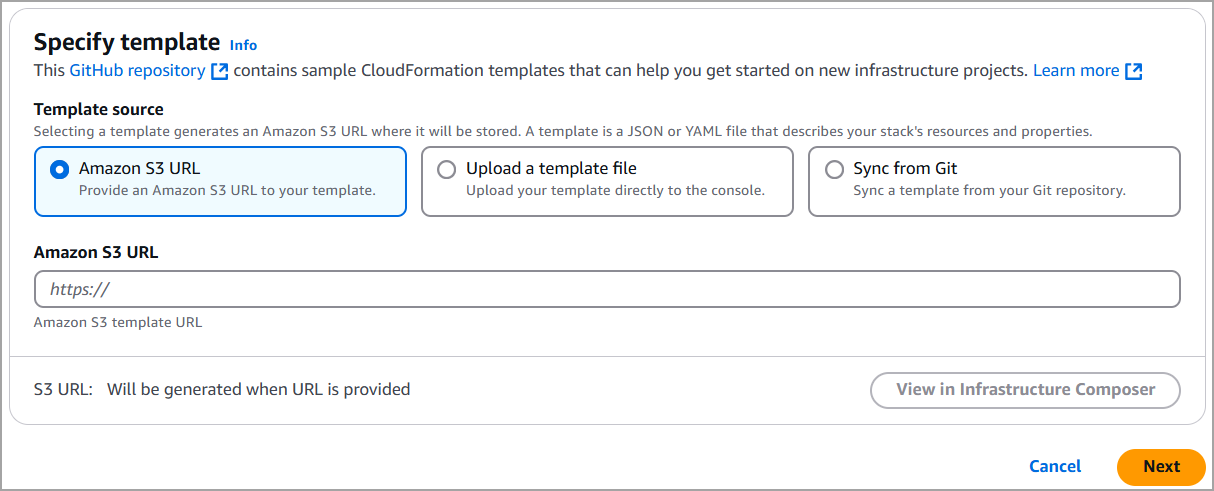
- Go to CloudFormation, click Create Stack, and select With new Resources.
- Select the Amazon S3 URL field, and Specify template.
- To create the Service Account CloudFormation Stack,
Specify the S3 URL of the Service Account CFT (see URL in the Prerequisite section).
To create the Target Account CloudFormation Stack,
Specify the S3 URL of the Target Account CFT.
Then, click Next to continue to the template configuration.
5. Under Stack name,
If you are creating a Service Account Stack,
Enter a name for the Qualys AWS Cloud scanning stack (Lambda function), such as 'qualys-cloud-scanning-service-account'.

If you are creating a Target Account Stack,
Enter a name for the Qualys AWS Cloud scanning stack (Lambda function), such as 'qualys-cloud-scanning-target-account'.

6. Under Parameters, provide environment details for your subscription, including Gateway URL, Qualys Access Token (OR QualysClientId, QualysClientSecret), and so on.
- To scan Fargate Inventory, ensure EnableFargateInventory parameter is set to 'true'.
- To scan lambda functions, ensure EnableLambdaScanning parameter is set to 'true'.
The table below explains the parameters for the Service Account Stack.
| Parameter Name | Mandatory | Default Value | Description |
|---|---|---|---|
| CloudOperatorImageUri | Yes | --- | ECR image URI in the same region as the stack |
| QualysAccessToken OR QualysClientId QualysClientSecret OR QualysSecretArn |
Yes | --- | Used for authorization. You can either use QualysAccessToken or QualysClientID, QualysClientSecret or QualysSecretArn |
| GatewayURL | Yes | --- | Qualys Gateway URL. |
| CloudOperatorLambdaArchitecture | Yes | x86_64 | Architecture for Lambda function (x86_64 or arm64) |
| LogLevel | Yes | Info | Log level for Lambda functions (debug, info, warn, error, fatal) |
| OrganizationId | No | --- | Mandatory if you want to scan a Lambda function from a target account. |
| TargetAccountIds | No | --- | Mandatory if you want to scan a Lambda function from a target account. |
| SecondaryRegions | No | --- | Regions beyond the deploy region; deploys StackSet |
| ScanServiceAccount | No | true | To scan only service accounts. Set false to scan only target accounts. |
| OrchestratorMemorySize | No | 2048 | --- |
| OrchestratorTimeout | No | 900 (max) | --- |
| CustomerId | Yes (only for Fargate Inventory) | --- | Required only for Fargate inventory. Qualys customer/subscription id sent as customerId in v2.1 inventory events (and the X-Customer-Id header). |
| EnableCloudMetadataCollection |
No | false | Enrich Fargate inventory events with task-definition metadata (per-container cpu/memory/env/labels) and resource tags via ECS Describe* APIs. Best-effort; off by default. |
| EnableFargateInventory | Yes (only for fargate Inventory scan) | true | Enable the ECS Fargate workload. Currently performs inventory collection (captures ECS Task State Change events). Forwards to the SAME Qualys backend (GatewayURL + Qualys auth) used by Lambda scanning. NOTE - collecting from OTHER accounts additionally requires TargetAccountIds or OrganizationId, or cross-account sends are rejected by the queue policy. |
| EnableLambdaScanning | Yes (only for Lambda function scan) | true | Enable Lambda function scanning while running Fargate inventory scan. Set to 'false' to disable Lambda scanning. |
| LambdaSQSBatchSize | No | Number of SQS messages to process in batch for Lambda workload queue | |
| LambdaScanMaxConcurrency |
No | Maximum concurrency for Lambda scanning event source mapping (number of simultaneous Lambda invocations processing SQS messages) | |
| QualysSecretArn |
No | Optional Secrets Manager ARN with Qualys credentials JSON {access_token, client_id, client_secret}. When set, it OVERRIDES the plaintext QUALYS_* env vars; empty falls back to them. Not NoEcho, so immune to the '****' clobber. |
|
| SQSBatchSize |
No | Number of SQS messages to process in batch for the Fargate inventory queue (tuned independently of Lambda scanning) |
The table below explains the parameters for the Target Account Stack.
| Parameter Name | Mandatory | Default Value | Description |
|---|---|---|---|
| SecondaryRegions | No | -- | Additional regions (beyond the stack deploy region) to deploy EventBridge rules for cross-region Lambda detection (For example, sa-east-1,eu-west-1). Must not include the stack deploy region. |
| ServiceAccountId | Yes | -- | AWS Account ID of the service account where the Lambda scanning infrastructure is deployed. |
| ServiceAccountRegion | Yes | -- | AWS region where the service account stack is deployed. For example, us-west-2 |
| EnableFargateInventory | true | Forward ECS Task State Change events from this target account to the service account for the Fargate workload (inventory now, image scanning later). | |
| EnableLambdaScanning |
Yes (only for Fargate Inventory) | true | Enable Lambda function scanning. Set to 'false' to disable Lambda event forwarding from this target account. |
7. Click Next to continue through the workflow. Acknowledge the Capabilities box.
8. Click Create stack. That’s it!
EnableLambdaScanning and EnableFargateInventory - Combination Matrix
The EnableLambdaScanning and EnableFargateInventory parameters exist independently on both the Service Account Stack and the Target Account Stack. The effective behavior depends on how the two stacks are configured together. The table below shows all four combinations.
| Service Account | Target Account | Real-time (new) events | Initial scan of existing resources | Result |
|---|---|---|---|---|
true |
true |
Forwarded and scanned | Scanned | Works as expected. |
true |
false |
Not forwarded (target-side rule disabled) | Still scanned — onboarding backfill enumerates existing Lambda functions; Fargate daily and onboarding bulk-scan runs regardless | Incomplete opt-out: Disabling scanning on the target account does not stop existing resources from being scanned. Resources deployed before the change remain in scope. Only newly created resources are excluded. |
false |
true |
Dropped into disabled-capture queue (service-side routing rule disabled) | Skipped — service global flag is false |
Nothing scanned: Consistent, but the target’s opt-in is entirely overridden by the service account’s master switch. The target-side flag has no effect, which may be unexpected for target account administrators who explicitly enabled scanning. |
false |
false |
Not forwarded | Skipped | Works as expected — everything off. |
Service=true, Target=false is the high-risk combination: the target account believes it has opted out, but its existing Lambda functions and ECS tasks continue to be scanned — and Fargate workloads are re-scanned every 24 hours — because the target’s local choice is never communicated to the service account.
Service=false, Target=true results in total silence for that target. No data is collected and no error is raised, which can be confusing for target account administrators who set the flag to true expecting scanning to begin.
To avoid unexpected scanning, ensure both stacks carry the same value for each flag before deploying target accounts.
Resources Created
When the stack creation is successful, several resources are created, and they’ll appear in the Resources section, as shown below.
Here’s another look at the resources created for a Service Account Stack named 'qualys-cs-cloud-scanning'.
| Logical ID | Type |
|---|---|
| CloudOperator | AWS::Lambda::Function |
| CloudOperatorEventSourceMapping | AWS::Lambda::EventSourceMapping |
| CloudOperatorLogGroup | AWS::Logs::LogGroup |
| CloudOperatorOnboardingEventSourceMapping | AWS::Lambda::EventSourceMapping |
| CrossRegionEventBusPolicy | AWS::Events::EventBusPolicy |
| CrossRegionForwardingRule | AWS::Events::Rule |
| DisabledEventsCaptureDepthAlarm | AWS::CloudWatch::Alarm |
| DisabledEventsCaptureQueue | AWS::SQS::Queue |
| DLQMessagesAlarm | AWS::CloudWatch::Alarm |
| ECSTaskStateChangeRule | AWS::Events::Rule |
| EventBridgeToSQSRole | AWS::IAM::Role |
| FargateBulkScanDeadLetterQueue | AWS::SQS::Queue |
| FargateBulkScanEventSourceMapping | AWS::Lambda::EventSourceMapping |
| FargateBulkScanQueue | AWS::SQS::Queue |
| FargateDisabledDLQRule | AWS::Events::Rule |
| FargateEventsRuleDLQ | AWS::SQS::Queue |
| FargateEventsRuleDLQPolicy | AWS::SQS::QueuePolicy |
| FargateInventory | AWS::Lambda::Function |
| FargateInventoryBulkScanPermission | AWS::Lambda::Permission |
| FargateInventoryBulkScanRule | AWS::Events::Rule |
| FargateInventoryDeadLetterQueue | AWS::SQS::Queue |
| FargateInventoryEventSourceMapping | AWS::Lambda::EventSourceMapping |
| FargateInventoryExecutionRole | AWS::IAM::Role |
| FargateInventoryFlushPermission | AWS::Lambda::Permission |
| FargateInventoryFlushRule | AWS::Events::Rule |
| FargateInventoryLogGroup | AWS::Logs::LogGroup |
| FargateInventoryQueue | AWS::SQS::Queue |
| FargateInventoryQueuePolicy | AWS::SQS::QueuePolicy |
| InitialScanTrigger | Custom::InitialScan |
| InventoryDedupTable | AWS::DynamoDB::Table |
| LambdaDisabledDLQRule | AWS::Events::Rule |
| LambdaEventsDLQ | AWS::SQS::Queue |
| LambdaEventsQueue | AWS::SQS::Queue |
| LambdaEventsQueuePolicy | AWS::SQS::QueuePolicy |
| LambdaFunctionEventsRule | AWS::Events::Rule |
| LambdaScanJobsTable | AWS::DynamoDB::Table |
| OnboardedAccountsTable | AWS::DynamoDB::Table |
| OnboardingEventsDLQ | AWS::SQS::Queue |
| OnboardingEventsQueue | AWS::SQS::Queue |
| OnboardingEventsQueuePolicy | AWS::SQS::QueuePolicy |
| OrchestratorErrorAlarm | AWS::CloudWatch::Alarm |
| OrchestratorExecutionRole | AWS::IAM::Role |
| OrganizationEventBusPolicy | AWS::Events::EventBusPolicy |
| SecondaryRegionEventBridgeStackSet | AWS::CloudFormation::StackSet |
| ServiceCacheTable | AWS::DynamoDB::Table |
| SQSQueueDepthAlarm | AWS::CloudWatch::Alarm |
| StackSetAdministrationRole | AWS::IAM::Role |
| StackSetExecutionRole | AWS::IAM::Role |
| TargetAccountLambdaForwardingRule | AWS::Events::Rule |
| TaskDefinitionCacheTable | AWS::DynamoDB::Table |
Here’s another look at the resources created for a Target Account Stack named 'qualys-lambda-scanning-target'.
| Logical ID | Type |
|---|---|
| CrossAccountRole | AWS::IAM::Role |
| EventBridgeToSQSRole | AWS::IAM::Role |
| FargateForwardingFailedInvocationsAlarm | AWS::CloudWatch::Alarm |
| FargateRegionalRulesStackSet | AWS::CloudFormation::StackSet |
| FargateStateChangeRule | AWS::Events::Rule |
| LambdaForwardingFailedInvocationsAlarm | AWS::CloudWatch::Alarm |
| LambdaFunctionEventsRule | AWS::Events::Rule |
| SecondaryRegionEventBridgeStackSet | AWS::CloudFormation::StackSet |
| StackSetAdministrationRole | AWS::IAM::Role |
| StackSetExecutionRole | AWS::IAM::Role |
| TargetAccountOnboardingNotifier | Custom::TargetAccountOnboardingNotifier |
| TargetAccountOnboardingNotifierFunction | AWS::Lambda::Function |
| TargetAccountOnboardingNotifierRole | AWS::IAM::Role |