Image Assessment Policies
Image Assessment policies define the security rules that are evaluated when container images are scanned through a CI/CD pipeline. When an image violates a policy, CS either blocks the image from being deployed or generates a warning, depending on the configured policy behavior.
To view Image Assessment policies, go to Policies in the left navigation menu and click the Image Assessment tab.
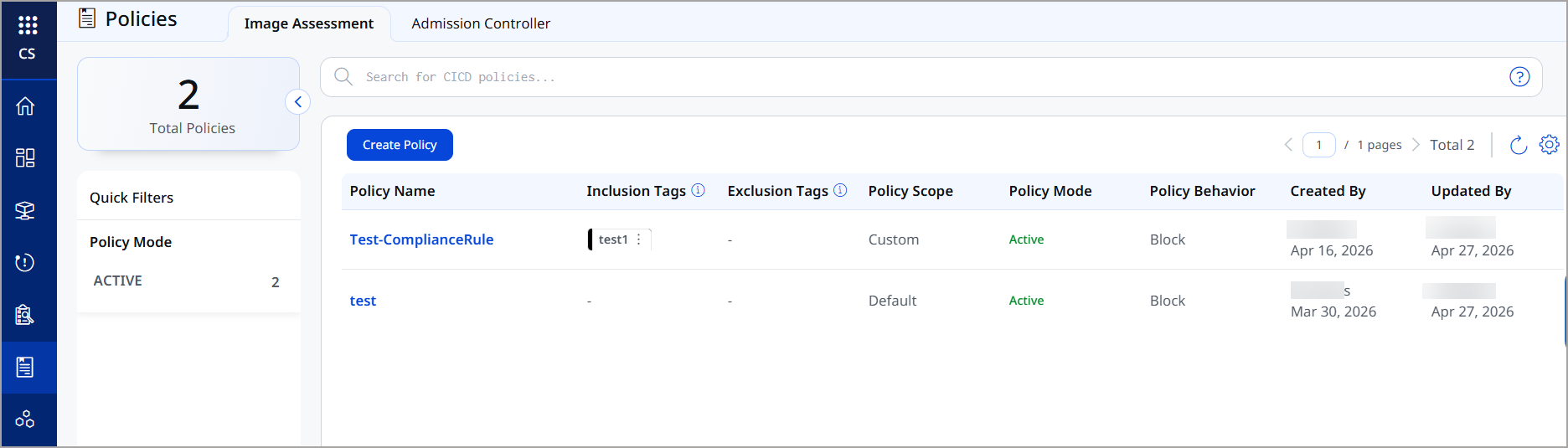
Policy List
The policy list displays the following information for each Image Assessment policy.
| Column | Description |
|---|---|
| Policy Name | The name of the policy. Click the name to view or edit the policy details. |
| Inclusion Tags | Qualys tags that determine which images this policy applies to. Only images matching these tags are evaluated against the policy rules. |
| Exclusion Tags | Qualys tags that exempt images from this policy. Images matching these tags are not evaluated even if they match the inclusion tags. |
| Policy Scope | Indicates whether the policy applies to a specific subset of images (Custom) or to all images by default (Default). |
| Policy Mode | Shows whether the policy is Active (enforced) or Inactive (not enforced). |
| Policy Behavior | The action taken when a policy violation is detected: Block prevents the image from being deployed; Warn allows the image to proceed with a warning. |
| Created By | The username and date when the policy was created. |
| Updated By | The username and date when the policy was last modified. |
Quick Filters
Use the Policy Mode quick filter in the left panel to narrow the list by Active or Inactive policies.
Creating an Image Assessment Policy
Click Create Policy to define a new Image Assessment policy. You can specify the policy rules, scope, inclusion and exclusion tags, and the behavior (Block or Warn) when a violation is detected.
For step-by-step instructions, refer to Creating Security Policies.
Also see,
Policies