Sonatype Nexus Registry
Sonatype Nexus Registry is supported by the Qualys Container Security Registry sensor. Follow the steps below to add Sonatype Nexus Registry in order to scan it.
- Download and install the Registry sensor.
1.1 Go to Configurations > Sensors > Install Sensor and in Sensor Installation, select Registry.
1.2 Select the Container Environment where you want to deploy the sensor and follow the installation instructions on the screen.
1.3 Ensure the Registry sensor is in the Running state (Configurations > Sensors) and continue to the next step. - Go to Assets > Registries > New Registry to add your Sonatype Nexus Registry and set up a scanning schedule.
- Provide the following information:
- Registry Type: Choose registry type Docker V2-Private.
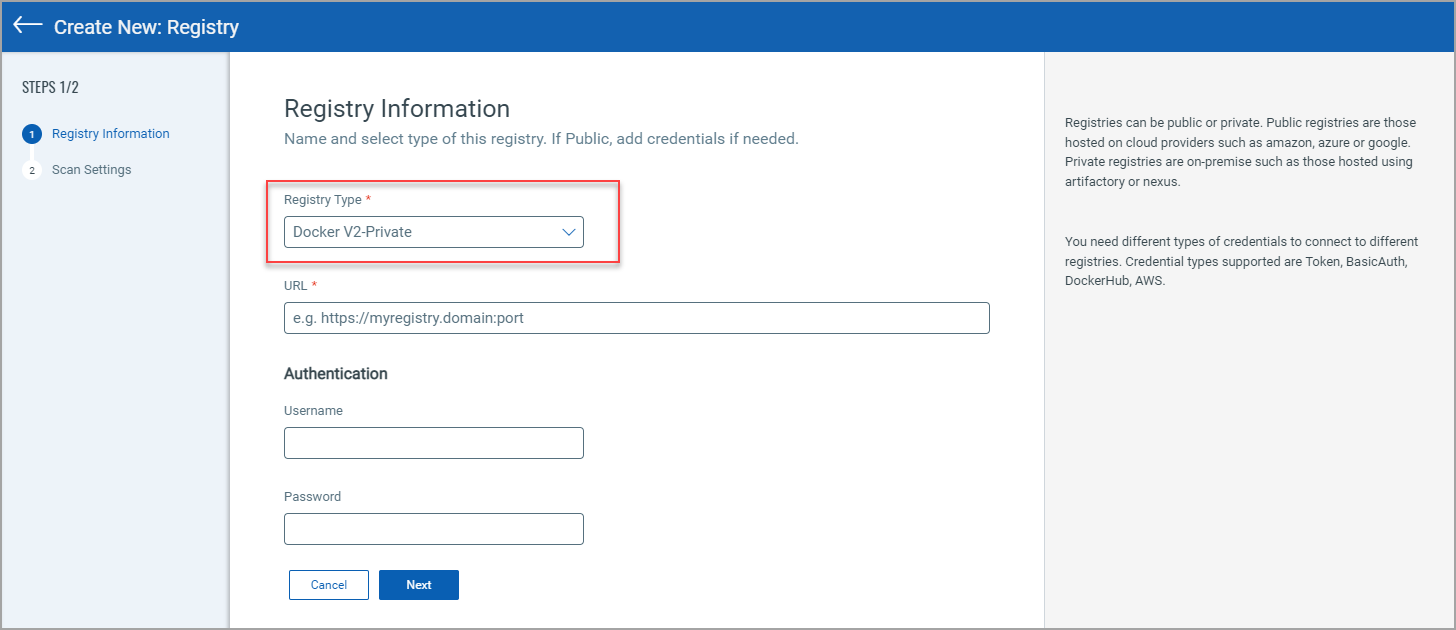
- URL: Enter the registry URL.
- Authentication: Enter the authentication credentials of your Sonatype account for connecting to your registry.
Sonatype Nexus Registry supports token-based authentication. The sensor will perform the V2 catalog call with the authentication token.
- Registry Type: Choose registry type Docker V2-Private.
-
After adding registry information, click Next to enter scan settings. Like with other registry types, you can choose to scan immediately (On Demand) or on an on-going basis (Automatic). For help with scan settings, see Configure Scan Settings.