How can I view vulnerabilities (QIDs) in my images?
The Vulnerabilities (Beta) tab lists all vulnerabilities in your container images. Vulnerabilities are identified as QIDs. A QID (Qualys ID) is a unique identifier assigned by Qualys to every vulnerability, misconfiguration, or security condition detected during a scan. It is a unique number that represents a specific vulnerability signature in Qualys KnowledgeBase (Qualys Enterprise TruRisk™ Platform > VMDR > KnowledgeBase).
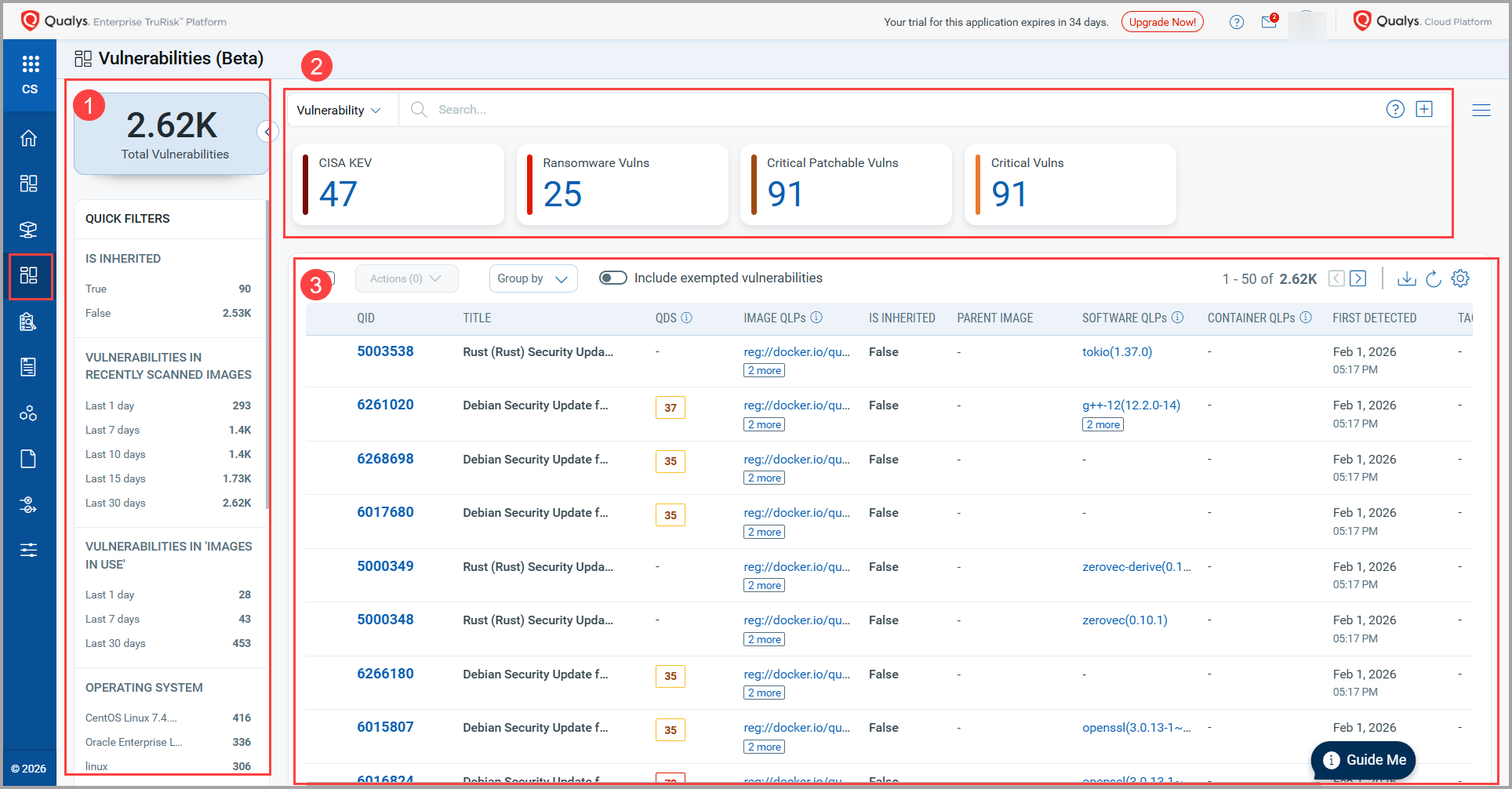
1. Quick Filters
This section provides some quick options that help you to filter vulnerabilities.
- Is Inherited - This tile shows the total number of images in your account that are inherited from the base image. You can click the True or False values to retrieve the corresponding QIDs.
- Vulnerabilities in Recently Scanned Images - Gives you QIDs found in recently scanned images in the last 1 day, 7 days, 10 days, 15 days, or 30 days.
- Vulnerabilities in 'Images In Use' - Indicates the QIDs found in scanned 'Images in Use' in - last 1 day, 7 days, or 30 days.
- Operating System - Shows the total number of QIDs found in various OSs in your environment.
- Type Detected - Filters the QIDs based on the type detected.
Valid values:
- Confirmed: Shows QIDs that are considered as confirmed.
- Potential: Shows QIDs that are considered as potential. - QDS Severity - Shows the total number of QIDs based on the severity type.
- RTIS - Provide Real-time Threat Indicators. These are actionable data points used to prioritize which security flaws pose the greatest immediate risk.
2. Tile Section
The section shows you information about the QIDs using the following tiles.
- CISA KEV: Shows the total number of CISA KEV present in your environment.
- Ransomware Vulns: Indicates the number of vulnerabilities that are ransomware.
- Critical Patchable Vulns: Indicates the number of critical vulnerabilities that can be patched.
- Critical Vulns: Indicates the number of critical vulnerabilities.
3. List Section
This section lists all QIDs in your environment along with their details.
| Column | Description |
| QID | Indicates a number that represents a unique vulnerability. For example, 5003538. |
| TITLE | Indicates the title of the QID. For example, Rust Security Update for tokio |
| QDS | Indicates the Qualys Detection Score of the selected image. To know more, refer to TruRisk Score and QDS in Container Security. |
| IMAGE QLPs | Indicates Qualys Locator Path (QLP) of the image associated with the vulnerability. To know more, refer to Container Security 1.42 Release Notes. |
| IS INHERITED | Shows if the vulnerability is inherited. |
| PARENT IMAGE | For child images, it shows details of the parent image. - (dash): Indicates that the QID is present in a parent image. |
| SOFTWARE QLPs | Indicates Qualys Locator Path (QLP) of the software associated with the vulnerability. |
| CONTAINER QLPs | Indicates Qualys Locator Path (QLP) of the container associated with the vulnerability. |
| FIRST DETECTED | Shows the date on which the vulnerability was found for the first time. |
| TAGS | Shows tags associated with the vulnerability. |