ETM Identity Release 1.3.0
June 25, 2026
Introduced Foreign Security Principal Support
ETM Identity now identifies and processes Foreign Security Principal (FSP) within Active Directory environments. FSPs are accounts that exist in another forest but have rights in the AD forest.
Prerequisite: Availability of the Foreign Security Principal feature is dependent on the Qualys Cloud Agent version 6.6.0+
Managing Forest Security Principals (FSPs) provides key benefits:
- Cross-Forest Permissions
Assigns local access rights to users from trusted forests. - Security & Auditing
Serves as placeholders in Access Control Lists (ACLs) for traceable permissions on external access. - Universal Group Membership
Allows centralized resource access in multi-domain environments. - Broken Trust Identification
Orphaned FSPs are easily identifiable if the trust relationship with an external forest is lost.
When are FSPs Created?
- FSPs are created automatically by the system when:
- A user/group from a trusted external forest/domain is added to a domain local group in the local domain.
- A special identity (e.g., Authenticated Users) is added to a group.
- Permissions are granted to a foreign principal on a local resource.
Key enhancements include:
- Cross-Domain Identity Visibility
- Improved handling of forest trust relationships between domains.
- Enables identification of users and groups from trusted external domains.
- Foreign Security Principal (FSP) Identification
The system locates the domain as the administrator object and links edges to the corresponding foreign security principal, enabling accurate graph traversal across trust boundaries.- External users and groups are now clearly identified as Foreign Security Principals (FSPs).
- Helps distinguish between:
- Local domain users
- Foreign (external) users
- Suspicious identities
- Enhanced Security and Auditing Insights
- Provides better insights into:
- Cross-domain access
- Group memberships involving external entities
- Supports auditing of foreign user/group activity across trusted domains.
- Provides better insights into:
- Suspicious Identity Highlighting
- Improved detection of:
- Suspicious users
- Suspicious group relationships
- Helps identify unexpected or risky cross-domain associations.
- Improved detection of:
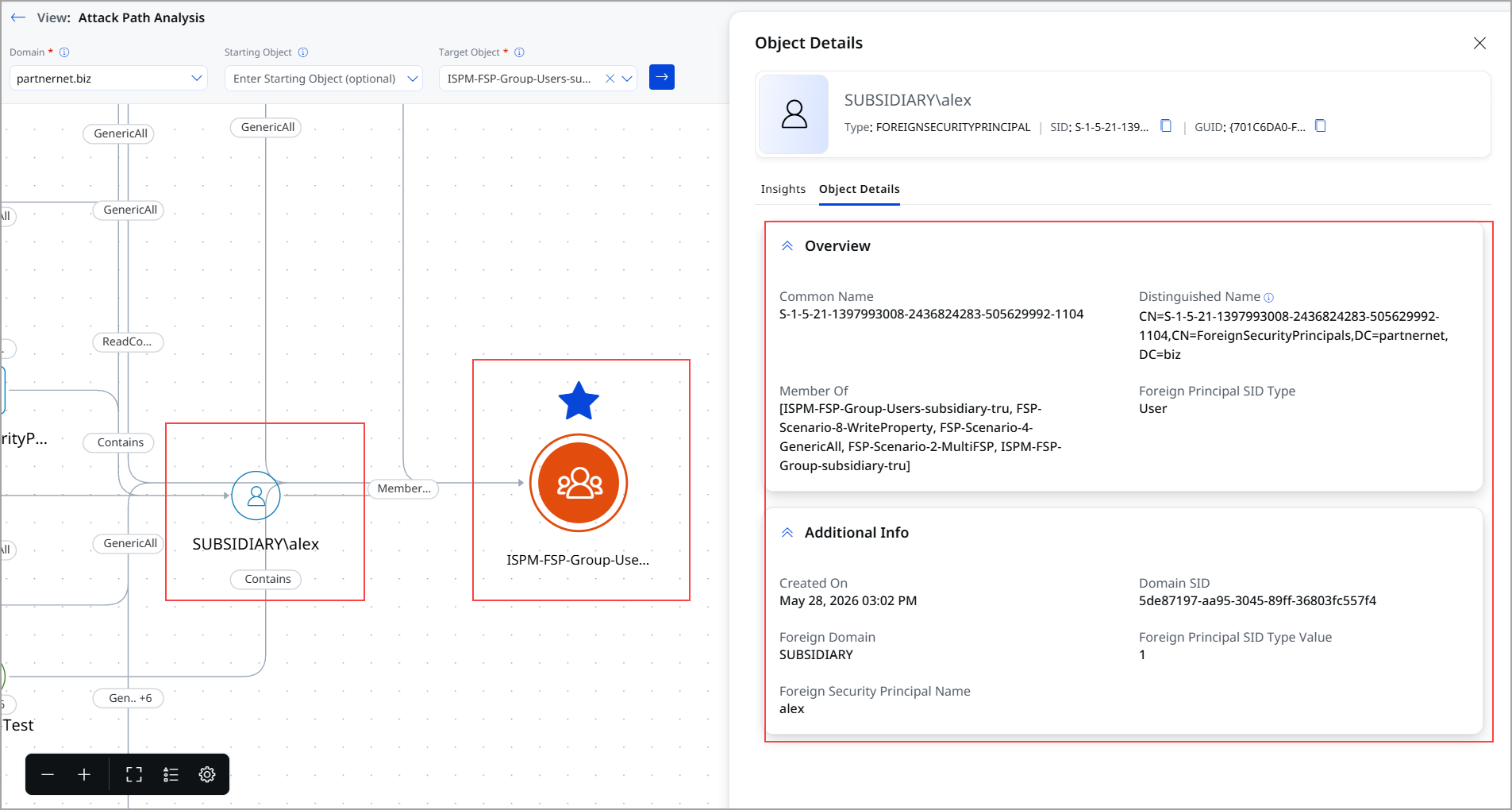
The following screenshot displays the attack path analysis for the user showing the FSP account.
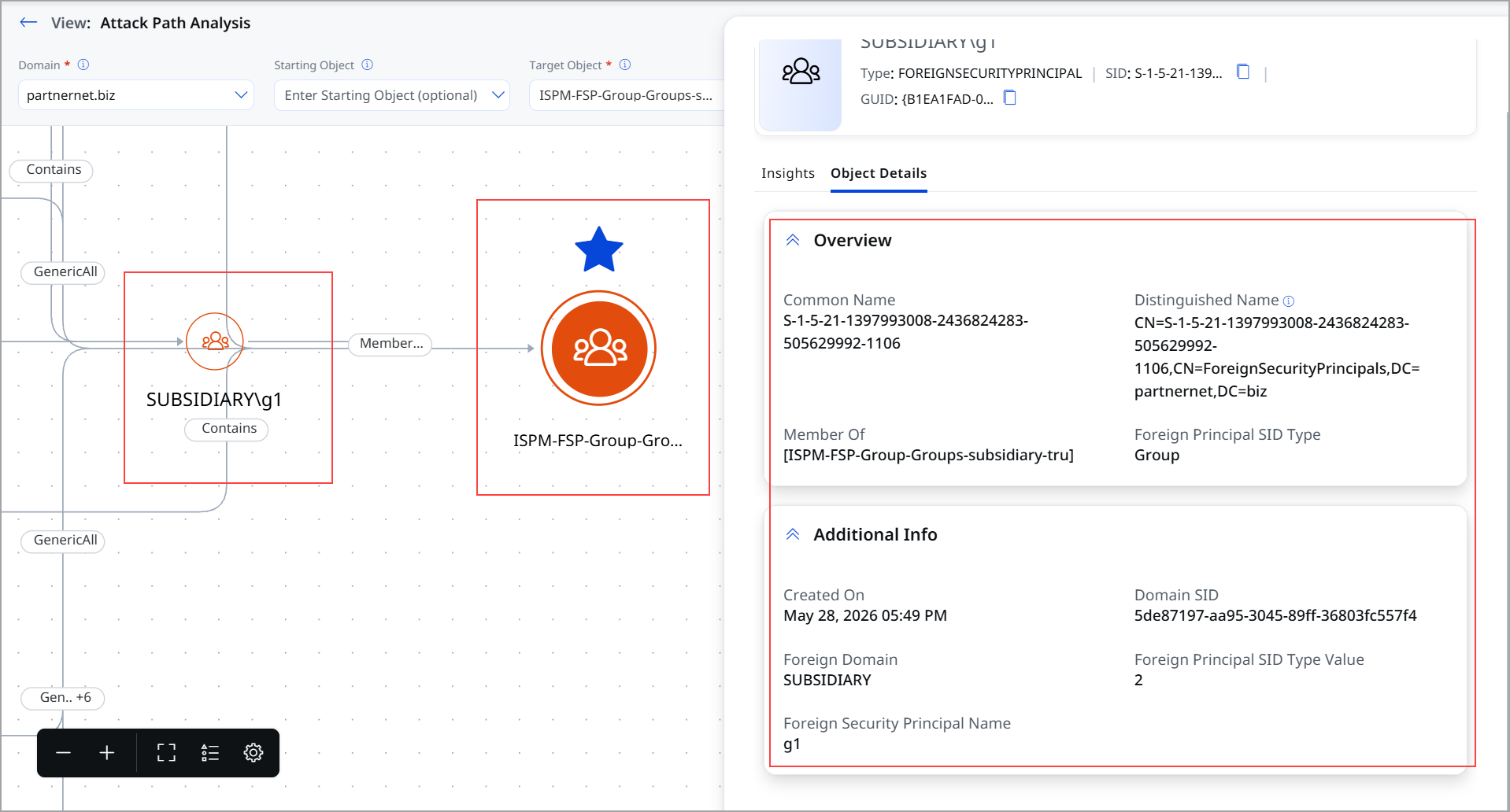
The following screenshot displays the attack path analysis for the group, showing the FSP account.
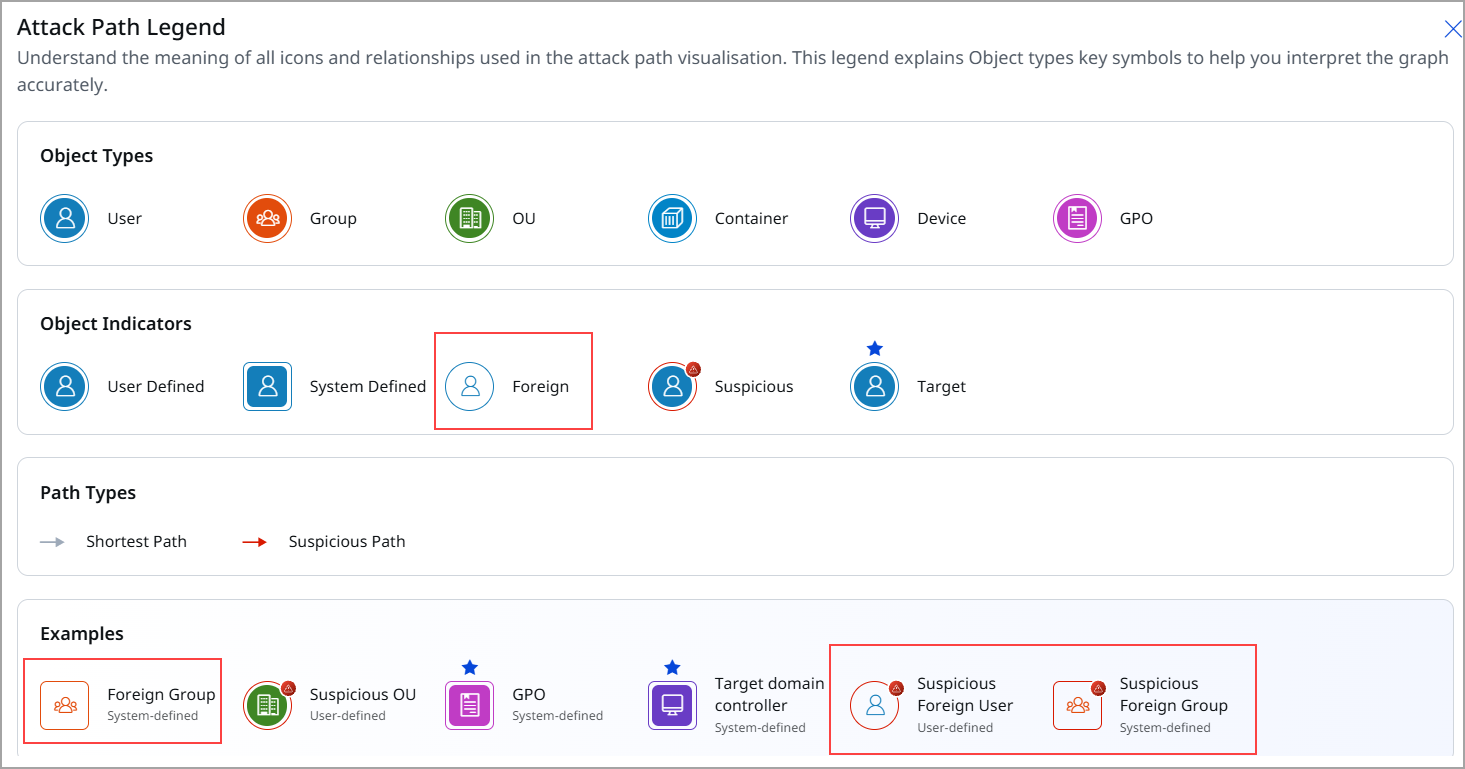
The following screenshot displays the newly added Attack Path Legends , such as Foreign Users and Foreign groups.
For more information on Attack Path Analysis, refer to ETM Identity Online help.
Introduced Role-Based Access Control
We have introduced Role-Based Access Control (RBAC) to enhance security, streamline access management, and ensure users can only access authorized features and data. RBAC restricts system access by assigning roles, permissions, and privileges, enabling controlled access across UI and backend APIs.
Prerequisite: Availability of Role-Based Access Control feature is is dependent on Qualys Cloud Agent version 6.6.0+.
Key highlights are:
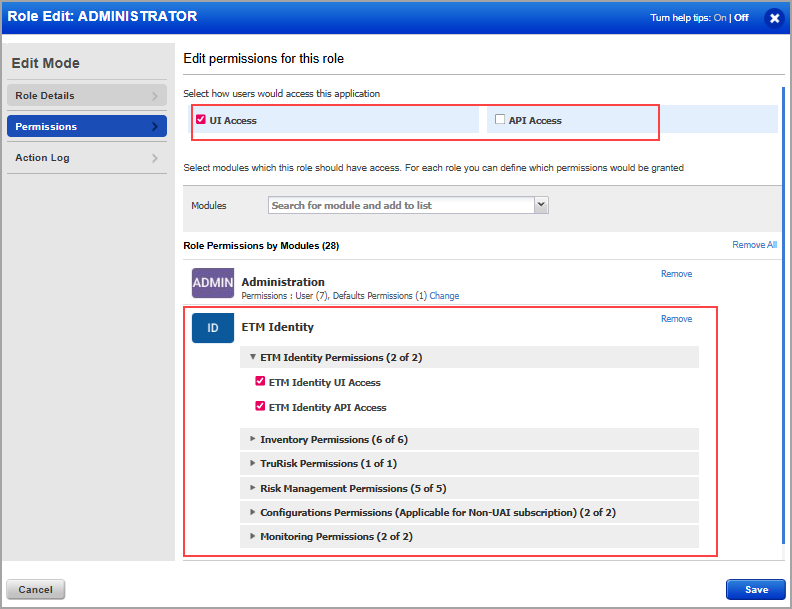
- Base permissions are:
- ETM Identity UI access
- ETM Identity API access
- Role Updates
Updated default roles in ETM Identity:- ETM Identity Manager has full access (Grants full access to all tabs and operations within the ETM Identity app, including write permissions)
- ETM Identity Viewer has restricted access (Grants read access to all tabs within the ETM Identity app; write operations are not permitted.)
The introduction of Role-Based Access Control (RBAC) helps by restricting role update capabilities to specific users, improving governance, and enforcing better control over permission management. Overall, this implementation improves data integrity, user experience, and operational compliance.
Administrators can:
- Create custom roles
- Assign feature permissions
- Restrict feature visibility
- Control tenant/user access
To view the permission, navigate to Administration app > Role Management > New Role.
For more information, refer to the Administration Online Help.
Static Tag Scoping
With static tag scoping, administrators assign tags to both users and assets, ensuring that users can view only the data associated with matching tags.
Dynamic Tag Scoping
Dynamic tag scoping supports dynamic tag rules and automated tagging workflows, enabling user access and visibility to be automatically managed based on predefined conditions and policies.
To know more about the permissions for ETM Identity, refer to ETM Identity Online Help.
Multi-Factor Authentication (MFA) Status Display (Unified Asset Inventory Enabled Account)
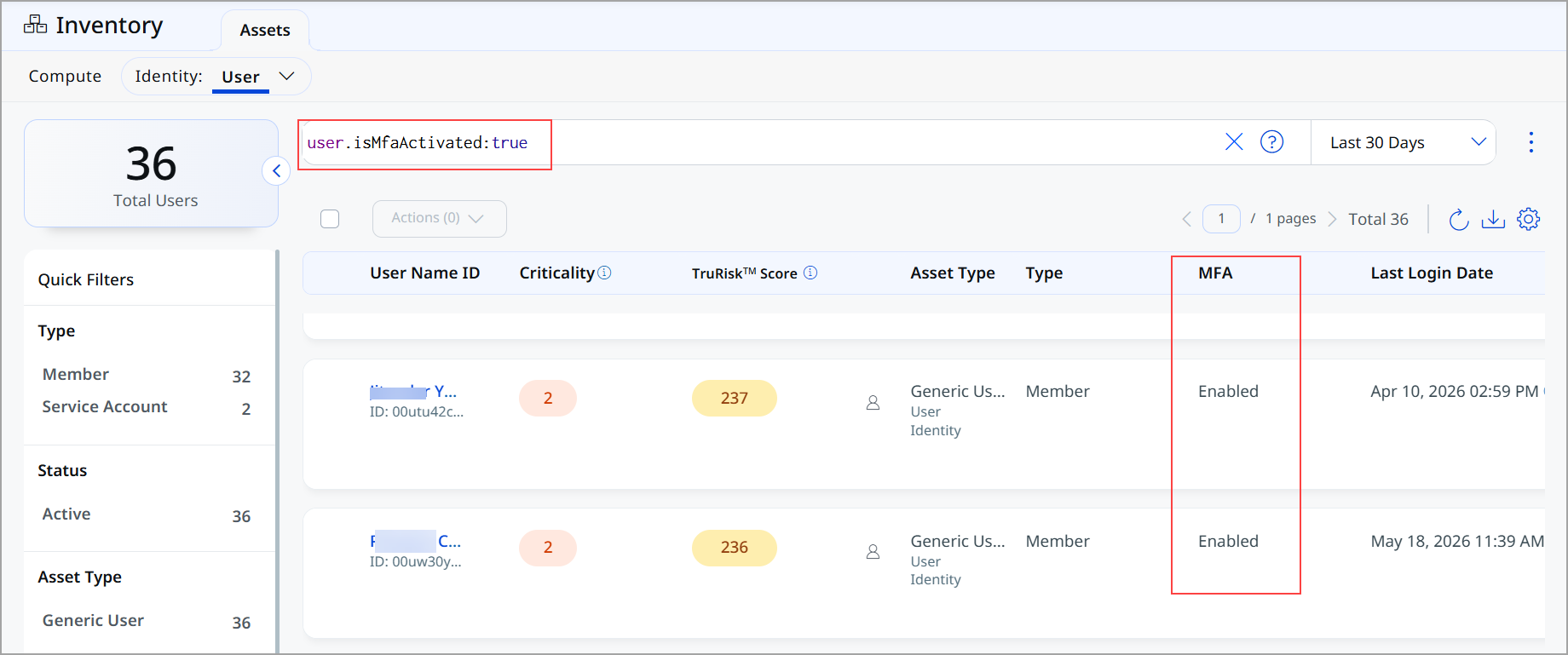
ETM Identity now supports Multi-Factor Authentication (MFA) enrollment status directly in the Qualys Inventory dashboard. This enhancement gives security and identity teams immediate visibility into whether multi-factor authentication is enabled or disabled for each user, without requiring manual cross-referencing across identity providers. The feature is available for users ingested through the Entra and Okta connectors.
This feature is beneficial for
-
View MFA status for all supported users in a single inventory view, eliminating the need to query identity providers separately.
- Identify users without MFA enabled, enabling teams to prioritize remediation efforts and reduce exposure.
-
Use Qualys Query Language (QQL) to filter and segment users by MFA status, supporting both audit and operational workflows.
-
Monitor MFA support across Entra and Okta environments within a unified inventory interface.
You can locate the MFA column in the user inventory table. The column displays MFA value. You can also filter users by MFA status using QQL user.isMfaActivated:true
-
True: MFA is enabled for the user.
-
False: MFA is disabled for the user.
New Tenant and Policy Tabs (Unified Asset Inventory Enabled Account)
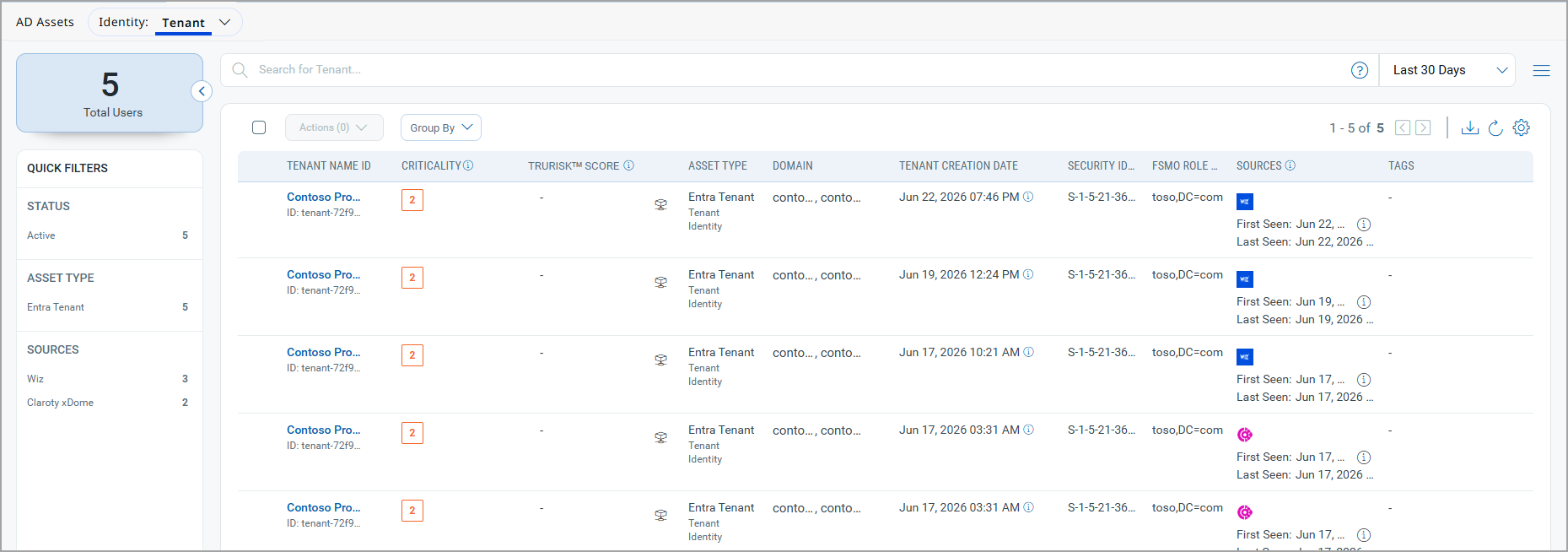
We have introduced two new tabs in the UI: Tenant and Policy. These tabs provide a unified and centralized view of identity environments and policies across multiple identity providers.
Prerequisite: Availability of these tabs is dependent on the Unified Asset Inventory (UAI) 1.2 release.
Tenant Tab
The Tenant tab provides a consolidated view of identity environments across different platforms by normalizing equivalent constructs:
| Source System | Representation in Tenant Tab |
|---|---|
| Active Directory (AD) | Domain |
| Microsoft Entra ID | Tenant |
You can now view and manage all identity environments from a single Tenant tab. Active Directory (AD) domains and Microsoft Entra tenants are displayed in a unified format. It enables easier navigation and consistent visibility across hybrid identity setups.
To view the Tenant tab, navigate to Inventory > Assets > Identity > Tenant.
Policy Tab
The Policy tab centralizes policy visibility across supported identity providers.
| Source System | Policy Type Shown |
|---|---|
| Active Directory (AD) | Group Policy Objects (GPOs) |
| Microsoft Entra | Conditional Access Policies |
All policies are accessible in one place, regardless of their source.
This provides a standardized view for monitoring and managing policies and simplifies cross-platform policy governance.
To view the Policy tab, navigate to Inventory > Assets > Identity > Policy.
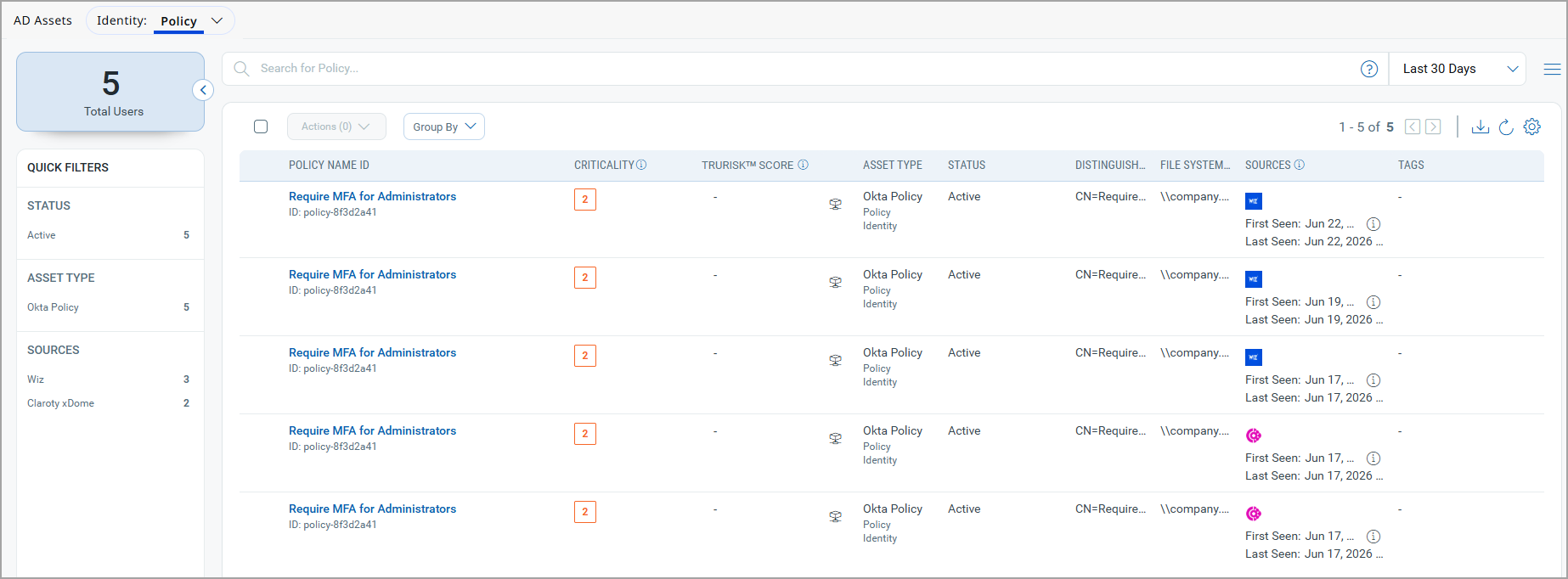
The Tenant and Policy tabs are currently populated for AD Agent, AD Connector, and Entra Connector.
To know more about these tabs, refer to ETM Identity Online Help.
Interactive Cards In Risk Management and Inventory Tabs
We introduced interactive cards across multiple tabs to help you quickly identify risks, prioritize actions, and monitor users and groups more efficiently.
UAI Enabled Accounts
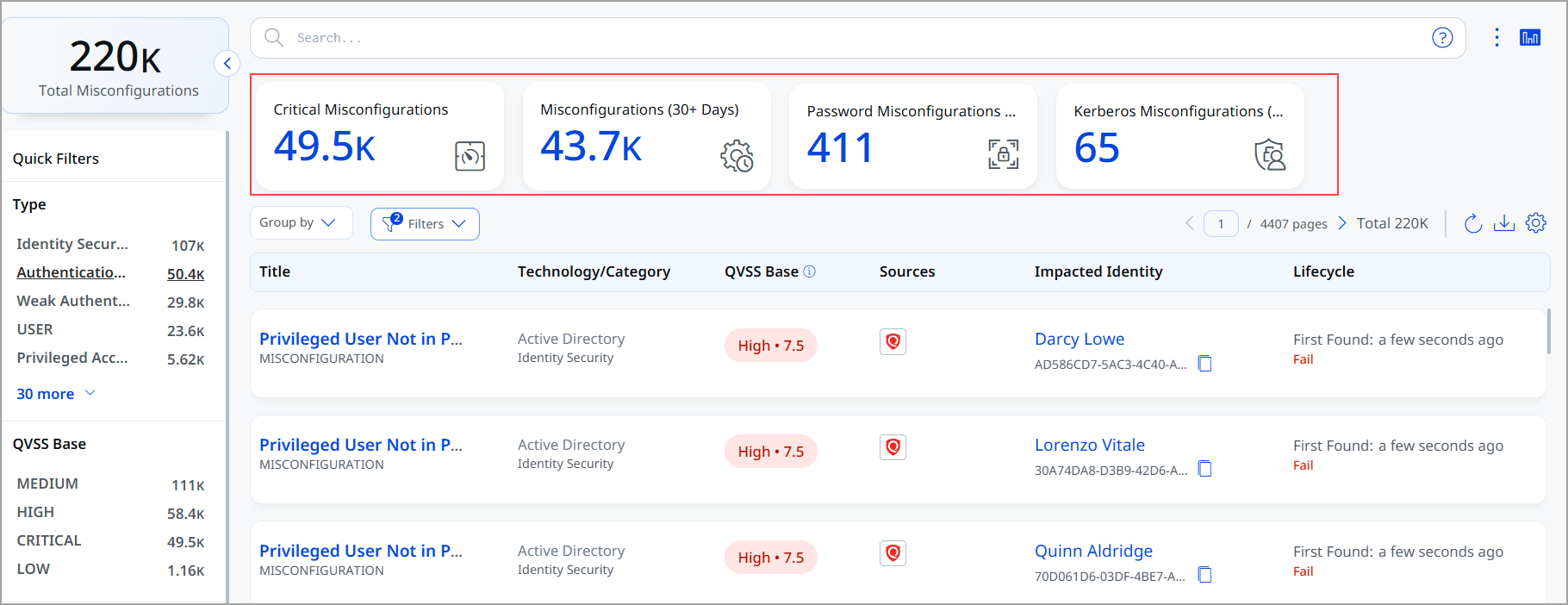
The Misconfigurations tab now includes four cards. It saves time by providing a quick snapshot rather than deep searching. The following is the list cards;
- Critical Misconfigurations. It helps you prioritize the most critical security gaps first.
- Misconfigurations (30+ days) open for more than 30 days. It helps to identify long-pending issues that need immediate attention
- Password Misconfigurations (Last 30 Days) detected within 30 days. It helps to monitor recent authentication-related risks related to passwords)
- Kerberos Misconfigurations (Last 30 Days) - detected within 30 days. It helps to monitor recent authentication-related risks in to Kerberos.
Accounts with Inventory (Qualys Apps)
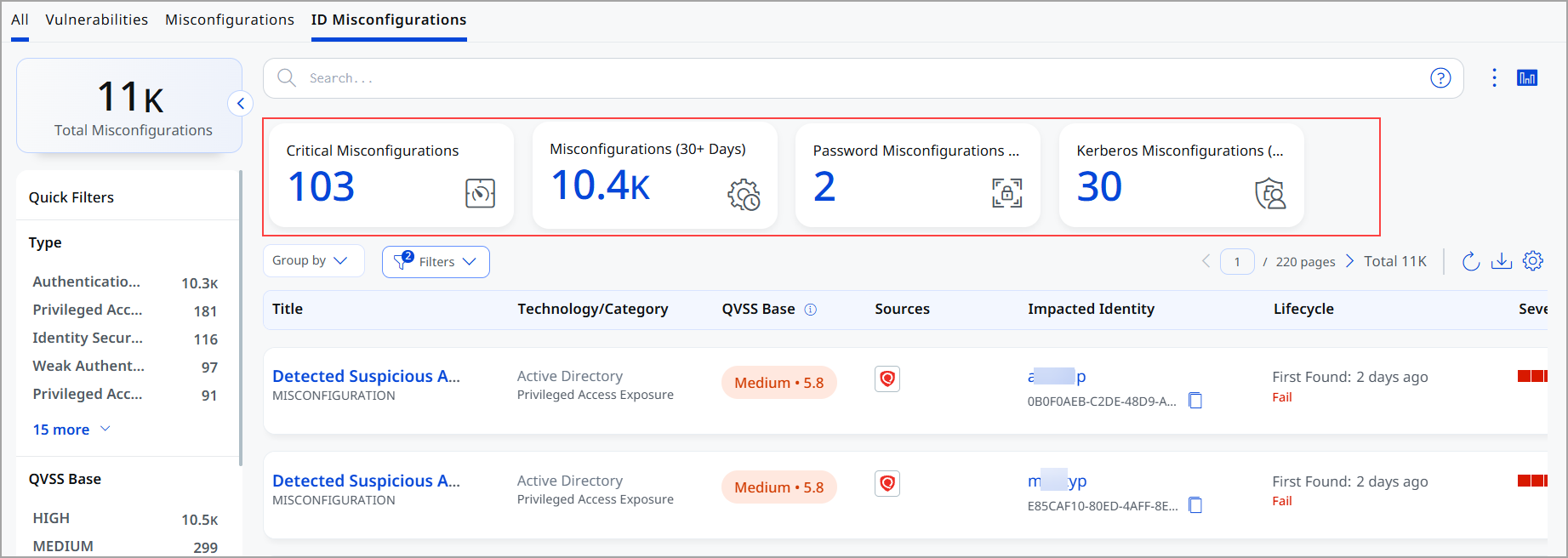
For the accounts with inventory from Qualys apps (Non UAI account) we have added cards in ID Misconfigurations, Identity Users, Identity Groups tabs and dashboard.
ID Misconfigurations Tab
The ID Misconfigurations tab now includes four cards. They provide visibility into identity-related configuration issues. The following is the list of cards:
- Critical Misconfigurations
Critical Misconfiguration helps you prioritize the most critical security gaps first. -
Misconfigurations (30+ days)
Misconfigurations open for more than 30 days. It helps to identify long-pending issues that need immediate attention - Password Misconfigurations (Last 30 Days)
Password misconfigurations detected within 30 days. It helps to monitor recent authentication-related risks related to passwords) - Kerberos Misconfigurations (Last 30 Days) -
Kerberos misconfigurations detected within 30 days. It helps to monitor recent authentication-related risks in to Kerberos.
Identity Users Tab
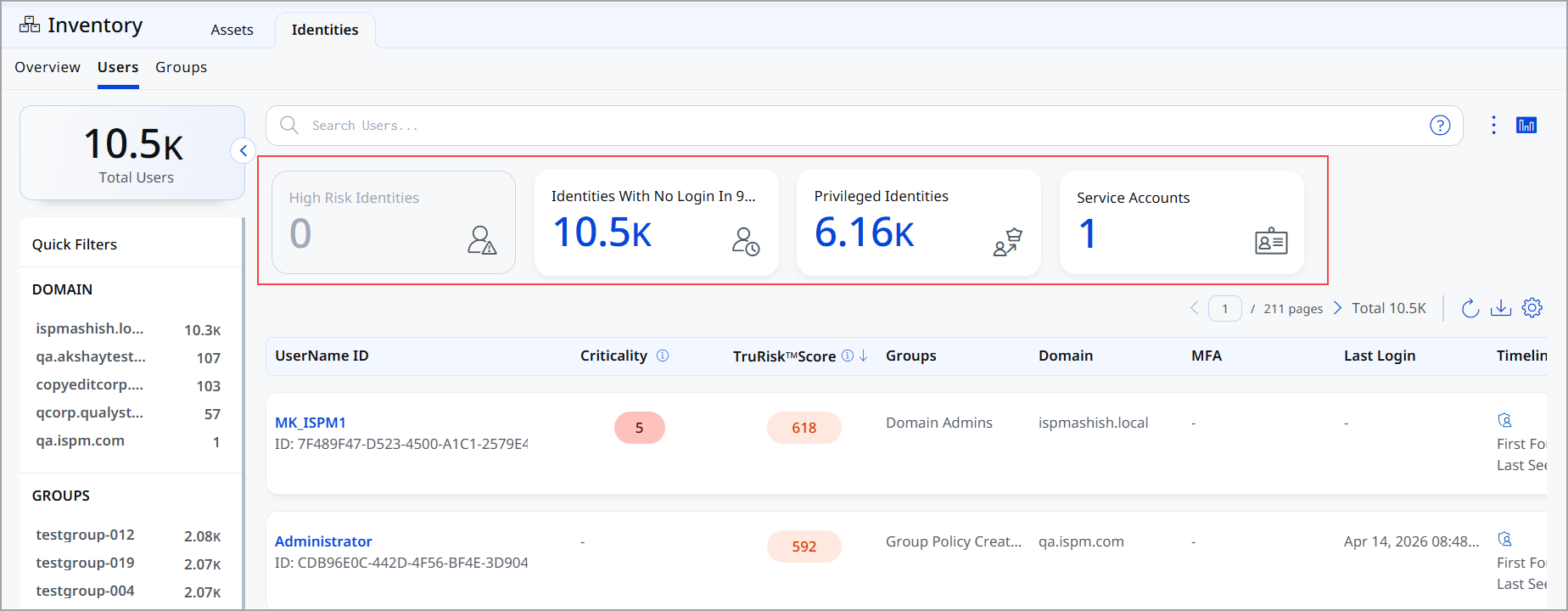
The Identity Users tab now includes four cards. These cards provide on risky or important user accounts. The following is the list of cards:
- High-risk identities (risk score > 800)
Spot high-risk users who may need immediate action. - Identities with no login in 90 days
Identifies inactive accounts that can be cleaned up or disabled - Privileged identities
Monitors privileged accounts to avoid misuse - Service accounts
Track service accounts that often go unnoticed but are sensitive
Identity Groups Tab
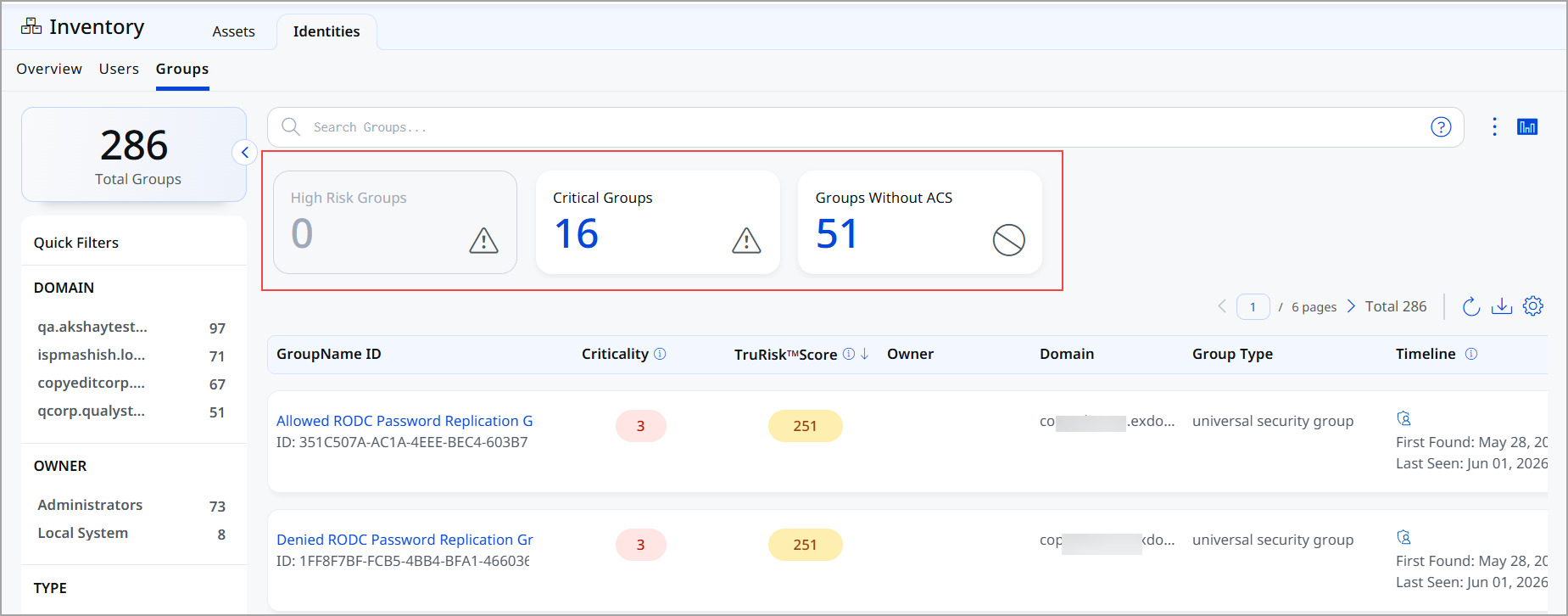
The Identity Groups tab now includes three cards. These cards provide insights into group-level risks. The following is the list of cards:
- High Risk Groups (Trurisk score > 800)
Identify risky groups that can expose multiple users at once. - Critical Groups
Understand group criticality using ACS scoring - Groups Without ACS
Detect groups without proper evaluation (missing ACS score)
Dashboard
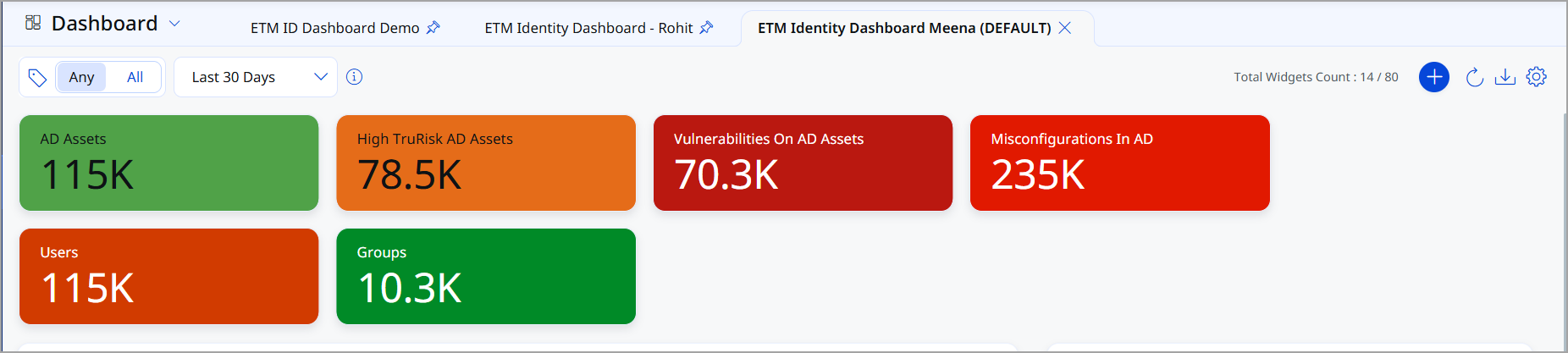
You can now access widgets for the most common misconfigurations, identities with excessive privileges, and identities with the most common misconfigurations.
AD Real-Time Monitoring
AD Real-Time Monitoring continuously captures Active Directory events and converts them into actionable security alerts.
This feature includes:
- Live security monitoring
- Event visibility
- Real-time detection
- Alert generation
- Response guidance
Prerequisite: Availability of AD Real-Time Monitoring is dependent on Qualys Cloud Agent version 6.6.0+
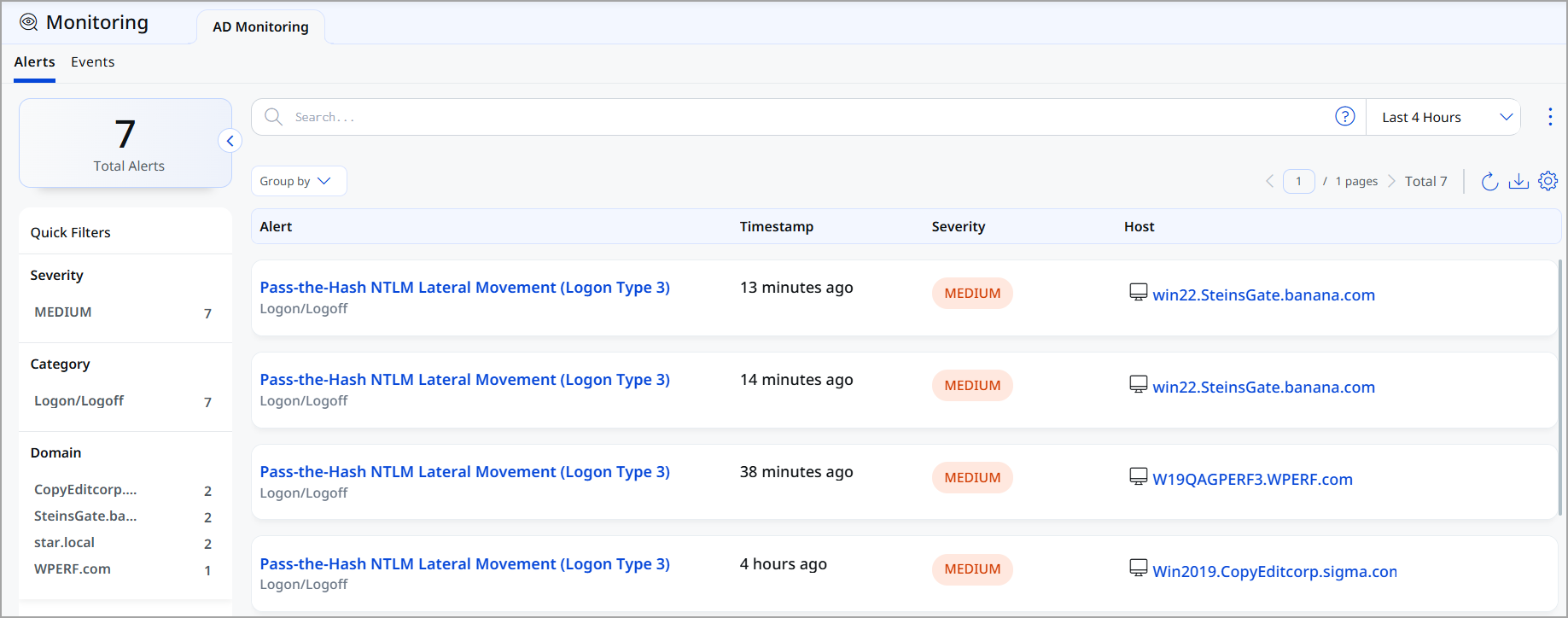
Active Directory events are collected by the AD agent and converted into a standard format for processing. The events are then enriched with identity, asset, and AD-related information to provide additional context. Next, they are analyzed against detection and misconfiguration rules to identify potential security issues. When a rule match is found, the system generates real-time security alerts for investigation and response.
Core capabilities of AD real time monitoring are
- The system continuously monitors logons, account changes, group membership modifications, directory service access, policy changes, and overall security activity to identify and respond to potential threats in real time.
- The system automatically identifies risky behaviors, including suspicious logons, policy misuse, potential compromise indicators, privilege abuse, and lateral movement patterns, to help detect and respond to security threats proactively.
- Alerts include severity levels, detailed event information, source and target details, recommended remediation steps, and the raw event payload to support accurate investigation and response.
To view alerts and events, navigate to Monitoring tab > AD Monitoring > Alerts and Events.
To know more about AD monitoring, refer to ETM Identity Online Help.
Automated Group Scoring
We introduced Automated Group Scoring to simplify and accelerate identity risk assessment. The platform can now automatically assign default ACS (Asset Criticality Score) values to groups that lack manually configured scores.
The following are key benefits:
- Reduces the manual effort required to maintain ACS scoring.
- Ensures broader coverage for identity risk calculations.
- Helps eliminate scoring gaps caused by unclassified groups.
- Improves consistency in risk posture evaluation across Active Directory environments.
Organizations can achieve more complete and accurate identity risk assessments without requiring administrators to manually score every group object.
Attack Path Analysis Enhancement
Attack Path Analysis has been improved to provide clearer visuals and more accurate, context-aware metrics, making it easier for analysts to quickly understand and investigate potential attack paths.
Dynamic Count Updates in Attack Path Views
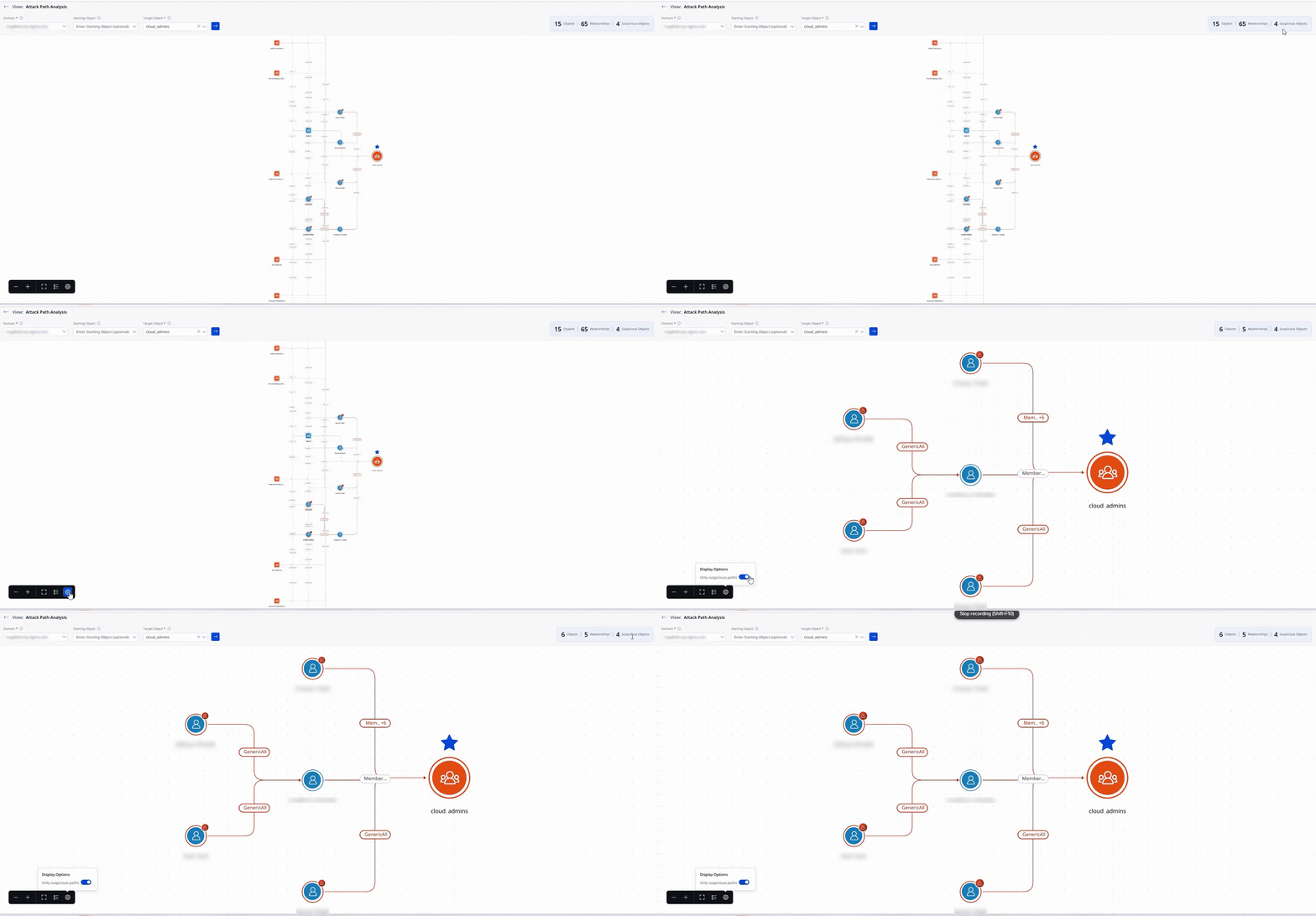
Attack Path Analysis now updates object, relationship, and suspicious path counts dynamically when switching between Suspicious and Non-Suspicious view modes. Previously, counts remained unchanged when toggling the view filter in Display Options. Counts now automatically reflect only the nodes and relationships visible in the active graph view. This provides accurate, context-aware metrics at a glance, helping analysts quickly understand the scope of the current view without manually comparing counts against the displayed graph.
Cleaner Attack Path Graphs with Excluded Edge Removal
The Attack Path Analysis graph is now simplified by removing generic excluded edges, reducing visual clutter, and enhancing analysis. This results in a cleaner visualization that highlights relevant relationships and suspicious paths, improving investigation efficiency.
Issues Addressed
There are no notable customer issues in this release.