View, Search, and Filter CISA BOD 26-04 Attributes for Findings
Use the Findings listing and the finding details to see each finding's CISA BOD 26-04 risk factors and remediation SLA. You can also use search tokens and Group by options to organize your findings.
Navigate to : Risk Management > Findings > Vulnerabilities
Before you begin: CISA BOD 26-04 support is available on request. Contact Qualys Support or your Technical Account Manager (TAM) to turn it on for your subscription.
Add or Remove Columns
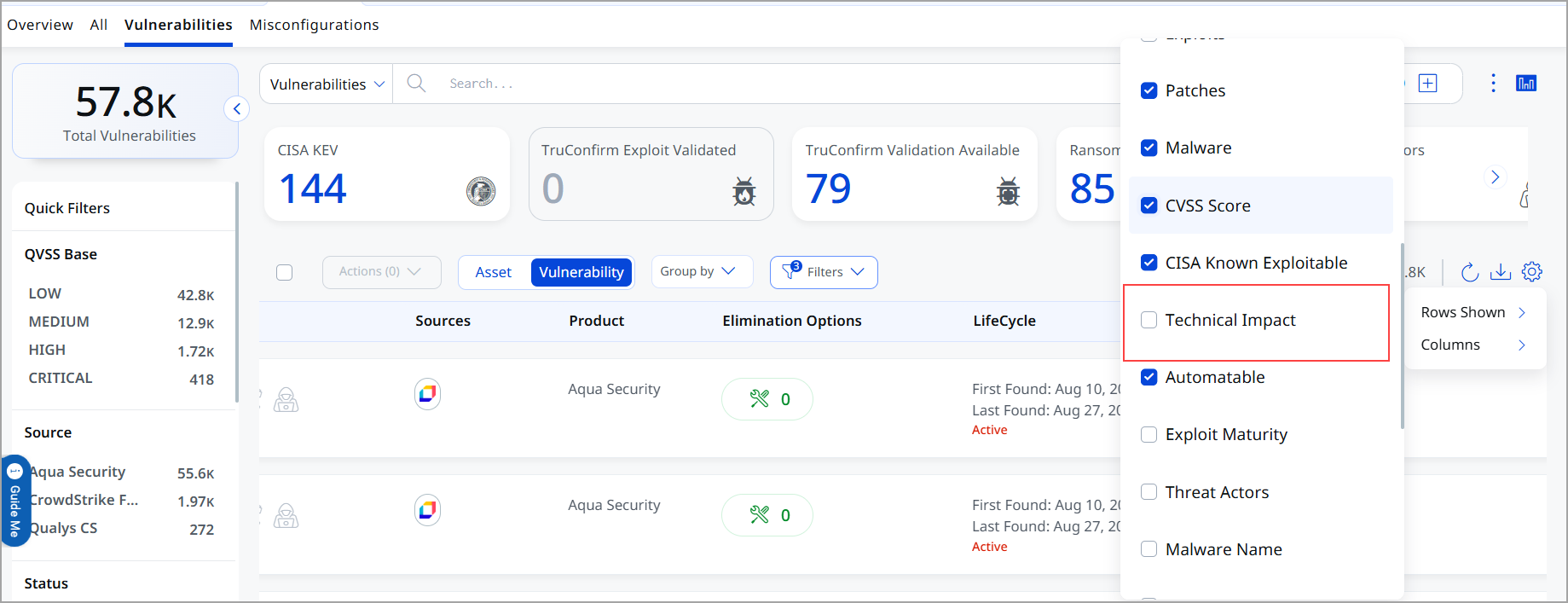
You can add or remove columns on the Findings listing to customize the table view. The Technical Impact and Automatable columns are hidden by default. To show them, click  > Columns, and then select their check boxes.
View the SLA Tier in the Lifecycle Column
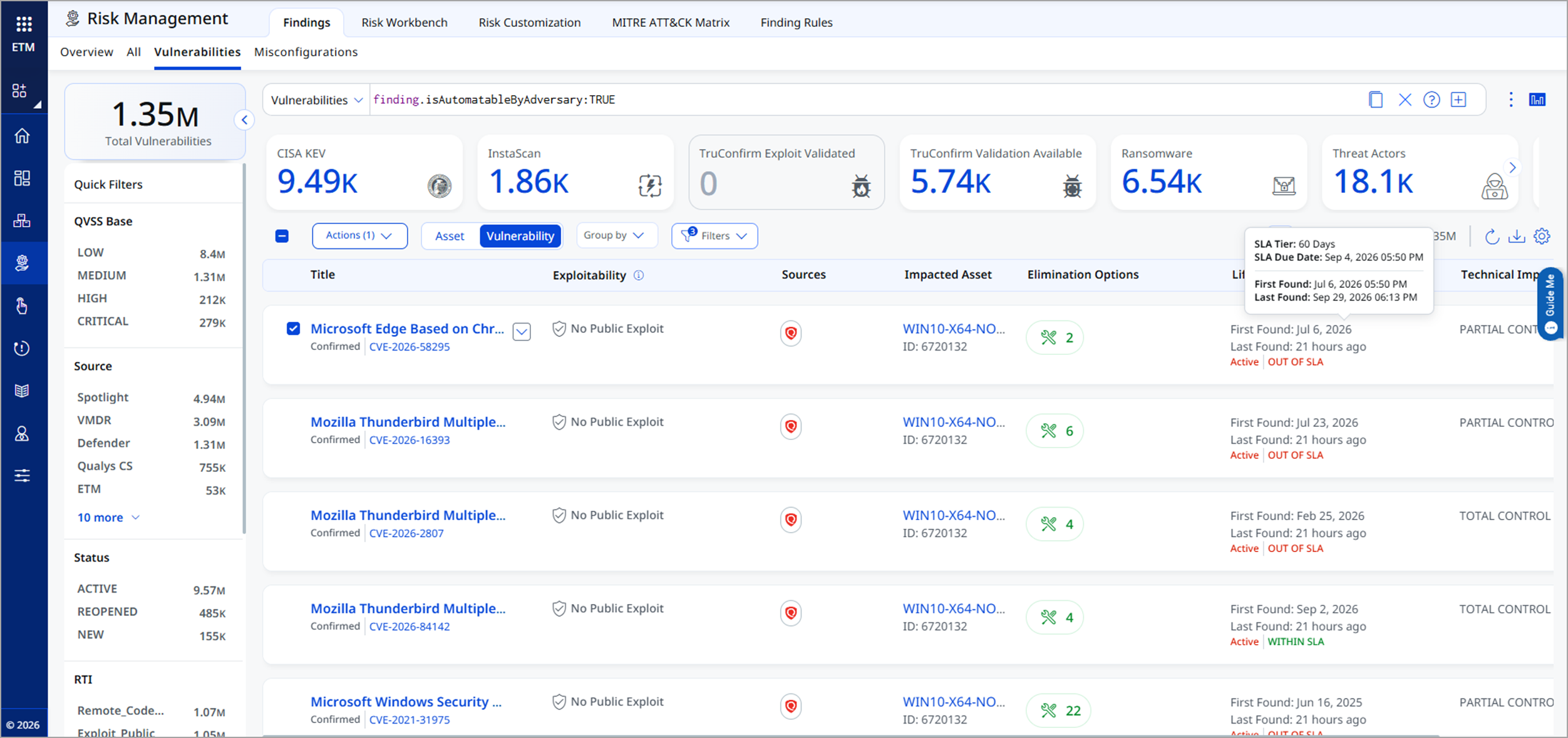
Hover over the Lifecycle column to viiew when the finding was first found and last found. The tooltip also shows the SLA Tier, which is the SLA days and the calculated SLA due date.
View CISA BOD 26-04 Data in Finding Details
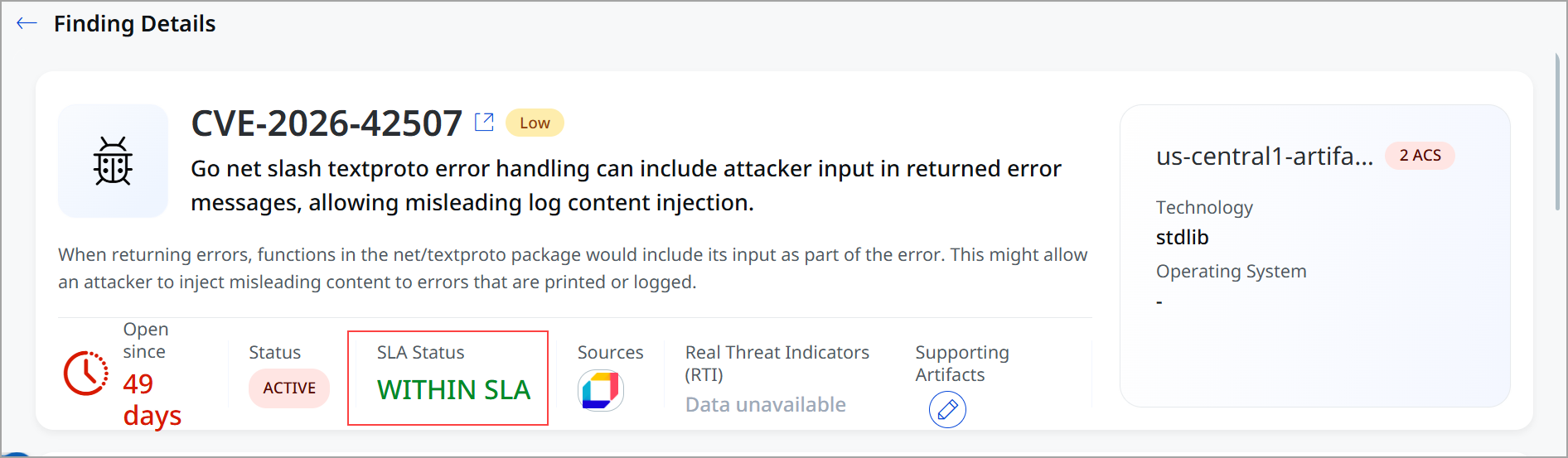
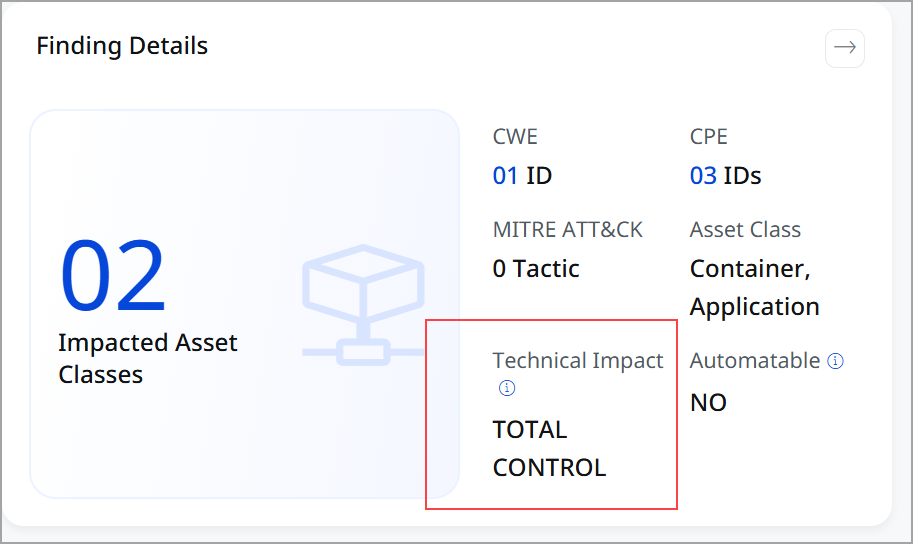
Select a finding to open its details. The finding details show:
- SLA Status: Within SLA, Nearing SLA, or Out of SLA. Hover over the status to see the SLA Tier (SLA days and due date).
Nearing SLA: A finding is considered Nearing SLA starting 2 days before its Actual Due Date and remains in this state until the Actual Due Date is reached.
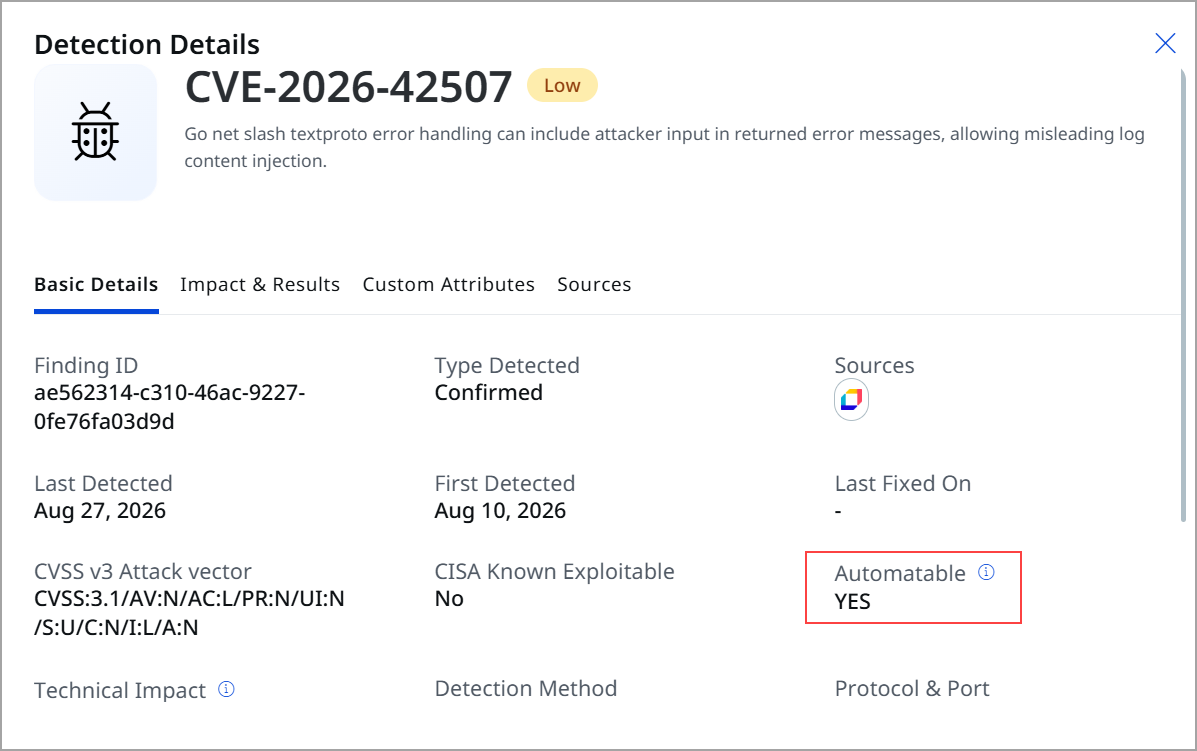
- Automatable: Yes or No, in the detection details section.
- Technical Impact: Total Control, Partial Control, or Unknown, in the detection details section.
When CISA has not provided a technical impact assessment for a finding, the Technical Impact is shown as Unknown. Such findings are assigned the SLA Fix on System Upgrade. If updated CISA enrichment data becomes available later, the applicable remediation timeline is updated accordingly.
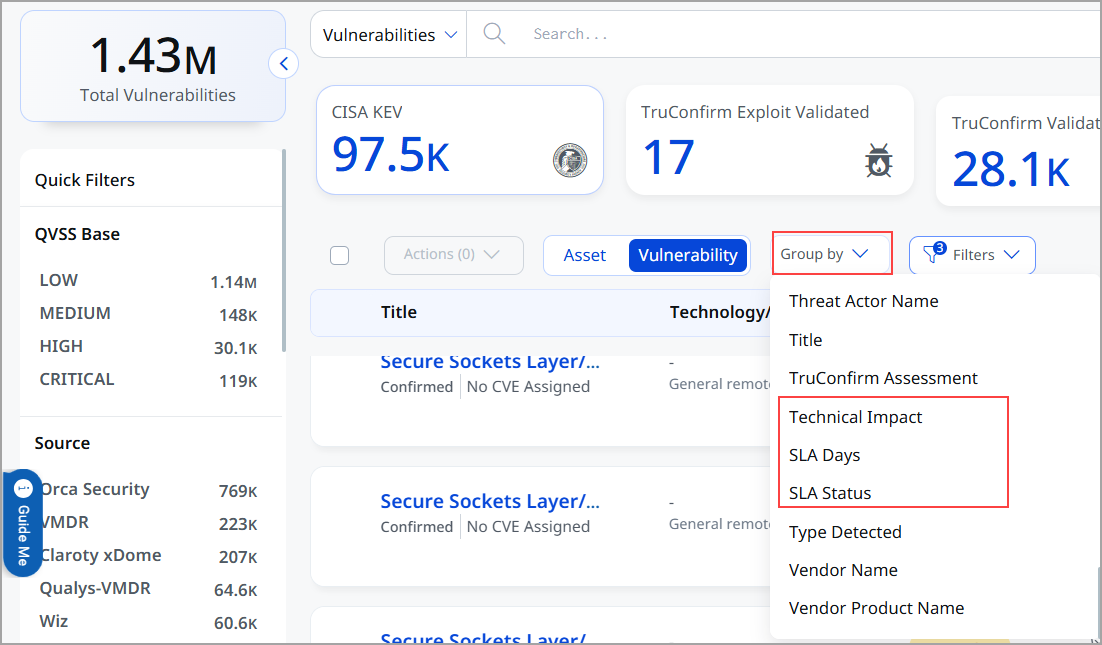
Group by Option
After you get your search results, you can organize your findings into logical groups. Group by options include Technical Impact, Automatable, Remediation SLA, and SLA Status. You can group by only one of these options at a time.
CSV downloads from the Findings listing do not include the Technical Impact and Automatable columns. To download these columns, use TruLens or the Knowledge Base.
Frequently Asked Questions
Find answers to common questions about CISA BOD 26-04 support in ETM.
What is CISA BOD 26-04?
BOD 26-04 is a Binding Operational Directive that requires FCEB agencies to prioritize vulnerability remediation based on asset exposure, CISA KEV status, exploit automation, and technical impact. It supersedes and revokes BOD 19-02 and BOD 22-01, replacing their remediation requirements with a risk-based remediation timelin
Who has to comply with BOD 26-04?
All FCEB agency information systems, including systems a contractor operates on the agency's behalf when required by contract. Agencies remain responsible for inventory, status tracking, and continuous monitoring of systems in third-party environments, including services with and without FedRAMP authorization.
What is forensic triage, and when is it required?
Forensic triage is a focused investigation to determine whether a vulnerable asset has been compromised. Under BOD 26-04, certain high-risk vulnerability scenarios require both remediation within three days and forensic triage. CISA provides recommended target timelines for the triage steps, but the 72-hour sequence is guidance rather than a separate BOD deadline
In ETM, a finding that needs forensic triage shows Forensic Triage as its required action. To find these findings, search with finding.remediationSla.actionRequired: "FORENSIC TRIAGE" AND remediationSLA.days=3 days
How does ETM calculate the remediation due date for a finding?
ETM determines the applicable remediation timeline and due date using the BOD 26-04 criteria: asset exposure, CISA KEV status, exploit automation, and technical impact. Starting time for SLA is first detection date or last reopened date.
What happens when Automatable or Technical Impact data is unavailable for a vulnerability?
When CISA has not provided an assessment for a specific vulnerability, for Automatable ETM takes 'No' and Technical Impact case it takes 'Unknown'. SLA is assigned as 'Fix on System Upgrade' for such vulnerabilities. The applicable remediation timeline is updated when new CISA enrichment data becomes available.
Where do I see CISA BOD 26-04 data in ETM?
You see it in these places:
- Findings listing: Technical Impact and Automatable columns (hidden by default), and the SLA Tier in the Lifecycle column tooltip.
- Finding details: SLA Status, and Automatable and Technical Impact in the detection details.
- Dashboard: widgets built on the CISA BOD 26-04 tokens.
- TruLens and the Knowledge Base: Technical Impact and Automatable columns and tokens.
Is CISA BOD 26-04 support limited to federal agency subscriptions?
No. CISA BOD 26-04 support is available on request for any ETM subscription. Contact Qualys Support or your Technical Account Manager (TAM) to turn it on. It works the same way for UAI and non-UAI subscriptions. Federal agencies are the primary audience for this capability, but it is not restricted to federal subscriptions.
Can I group a widget or listing page by more than one CISA BOD 26-04 token at a time?
Not yet. Group by currently supports a single CISA BOD 26-04 token at a time, such as Remediation SLA or Technical Impact, on both the ETM dashboard and the Findings listing. Support for grouping by multiple CISA BOD 26-04 tokens together is planned for a later release.
Can I chart CISA BOD 26-04 counts as a trend over time?
Yes. In ETM, you can build trend widgets on the CISA BOD 26-04 tokens, for example, to follow your Out of SLA count over time. See Track CISA BOD 26-04 Compliance on ETM Dashboard.
Can I include CISA BOD 26-04 fields in CSV downloads?
It depends on where you download from. CSV downloads from TruLens and the Knowledge Base include the Technical Impact and Automatable columns. CSV downloads from the Findings listing do not include these two columns.
Why can't I use the SLA tokens in TruLens?
TruLens shows CVE information, and SLAs apply to findings. So TruLens supports only the finding.technicalImpact and finding.isAutomatableByAdversary tokens. To search by SLA days, status, profile, due date, or required action, use the Findings listing.